EPGTalk: A Free, Nightly-Updated EPG for US, UK, Mexico, and Canada
Welcome to EPG Talk, your go-to repository for an extensive Electronic Program Guide (EPG) covering a diverse range of television channels from the United States, Canada, United Kingdom, and Mexico. This project aims to simplify your TV viewing experience by providing accurate and up-to-date schedules, ensuring you never miss your favorite shows.
At a glance
- What is it?
- EPGTalk is a one-person project that publishes XMLTV guides for over 1,000 channels across four countries, updated nightly. The real question is whether a free, community-run guide can match the reliability you expect from a commercial EPG.
- Who is it for?
- Adopt EPGTalk if you need a free, multi-country EPG for IPTV apps like TiviMate or Kodi, and you accept that it is a single maintainer's project with no formal support. Do not use it if you require guaranteed uptime, immediate error fixes, or a formal licence.
- Can I use it commercially?
- Not without permission. GitHub finds no licence file in the repository, and without a licence all rights are reserved by default: you may read the code but not reuse it. Check the README, or ask the authors, before using it.
- Is it still maintained?
- Yes. The repository received new commits within the last day.
- What is it written in?
- GitHub does not report a main language for this repository.
Answers come from the project's GitHub data, last synced on October 22, 2026, and from our analysis. They are not legal advice.
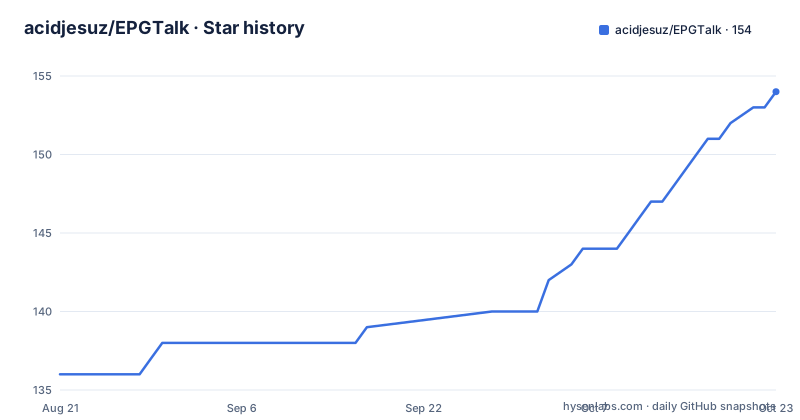
Star history
- acidjesuz/EPGTalk153 ★ · +17
| Repository | 2026-08-21 | 2026-10-22 |
|---|---|---|
| acidjesuz/EPGTalk | 136 | 153 |
17 Stars in the last 62 days, measured from the daily GitHub snapshot. Compare with other projects
Editorial analysis
What EPGTalk Actually Provides
EPGTalk is a free Electronic Program Guide (EPG) published as XMLTV files on GitHub. It covers television channels from the United States, Canada, United Kingdom, and Mexico. The README shows five downloadable guides: a combined file, a US national guide, a UK guide, a Latino/Mexico guide, and a US local guide covering 140+ markets. The combined guide lists 1,100 channels with 29,746 programs, but only covers 24 hours. The national guides each cover 7 days. The US local guide covers 72 hours. This is a schedule data source, not a streaming service. You plug the URLs into an IPTV app that supports XMLTV, and the app displays the listings. The project has been running since 2017 according to the README, and it is maintained by one person.
The Nightly Pipeline: How the Data Gets Fresh
The README describes a fully automated pipeline that runs every night. It pulls data from separate sources for the US, UK, Mexico, and Canada, then combines them into the output files. The pipeline pushes the updated guides to GitHub automatically. The stats table in the README shows timestamps like '11:57 PM' and '12:25 AM', indicating the guides are refreshed after midnight Central Time. The pipeline also produces a STATUS.md page that updates nightly after each push. This automation is the core of the project: without it, the guides would go stale quickly. The README advises waiting 24 hours before reporting an issue because most problems resolve on the next update. That suggests the pipeline is designed to be self-correcting, but it also means you cannot expect instant fixes.
Getting Started: URLs and App Setup
You do not install EPGTalk. You consume it via URLs. The README gives five raw GitHub URLs, for example https://raw.githubusercontent.com/acidjesuz/EPGTalk/master/guide.xml.gz for the combined guide. If your app does not support .gz compression, you can use the uncompressed version at https://raw.githubusercontent.com/acidjesuz/EPGTalk/master/guide.xml. Setup in apps like TiviMate, Kodi, or Perfect Player follows the same pattern: open settings, find the EPG or TV Guide section, add a source, paste the URL, and save. The README claims this takes about 60 seconds. The compressed files are significantly smaller; the combined guide is 38.8 MB compressed, but the uncompressed version will be larger, which matters if your app fetches over a slow connection. The README does not specify the uncompressed size, so you should test that yourself.
Coverage Gaps and the 24-Hour Combined Guide
The most notable limitation is the combined guide's coverage. It lists 1,100 channels but only covers 24 hours, while the individual national guides cover 7 days. If you want a week of listings, you cannot use the combined URL; you must pick a national guide. That means juggling multiple URLs if you watch channels from more than one country. The US local guide covers only 72 hours, which is fine for weekend planning but not for a full week. The README does not list which specific channels are included beyond general categories like 'US national' or 'UK national'. You will need to check the actual XML or the STATUS.md page to see if your local channel or niche network is present. For a project that has run for nine years, the absence of a channel list in the README is a real usability gap.
The Single-Maintainer Risk
The README is explicit that EPGTalk is built and maintained by one person. That is both a strength and a risk. A single maintainer can move fast and keep the project free, but there is no bus factor. If the maintainer stops, the nightly pipeline stops, and the guides go stale. The README also says the project is 'never stopping', but that is a promise, not a guarantee. There is no mention of a formal licence in the repository metadata, which is a red flag for commercial use. The README states the EPG is for 'LEGAL use Only', but it does not clarify the licensing of the underlying data. If you plan to redistribute the guides or use them in a commercial product, you need to contact the maintainer or check the repository files directly. The lack of a licence means you have no explicit permission to reuse the data beyond personal use.
Alternatives: What Else Is Out There
The main alternative is to use a commercial EPG service that comes with your IPTV subscription or a dedicated EPG provider that offers a formal SLA. Services like Schedules Direct (for North America) provide licensed guide data via API, but they charge a fee. The difference in approach is fundamental: Schedules Direct licences data from the same sources broadcasters use, so you get accurate, legally cleared listings with support. EPGTalk scrapes or aggregates data from unknown sources, which is why it is free. Another alternative is to run your own EPG aggregator using open-source tools like tvheadend's EPG grabber, but that requires you to maintain the grabber configuration and schedule. The trade-off is clear: EPGTalk is zero-cost and zero-maintenance, but you accept unknown data provenance and no guarantees. If you need reliable, licensed data for a business, pay for it. If you are a hobbyist, EPGTalk is hard to beat.
What to Verify Before You Rely on It
Before you make EPGTalk your primary EPG, check the STATUS.md page for the current channel counts and coverage dates. The README's stats table is a snapshot, and it will change nightly. Download the guide file and inspect it: confirm your specific channels are present and that the XML is well-formed. Test the .gz URL in your actual app, because some apps handle compressed XMLTV poorly. Also, note the README's warning to wait 24 hours before reporting issues. That means you should not expect immediate support if a channel's data is wrong. If you are using the combined guide, be prepared for only 24 hours of listings, which may be insufficient for DVR scheduling. The project has no releases and no documented changelog, so you cannot track what changed between updates. That is acceptable for a free service, but it is a real constraint.
Editorial conclusion
Adopt EPGTalk if you need a free, multi-country EPG for IPTV apps like TiviMate or Kodi, and you accept that it is a single maintainer's project with no formal support. Do not use it if you require guaranteed uptime, immediate error fixes, or a formal licence. Before relying on it, verify that your specific channels are listed, check the STATUS.md page for current coverage, and test the .gz URL in your app, since the combined guide only covers 24 hours while the national guides cover 7 days.
Frequently asked questions
What is EPGTalk and what does it provide?
A free electronic program guide covering television channels from the United States, Canada, the United Kingdom and Mexico, published as XMLTV files and pushed to the repository every night. Five guides are offered: a combined file, US national, UK national, Latino and Mexico, and US local markets.
How do I get an EPG working on IPTV with EPGTalk?
In your app open the settings and find the TV guide or EPG section, tap the option to add a source or import a guide, paste one of the raw file URLs, then save and restart the app. It is documented as working with TiviMate, Kodi, Perfect Player, OTT Navigator, IPTV Smarters and any XMLTV-compatible app.
How often does EPGTalk update?
Every night, automatically, to the repository. The statistics block in the README is regenerated after each push and a separate status document tracks the same thing, so the intended first check when a listing looks wrong is that status page rather than an issue.
What apps work with EPGTalk?
TiviMate, Kodi, Perfect Player, GSE IPTV, OTT Navigator, IPTV Smarters, Sparkle TV, Channels DVR, and any app that speaks XMLTV. If your app cannot read a compressed file, an uncompressed version of the combined guide is in the repository root at the same path without the compression extension.
Is using the EPGTalk guides legal?
The maintainer states that the guides are provided for legal use only. A program guide is a schedule rather than content, but that boundary is the maintainer's to draw, so read the notice in the README before relying on it commercially.
Which EPGTalk guide should I use?
The combined guide is what the README tells first-time users to start with, since everything is in one URL, but the comparison table gives it a shorter coverage window than the regional guides and the statistics block shows it is also the largest download. The regional guides carry more programmes each.
Official sources
Add this badge to your README
If you maintain this project, the badge below links readers to this analysis and shows its maintenance status from the daily GitHub snapshot. Paste the markdown into your README; add ?metric=license or ?metric=stars to the image URL for a different field.

[](https://hysenlabs.com/projects/acidjesuz-epgtalk)Star history chart for your README
[](https://hysenlabs.com/projects/acidjesuz-epgtalk)