5ire: A Desktop MCP Client With a Local Vector Store
5ire is a cross-platform desktop AI assistant, MCP client. It compatible with major service providers, supports local knowledge base and tools via model context protocol servers .
At a glance
- What is it?
- 5ire is a TypeScript desktop assistant that speaks to OpenAI, Anthropic, Google, Ollama and others while acting as a Model Context Protocol client. Its distinguishing feature is an in-process knowledge base built on bge-m3, and its heaviest constraint is the runtime it demands before tools work at all.
- Who is it for?
- Adopt 5ire if you want a desktop MCP client that keeps embeddings and document parsing on your own machine, and you are willing to install Python, Node.js and uv before the tools feature becomes usable. Skip it if your workflow lives in a terminal, or if you need a permissively licensed codebase you can embed in a product, since the repository carries a NOASSERTION licence that you must read before redistributing anything.
- Can I use it commercially?
- Check first. The repository uses a licence we do not classify automatically, so read its LICENSE file before any commercial use.
- Is it still maintained?
- Yes. The repository last received commits 10 days ago.
- What is it written in?
- Mainly TypeScript, according to GitHub's language statistics.
Answers come from the project's GitHub data, last synced on November 15, 2026, and from our analysis. They are not legal advice.
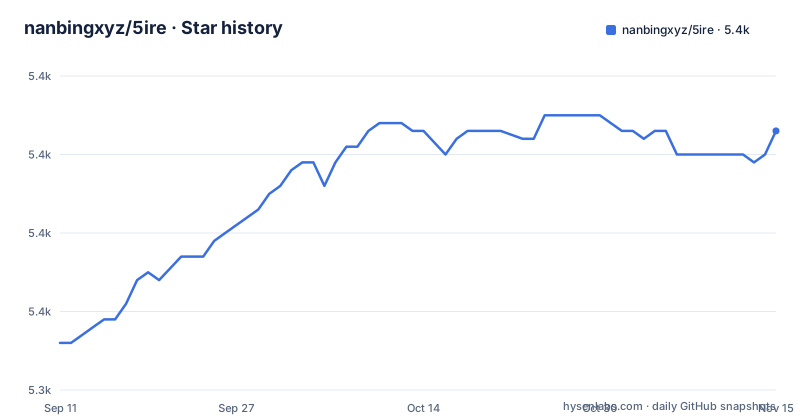
Star history
- nanbingxyz/5ire5,373 ★ · +27
| Repository | 2026-09-11 | 2026-11-15 |
|---|---|---|
| nanbingxyz/5ire | 5.3k | 5.4k |
27 Stars in the last 65 days, measured from the daily GitHub snapshot. Compare with other projects
Editorial analysis
The Gap 5ire Fills Between a Chat Window and a Tool Runner
Most desktop chat clients stop at conversation. You paste an API key, pick a model, and the application sends text to a provider. Anything beyond that, such as reading a local file, querying a database, or hitting a remote service, requires a separate tool and a separate mental model. 5ire positions itself as the place where those two halves meet. It is a cross-platform desktop assistant that also implements the client side of the Model Context Protocol, so the same window that holds your conversation can invoke tools exposed by MCP servers. The README frames MCP as a standardised way for applications to provide context to LLMs, and the project links to the client list on modelcontextprotocol.io. The intended user is someone who wants provider choice and tool access without assembling a stack of scripts. The README lists OpenAI, Azure, Anthropic, Google, Mistral, Doubao, Grok, DeepSeek and Ollama as supported providers, which means the same interface can point at a hosted model or a local one. That provider list is the first thing to check against your own requirements, because it is a fixed enumeration rather than an open plugin surface. If your provider is not named, the README gives no indication of a generic OpenAI-compatible escape hatch.
MCP Server Management and the Marketplace Directory
The tool support in 5ire is not a bespoke plugin format. The application is an MCP client, so servers written against that protocol are the unit of extension. The README describes a companion repository, nanbingxyz/mcpsvr, as a community-driven directory of MCP servers, and it also points to a wiki page for one-click server installation that site owners can integrate. That last detail is worth pausing on. A one-click install flow implies a URL scheme or a deep link that hands a server definition to the desktop app, which lowers the barrier for a user who does not want to edit a JSON config by hand. The README does not spell out the wire format of that link, so treat the wiki page as the source of truth rather than inferring it.
The Runtime You Must Install Before Tools Work
This is the part that separates 5ire from a pure chat client, and it is stated plainly in the README. Before activating the tools feature, the following components must be installed: Python, Node.js, and uv, the Python package manager. The README explains the reason: these components constitute the runtime environment for the MCP server. In other words, 5ire does not ship a self-contained sandbox for every server. It relies on the host machine having an interpreter and a package manager available, because MCP servers are frequently distributed as Python or Node packages that need to be fetched and executed. The README does offer an escape hatch: if you do not anticipate using the tools feature immediately, you may skip this installation step and complete it later. That is a sensible staging of complexity, and it means a first-run experience for plain chat does not require a Python toolchain. The trade-off is real though. A desktop application that shells out to a system Python and a system Node inherits whatever version conflicts already exist on that machine. The README does not describe version pinning or an isolated environment per server, so a broken global Python is a plausible failure mode.
Local Knowledge Base: bge-m3 and the Supported File Types
The knowledge base is the feature that most clearly distinguishes 5ire from a thin API wrapper. According to the README, the project integrates bge-m3 as its local embedding model, described there as strong at multilingual vectorisation, and it supports parsing and vectorisation of docx, xlsx, pptx, pdf, txt and csv documents. The vectors are stored locally to power retrieval-augmented generation without sending document content to an embedding API. That design choice matters for two reasons. First, it removes a per-token embedding cost and a network round trip from the indexing path. Second, it keeps the raw text of your documents on your disk, which is often the actual constraint for anyone working with internal material. The cost is that embedding now competes for local compute, and the README gives no figures for indexing throughput or memory footprint, so you should measure that yourself against your own corpus. Note also the file type list. It covers the common Office and PDF formats plus plain text and CSV, but it is a closed enumeration. If your documents are Markdown, HTML, or something more exotic, the README does not claim support for them.
Analytics, Prompts, Bookmarks and Search
Four supporting features round out the application. Usage analytics tracks API usage and spending, which the README frames as a way to understand cost and make informed decisions about service use. For anyone routing traffic through several providers, a local spend ledger is more useful than checking each provider dashboard separately. The prompts library stores and organises prompts with support for variables, which turns repeated instructions into reusable templates rather than copy-paste. Bookmarks are described with a specific guarantee: you can bookmark a conversation, and even if the original messages are deleted, the saved bookmarked content remains unaffected. That is a deliberate decoupling of the bookmark from the conversation record, and it is the kind of detail that only shows up when someone has been burned by the alternative. Quick search performs keyword searches across all conversations. Note the word keyword. The README does not describe semantic search over conversation history, so if you expect to find a past discussion by meaning rather than by string, that expectation is not supported by the documentation.
Building From Source and the Notarisation Requirement
The README includes a tip aimed at anyone packaging the application rather than downloading a release. It states that because 5ire uses native dependencies, it needs to be packaged on the corresponding platform. There is no cross-compilation story here. If you want a macOS build, you build on macOS. On macOS specifically, the README notes that you may need to configure APPLE_TEAM_ID, APPLE_ID and APPLE_ID_PASS for notarisation to avoid security alerts. Those three environment variables are the concrete cost of distributing a signed build to other people. For an individual developer running the app locally, this is irrelevant. For a team that wants to ship an internal fork with a preloaded MCP server, it is a real piece of CI work, and it cannot be done from a Linux runner. The repository also points contributors at a DEVELOPMENT.md setup guide and an INSTALLATION.md guide, which is where the actual build commands live. The package.json scripts include build and package, the latter running tsx ./scripts/package/index.ts.
Where 5ire Is the Wrong Tool
The clearest limitation is the desktop-only shape. Everything described here assumes a graphical application with a window, a knowledge base panel, and a settings screen. If your work happens over SSH, in a container, or inside a CI job, the README describes no path to 5ire. A second boundary is the licence. The repository is marked NOASSERTION, which means the licence could not be automatically identified. That is not the same as having no licence, but it does mean you cannot assume permissive terms. Before you fork 5ire into a commercial product or redistribute a modified build, read the actual licence file in the repository. A third boundary is the tool runtime dependency. If you want a zero-install, sandboxed tool experience where servers cannot touch the host filesystem, a client that requires a system Python and Node is the wrong architecture. The README does not describe sandboxing or permission prompts around MCP server execution, so the trust boundary is effectively the same as running those servers yourself. Finally, the conversation search is keyword-based, so a team hoping to treat 5ire as a searchable institutional memory will find the retrieval weaker than the knowledge base feature suggests.
How It Compares to a Terminal MCP Client
The obvious alternative for an engineer is a command-line MCP client that wires servers into an existing terminal workflow, or a code editor extension that already speaks MCP. The difference in approach is not cosmetic. A terminal client typically reads a configuration file, launches servers as child processes, and pipes results back as text. It composes with shell scripts, it runs on a headless server, and it has no installer. 5ire inverts that. It gives you a persistent GUI with provider switching, a prompt library, a spend ledger, and a vector store, all inside one application, and it asks you to install a Python toolchain to make the tool layer work. The terminal approach wins on composability and on remote machines. The 5ire approach wins when the person using it is not going to maintain a config file, and when the value comes from the local document index rather than from ad-hoc tool calls. These are different users, and picking the wrong one costs either flexibility or adoption.
Editorial conclusion
Adopt 5ire if you want a desktop MCP client that keeps embeddings and document parsing on your own machine, and you are willing to install Python, Node.js and uv before the tools feature becomes usable. Skip it if your workflow lives in a terminal, or if you need a permissively licensed codebase you can embed in a product, since the repository carries a NOASSERTION licence that you must read before redistributing anything. Verify two things first: the exact licence text in the repository, and whether a build for your platform exists, because the README states that native dependencies force packaging on the corresponding platform.
Frequently asked questions
What has to be installed before 5ire's MCP tools work?
Python, Node.js and uv, which the README names as the runtime environment for the MCP server. The installation walkthrough is kept in INSTALLATION.md, and the README says the step can be left until tools are actually needed.
Which document types can 5ire put into its local knowledge base?
docx, xlsx, pptx, pdf, txt and csv. Each file is parsed and vectorized with bge-m3 as the local embedding model, and the vectors are stored on the machine to power local retrieval augmented generation.
How is a 5ire build packaged on macOS without security alerts?
Because 5ire uses native dependencies it has to be packaged on the platform it runs on, and the README says macOS notarization may need APPLE_TEAM_ID, APPLE_ID and APPLE_ID_PASS configured to avoid the alerts. The package script runs ./scripts/package/index.ts.
Can 5ire run against a local model instead of a paid API?
Ollama is one of the providers in the same list as the hosted services. Usage analytics tracks API usage and spending, which has nothing to accumulate when every call goes to a local model.
Official sources
Add this badge to your README
If you maintain this project, the badge below links readers to this analysis and shows its maintenance status from the daily GitHub snapshot. Paste the markdown into your README; add ?metric=license or ?metric=stars to the image URL for a different field.

[](https://hysenlabs.com/projects/nanbingxyz-5ire)Star history chart for your README
[](https://hysenlabs.com/projects/nanbingxyz-5ire)Was this useful?