ACL style files: two LaTeX template tracks and what authors cannot change
Official style files for papers submitted to venues of the Association for Computational Linguistics
At a glance
- What is it?
- The acl-org/acl-style-files repository holds the official LaTeX style files and templates for papers submitted to ACL-affiliated conferences. Authors must use them unmodified, and publications chairs adapt them by forking rather than editing the canonical copy.
- Who is it for?
- Use these style files if you are submitting to an ACL-affiliated conference and need a compliant LaTeX setup. Submission rules prohibit other templates, and the START system expects these specific files, so there is no alternative for a compliant submission.
- Can I use it commercially?
- Not without permission. GitHub finds no licence file in the repository, and without a licence all rights are reserved by default: you may read the code but not reuse it. Check the README, or ask the authors, before using it.
- Is it still maintained?
- Yes. The repository last received commits 116 days ago.
- What is it written in?
- Mainly BibTeX Style, according to GitHub's language statistics.
Answers come from the project's GitHub data, last synced on October 23, 2026, and from our analysis. They are not legal advice.
Star history
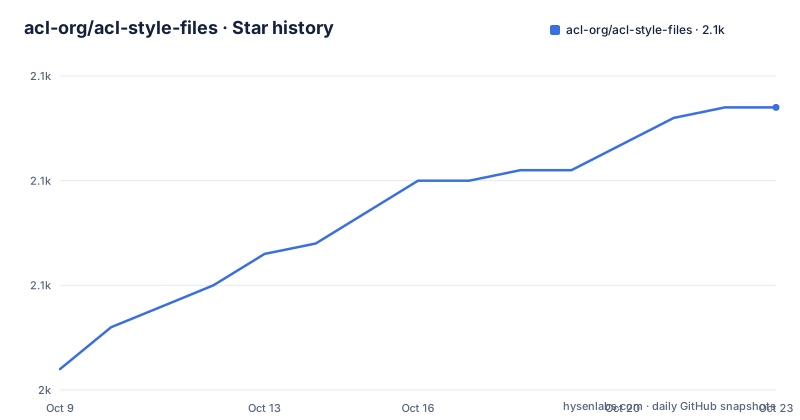
- acl-org/acl-style-files2,067 ★ · +25
| Repository | 2026-10-09 | 2026-10-23 |
|---|---|---|
| acl-org/acl-style-files | 2k | 2.1k |
25 Stars in the last 14 days, measured from the daily GitHub snapshot. Compare with other projects
Editorial analysis
Two template files serve pdfLaTeX and XeLaTeX/LuaLaTeX as separate tracks
Rather than offering a single template, the repository supplies 2 documents that match different LaTeX engine families. acl_latex.tex is for authors working with standard LaTeX and pdfLaTeX. acl_lualatex.tex is the one to use with XeLaTeX and LuaLaTeX. Both pull in the same acl.sty style file, but the template preambles differ because those engine families handle fonts and Unicode input in ways that affect declaration order.
For detailed instructions on using the style, the README points to acl_latex.tex itself, which also serves as the starting document for a submission. That means copying and renaming acl_latex.tex is both step one of any submission and the way to read the documented constraints. Authors using XeLaTeX or LuaLaTeX follow the same pattern with acl_lualatex.tex instead.
Choosing an engine is therefore the first decision, not a last-minute configuration detail. Whether pdfLaTeX or XeLaTeX is appropriate depends on font support and character encoding needs, and that choice sets which template belongs in the project. The README gives no guidance on choosing between them, so authors who have not yet picked an engine should evaluate whether they need Unicode font handling before starting.
For most authors submitting to a typical NLP or computational linguistics venue, pdfLaTeX and acl_latex.tex will be the path. The XeLaTeX track matters most for papers with non-Latin scripts, or for authors whose institution's LaTeX environment is built around LuaLaTeX.
6 named files make up the submission package, and each serves a distinct role
Among the 10 top-level repository entries, 6 are named files: acl.sty, acl_latex.tex, acl_lualatex.tex, acl_natbib.bst, anthology.bib.txt, and custom.bib. A formatting.md document, a tests/ directory, a .github/ directory and a README.md complete the layout.
acl.sty is the core style file that both template documents load. Authors do not edit it; the rules prohibit modification. They load it. acl_natbib.bst is the BibTeX bibliography style, and it handles the citation format required by ACL venues. Those 2 files define the typographic contract for every submitted paper.
anthology.bib.txt holds BibTeX entries for ACL Anthology papers. Citing prior work from ACL venues is a recurring task in NLP research, and having a pre-built bibliography file in the repository reduces the effort spent hunting for citation keys. custom.bib is where authors place their own references that do not appear in the anthology file. Keeping those in separate files can help manage a long bibliography across multiple revisions.
Formatting.md at the repository root supplements what the README links to externally. An external link points to the ACLPUB formatting page at https://acl-org.github.io/ACLPUB/formatting.html, but a local formatting.md means some rules are documented alongside the style files rather than only on an external site.
A tests/ directory and a .github/ directory are present, suggesting automated checks run on changes, though the README does not describe what those tests cover or how to run them locally.
3 paths to get the files, with Overleaf listed first and the .zip for quick local snapshots
Authors can get the style files in 3 ways. The Overleaf template at https://www.overleaf.com/latex/templates/association-for-computational-linguistics-acl-conference/jvxskxpnznfj is listed first in the README. For authors who write in Overleaf, this is the most direct path: open the template, copy it to a personal project, and the right files are in place without any git operations.
A direct clone or download of the GitHub repository is the second path. A .zip of the master branch is available at https://github.com/acl-org/acl-style-files/archive/refs/heads/master.zip, which gets a snapshot without requiring git. That option matters on a machine without a git client, or in a workshop setting where setup time is short.
For an author who also needs a local copy, or who wants to track updates over time, the repository is the authoritative source. The Overleaf template is a copy maintained through a manual sync workflow. Because that workflow requires several steps and a manual click in the Overleaf web interface, the Overleaf template may lag the repository by however long it takes a maintainer to complete all 4 sync steps. An author who copied the Overleaf template early in a conference cycle and wants to confirm the copy is current should compare it against the master branch before camera-ready submission.
Authors cannot modify the style files or substitute a template from another conference
Modification is prohibited. The README states that authors may not modify these style files or use templates designed for other conferences, covering both directions of deviation: changing what the repository provides and replacing it with something else.
Why the rule exists becomes clear when you consider the reviewing side. Conference program committees check formatting compliance, and a paper that renders differently from what the official files produce can create problems in the reviewing system. START, which handles submissions for many ACL-affiliated conferences, stamps page numbers and identifiers using the official template layout, and that pipeline expects the files from this repository.
Practical workarounds authors sometimes attempt are therefore blocked. Adding line numbers for review, shifting a margin by a fraction of an inch, or switching to a slightly different font family all require touching acl.sty or the template preamble. Any of those changes is a modification the rules prohibit. An author who finds a spacing problem or a rendering conflict should raise it in the repository as an issue or a pull request, rather than patching a local copy.
Preprint workflows are covered by the same rule. A draft uploaded to arXiv before the camera-ready deadline must still use the unmodified official style. Adding reviewer-friendly annotations by editing the style is not permitted, and the README names no exception for preprints.
Publications chairs fork and rename the repository, and general improvements go back as pull requests
Conference organizers follow a different process from authors. A publications chair forks the repository, makes the changes needed for the specific event, and sends changes back to the canonical copy only when they represent general improvements rather than event-specific customizations.
At minimum, 2 changes are required for every conference: update the conference name inside the files, and rename the files themselves. A submission package labeled with the generic ACL name does not suit a venue named EMNLP, NAACL or any other affiliated conference. Renaming the files and updating the name inside them are the steps that produce a correctly labeled package for authors.
When a chair makes a change that would benefit all future conferences, the README invites a pull request. That mechanism is how the canonical template evolves over time. The boundary between a general improvement and a conference-specific customization is not defined in the README, so a chair who is uncertain about whether a change is general enough should open a discussion before sending a pull request.
Changes that do not make it into the canonical repository stay in the fork. A fork-only change disappears after the conference completes unless the chair archives it or sends it upstream.
START submission ID stamping moved from a manual author field to a program chair request
Earlier versions of the ACL style required authors to fill in a START submission ID manually. That identifier was then stamped at the top of each page of the anonymized version, giving reviewers a way to match pages to entries in the review system. Since that approach relied on authors filling in a value correctly every time, it introduced a consistent failure point.
Stamping can now happen automatically inside START, removing the per-author step. The current approach shifts the action to the program chair: email [email protected] to request the automatic stamping. That request must be made once per conference, and it is not a default.
A chair who assumes the stamping is on by default may discover, after the submission deadline, that anonymous submissions carry no identifier. The README does not describe what the reviewing system shows in that case, but based on the description of the old manual field, the stamp would simply be absent. Requesting it before the submission period opens closes that gap.
For authors, the change is entirely transparent. Nothing in the current template requires finding or entering a submission ID. That field is gone, and the identifier comes from the system rather than from an author filling in a placeholder.
Syncing the Overleaf template takes 4 sequential steps and ends with a manual click
Maintainers who push a change from GitHub to the Overleaf template follow a 4-step process. First, merge the pull request or push the change to GitHub. Second, pull from GitHub to a local copy of the repository. Third, push from that local copy to the Overleaf project, whose git URL is https://git.overleaf.com/5f64f1fb97c4c50001b60549. Fourth, open the Overleaf project, click Submit and then Submit as Template.
Only the fourth step updates what authors see when they copy the template from the Overleaf gallery. Steps 1 through 3 update the project on Overleaf but leave the public template unchanged. A maintainer who completes steps 1 through 3 and stops there leaves the gallery template in its previous state indefinitely.
For authors, this workflow is invisible. Opening the Overleaf template link and copying it gives whatever state the last completed 4-step sync left behind. If the GitHub repository received a change after the author copied the template, that copy will not update automatically. Checking the repository's commit history and comparing it against the copy's content is the only way to confirm that a local or Overleaf copy is current.
The last push to the repository was on 2026-06-29, and no GitHub releases exist, so version tracking happens through commit history rather than a tagged release or a changelog entry.
Editorial conclusion
Use these style files if you are submitting to an ACL-affiliated conference and need a compliant LaTeX setup. Submission rules prohibit other templates, and the START system expects these specific files, so there is no alternative for a compliant submission. If you work in Overleaf, the template link at https://www.overleaf.com/latex/templates/association-for-computational-linguistics-acl-conference/jvxskxpnznfj is the fastest starting point. If you run a local LaTeX environment, the .zip download from the master branch or a direct clone gives you the same 10 files. Publications chairs should fork the repository rather than modifying the canonical copy, rename the files to match the conference, and request the START stamping by contacting [email protected] before the submission deadline, not after.
Frequently asked questions
Where do I get the ACL style files for my submission?
The README gives 3 options: the Overleaf template at the link in the README, the GitHub repository itself, and a .zip download of the master branch. For local LaTeX environments, the .zip is the quickest option without needing git.
Can I modify the ACL style files to add line numbers or adjust margins?
No. The README states that authors may not modify the style files or use templates designed for other conferences. That prohibition covers margin changes, line number packages inserted into acl.sty, and any other alteration to the provided files.
Which ACL template file should I use: acl_latex.tex or acl_lualatex.tex?
Use acl_latex.tex when working with standard LaTeX or pdfLaTeX. Use acl_lualatex.tex when working with XeLaTeX or LuaLaTeX. Both load the same acl.sty style file, but the template preambles differ to handle each engine's requirements.
How do publications chairs adapt the ACL style files for their specific conference?
The README says to fork the repository and make the necessary changes, with the minimum being to update the conference name in the files and rename the files themselves. Changes that would benefit future conferences can be sent back as a pull request to the canonical repository.
Do authors still need to fill in a START submission ID in the ACL template?
No. The README states that the manual submission ID field is no longer needed because START can now stamp it automatically. However, the program chair must request that feature by emailing [email protected].
Official sources
Add this badge to your README
If you maintain this project, the badge below links readers to this analysis and shows its maintenance status from the daily GitHub snapshot. Paste the markdown into your README; add ?metric=license or ?metric=stars to the image URL for a different field.

[](https://hysenlabs.com/projects/acl-org-acl-style-files)Star history chart for your README
[](https://hysenlabs.com/projects/acl-org-acl-style-files)Was this useful?