Spacemacs replaces your Emacs configuration instead of layering on top of it
A community-driven Emacs distribution - The best editor is neither Emacs nor Vim, it's Emacs *and* Vim!
At a glance
- What is it?
- Spacemacs is an Emacs Lisp distribution under GPL-3.0 whose default branch is develop. It wants Emacs 28.2 or newer, git and GNU tar already in place, and it writes itself into ~/.emacs.d rather than merging with whatever configuration you already have.
- Who is it for?
- Spacemacs fits someone starting Emacs from scratch who wants a keymap, a package set and documentation already wired together. It does not fit anyone with a configuration they care about, anyone on a distribution whose Emacs is older than 28.2, and nobody on XEmacs.
- Can I use it commercially?
- Yes, with conditions. GPL-3.0 is a copyleft licence: if you distribute software that includes it, you must release that software's source code under the same licence. Running it internally without distributing it does not trigger that obligation.
- Is it still maintained?
- Yes. The repository last received commits 5 days ago.
- What is it written in?
- Mainly Emacs Lisp, according to GitHub's language statistics.
Answers come from the project's GitHub data, last synced on November 13, 2026, and from our analysis. They are not legal advice.
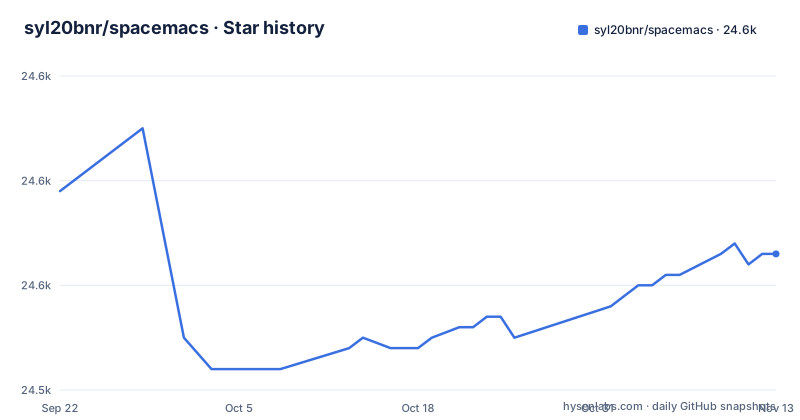
Star history
- syl20bnr/spacemacs24,553 ★ · -6
| Repository | 2026-09-22 | 2026-11-13 |
|---|---|---|
| syl20bnr/spacemacs | 24.6k | 24.6k |
-6 Stars in the last 52 days, measured from the daily GitHub snapshot. Compare with other projects
Editorial analysis
One git clone, and only over an empty ~/.emacs.d
Spacemacs is not something you add to an Emacs. The quick start writes it into the directory Emacs already reads configuration from, and for a machine with no existing setup, with the prerequisites in place, the whole install is one command:
git clone https://github.com/syl20bnr/spacemacs "${HOME}/.emacs.d"That line is deliberately narrow. It is offered only to people who do not already have an Emacs configuration, and only when Emacs 28.2 or above, git and tar are present. Anyone who does have a working setup is sent to the full installation instructions rather than told the clone is safe to run.
What this path does not do is merge. There is no step in it that reads your existing init file, keeps it, or walks the clone back later. So the consequence lands entirely on you: on a machine where your old configuration still matters, moving or backing up ~/.emacs.d is a decision you make before running the line, not something the installer handles for you afterwards.
Every binding hangs off SPC, and Alt-m is the same chord
Spacemacs replaces the default keymap with one leading key. Every binding is reachable through SPC or through Alt-m. The prefixes are meant to be readable rather than arbitrary: SPC b is the buffer group, SPC p is the project group, so the second key tells you what a command acts on before you read its name.
Finding bindings is meant to be interactive too. Pressing the space bar opens the list of carefully chosen key bindings, and the home buffer carries a [?] button that suggests a first few to try. Documentation sits behind the same mechanism, SPC h SPC opens it, and each layer carries its own, alongside general documentation, a quick start guide and an FAQ.
The cost of that choice is that the list is interactive rather than a flat table, and the repository root has no cheat sheet enumerating every command. Learning the system means sitting in front of it rather than reading ahead. The same shape applies to editing: the distribution is built for people arriving from Vim as well as from Emacs, and it says so directly, including the claim that moving quickly between the two input styles makes it a good pair programming tool.
Layers are the unit of configuration, and the root directory shows the seams
Nearly everything Spacemacs gives you arrives as a layer: packages grouped into configuration layers that follow a set of conventions written down in CONVENTIONS.org. The repository root makes the structure plain. There is layers/ for the layers, core/ for the machinery underneath, doc/ for documentation, assets/ for shipped files, tests/ for the test suite, news/ alongside CHANGELOG.org and CHANGELOG.develop for change history, and private/. Two files at the root split initialization in two: early-init.el for the part that runs before packages are available, and init.el as the main entry point.
The repository ships tests/ and links a workflow file named elisp_test.yml, but those exercise the project, not the configuration you assembled.
Emacs 28.2 is the floor, and XEmacs is off the table
Spacemacs extends Emacs, so the version of Emacs is the first thing that can stop you. The stated requirement is Emacs 28.2 or above. The development version is not officially supported, though it is expected to work anyway, which reads as a warning rather than permission: on a nightly build, breakage is not a supported configuration and you should not expect the project to treat it as one.
What Spacemacs will not do is run on XEmacs, and the instructions are emphatic. XEmacs is an old fork with subtle differences and it is not supported. There is no compatibility shim and no fallback path.
That boundary bites hardest on Linux distributions still packaging an older Emacs. The instructions name this case directly: some distributions support only versions older than 28.2, and in that case you are told to build Emacs from source. That is a real cost with a real failure mode, and you pay it before reaching a single key binding. The same list also assumes a package manager for the OS if the system does not already ship one.
Git and tar are hard requirements, ripgrep is a speed preference
The dependency list splits cleanly into what breaks the install and what makes it unpleasant. git is required to download and update Spacemacs. GNU tar in particular is required, because it is what installs and updates the Emacs packages Spacemacs pulls in, so a minimal container without tar never reaches a working editor. A package manager for the OS is needed too if the system does not have one.
Line searching is the soft side, and optional. A set of commands needs one of ripgrep (rg), The silver searcher (ag), ack, or GNU Grep or BSD Grep. With none of them installed, those commands have no backend. Grep is described as very slow, and is named the fallback because it is already on most systems.
The difference shows up exactly where searching matters most: inside a large buffer and across a repository. Left on the Grep fallback, the same key presses that feel instant on ripgrep turn into a pause, and the easy conclusion is that the distribution is slow rather than that the search tool is. Install the searcher before the configuration, not after it starts to grate.
The font you install decides whether the mode-line looks right
Spacemacs draws a lot of Unicode symbols, and whether they render depends on fonts rather than on your configuration. The default font is Source Code Pro. Using it is optional and you can set your own instead, but the fallback fonts are not optional in practice: they exist so particular symbols appear at all, and the operating system decides which ones apply. Linux uses Nanum Gothic, macOS uses Arial Unicode MS, and Windows uses MS Gothic together with Lucida Sans Unicode. On Linux the generic route is a pre-built TTF from the adobe-fonts repository, and the distribution package manager is preferred when it carries Nerd Fonts and Nanum Gothic.
The failure this causes is a misdiagnosis. With a fallback font missing, the mode-line stops resembling the picture at the top of the project page, and symbols that carry meaning vanish or become replacement characters. A first-time user reads that as a broken install and starts changing configuration that was never wrong. Compare the mode-line against that reference image before touching anything, so a font gap is recognized as a font gap. Nothing here is enforced at startup: a missing font does not stop Emacs from launching, it just quietly changes what is on screen.
Recent pushes on develop, newest tagged release from January 2018
The maintenance picture is unusual and worth reading carefully. The repository is not archived, its default branch is develop, and that branch was last pushed on 2026-10-28, so work is still landing. The release record is far older. The newest version listed is v0.200.13 from 2018-01-25, followed by v0.200.12 from 2018-01-24 and v0.200.11 from 2018-01-23: three consecutive patch versions inside three days, then no tag for years while commits continue.
That gap is the practical consequence. A version number is not a useful upgrade signal here, because the tag you would compare against stopped moving long before the branch did. If you pin a version or file a report, the branch is the thing that actually describes your code. The README also still calls the project beta and invites contributions, which fits a distribution whose interface is expected to keep changing. And with develop as the default branch, a clone gives you the moving target rather than the last tagged state.
Editorial conclusion
Spacemacs fits someone starting Emacs from scratch who wants a keymap, a package set and documentation already wired together. It does not fit anyone with a configuration they care about, anyone on a distribution whose Emacs is older than 28.2, and nobody on XEmacs. Before cloning over ~/.emacs.d, move what is already there, install ripgrep and the font fallback your OS needs, and accept that upgrading is a pull against develop rather than a version bump.
Frequently asked questions
What is spacemacs
A community-driven Emacs distribution written in Emacs Lisp and released under GPL-3.0, with develop as its default branch. It becomes your Emacs configuration rather than sitting beside it, and it asks for Emacs 28.2 or newer along with git and tar.
how to install spacemacs
On a machine with no existing Emacs configuration, clone the repository over the configuration directory: git clone https://github.com/syl20bnr/spacemacs "${HOME}/.emacs.d". That single line assumes Emacs 28.2 or above, git and tar are already installed. If you already have an Emacs setup, the quick start points you at the full installation instructions instead.
how to install spacemacs on windows
The same clone works in Windows PowerShell. If HOME is not set in the environment or in the registry, the target becomes ${env:APPDATA}/.emacs.d instead. Windows also needs the MS Gothic and Lucida Sans Unicode fallback fonts so the symbols Spacemacs draws render.
which is better, Doom Emacs or Spacemacs
Its README does not compare the two. What Spacemacs states about itself is that it focuses on ergonomics, mnemonics and consistency, keeps bindings behind SPC or Alt-m with readable prefixes such as SPC b for buffers and SPC p for projects, and organizes packages into configuration layers following the conventions in CONVENTIONS.org.
spacemacs vs vim
Spacemacs is not a replacement for Vim, it is an Emacs distribution that keeps Vim style editing available. It says it can be used naturally by Emacs and Vim users, that you can mix the two editing styles, and that switching between them quickly makes it a good pair programming tool.
is spacemacs dead
No. The repository is not archived and its develop branch was last pushed on 2026-10-28. The newest release listed is v0.200.13 from 2018-01-25 though, so the tagged versions stopped moving years before the branch did, and the README still describes the project as beta.
Official sources
Add this badge to your README
If you maintain this project, the badge below links readers to this analysis and shows its maintenance status from the daily GitHub snapshot. Paste the markdown into your README; add ?metric=license or ?metric=stars to the image URL for a different field.

[](https://hysenlabs.com/projects/syl20bnr-spacemacs)Star history chart for your README
[](https://hysenlabs.com/projects/syl20bnr-spacemacs)Was this useful?