acme.sh: A Shell-Only ACME Client for Certificate Automation Without Python
A pure Unix shell script ACME client for SSL / TLS certificate automation
At a glance
- What is it?
- acme.sh is a pure Unix shell ACME client that issues, renews, and installs SSL certificates with no Python dependency. It targets users who want a lightweight, scriptable tool across many Unix-like systems.
- Who is it for?
- Adopt acme.sh if you need a lightweight, shell-only ACME client that runs on diverse Unix systems, including BSDs and embedded platforms, without Python. Avoid it if you prefer a more structured, Python-based tool like Certbot or need extensive GUI integration.
- Can I use it commercially?
- Yes, with conditions. GPL-3.0 is a copyleft licence: if you distribute software that includes it, you must release that software's source code under the same licence. Running it internally without distributing it does not trigger that obligation.
- Is it still maintained?
- Yes. The repository received new commits within the last day.
- What is it written in?
- Mainly Shell, according to GitHub's language statistics.
Answers come from the project's GitHub data, last synced on November 15, 2026, and from our analysis. They are not legal advice.
Star history
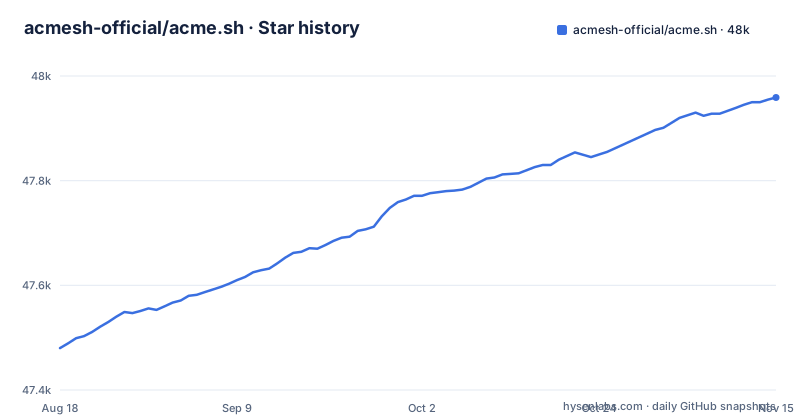
- acmesh-official/acme.sh47,959 ★ · +479
| Repository | 2026-08-18 | 2026-11-15 |
|---|---|---|
| acmesh-official/acme.sh | 47.5k | 48k |
479 Stars in the last 89 days, measured from the daily GitHub snapshot. Compare with other projects
Editorial analysis
What Problem acme.sh Solves and Who It Is For
acme.sh addresses the need to automate SSL/TLS certificate issuance and renewal without requiring a heavyweight runtime. It is a pure Unix shell script, meaning it runs on Bash, dash, and sh, and it explicitly avoids any dependency on Python. That makes it attractive for system administrators who manage minimal environments, such as embedded devices, BSD jails, or routers like OpenWRT, where installing Python is undesirable. The README lists a wide range of tested platforms, from macOS and Windows (via Cygwin) to FreeBSD, Solaris, and even Haiku and GNU Hurd. This breadth suggests the project targets users who need a single tool that works across many Unix-like systems without per-platform package management overhead. The core value is simplicity: the README claims you can learn it in three minutes, and it handles issuance, renewal, and installation in one script.
How acme.sh Works: The Mechanism Behind the Shell Script
acme.sh implements the ACME protocol directly in shell. The README states it offers a full ACME protocol implementation, which means it can talk to certificate authorities like Let's Encrypt or ZeroSSL without relying on external ACME libraries. The script uses standard Unix tools like curl and openssl, which are commonly available. It supports ECDSA certificates, SAN, and wildcard certificates, covering typical web server needs. The automation model is based on cron jobs: the README mentions cron job notifications for renewal or error. This implies that after initial issuance, acme.sh sets up a scheduled task to check expiry and renew automatically. The script does not require root or sudoer access, which is a notable design choice. It can run as a regular user, writing certificates to user-writable directories, and then use hooks to install them into system services. The README points to the wiki for deeper documentation.
Getting Started: Installation and Basic Commands
The project's homepage is acme.sh, and the repository is acmesh-official/acme.sh. The repository's Dockerfile installs from a checkout with `acme.sh --install` and otherwise falls back to `curl https://get.acme.sh | sh`. The script has commands such as `--issue`, `--install-cert`, `--renew`, `--install-cronjob` and `--upgrade`, and the README points to the wiki for full documentation.
Platform Compatibility and the Shell-Only Advantage
The README lists an extensive set of tested operating systems, including Mac OSX, Windows (with Cygwin), FreeBSD, Solaris, Ubuntu, OpenBSD, NetBSD, DragonFlyBSD, MidnightBSD, Omnios, OpenIndiana, Tribblix, Haiku, Hurd, and many Linux distributions. This is a strong point for acme.sh: it runs on systems where Python may not be preinstalled or where a Python interpreter is too heavy. The project's CI workflows on GitHub Actions cover many of these platforms, which gives some confidence in cross-platform behavior. The pure shell approach also means the script is portable across shells, as it claims compatibility with Bash, dash, and sh. However, this portability comes with a cost: the script must rely on external tools like curl and openssl, which are not always present. The README notes Alpine Linux requires curl, implying that the script does not bundle these dependencies. So, while there is no Python, you still need a working curl and openssl, which are common but not universal.
Limitations and Failure Modes
One genuine limitation is that acme.sh is a shell script, which makes it harder to debug and extend than a Python or Go client. Shell scripts are prone to quoting issues and platform-specific quirks, especially across the many systems listed. The README's claim of 'full ACME protocol implementation' is ambitious, and in practice, edge cases like rate limits or new ACME extensions may require updates. The project does release regularly, with versions 3.1.4, 3.1.5 and 3.1.6 published between July and September 2026, so maintenance is active. However, the reliance on cron for renewal means that if the cron job is misconfigured or the system is off during the renewal window, certificates can expire. The README mentions notifications for renewal or error, but setting those up is an extra step. Another failure mode is the DNS API integrations: if your DNS provider is not supported, you cannot use the `--dns` method, and you must fall back to manual DNS or webroot, which may not work for wildcard certificates. Check the repository's dnsapi directory or the wiki for your specific provider.
Alternative: Certbot and the Difference in Approach
The most direct alternative is Certbot, the Electronic Frontier Foundation's ACME client written in Python. Certbot is more structured, with a plugin system for various web servers and DNS providers, and it is often packaged in Linux distributions. The key difference is the language and runtime: Certbot requires Python, while acme.sh does not. This makes acme.sh preferable on systems where Python is not available or where you want a single script you can copy. So, the choice comes down to environment constraints: if you need Python-free operation or exotic platform support, acme.sh wins; if you prefer a well-established tool with a large community and are okay with Python, Certbot is a solid choice. The trade-off is between portability and ecosystem maturity.
Maintenance, License, and Upgrade Cost
The project is licensed under GPL-3.0, which means if you distribute modified versions, you must share source code. For most users running acme.sh as a tool, this is not a burden, but it is a consideration if you embed it in a commercial product. The repository is actively maintained, with the latest release 3.1.6 published on 2026-09-20, after 3.1.5 on 2026-09-19 and 3.1.4 on 2026-07-17. This suggests a steady release cadence, which is good for security updates. The Dockerfile lists an `upgrade` command among the script's verbs. The maintenance cost is low because it is a single script, but you must keep up with releases to get ACME protocol changes and DNS provider updates. The test coverage across many OSes via GitHub Actions is a positive sign, but you should still test on your specific platform, especially if it is less common. The project also has a Docker image, which adds another deployment option, but the shell script itself is the core.
Editorial conclusion
Adopt acme.sh if you need a lightweight, shell-only ACME client that runs on diverse Unix systems, including BSDs and embedded platforms, without Python. Avoid it if you prefer a more structured, Python-based tool like Certbot or need extensive GUI integration. Before adopting, verify that your DNS provider is supported via the built-in hooks, confirm that your shell environment (Bash, dash, or sh) meets the documented compatibility. The project is actively maintained, with recent releases in 2026, but you must check the wiki for the latest DNS API changes.
Frequently asked questions
What is acme.sh?
It is an ACME protocol client written purely in Unix shell that issues, renews and installs SSL/TLS certificates automatically, with no dependency on Python. It supports ECDSA keys, SAN and wildcard certificates, and runs under bash, dash and sh.
How to install acme.sh?
The project's own Docker build runs the script from the checkout with --install, and falls back to piping the installer into a shell otherwise. In the Docker image, the Dockerfile then symlinks the installed script to /usr/local/bin/acme.sh.
How do you use acme.sh with Let's Encrypt?
It speaks the full ACME protocol, so certificate issuance and renewal run through the same shell script rather than a separate tool. The README describes it as a single script that issues, renews and installs certificates automatically.
Is acme.sh safe to run on a server?
The client is GPL-3.0 licensed, written in shell so you can read it before running it, and does not require root or sudoer access. It runs DNS and install hooks from its dnsapi, notify and deploy directories.
acme.sh vs certbot: which one is different in approach?
certbot is a distribution package built around a Python runtime and a plugin set, while acme.sh is a single shell file that asks for openssl and curl and ships its own DNS API and install hooks. The project also states that it does not require root or sudoer access.
Official sources
Add this badge to your README
If you maintain this project, the badge below links readers to this analysis and shows its maintenance status from the daily GitHub snapshot. Paste the markdown into your README; add ?metric=license or ?metric=stars to the image URL for a different field.

[](https://hysenlabs.com/projects/acmesh-official-acme-sh)Star history chart for your README
[](https://hysenlabs.com/projects/acmesh-official-acme-sh)Was this useful?