ACreTeam/ac-decomp: Animal Crossing GameCube Decompilation
Decompilation of Animal Crossing for the Nintendo GameCube.
At a glance
- What is it?
- ACreTeam/ac-decomp reconstructs source code for the USA Rev 0 GameCube release of Animal Crossing. It is aimed at reverse engineering contributors who already have the game disc image and can build C with Ninja on Windows, macOS, or Linux.
- Who is it for?
- Adopt ACreTeam/ac-decomp if reverse engineering the USA Rev 0 GameCube release is your specific target and you can supply `orig/GAFE01_00`. Do not expect it to build the N64 release or another regional revision, and do not treat a completed `ninja` build as confirmation that matching every object has succeeded.
- Can I use it commercially?
- Yes. CC0-1.0 is a permissive licence: you can use, modify and sell software built on it, as long as you keep its copyright and licence notices.
- Is it still maintained?
- Yes. The repository received new commits within the last day.
- What is it written in?
- Mainly C, according to GitHub's language statistics.
Answers come from the project's GitHub data, last synced on November 7, 2026, and from our analysis. They are not legal advice.
Star history
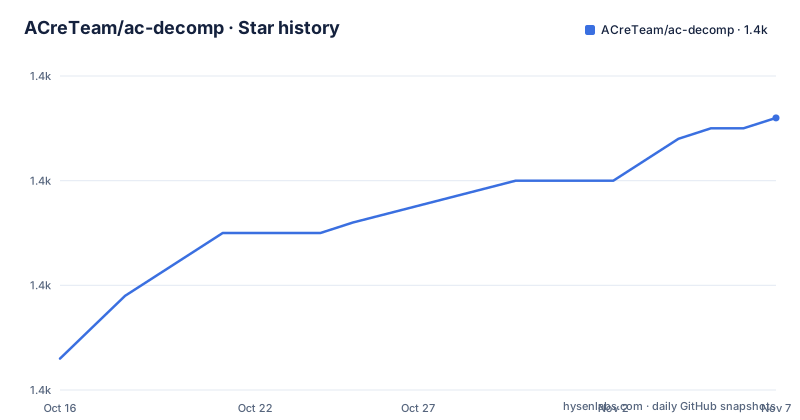
- ACreTeam/ac-decomp1,436 ★ · +23
| Repository | 2026-10-16 | 2026-11-07 |
|---|---|---|
| ACreTeam/ac-decomp | 1.4k | 1.4k |
23 Stars in the last 22 days, measured from the daily GitHub snapshot. Compare with other projects
Editorial analysis
USA Rev 0 GameCube Scope for ac-decomp
ACreTeam/ac-decomp addresses a narrow reverse engineering problem: producing a C decompilation of Animal Crossing for Nintendo GameCube from an existing game copy. Its supported target is `GAFE01_00`, identified in the README as Rev 0 for the USA. This repository is therefore not a general Animal Crossing source release and not a substitute for the separate N64 decompilation effort linked by the project.
The boundary matters before any build is attempted. The repository contains no game assets or assembly, and the README explicitly says that an existing copy of the game is required. The intended workflow starts from source reconstruction and uses the original disc image as input to configuration and build tools. A reader who has a different Animal Crossing revision, a different regional release, or no legally obtained disc image cannot treat the documented path as applicable.
The primary language is C, with repository entries such as `src/`, `include/`, `tools/`, `config/`, and `configure.py`. That layout is consistent with a compiler-driven decompilation project rather than an editor or a document archive. The absence of GitHub releases also means there is no release artifact to substitute for source checkout, submodules, and the game image preparation described in the README.
Source, Game Data, and Build Pipeline
The documented data flow has three main stages. First, the repository is cloned with its submodules, because later configuration and build steps may depend on code outside the top-level tree. Second, the reader places the supported disc image at `orig/GAFE01_00`. Third, `configure.py` is run, followed by `ninja`.
The build system is driven by `configure.py` and the `ninja` executable. The README also mentions `splits.txt` and `symbols.txt` as files whose changes trigger automatic rebuilds in objdiff. This indicates that the project supports more than source-file edits alone. Changes to headers, configuration, split definitions, and symbol definitions are treated as relevant to the generated project.
The repository does not contain the game assets or assembly that would allow a build from source alone. The original image is consequently part of the build input rather than an optional reference. The README lists ISO (GCM), RVZ, WIA, WBFS, CISO, and GCZ as supported image formats, but it does not document a legal source or a bundled copy. Obtaining that input remains outside the repository instructions.
The README links to documentation for dumping game files, Ghidra setup, generating decomp context, decomp.me, Ghidra, m2c, and decompilation basics, although those guides are commented out in the displayed README. The visible instructions therefore provide a build path without describing the complete reverse engineering workflow behind it.
Native Setup and objdiff Workflow
Windows setup has a specific tooling preference. The README strongly recommends native tooling and says WSL or msys2 are not required. One stated limitation is that objdiff cannot get filesystem notifications for automatic rebuilds when the project runs under WSL. On Windows, Python and Ninja must be available through `%PATH%`; the README also gives `pip install ninja` as a quick installation option for Ninja.
macOS uses Homebrew for Ninja and `wine-crossover`. The README also gives a quarantine removal command for macOS systems that reject `Wine Crossover.app` after an OS upgrade. Linux users are directed to install Ninja and, on non-x86 or non-x86_64 platforms, install Wine from the package manager. On x86 and x86_64, the project automatically downloads and uses `wibo`, described in the README as a minimal 32-bit Windows binary wrapper.
The visible workflow is platform-aware, but the README does not claim that every operating system has the same experience. Windows users who need automatic objdiff rebuild notifications are explicitly directed toward native tooling. Linux users on non-x86 systems must also arrange Wine themselves, which makes that platform path less self-contained than the x86 path described in the documentation.
The diffing stage starts after the initial build succeeds. The README says that an `objdiff.json` file should then exist in the project root. After downloading a release from the `encounter/objdiff` repository, the reader sets `Project directory` under project settings, and objdiff should load the configuration automatically. An object can then be selected from the left sidebar for comparison. Automatic rebuilds cover source files, headers, `configure.py`, `splits.txt`, and `symbols.txt`.
First Build Tutorial for a Supported GameCube Image
The first real use is to prepare a checkout, install the required build tools, provide the disc image, configure the project, and run the initial build. On Windows, ensure Python and Ninja are available in `%PATH%` before starting. On macOS or Linux, install Ninja according to the platform instructions.
Clone the repository with its submodules. The `--recursive` option is part of the documented command, so do not omit it if later steps depend on submodule contents.
git clone --recursive https://github.com/Prakxo/ac-decomp.gitThe README also gives a separate submodule update command. Run it after cloning if the checkout already exists or if submodules have not yet been initialized.
git submodule update --init --recursiveCopy the USA Rev 0 image to `orig/GAFE01_00`. The supported formats named by the README are ISO (GCM), RVZ, WIA, WBFS, CISO, and GCZ. The file path must match exactly because it is the documented build input location.
Configure the project with the repository script.
python configure.pyThe README says that another version can be selected with `--version`, but it lists only `GAFE01_00` as supported. Do not assume that flag makes unsupported releases buildable.
Run the initial build.
ninjaA successful initial build should produce `objdiff.json` in the project root according to the README. That file is the documented handoff to objdiff, not merely a general build artifact.
Where objdiff Fits and What It Does Not Prove
objdiff provides the comparison surface for this project. The README instructs users to download its latest release, set `Project directory`, load the generated configuration automatically, and select an object from the left sidebar. This is a different operation from compiling. objdiff is used to inspect differences and observe rebuilds, while `ninja` performs the build.
Automatic rebuild notifications are tied to a defined file set: source files, headers, `configure.py`, `splits.txt`, and `symbols.txt`. This makes the tool useful for an iterative decompilation workflow, where a contributor changes one of these inputs and checks the resulting object comparison. The README does not provide a numerical matching result, so it offers no basis for claiming that the project is complete or that a particular build matches the original game.
The Windows warning about WSL is a concrete operational limitation. If filesystem notifications are required for automatic rebuilds, native Windows tooling is the documented choice. The README also does not describe offline configuration, editor integration details, CI behavior, rollback procedures, or compatibility with every objdiff release. Those points should not be inferred from the existence of the configuration file.
For contributors, objdiff turns the repository into an inspectable workspace. For users seeking a playable game, this repository does not document packaging a distributable game image. Its role is source reconstruction and comparison.
Maintenance, License, and Upgrade Boundaries
The repository is not archived, and its last push was on 2026-07-18. That is the maintenance information supported by the repository metadata; the README does not describe a release schedule or a support policy. There are no GitHub releases listed, so upgrades are handled through the repository and its submodules rather than through a documented release artifact.
The project license is `CC0-1.0`. That identifier describes the repository's stated licensing choice. This article does not give legal advice about game assets, copyright ownership, or the legal status of a disc image. The absence of assets and assembly in the repository does not remove the reader's responsibility for the source and use of the required game copy.
The separate N64 decompilation link is explicitly different work. Switching from the GameCube project to that project is not a version toggle within the documented `GAFE01_00` workflow. Likewise, `--version` is described as a selector, but the visible supported-version list contains only the USA Rev 0 GameCube target.
Upgrade cost is therefore primarily source management and build compatibility cost. The documented commands initialize submodules, run a Python configuration script, and invoke Ninja. The repository does not document a migration script, version-pinning policy, or rollback procedure.
Limits of ACreTeam/ac-decomp Compared with Other Workflows
The clearest alternative is to treat the linked N64 decompilation as the relevant project for the original N64 version of Animal Crossing. The README says that the original N64 version is being worked on elsewhere. The approach differs by target platform and code lineage: ACreTeam/ac-decomp is for the GameCube release and documents a GameCube disc image as its build input.
Another practical alternative is to use a game image or packaged release without attempting source reconstruction. That may fit someone who only wants to run the game, but it is not the same task. ACreTeam/ac-decomp does not document a ready-to-run emulator package, a playable build, or game assets. Its documented output is a compiler-driven source project that can be compared with objdiff.
For reverse engineering specifically, the repository is narrower than a general modding toolkit. The README names Ghidra, m2c, decomp.me, and related guides, but those references are in commented documentation rather than visible step-by-step instructions in the displayed content. The project should therefore be judged against a target and build workflow, not against a claim of general tooling coverage.
Adoption Decision for ACreTeam/ac-decomp
ACreTeam/ac-decomp is appropriate for a contributor who has specifically selected USA Rev 0 Animal Crossing for GameCube, accepts the required game-image dependency, and wants a C-based decompilation workflow with objdiff comparison. The repository provides a documented path from recursive checkout through `configure.py` and `ninja`, plus a defined location and set of files involved in automatic rebuild behavior.
It is the wrong choice for someone targeting the N64 release, seeking an unsupported regional revision, expecting bundled assets, or looking for a packaged playable game. It is also a poor fit if the required Windows environment cannot provide native filesystem notifications for objdiff, unless that limitation is acceptable.
The first verification should be concrete: confirm that the image is the supported `GAFE01_00` USA Rev 0 copy, place it at `orig/GAFE01_00`, and run the documented configuration and `ninja` commands. After the initial build, verify that `objdiff.json` appears in the project root and that objdiff can load the project before changing source files.
Editorial conclusion
Adopt ACreTeam/ac-decomp if reverse engineering the USA Rev 0 GameCube release is your specific target and you can supply `orig/GAFE01_00`. Do not expect it to build the N64 release or another regional revision, and do not treat a completed `ninja` build as confirmation that matching every object has succeeded. Verify first that your disc image is supported, that native Windows tooling is available if automatic rebuild notifications are required, and that objdiff can load the generated `objdiff.json`.
Frequently asked questions
What game version does ACreTeam/ac-decomp support?
The README lists `GAFE01_00`, Rev 0 for the USA, as the supported version. It does not list other GameCube revisions in the displayed instructions.
Does ACreTeam/ac-decomp include Animal Crossing game assets?
No. The repository explicitly does not contain game assets or assembly, and the README says that an existing copy of the game is required.
How do I build ACreTeam/ac-decomp?
Clone the repository recursively, initialize submodules, copy a supported disc image to `orig/GAFE01_00`, run `python configure.py`, and then run `ninja`.
How does ACreTeam/ac-decomp work with objdiff?
After the initial build succeeds, the README says `objdiff.json` should exist in the project root. In objdiff, set `Project directory`, then select an object from the left sidebar for comparison.
Does WSL support automatic rebuilds in ACreTeam/ac-decomp?
The README says objdiff is unable to get filesystem notifications for automatic rebuilds when the project runs under WSL. It recommends native tooling on Windows.
Official sources
Add this badge to your README
If you maintain this project, the badge below links readers to this analysis and shows its maintenance status from the daily GitHub snapshot. Paste the markdown into your README; add ?metric=license or ?metric=stars to the image URL for a different field.

[](https://hysenlabs.com/projects/acreteam-ac-decomp)Star history chart for your README
[](https://hysenlabs.com/projects/acreteam-ac-decomp)Was this useful?