Atomizer generates the atomic stylesheet instead of shipping one
A library to create small, reusable CSS that scales as your website grows.
At a glance
- What is it?
- Atomizer is a build-time generator that scans source files for atomic class names and emits the matching CSS, packaged as a monorepo with integrations for Grunt, Gulp, Webpack, Metalsmith, Boot and Ember. It fits component-heavy templating frameworks and gets awkward the moment your styling needs state or scope that a class name cannot express.
- Who is it for?
- Adopt Atomizer if you are building a component library in React, Ember or Angular and want every generated rule to exist because something referenced it. Do not adopt it if your design system needs runtime theme switching, per-component overrides or anything a utility class cannot express.
- Can I use it commercially?
- Check first. The repository uses a licence we do not classify automatically, so read its LICENSE file before any commercial use.
- Is it still maintained?
- Activity is slowing. The repository last received commits 7 months ago.
- What is it written in?
- Mainly JavaScript, according to GitHub's language statistics.
Answers come from the project's GitHub data, last synced on November 7, 2026, and from our analysis. They are not legal advice.
Star history
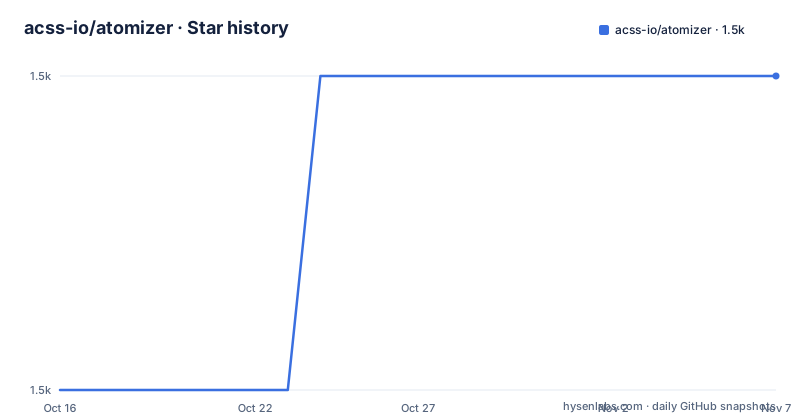
- acss-io/atomizer1,544 ★ · +1
| Repository | 2026-10-16 | 2026-11-07 |
|---|---|---|
| acss-io/atomizer | 1.5k | 1.5k |
1 Stars in the last 22 days, measured from the daily GitHub snapshot. Compare with other projects
Editorial analysis
The stylesheet is an output, not an input
The usual CSS workflow starts from a stylesheet and rules for classes the HTML happens to use. Atomizer inverts that. Class names in your templates are single purpose units such as a positioning or colour class, and the tool scans your source for the ones you wrote, then emits only the CSS those names resolve to. The result is a file that exists because the code references it, which is the argument the project makes about reuse.
The README positions this against component-oriented templating frameworks, naming React, Ember and Angular explicitly, since a component that carries its own class list needs no separate stylesheet. The topic tags on the repository use the older names for the idea, atomic-css, functional-css and utility-css, which tells you this project comes from the first wave of that movement rather than from the Tailwind generation that followed.
One detail worth flagging: the repository itself is a monorepo, and the library source lives under `packages/atomizer`. The root `package.json` is named `atomizer-mono`, is marked private and carries the note that this package should not be published. What you consume is one of the workspace packages, not the repository root.
Configuration lives in atomizer.config.js
Generation is driven by a config file. One sits at the repository root as `atomizer.config.js`, and a second exists in `examples/`, which is the one the examples build actually uses.
The npm scripts show the command line shape. Two invocations appear, one for the documentation site and one for the examples, and they differ in exactly the way you would expect: the examples pass an explicit config and an explicit output path, the docs build takes the defaults.
"atomizer:docs": "atomizer --quiet -R -o ./app/assets/css/atomic.css",
"atomizer:examples": "atomizer --quiet -R -c ./examples/atomizer.config.js -o ./examples/css/atomic.css"
The `-R` flag and the `--quiet` flag are what you will notice first if you run these by hand: one controls recursive scanning, the other silences the log. Output lands in a single stylesheet file, which is the one hard constraint of the model. There is no documented code splitting or per-component output in what the README and scripts show.
The examples directory shows the rule families in practice
The repository ships HTML examples that double as documentation of what the rule set covers. The file list is more informative than a changelog here: `examples/align.html`, `examples/blend-modes.html`, `examples/breakpoints.html`, `examples/grid.html`, `examples/layout.html` and `examples/simple.html`.
Breakpoints deserve a note. Responsive variants in an atomic system are expressed by naming the class differently, so the generator has to know your breakpoint values before it can emit the media query. That is configuration, not a default, and it is the kind of decision that belongs in `atomizer.config.js` next to the examples that use it.
To browse them locally, the scripts include a command that starts a live server over the examples directory:
"examples": "concurrently \"npm run atomizer:examples\" \"live-server examples --wait 500\""The `--wait 500` gives the generator half a second to write `examples/css/atomic.css` before the browser connects, which tells you the build is fast enough to regenerate while you edit.
Integrations are separate packages, some maintained elsewhere
The plugin list is where Atomizer's real reach is, and it is also where the maintenance risk sits. Inside this monorepo you find the Grunt plugin at `packages/grunt-atomizer` and the Webpack loader at `packages/webpack-atomizer-loader`. Gulp, Metalsmith, Boot and Ember integrations live in separate repositories under other or individual maintainers, including `gulp-atomizer`, `metalsmith-atomizer`, `boot-atomizer` and `ember-cli-atomizer`.
That split matters when you choose a build tool. The Webpack loader sits in the same repository and shares its release cadence. The Gulp task sits in a different repository with its own history. There is a PostCSS plugin too, published as `postcss-atomizer`.
Editor support exists in two forms. The Atomic CSS Snippets extension for VSCode, published as `acss-io.atomic-css-snippets`, provides quick suggestions for class names, and a separate community extension searches atomic CSS inside the editor. Both exist because the class names have to be typed by hand; there is no visual picker built into the generator.
The docs site is served by Jekyll in a container for local development:
services:
    jekyll:
        image: jekyll/jekyll:latest
        ports:
            - 4000:4000
The environment sets `JEKYLL_ENV=development` and the command runs `jekyll serve --watch --incremental` inside `docs`, so the documentation you read locally is the same site published at acss-io.github.io/atomizer.
Where the atomic model gets expensive
The design has a known ceiling and it is not a bug in the generator. Utility classes are static strings resolved at build time, so some runtime styling decisions may require additional handling beyond the generated classes. A user setting a colour from a saved preference is not a case this architecture solves by itself, and the README does not document a theming layer.
The second cost is class name density in templates. The tradeoff that atomic CSS makes, trading selectors for repetition in markup, is favourable when you have many instances of a component and unfavourable when markup is long-lived and hand-edited by people who did not choose the class names.
Third, and most concrete here: the last push was on 2026-04-08. Tagged releases show `postcss-atomizer` at 2.0.0 on 2025-04-22, `atomizer` at 3.30.0 on 2024-10-02 and `atomic-css-snippets` at 1.0.12 on 2024-10-02. The repository is not archived, but the branch has been quiet for months and the core library's last tag is older than the PostCSS plugin's. Plan on maintaining the integration layer yourself. Licensing is the Yahoo Inc. BSD license, with third-party code listed in the root `package.json` rather than in a separate attribution file.
Editorial conclusion
Adopt Atomizer if you are building a component library in React, Ember or Angular and want every generated rule to exist because something referenced it. Do not adopt it if your design system needs runtime theme switching, per-component overrides or anything a utility class cannot express. Verify first that the last release you pin has a PostCSS plugin to match your bundler, and read LICENSE.md directly, since the Yahoo Inc. BSD terms are what the README points to and GitHub classifies the license as non-standard.
Frequently asked questions
How do I install and run Atomizer?
It is consumed as one of the workspace packages inside this monorepo rather than from the repository root, whose package.json is marked private. The repository scripts show the CLI form, for example `atomizer --quiet -R -c ./examples/atomizer.config.js -o ./examples/css/atomic.css`.
Does Atomizer have an integration for Webpack and Gulp?
Yes. The Webpack loader is `webpack-atomizer-loader` and the Grunt plugin is `grunt-atomizer`, both inside this monorepo. The Gulp task `gulp-atomizer` is maintained in a separate repository, as are the Metalsmith, Boot and Ember integrations.
What license is Atomizer released under?
The README states the software is free to use under the Yahoo Inc. BSD license, with copyright information in LICENSE.md. GitHub does not classify that license as standard, so the LICENSE.md file is the authoritative text.
Where do I find the list of supported Atomizer rules?
The published documentation at acss-io.github.io/atomizer covers them, and the repository keeps runnable examples under `examples/`, including align, blend-modes, breakpoints, grid, layout and simple pages.
Official sources
Add this badge to your README
If you maintain this project, the badge below links readers to this analysis and shows its maintenance status from the daily GitHub snapshot. Paste the markdown into your README; add ?metric=license or ?metric=stars to the image URL for a different field.

[](https://hysenlabs.com/projects/acss-io-atomizer)Star history chart for your README
[](https://hysenlabs.com/projects/acss-io-atomizer)Was this useful?