Shower: HTML slides with a timer, a progress bar and two themes
Shower HTML presentation engine
At a glance
- What is it?
- A look inside the HTML presentation engine whose core handles slide navigation, a progress bar and a timer, while the look itself arrives as separate npm packages.
- Who is it for?
- Shower fits a speaker who writes decks in HTML and wants navigation, a progress bar and a timer with nothing to build. Before you commit, pin every @shower package yourself, since the project publishes no releases to compare versions against, and keep anything beyond the four core behaviours, such as speaker notes or a scripted PDF export, outside the engine.
- Can I use it commercially?
- Check first. The repository uses a licence we do not classify automatically, so read its LICENSE file before any commercial use.
- Is it still maintained?
- Yes. The repository last received commits 6 days ago.
- What is it written in?
- Mainly JavaScript, according to GitHub's language statistics.
Answers come from the project's GitHub data, last synced on November 15, 2026, and from our analysis. They are not legal advice.
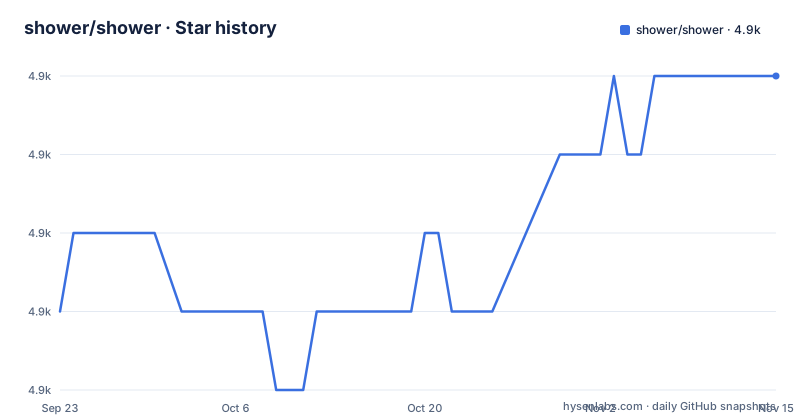
Star history
- shower/shower4,879 ★ · +3
| Repository | 2026-09-23 | 2026-11-15 |
|---|---|---|
| shower/shower | 4.9k | 4.9k |
3 Stars in the last 53 days, measured from the daily GitHub snapshot. Compare with other projects
Editorial analysis
Slide behaviour lives in @shower/core, styling lives in a theme package
Slides in Shower are HTML, and the behaviour around them belongs to @shower/core rather than to the markup you write. The project's opening list puts it plainly: built on HTML, CSS and vanilla JavaScript, and themes are separated from engine. That split decides who maintains the CSS. You write the slides, a theme package supplies the look.
| Package | Description | |---------|-------------| | @shower/core | Presentation engine: slide management, navigation, progress bar, timer | | @shower/material | Material Design theme | | @shower/ribbon | Ribbon theme | | @shower/shower | Ready-to-use presentation template | | @shower/cli | CLI tool for creating, serving, bundling, and publishing presentations |
Two entries carry the styling: @shower/material is a Material Design theme and @shower/ribbon is a Ribbon theme. One is a template you can copy from, @shower/shower, and one is a command line tool.
Two ways in: unzip the shower.zip template or install the CLI globally
There are two documented ways to start, and they cost different things.
The first skips the toolchain. Download and unzip the shower.zip template archive, open index.html in any text editor, and start creating your presentation there. Nothing gets installed, and what you end up with is a folder of files you can hand to someone as it is.
The second route puts Node.js on your machine and hands the file work to the CLI:
npm install -g @shower/cli
shower create
The global flag in that first line is the part to weigh. It installs one version for the whole machine instead of one version per project, so it shares a fate with every other deck you have. The README does not document a local install, and it does not name a version for either command.
Slide management, navigation, progress bar, timer: the core's whole list
@shower/core is the engine, and its documented job list has four items: slide management, navigation, the progress bar and the timer. Slide management and navigation are what move a deck from one slide to the next and keep track of where you are. The progress bar puts that position on screen for the room. The timer puts elapsed time next to it.
Those four items are the engine's documented job list, and the README says the core ships with plugins. Everything else in the repository is a theme above it, a template that wires it into a deck, or the CLI working on files. So when you go looking for a feature, check those four names first. Anything a slide tool usually offers beside them, such as transitions, build steps or audience analytics, appears nowhere in this package's description.
The core has no room for notes, a speaker view or an export command
Presenting is more than showing slides to the room, and the parts that happen off screen have no home in this engine. The README does not document a speaker view, a presenter console, presenter notes, a remote control path from a phone, or any way to collect questions from the audience. If your talk depends on notes only you can read, the README gives them no documented place in Shower.
Output has the same shape. Printable to PDF is listed as a property of the engine, not as a command, and the README does not describe a page size, an orientation, or how a slide crosses a page boundary. The README names no export command.
Themes are packages, and writing a third one is undocumented
The look of a deck comes from a package, not from a stylesheet you copy into the project. @shower/material is a Material Design theme, @shower/ribbon is a Ribbon theme, and the engine sits underneath both. Changing one for the other is a change of dependency rather than a rewrite of your markup, and that is what keeping themes separated from the engine buys you.
What you do not get is a documented way to write a third one. There is no theme API in the README, no hook list, and no class contract to satisfy. A team that needs an internal look has to read the theme packages' CSS and the core markup to work out what a theme is expected to style. That cost lands on you, and the repo does carry a docs/ directory that the README never points you into.
Fully keyboard accessible, printable to PDF, latest stable browsers only
Three of the five claims on the front page are about delivery rather than authoring: it works in all modern browsers, it is fully keyboard accessible, and it is printable to PDF. The browser support section narrows the first claim to the latest stable versions of Chrome, Edge, Firefox and Safari. Older builds, embedded viewers, and the managed browsers that locked-down conference machines tend to ship all fall outside the supported set, and no fallback behaviour is documented for them.
Keyboard access is claimed without a published key map. The README does not list the keys for moving forward, moving back, or starting and stopping the timer, so anyone driving a deck from the keyboard learns them from the running deck itself. Rehearsing at home, that is a small cost. Doing it the first time on stage, it is a worse one.
Contributing runs through .githooks and a lint chain before the tests
The repository is an npm workspace whose workspaces are packages/* and shwr.me, and it declares node >=24 under engines, so working on a theme from a clone means a current Node. The prepare script points Git at .githooks, so the hooks come from the repo rather than from your own config. Linting runs editorconfig-checker, then eslint, then stylelint over `packages/{material,ribbon}/styles/**/*.css`, and the test script runs that lint step plus the cli and core suites:
npm run build:core
npm run lint
npm run test:cli
npm run test:core
There are per-theme dev scripts too, `dev:shower`, `dev:ribbon` and `dev:material`, plus a build:shwr.me script for the site behind https://shwr.me. The README suggests filing an issue with your idea before sending a pull request, and eight contributors are named in the README in historical order.
No GitHub releases, so npm is the only place a version shows up
The project is not archived and its last commit landed on 26 October 2026, so work is still landing on it. It publishes no GitHub releases, though, which leaves npm as the only place a version number appears at all. Nothing in the README says which versions of the five packages belong together, so a deck that pins @shower/core and takes a theme without a pin can end up on mismatched packages with no release notes to compare them against.
Two things are worth checking before you commit. First, pin each @shower package explicitly and read what npm reports for each one, because there is no releases page to compare against. Second, the terms: the README closes with Licensed under MIT License and points at LICENSE.md in the repo root, where CHANGELOG.md also sits.
Editorial conclusion
Shower fits a speaker who writes decks in HTML and wants navigation, a progress bar and a timer with nothing to build. Before you commit, pin every @shower package yourself, since the project publishes no releases to compare versions against, and keep anything beyond the four core behaviours, such as speaker notes or a scripted PDF export, outside the engine.
Frequently asked questions
What does the name Shower mean in this project?
The README opens with a dictionary entry rather than a tagline: Shower, written with the pronunciation ['ʃəuə], noun, a person or thing that shows. The name comes from showing, not from anything related to water.
How do I create my first Shower presentation with the CLI?
Install Node.js, then run `npm install -g @shower/cli` to put the tool on your machine and `shower create` to generate a presentation. The CLI also handles serving, bundling and publishing presentations once the deck exists.
Which packages make up Shower and what does each one do?
There are five. @shower/core is the presentation engine handling slide management, navigation, the progress bar and the timer. @shower/material is a Material Design theme, @shower/ribbon is a Ribbon theme, @shower/shower is a ready-to-use presentation template, and @shower/cli creates, serves, bundles and publishes presentations.
Which browsers can display a Shower deck?
The latest stable versions of Chrome, Edge, Firefox and Safari. Anything older, including an embedded viewer or a managed browser on locked-down hardware, sits outside the supported set, and the project documents no fallback for it.
Does Shower publish releases I can pin a version to?
The repository has no GitHub releases, so npm is the only place a published version shows up. The README also names no version numbers for the packages it tells you to install, which leaves the pinning to you.
Official sources
Add this badge to your README
If you maintain this project, the badge below links readers to this analysis and shows its maintenance status from the daily GitHub snapshot. Paste the markdown into your README; add ?metric=license or ?metric=stars to the image URL for a different field.

[](https://hysenlabs.com/projects/shower-shower)Star history chart for your README
[](https://hysenlabs.com/projects/shower-shower)Was this useful?