pikaur: an AUR helper that reviews PKGBUILDs in one pass
AUR helper with minimal dependencies. Review PKGBUILDs all in once, next build them all without user interaction.
At a glance
- What is it?
- pikaur is an Arch Linux helper for the AUR whose defining choice is that it does not try to outsmart pacman. It collects the PKGBUILDs, shows you the diff and the build files, and then hands the work to pacman and answers its questions, rather than reaching for --noconfirm and --force. The dependency list is one library deep, and the configuration file is unusually thorough for a tool of this kind.
- Who is it for?
- Adopt pikaur if you want an AUR workflow that shows you every PKGBUILD diff before anything is built, and if you are the kind of user who answers pacman's questions rather than suppressing them. It is the wrong tool if you want unattended installation, because a helper that automates the build also automates the code execution in the PKGBUILD, and it is the wrong tool if you expect a rich dependency resolver, since pikaur deliberately leaves that to pacman.
- Can I use it commercially?
- Yes, with conditions. GPL-3.0 is a copyleft licence: if you distribute software that includes it, you must release that software's source code under the same licence. Running it internally without distributing it does not trigger that obligation.
- Is it still maintained?
- Yes. The repository last received commits 27 days ago.
- What is it written in?
- Mainly Python, according to GitHub's language statistics.
Answers come from the project's GitHub data, last synced on November 7, 2026, and from our analysis. They are not legal advice.
Star history
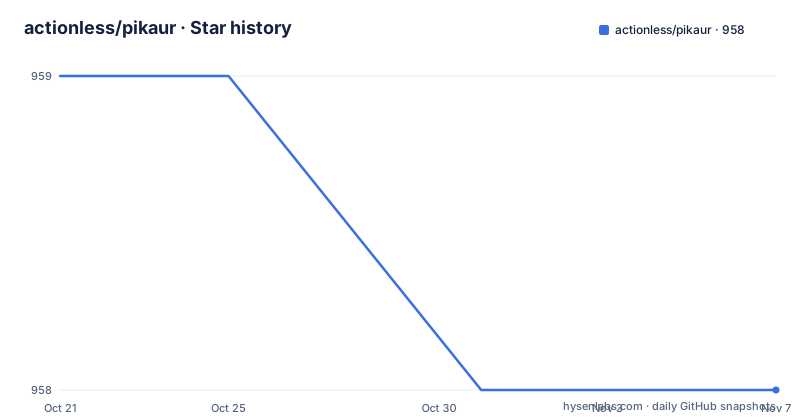
- actionless/pikaur958 ★ · -1
| Repository | 2026-10-21 | 2026-11-07 |
|---|---|---|
| actionless/pikaur | 959 | 958 |
-1 Stars in the last 17 days, measured from the daily GitHub snapshot. Compare with other projects
Editorial analysis
The choice not to outsmart pacman
pikaur is an AUR helper with minimal dependencies, and its one line description states its workflow: review PKGBUILDs all at once, then build them all without user interaction. It is inspired by pacaur, yaourt and yay.
What makes it different is stated in the next paragraph, and it is the most important design decision in the project. Instead of trying to be smarter than pacman by using --nodeps, --force, --ask, --noconfirm and so on, it just interactively tells pacman what to do. If pacman asks some unexpected question, the user will be just able to answer it manually.
That is a philosophical position about AUR helpers, and it runs through the whole tool. The AUR is a repository of user-submitted build scripts, and a PKGBUILD is a shell script that runs as your user on your machine. Any helper that builds one is running code it did not write. The usual response to the friction of that is to make the friction go away with flags that suppress questions and force past conflicts, and pikaur takes the other road: the questions are the safety mechanism, and a helper that swallows them is removing the only checkpoint a user had.
The result is a workflow where the reading happens in one batch, at the front, and the building happens afterwards, in one batch, uninterrupted. You are shown the diffs and the build files for everything that is going to change, you decide, and then the builds run. That ordering is what makes the review practical, because reviewing thirty packages one prompt at a time is not reviewing at all.
The dependency story is part of the same philosophy. The project metadata lists exactly one runtime dependency, pyalpm, the Python binding to the pacman library, and the build backend is hatchling. The description of the project is an AUR helper with minimal dependencies, and the README says the same thing in its first line, which is a promise a reader can check in one file.
The pacman operations it extends
The second half of the README is a table of the pacman operations that gain AUR capability, and the pattern is that you keep using the pacman interface you already know.
The -S operation builds AUR packages, and --needed, --ignore and --noconfirm are supported as in pacman, with other arguments just passed through to it. The -Sw variant builds AUR packages but does not install them, which is the build only version. The -Ss operation searches or lists all AUR packages, with -q supported. -Si shows package information. -Su and -Syu do the sysupgrade. -Sc and -Scc clean the build directory and the built packages cache. -Qu queries what is upgradeable, with -q supported.
That is the whole surface, and the design goal is that muscle memory transfers. Someone who knows pacman already knows pikaur for the operations that matter, and the AUR part appears where you would expect it rather than in a parallel command language.
The one exception is spelled out with precision. Pikaur wraps all the pacman options accurately except for -Syu, which is split into -Sy, to refresh the package list first, and -Su, to install the upgrades after the user has confirmed the package list or altered it through the manual package selection. The reason is the well known Arch footgun, where a partial upgrade from a stale package list breaks a system, and the split makes the refresh a separate, visible step that the user can inspect and modify before anything is installed.
The pikaur-specific flags live behind their own help invocations, with -Sh, -Qh, -Ph, -Gh and -Xh, which keeps the pacman-compatible surface clean and puts the extensions somewhere you look for them deliberately.
The review step, and the failures it is there to catch
The features list is where the review workflow becomes concrete, and several items are there specifically because AUR builds fail in ways a user has to answer for.
The tool interacts with common build problems, and the README names them: an untrusted GPG key, a checksum mismatch and the wrong architecture. Those are the three failures that a PKGBUILD produces regularly, and each of them is a moment where the correct behaviour is to stop and ask rather than to force. An untrusted key means the source signature cannot be verified, a checksum mismatch means the downloaded file is not what the build script expected, and the wrong architecture means the package is being built for a CPU the machine does not have.
The manual package selection is the other half of the review. In the install prompt you can edit the selection in a text editor, which means you can ignore an unwanted update or choose a different package provider for a dependency. That is a text editor as a UI, and it is unglamorous and effective, because it lets the user express a selection that a menu of numbered options could not.
The diff and the file review are the security part. Pikaur shows the AUR package diff and lets you review the PKGBUILD and the .install files before anything is built, and the config file has options that control exactly this, including DontEditByDefault, NoEdit and NoDiff, plus a configurable GitDiffCmd, which is the command used to produce the diff, with template variables for the repository path and the last installed and current hashes so that the diff is between the version you have installed and the version being proposed.
And before a sysupgrade, the tool shows the unread Arch news, which is the distribution's own mechanism for telling users about manual interventions they are about to need, and which is the single most common way a rolling release system breaks a machine that a user did not read the news.
Installing it, and the case for a static copy
The installation is the standard Arch sequence, and it is short enough to be worth reading as an example of how AUR packages are built:
sudo pacman -S --needed base-devel git
git clone https://aur.archlinux.org/pikaur.git
cd pikaur
makepkg -fsri
The build and install flags are the familiar ones, with the trust of the package and the interactive run of the install script. The clone is from the AUR itself rather than from GitHub, which is the usual arrangement for an AUR helper that lives in the AUR.
The second half of the README is about a scenario that every AUR helper has to think about, which is what happens when the helper itself is broken. The recommended answer is a separate package, pikaur-static, which does not depend on Python or Pyalpm and does not conflict with the regular installation. The reasoning is explicit: it exists to avoid situations during upgrading the system when you cannot run pikaur anymore, for example because of breaking changes in Python, Pyalpm or another system dependency. If the update broke, you can download the static build from the releases page, or downgrade the package that broke it, build and install pikaur-static from the AUR, and then upgrade again.
That is a small piece of engineering with a large effect on whether a machine is recoverable, and it is the kind of thing a helper with few dependencies can afford to ship and a helper with many cannot.
For development, or for trying it without touching the system, the repository can be run directly:
git clone https://github.com/actionless/pikaur.git
cd pikaur
python3 ./pikaur.py -S AUR_PACKAGE_NAME
The Python version floor is in the project metadata as 3.12 or newer, and the Makefile goes further and checks for 3.12.3 specifically, with an explicit error if Python is not found.
What ends up on disk, and every knob the config file has
The file locations section describes the whole working state of the tool in one tree:
~/.cache/pikaur/
├── build/  # build directory (removed after successful build)
├── pkg/  # built packages directory
~/.config/pikaur.conf  # config file
~/.local/share/pikaur/
└── aur_repos/  # keep aur repos there; show diff when updating
    └── last_installed.txt  # aur repo hash of last successfully installed package
That last file is the mechanism behind the diff, since it records the hash of the last successfully installed package, which is the point the GitDiffCmd compares against. It is a small file with a disproportionate role, and it explains why the config file lets you replace the diff command entirely, since different users want different diff tools.
The config file itself is at ~/.config/pikaur.conf and is organised in three sections.
The sync section covers upgrade behaviour. DevelPkgsExpiration counts development packages, the -git, -svn, -bzr, -hg and -cvs ones, older than a number of days as upgradeable, with -1 disabling it and 0 meaning always upgrade, and a --devel argument overriding it. AlwaysShowPkgOrigin shows the repository name even for official packages. UpgradeSorting sorts upgrades by versiondiff, pkgname or repo. ShowDownloadSize shows the download size for repository packages. And IgnoreOutofdateAURUpgrades ignores AUR packages that carry the outofdate mark during a sysupgrade.
The build section controls the build itself. GpgDir overrides the GPG home directory used when validating AUR package sources, and the README points at the gpg man pages for the --homedir and GNUPGHOME explanations, which is where the security-relevant detail lives. KeepBuildDir, KeepDevBuildDir and KeepBuildDeps decide what is left behind after a build, so that a failing build can be inspected instead of vanishing. SkipFailedBuild always skips a failed build and does not show the recovery prompt, which is the setting to understand before you set it, because it removes the chance to answer the questions the tool exists to ask. IgnoreArch ignores specified architectures in PKGBUILDs, which is the workaround for the wrong architecture failure.
The review section is the last one, and it holds the options that decide whether the user reads anything. DontEditByDefault, NoEdit and NoDiff each default to no, and each is overridden by a command line flag, which means the safe behaviour is the default and the impatient behaviour has to be typed.
The engineering behind the wrapper
The repository is a well equipped Python project, and the tooling tells you how it is maintained.
The packaging is modern: a pyproject.toml with hatchling as the build backend, the project version matching the release, and two console entry points, pikaur and pikasay, the latter pointing at a separate module, which is the friendly output helper. The typing configuration is strict, with mypy configured to disallow untyped defs, untyped calls, incomplete definitions, implicit optionals and untyped decorators, plus warn_return_any and strict_equality.
The linting is broader than a single tool. The Makefile references ruff, flake8, pylint, mypy, vulture and shellcheck, with separate targets for each, and the shellcheck step is the one that matters for a project that generates and runs shell fragments during a build. There is a bandit configuration that excludes the maintenance scripts and the meta helpers directories, which is a sensible carve-out for a tool whose whole job is running package scripts. The Makefile also has a locale target with sixteen languages, a manual page target that generates a man page from the README through a pikaman script, and a standalone target for the static variant.
The test layout is visible in the tree as pikaur_test, and the CI badges point at a tests workflow with coverage reported to Coveralls. There is a Dockerfile that builds on archlinux:base-devel, sets up mirror lists, installs the build tooling, and fetches git tags, which is the environment the project is developed and tested in. There are two PKGBUILD files, one for the package and one for development dependencies, and a separate Dockerfile_export for producing the exported artefacts.
The overall shape is a project that has been around long enough to have accumulated a lot of small machinery, and that has kept the machinery organised rather than letting it sprawl.
Licence, cadence and the judgement to make
The licence is GPL-3.0, recorded in the project metadata and in the LICENSE file, with the source headers pointing at the GNU licence text. This describes the published terms rather than legal advice.
The release cadence is steady. Version 1.34 was published on 2026-09-10, 1.33.3 on 2026-03-07 and 1.33.2 on 2026-02-01, and the last push was on 2026-10-12. The repository is not archived, and the project is classified as Production/Stable in its metadata.
The judgement is really about trust, and it is worth stating the trade plainly. Every AUR helper runs code you did not write, as root, on your machine. The difference between a careful helper and a careless one is not the feature list, it is whether the user gets to see the code before it runs. pikaur is built around that: review in one batch, then build without interruption, with pacman's questions left in place to be answered.
The cost of that position is that the tool will stop and wait. It will ask about an untrusted key, it will ask about a checksum mismatch, it will ask about an architecture, and it will not build a package you did not select. A user who wants a firehose will find this slow, and the option that removes the recovery prompt, SkipFailedBuild, is the one to read the documentation for before setting it.
The other thing to weigh is what pikaur is not. It is not a dependency resolver, by design, because that job belongs to pacman, and pikaur passes the decisions through. A user who wants smarter resolution should look at the helpers that try to be smarter, and the README is candid that those exist and that this one is not among them.
Editorial conclusion
Adopt pikaur if you want an AUR workflow that shows you every PKGBUILD diff before anything is built, and if you are the kind of user who answers pacman's questions rather than suppressing them. It is the wrong tool if you want unattended installation, because a helper that automates the build also automates the code execution in the PKGBUILD, and it is the wrong tool if you expect a rich dependency resolver, since pikaur deliberately leaves that to pacman. Before using it, read the review options and enable the diff prompt if it is not on by default, because the difference between a good AUR workflow and a bad one is entirely in whether you read the build script.
Frequently asked questions
What does pikaur do differently from other AUR helpers?
Instead of bypassing pacman with flags such as --nodeps, --force, --ask and --noconfirm, it interactively tells pacman what to do, so an unexpected question from pacman is answered by the user. The review of all PKGBUILDs happens first, and the builds run afterwards without interruption.
Which pacman operations does pikaur extend?
The -S family, with -S building AUR packages, -Sw building without installing, -Ss searching the AUR, -Si for information, -Su and -Syu for sysupgrade, -Sc and -Scc for cache cleaning, and -Qu for queryable upgrades. The exception is -Syu, which pikaur splits into -Sy to refresh the package list and -Su to install the upgrades after the user confirms the list.
What are pikaur's dependencies?
One, pyalpm, the Python binding to the pacman library, with hatchling as the build backend and Python 3.12 or newer required. The static variant, pikaur-static, has no Python or Pyalpm dependency at all, so that a broken update can still be recovered.
How do I configure pikaur?
The config file is at ~/.config/pikaur.conf and is organised into sync, build and review sections. The review section controls the diff and the PKGBUILD editing prompts, each defaulting to no, and the build section controls the GPG home directory, whether build directories are kept and whether failed builds are skipped without a recovery prompt.
Where does pikaur keep its state?
The build and built package directories are under ~/.cache/pikaur, the config file is ~/.config/pikaur.conf, and the AUR git repositories are kept under ~/.local/share/pikaur/aur_repos with last_installed.txt recording the hash of the last successfully installed package, which is what the diff is computed against.
Official sources
Add this badge to your README
If you maintain this project, the badge below links readers to this analysis and shows its maintenance status from the daily GitHub snapshot. Paste the markdown into your README; add ?metric=license or ?metric=stars to the image URL for a different field.

[](https://hysenlabs.com/projects/actionless-pikaur)Star history chart for your README
[](https://hysenlabs.com/projects/actionless-pikaur)Was this useful?