PyQt-Fluent-Widgets: four packages, one import name
A fluent design widgets library based on C++ Qt/PyQt/PySide. Make Qt Great Again.
At a glance
- What is it?
- PyQt-Fluent-Widgets is a fluent design widget library for PyQt5 that ships as a pip package with a lite and a full extra, and with separate PyQt6, PySide2 and PySide6 branches, and four package names that all install the same import name. Its README is candid about that collision, about a stale mirror producing an ImportError, and about the licence being GPLv3 for non-commercial projects only.
- Who is it for?
- Adopt PyQt-Fluent-Widgets if you want Windows-style controls on PyQt5 and can commit to one binding per environment. Do not mix the four packages, since they collide on the `qfluentwidgets` import name, and read the licence before you ship: the README grants GPLv3 for non-commercial projects and sells commercial use separately.
- Can I use it commercially?
- Yes, with conditions. GPL-3.0 is a copyleft licence: if you distribute software that includes it, you must release that software's source code under the same licence. Running it internally without distributing it does not trigger that obligation.
- Is it still maintained?
- Yes. The repository last received commits 13 days ago.
- What is it written in?
- Mainly Python, according to GitHub's language statistics.
Answers come from the project's GitHub data, last synced on November 14, 2026, and from our analysis. They are not legal advice.
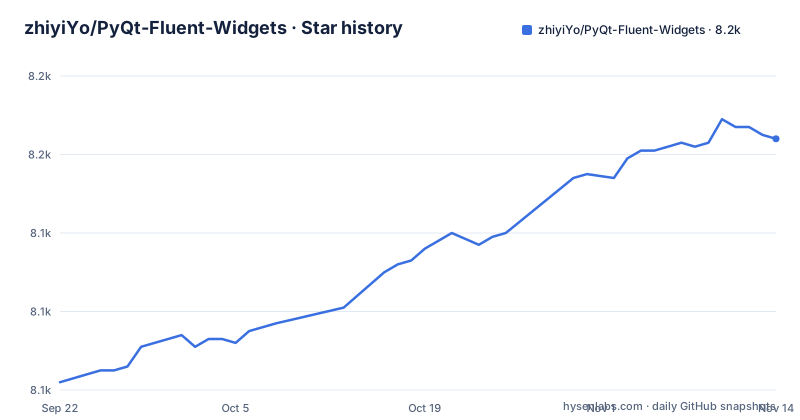
Star history
- zhiyiYo/PyQt-Fluent-Widgets8,164 ★ · +62
| Repository | 2026-09-22 | 2026-11-14 |
|---|---|---|
| zhiyiYo/PyQt-Fluent-Widgets | 8.1k | 8.2k |
62 Stars in the last 53 days, measured from the daily GitHub snapshot. Compare with other projects
Editorial analysis
Four packages share the qfluentwidgets import name
The most useful warning in the README is a prohibition: don't install PyQt-Fluent-Widgets, PyQt6-Fluent-Widgets, PySide2-Fluent-Widgets and PySide6-Fluent-Widgets at the same time, because their package names are all `qfluentwidgets`.
Four distributions, one import namespace.
The other bindings are not on PyPI through this README's route. If you are using PySide2, PySide6 or PyQt6, you download the code from the `PySide2`, `PySide6` or `PyQt6` branch of the repository. So the choice of binding is made before installation, by picking a branch or the default, and it cannot be revisited inside a virtual environment without a reinstall.
The library itself is one package directory, `qfluentwidgets/`, with `setup.py` and `requirements.txt` at the root.
Both install commands pass the mirror explicitly
The lite version, which is PyQt5 only, is one line:
pip install PyQt-Fluent-Widgets -i https://pypi.org/simple/The full version, which is the one that includes `AcrylicLabel`, adds an extra:
pip install "PyQt-Fluent-Widgets[full]" -i https://pypi.org/simple/The `-i` flag is not decoration. The Run Example section explains the failure it prevents: an `ImportError: cannot import name 'XXX' from 'qfluentwidgets'` indicates that the package version you installed is too low, and the fix is to replace the mirror source with https://pypi.org/simple and reinstall.
So the project's own troubleshooting story is that a mirror can serve a package version that is too low, and the symptom is a missing symbol rather than a version message. Passing the index explicitly makes the resolved version the one you expect.
The extra itself is small, and `setup.py` defines it as:
    extras_require = {
        'full': ['scipy', 'pillow', 'colorthief']
    },
Three packages, and the lite install omits all three.
darkdetect is a runtime dependency, so the theme follows the system
The install requirements are three libraries, and one of them decides what your application looks like:
    install_requires=[
        "PyQt5>=5.15.0",
        "PyQt5-Frameless-Window>=0.8.0",
        "darkdetect",
    ],
`darkdetect` reads the operating system's light and dark preference. `PyQt5-Frameless-Window` is the other structural dependency, and its presence in the requirements tells you this library builds frameless windows rather than decorating the ones Qt gives you.
`requirements.txt` at the root lists the union of the base requirements and the `full` extra, adding `colorthief`, `scipy` and `pillow` to the three install requirements.
setup.py says 1.11.3 and the newest tag is v1.7.0
Two version records, and they are far apart. The release list has v1.7.0 from 2024-10-20 and v1.6.0 from 2024-07-24. The `setup.py` in the repository declares `version="1.11.3"`.
So the package version is four minor versions ahead of the newest tag in the release record, and the last push was on 2026-11-01 with the repository not archived. That means the version pip installs is not something you can confirm from the tags, and the tags are not what a packager would use to identify a build.
There is a practical consequence for anyone pinning. The README's own version reference in issue reporting asks for the QFluentWidgets library version, which is the `setup.py` number rather than a tag, and that is the number a bug report should carry.
`CHANGELOG.md` sits at the repository root, so the difference between 1.7.0 and 1.11.3 is recorded somewhere even if the tags are not the place to look.
The README grants GPLv3 for non-commercial projects only
The licence section is one sentence with a condition in it: PyQt-Fluent-Widgets is licensed under GPLv3 for non-commercial project, and for commercial use please purchase a commercial license. The copyright line is 2021 by zhiyiYo.
Meanwhile the packaging metadata is unconditional. `setup.py` sets `license="GPLv3"`, lists `License :: OSI Approved :: GNU General Public License v3 (GPLv3)` among the classifiers, and declares `Operating System :: OS Independent`.
So the metadata describes a plain GPLv3 package while the README describes a licence that applies to non-commercial projects and a separate commercial one. Anyone shipping this in a product has to resolve that difference themselves, and the commercial terms live on a page the repository does not mirror.
The C++ side is separate again. QFluentWidgets in C++ requires purchasing a licence from the official website's price page, and the README's only free C++ artefact is a compiled demo zip on the release page.
The examples directory is the widget catalogue
There is no component list on the README's page, and there does not need to be one, because the repository carries fourteen example directories. Each is a runnable program rather than a snippet, and the way to run any of them is the same:
cd examples/gallery
python demo.py
The names describe what is covered: `basic_input`, `date_time`, `dialog_flyout`, `gallery`, `layout`, `media`, `menu`, `navigation`, `scroll`, `status_info`, `text`, `view` and `window`.
`examples/material/` also sits alongside the others.
The `gallery` example is the one the README names, and it is the right starting point for an evaluation because it is the whole set in one window. The `docs/` directory holds the Simplified Chinese README (`docs/README_zh.md`); the English README is at the root.
Designer integration and the Pro gallery are both downloads or purchases
Two capabilities sit outside the pip package.
The first is Designer integration. Fluent Client adds designer plugins so QFluentWidgets components can be dragged and dropped in Designer, and it is purchased from TaoBao or Afdian, with both links in the README. That is a separate application, not a plugin you install with pip.
The second is the Pro version, a library the README describes as containing more advanced components. There is no install command for it. Instead you can download `PyQt-Fluent-Widgets-Pro-Gallery.zip` from the release page for preview purposes, which is how you see what it contains before deciding whether to buy it.
So the free tier is the pip package and its examples, and everything above that layer is either a preview download or a purchase. The projects in the See Also section, Fluent-M3U8, Groove and Alpha-Gobang-Zero, are named as built on the library, which is a reasonable way to judge whether the widgets hold up in an application.
Editorial conclusion
Adopt PyQt-Fluent-Widgets if you want Windows-style controls on PyQt5 and can commit to one binding per environment. Do not mix the four packages, since they collide on the `qfluentwidgets` import name, and read the licence before you ship: the README grants GPLv3 for non-commercial projects and sells commercial use separately. Before your first run, install with the pypi.org mirror flag the README shows, because a stale mirror is the documented cause of a missing-symbol ImportError.
Frequently asked questions
How do I install PyQt-Fluent-Widgets?
For the lite PyQt5 version run `pip install PyQt-Fluent-Widgets -i https://pypi.org/simple/`, and for the full version with AcrylicLabel run `pip install "PyQt-Fluent-Widgets[full]" -i https://pypi.org/simple/`. The README passes the index explicitly because a stale mirror is the documented cause of an ImportError for a missing symbol.
Can I use PyQt-Fluent-Widgets with PySide6 or PyQt6?
Yes, but not from the default package. The README says to download the code from the PySide2, PySide6 or PyQt6 branch of the repository for those bindings, and warns never to install PyQt-Fluent-Widgets, PyQt6-Fluent-Widgets, PySide2-Fluent-Widgets and PySide6-Fluent-Widgets together because their package names are all qfluentwidgets.
What does the full extra add to PyQt-Fluent-Widgets?
The full version makes AcrylicLabel available. In setup.py the `full` extra is scipy, pillow and colorthief, and requirements.txt at the repository root lists those three alongside the base requirements of PyQt5, PyQt5-Frameless-Window and darkdetect.
What licence is PyQt-Fluent-Widgets under?
The README states the library is licensed under GPLv3 for non-commercial projects and that commercial use requires purchasing a commercial licence, while setup.py declares license GPLv3 with a GPLv3 classifier. Copyright is recorded as 2021 by zhiyiYo, and the C++ QFluentWidgets version requires a licence purchase of its own.
Official sources
Add this badge to your README
If you maintain this project, the badge below links readers to this analysis and shows its maintenance status from the daily GitHub snapshot. Paste the markdown into your README; add ?metric=license or ?metric=stars to the image URL for a different field.

[](https://hysenlabs.com/projects/zhiyiyo-pyqt-fluent-widgets)Star history chart for your README
[](https://hysenlabs.com/projects/zhiyiyo-pyqt-fluent-widgets)Was this useful?