actions/cache: the GitHub Actions caching action and its cache service v2 migration
Cache dependencies and build outputs in GitHub Actions
At a glance
- What is it?
- The cache action is a small TypeScript wrapper around a service that GitHub rewrote underneath it. The interesting decisions are in the inputs, the restore and save split, and the runner version requirements that came with v5 and v6.
- Who is it for?
- actions/cache is the default answer for making a workflow faster when the slow part is dependency installation, and for most repositories it should stay exactly that. Its limits are specific: the cache is scoped to key, version and branch, a fork pull request gets read-only access, and a cache miss is not an error unless you ask for it.
- Can I use it commercially?
- Yes. MIT is a permissive licence: you can use, modify and sell software built on it, as long as you keep its copyright and licence notices.
- Is it still maintained?
- Yes. The repository last received commits 99 days ago.
- What is it written in?
- Mainly TypeScript, according to GitHub's language statistics.
Answers come from the project's GitHub data, last synced on October 21, 2026, and from our analysis. They are not legal advice.
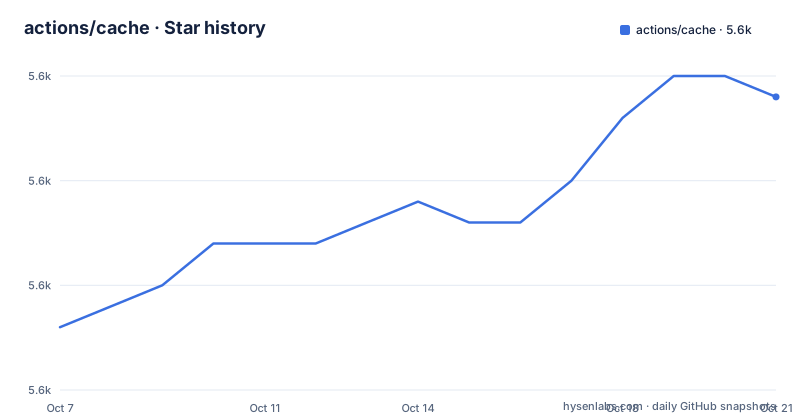
Star history
- actions/cache5,579 ★ · +11
| Repository | 2026-10-07 | 2026-10-21 |
|---|---|---|
| actions/cache | 5.6k | 5.6k |
11 Stars in the last 14 days, measured from the daily GitHub snapshot. Compare with other projects
Editorial analysis
A thin action in front of a service that was rewritten underneath it
The action's own description is one line: cache dependencies and build outputs in GitHub Actions. The repository is TypeScript, MIT licensed, and the code is small enough that the directory listing tells you most of it. There is `src/` for the TypeScript, `dist/` for the committed build output, `__tests__/` for jest tests, and two sibling directories, `restore/` and `save/`, each with its own `action.yml` and README. The root `action.yml` is the combined entry point.
The significant event in this project's history is not in the code. The README carries an important notice that the cache backend service has been rewritten from the ground up for performance and reliability, that actions/cache now integrates with the new cache service v2 APIs, and that the rollout and the sunset of the legacy service both happened on February 1st, 2025. The changes in that release are described as fully backward compatible.
What follows from that is a specific operational rule. Versions were deprecated and the README recommended moving to v4 or v3 before that date, with pinned SHA users directed to the SHAs of v4.2.0 or v3.4.0. It also states that workflow runs using a deprecated version will fail. So the deprecation was not a soft warning; it was a deadline with a failure mode behind it.
The other half of the notice is about self-hosted runners, and it is easy to skim past. If you manage your own runners you must be on 2.231.0 or newer for the new cache service, while v5 of the action requires 2.327.1. Failing to update both the action version and the runner version may result in workflow failures after the migration date.
The inputs are where the actual decisions live
The README documents six inputs, and two of them change behaviour in ways that can surprise you. The first three are the familiar ones: `key`, an explicit key for a cache entry, `path`, a list of files, directories and wildcard patterns to cache and restore, and `restore-keys`, an ordered multiline string of prefix-matched keys used when there is no exact hit.
The other three are opt-in behaviours that were added later. `fail-on-cache-miss` fails the workflow if no entry is found, which turns the cache from an optimisation into a gate. `lookup-only` checks whether an entry exists and skips the download without changing save behaviour. `enableCrossOsArchive` lets Windows runners save or restore archives that can be used on other platforms, and it defaults to false.
key
path
restore-keys
enableCrossOsArchive
fail-on-cache-miss
lookup-only
`lookup-only` is the interesting one for CI cost. A lookup is a metadata call, while a restore pulls the archive down and unpacks it. If a workflow only needs to know whether a cache exists, that is a large saving on a large cache.
There is also one environment variable, `SEGMENT_DOWNLOAD_TIMEOUT_MINS`, which sets the per-segment download timeout in minutes with a default of 10. It exists because the archive is transferred in segments, and a stuck segment previously hung the job. The v3 notes explain the history: a one hour timeout for cache downloads was introduced to fix a stuck-download problem, segment size was cut to 128MB and segment timeout to 10 minutes to fail fast, and `SEGMENT_DOWNLOAD_TIMEOUT_MINS` was added to let users override it.
On the output side there is exactly one, `cache-hit`, which is the string `true` or `false` on a hit and an empty string on a miss. That tri-state is the mechanism for skipping steps, and the empty string is the part to remember when writing a condition.
Splitting restore and save changes how a matrix behaves
The README opens by pointing out that two other actions exist alongside the primary cache action: the restore action and the save action. The v3 release notes call these new actions for granular control over caches. This is the feature that matters most for anyone running a matrix, and it is easy to miss because the main documentation is about the combined action.
With the combined action, the post step saves whatever it finds when the job finishes, which means every matrix leg attempts a write and the first one to finish wins the key. With restore and save separated, you put restore at the start of a job and save at the end, and you can point the save step at whichever leg actually produced the artifacts worth keeping. For a build that runs on a 12-way matrix where only one leg needs to be cached, that is the difference between twelve competing writes and one.
The build script in `package.json` shows how the four entry points are produced. There are separate ncc builds for `dist/restore` from `src/restore.ts`, `dist/save` from `src/save.ts`, `dist/restore-only` from `src/restoreOnly.ts` and `dist/save-only` from `src/saveOnly.ts`.
  "scripts": {
    "build": "tsc && ncc build -o dist/restore src/restore.ts && ncc build -o dist/save src/save.ts && ncc build -o dist/restore-only src/restoreOnly.ts && ncc build -o dist/save-only src/saveOnly.ts",
Scoping is the other constraint to understand before designing a key strategy. The cache is scoped to the key, the version, and the branch, and the default branch cache is available to other branches. That last clause is the mechanism behind a common CI pattern: a workflow on a feature branch can restore what the default branch built, and only a save from the default branch is visible to everyone else.
Read-only runs and the fork pull request case
The README's last documented section before the usage examples is read-only access. Some workflow runs only have read-only access to the cache, and the case it names is a workflow triggered by a pull request from a fork. Such runs can restore an existing cache but cannot write a new one.
This is the single most common reason a cache appears to work locally and intermittently in CI. It is also a security property rather than a limitation to work around: a workflow triggered from a fork runs code written by someone who does not have write access to your repository, so giving it the ability to publish cache entries would let it poison what your own workflows restore later.
The fix in the v5 line addresses a related gap rather than this one. v5.1.0 and v6.1.0, both published on 2026-06-26, are described as handling read-only cache access, in the v5.1.0 case through pull request 1775 and in v6.1.0 through 1768. The separate v6.0.0 release from three days earlier is the structural change, listing updated `@actions/cache`, `@actions/core` and `@actions/exec` to their latest major versions and a migration to the ESM module system.
For a self-hosted setup the prerequisites are spelled out too, and they are not only about Node. If you run inside a container you need a POSIX-compliant `tar` on the execution path. For cross-OS caching on a self-hosted Windows runner you need GNU tar and zstd, and they are recommended in general so performance is on par with hosted Windows runners. The v3 notes record a long tail of exactly these environment problems: zstd failing on Amazon Linux 2.0 runners, zstd not being used after a hosted runner upgrade past version 1.5.4, zstd not working on Windows with GNU tar, and a tar creation error when the path was the home folder on ubuntu-latest.
Two major versions shipping on the same day, and what the docs are for
The release history explains why a workflow pinning `actions/cache@v5` and one pinning `v6` can both be current. v6.0.0 was published on 2026-06-23, then v5.1.0 and v6.1.0 both on 2026-06-26. The README's version notes give the reasons for the split: v6 updated the three `@actions` packages to their latest major versions and migrated to ESM, v5 updated to Node 24 and requires a runner of 2.327.1 or newer, and v4 is the version that integrated with the cache service v2 APIs and moved to Node 20.
So the two lines are not one behind the other in feature terms. v5 and v6 are different branches of support for different constraints, and picking between them is largely a question of your runner version and whether your build tooling can consume an ESM package. The dependency list in `package.json` reflects that: `@actions/cache` at `^6.2.0`, `@actions/core` at `^3.0.1`, `@actions/exec` at `^3.0.0` and `@actions/io` at `^3.0.2`, with `engines` requiring Node 24 or newer.
The documentation is split across several markdown files at the root rather than living in one place: `caching-strategies.md`, `tips-and-workarounds.md`, `examples.md` and `RELEASES.md`, plus the two action READMEs under `restore/` and `save/`. The cross-OS caching section of `tips-and-workarounds.md` is the one the README links most often, followed by the cache segment restore timeout note. The project also uses licenser tooling, with a `.licensed.yml` config and a `.licenses/` directory.
One detail worth flagging: the `package.json` version field reads 6.1.0 while the dependency on `@actions/cache` asks for `^6.2.0`. That is not a contradiction in a normal project, but here it means the action version and the library version do not track each other, so reading the tag alone does not tell you which cache library version a given action release shipped against.
Editorial conclusion
actions/cache is the default answer for making a workflow faster when the slow part is dependency installation, and for most repositories it should stay exactly that. Its limits are specific: the cache is scoped to key, version and branch, a fork pull request gets read-only access, and a cache miss is not an error unless you ask for it. The version numbers are the part to get right today. v5 needs Node 24 and a runner of 2.327.1 or newer, v6 migrated the package to ESM, and both v6.1.0 and v5.1.0 shipped on 2026-06-26, so there are two supported major lines rather than one. If you self-host runners, check the runner version before the action version, since the README says updating only one of the two can leave a workflow failing after the cache service migration.
Frequently asked questions
What do the inputs of actions/cache do?
There are six. `key` is an explicit cache key, `path` is a list of files, directories and wildcard patterns, and `restore-keys` is an ordered multiline string of prefix-matched keys used when there is no exact hit. The other three are opt-in: `enableCrossOsArchive` allows archives to cross platforms, `fail-on-cache-miss` fails the workflow when nothing is found, and `lookup-only` checks existence without downloading.
Why does my workflow get a cache miss on pull requests from forks?
Because those runs have read-only cache access. The README names a workflow triggered by a pull request from a fork as the common case: it can restore an existing cache entry but cannot write a new one. This is deliberate, since a fork's code should not be able to publish cache entries that your own workflows would restore.
What is the difference between actions/cache and the restore and save actions?
The primary cache action does both in a single step, so every job in a matrix attempts a save and the first to finish claims the key. The restore and save actions separate the two, which lets a workflow restore early and choose which job actually writes the cache. v3 introduced them as new actions for granular control over caches.
What runner version does actions/cache v5 need?
A minimum Actions Runner version of 2.327.1, because v5 runs on the Node.js 24 runtime. The README also says that self-hosted runners need updating before upgrading the action, and separately that managing your own runners requires 2.231.0 or newer for compatibility with the new cache service.
How do I control how long a stuck cache download can block a job?
The `SEGMENT_DOWNLOAD_TIMEOUT_MINS` environment variable sets a per-segment download timeout in minutes, with a default of 10. Archives are transferred in segments, and segment size was reduced to 128MB with a 10 minute timeout specifically so a stuck download fails fast instead of hanging the run.
Official sources
Add this badge to your README
If you maintain this project, the badge below links readers to this analysis and shows its maintenance status from the daily GitHub snapshot. Paste the markdown into your README; add ?metric=license or ?metric=stars to the image URL for a different field.

[](https://hysenlabs.com/projects/actions-cache)Star history chart for your README
[](https://hysenlabs.com/projects/actions-cache)