RSSHub: Turning the Web into RSS Feeds, One Route at a Time
RSSHub generates RSS feeds from almost any source — from YouTube and Telegram to Weibo and Bilibili — through a large self-hostable route network.
At a glance
- What is it?
- RSSHub is an open-source TypeScript project that generates RSS feeds for websites that don't offer them. It runs as a self-hosted service with community-written routes, but its scale and license come with real trade-offs.
- Who is it for?
- Adopt RSSHub if you rely on RSS for news aggregation and need feeds from sites that lack native support, especially if you want to control your own instance and contribute routes. Avoid it if you cannot accept the AGPL-3.0 license obligations or if you need guaranteed feed stability, since routes can break when target sites change.
- Can I use it commercially?
- Yes, with strict conditions. AGPL-3.0 is a network copyleft licence: if people use a modified version over a network, for example as a hosted service, you must offer them its source code under the same licence.
- Is it still maintained?
- Yes. The repository received new commits within the last day.
- What is it written in?
- Mainly TypeScript, according to GitHub's language statistics.
Answers come from the project's GitHub data, last synced on November 13, 2026, and from our analysis. They are not legal advice.
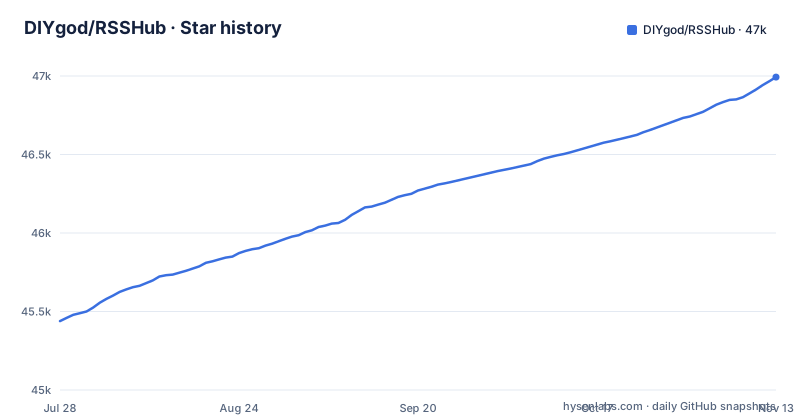
Star history
- DIYgod/RSSHub46,993 ★ · +1,554
| Repository | 2026-07-28 | 2026-11-13 |
|---|---|---|
| DIYgod/RSSHub | 45.4k | 47k |
1,554 Stars in the last 108 days, measured from the daily GitHub snapshot. Compare with other projects
Editorial analysis
The Problem: RSS Is Dying, but the Demand Is Not
Many modern websites, especially social platforms and news outlets, have removed or never offered RSS feeds. Readers who rely on RSS aggregators are left with either manual checking or abandoned tools. RSSHub exists to fill that gap by generating feeds for content that has no native RSS output. It is aimed at individual users who run their own reader, developers who want to integrate third-party content into their apps, and communities that want to archive or monitor specific sources. The project does not try to replace RSS readers; it tries to make RSS viable again by bridging the missing feeds.
How RSSHub Works: Routes as the Core Mechanism
The README describes RSSHub as a network of over 5,000 global instances, but the actual mechanism is simpler: each website that RSSHub supports is defined as a 'route'. A route is a piece of TypeScript code that fetches data from a specific site, parses it, and outputs it as a valid RSS feed. Each route is tailored to a particular source, such as a YouTube channel, a Twitter user, or a niche blog. When you request a URL like /twitter/user/username, RSSHub matches that path to a route, runs its fetching and parsing logic, and returns an XML feed. This design means the project's coverage depends entirely on the community writing and maintaining these routes. New routes are added via pull requests, and the README explicitly welcomes contributions, which is how the route count grows.
Getting It Running: Docker, npm, and the Public Instance
The README points to the documentation for deployment, but the repository layout and the package name give clear signals. You can run RSSHub via the official Docker image, which is listed on Docker Hub, or via the npm package 'rsshub'. The npm package suggests a Node.js environment, and the TypeScript source implies a build step. A typical deployment starts with cloning the repository, installing dependencies with pnpm, as the pnpm-lock.yaml and Dockerfile indicate, and then running the server, which listens on a port and serves routes. The documentation also mentions a public instance at rsshub.app, which means you can try routes without setting up your own server. However, the README does not list configuration keys; docker-compose.yml sets CACHE_TYPE and REDIS_URL, and the deployment docs cover the rest. The Docker image is the most direct path for a production setup.
The Scale Problem: Over 5,000 Instances, but Which Routes Work?
The README claims RSSHub is the world's largest RSS network with over 5,000 global instances. That number is the project's own claim. What is clear is that the project has a large community, given the number of related projects listed, like RSSHub Radar and RSSBud. But scale brings a practical problem: not every route is equally reliable. A route depends on the target website's structure, which can change without notice. When a site updates its HTML or API, the corresponding route breaks until a contributor fixes it. The README does not mention any automatic monitoring or health checks for routes, so you cannot assume a feed will work forever. This is a maintenance burden that falls on the community, and for a user, it means you should test each route you plan to use.
A Real Limitation: The AGPL-3.0 License Is Not Optional
RSSHub is released under the AGPL-3.0 license. This is a strong copyleft license, and it has direct implications for anyone who deploys it. If you modify the code and run it as a network service, you are required to make your modified source code available to users of that service. This is a genuine constraint for companies or individuals who want to build a proprietary service on top of RSSHub. The license also affects how you can embed RSSHub into a larger product. This is not legal advice, but the license text is clear about its terms. If you only run the stock image without modifications, the obligation is lighter, but you still need to comply with the license's distribution terms. For a hobbyist, this is rarely an issue; for a business, it can be a dealbreaker.
Alternative Approaches: Dedicated Scrapers and Native APIs
RSSHub is not the only way to get RSS from non-RSS sites. A common alternative is to write a dedicated scraper for each site, using a tool like BeautifulSoup or Puppeteer, and then generate your own RSS feed. The difference is that a scraper is custom code for one site, while RSSHub is a collection of such scrapers in one framework. Another alternative is to use a site's official API, if one exists, to fetch data and then format it as RSS. This approach is more stable because APIs are less likely to change, but it requires authentication tokens and rate limits management. RSSHub's routes often rely on public pages without authentication, which makes them simpler but more fragile. The trade-off is clear: RSSHub gives you breadth quickly, but a custom solution gives you control over reliability and data extraction.
Maintenance and Upgrade Costs: Community-Driven, but Not Free
The README states that the community ensures new routes, features, and bug fixes. That means you are relying on volunteers to keep feeds alive. The project publishes frequent date-stamped GitHub releases, such as v2026.11.03-8553.c3150be on 2026-11-03, which makes version tracking straightforward. Upgrading RSSHub likely means pulling the latest Docker image or updating the npm package. The documentation is the primary source of truth. For a self-hosted user, this means you should plan to check the documentation and the repository's commit history regularly. The cost is not in money but in time spent verifying that your feeds still work after each update.
Editorial conclusion
Adopt RSSHub if you rely on RSS for news aggregation and need feeds from sites that lack native support, especially if you want to control your own instance and contribute routes. Avoid it if you cannot accept the AGPL-3.0 license obligations or if you need guaranteed feed stability, since routes can break when target sites change. Before deploying, verify the documentation for your specific routes, check the rate limits of your target sites, and consider running the official Docker image to reduce setup friction.
Frequently asked questions
What does RSSHub do?
It aggregates content from sources that do not publish feeds and serves it as RSS. The README describes a network of over 5,000 global instances delivering millions of aggregated items, and its motto is that everything is RSSible.
How to install RSSHub?
The docker-compose file runs the image diygod/rsshub, publishes port 1200, sets CACHE_TYPE to redis with a redis service, and can point PLAYWRIGHT_CDP_ENDPOINT at a browserless service. The README sends you to docs.rsshub.app/deploy/ for the deployment guide and offers a pre-configured single click option on Hostinger.
Is RSSHub safe to run?
The compose file keeps the optional headless browser in a separate browserless container next to a Redis service. The repository includes a SECURITY.md.
Is RSSHub free to use?
The project is released under the AGPL-3.0 license by DIYgod. The Docker Hub image, the npm package and the hosted instance at rsshub.app are linked from the repository README, and docker-compose.yml names a ghcr.io mirror of the image.
RSSHub vs FreshRSS: which one do I need?
They do different jobs. RSSHub generates feeds from sources that have none, with routes compiled at build time, while FreshRSS is a self-hosted aggregator that reads feeds you already have. The projects listed around RSSHub, such as Folo, RSSHub Radar, RSSBud and RSSAid, are all readers or discovery tools on the consumption side.
Official sources
Add this badge to your README
If you maintain this project, the badge below links readers to this analysis and shows its maintenance status from the daily GitHub snapshot. Paste the markdown into your README; add ?metric=license or ?metric=stars to the image URL for a different field.

[](https://hysenlabs.com/projects/diygod-rsshub)Star history chart for your README
[](https://hysenlabs.com/projects/diygod-rsshub)Was this useful?