Activity Launcher puts hidden activities on the home screen
Activity launcher creates shortcuts for any installed app and hidden activities to launch them with ease
At a glance
- What is it?
- Activity Launcher is a small Kotlin Android app that turns app activities without icons into launcher shortcuts. Its capability is split across separate plugin projects, and the README documents far less than the project does.
- Who is it for?
- ActivityLauncher suits individual Android users who want a home screen icon for a screen an app does not expose, and the F-Droid build is a reasonable pick for anyone who prefers a listed package to a store build. It is a poor fit for anyone who needs scripted or audited launches, for a team that must know exactly which plugin version is bundled, or for a reviewer treating the 2.5.0-alpha.0 tag as a stable release.
- Can I use it commercially?
- Yes. ISC is a permissive licence: you can use, modify and sell software built on it, as long as you keep its copyright and licence notices.
- Is it still maintained?
- Yes. The repository last received commits 13 days ago.
- What is it written in?
- Mainly Kotlin, according to GitHub's language statistics.
Answers come from the project's GitHub data, last synced on November 7, 2026, and from our analysis. They are not legal advice.
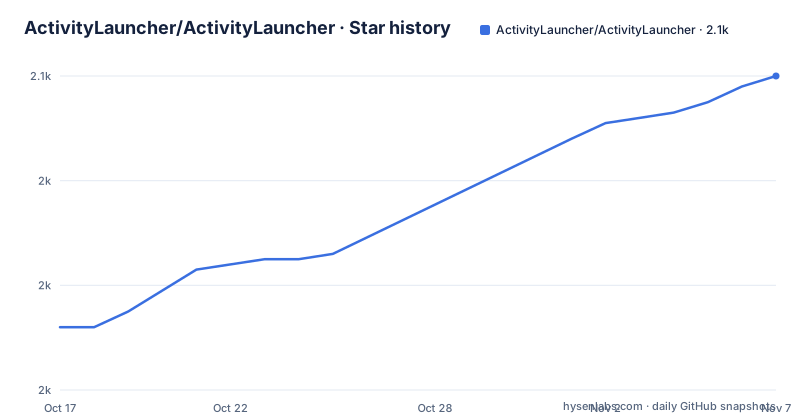
Star history
- ActivityLauncher/ActivityLauncher2,060 ★ · +48
| Repository | 2026-10-17 | 2026-11-07 |
|---|---|---|
| ActivityLauncher/ActivityLauncher | 2k | 2.1k |
48 Stars in the last 21 days, measured from the daily GitHub snapshot. Compare with other projects
Editorial analysis
An app that only has to add one missing icon
Activity Launcher exists for a specific gap on Android: many apps ship activities that never appear in the launcher, so the screen is there but no icon points at it. The project states its purpose plainly, creating shortcuts for installed apps and hidden activities so they can be launched with ease. That makes it a small utility for a user who already knows a screen exists and wants a tile for it, not a replacement home screen. The code is Kotlin, the repository carries the topics android and java, and the app is published on both F-Droid and Google Play, so it installs like any other Android application. Nothing in the project description suggests it manages the launcher itself. The responsibility is narrow: generate the shortcut that resolves to the activity, and let the platform's own launcher do the rest.
Shortcuts and launching are separate plugin problems
The interesting design decision is visible in the repository layout rather than in prose. The README says the organization contains the app source code and related projects, such as plugins for launching, naming the Shizuku Launch Plugin as an example, and plugins for shortcut creation. A top level file called PLUGIN_ARCHITECTURE.md documents that arrangement. The consequence is that capability lives outside the shipped application. A user who wants a different launch path is not flipping a switch in a settings screen, they are looking at a separate repository in the same organization. That separation keeps the core app small, and it also means the feature list of the installed application can be narrower than the feature list of the organization. The README does not say which plugins are bundled, which are optional, or how a plugin is attached to a shortcut.
Two store listings, two package names
Two different package identifiers appear in the README, one behind the F-Droid badge and one behind the Google Play badge. The F-Droid listing carries de.szalkowski.activitylauncher and the Play listing carries de.szalkowski.activitylauncher.pro. They are separate app ids rather than one id published in two places, so a person who installs from F-Droid and later switches to the Play release is changing application identity instead of updating an existing install. The README does not spell out what the pro variant adds, and neither does the repository description, so the difference has to be checked on the store listing itself. If you hand the Play build to a managed fleet of devices, the fact that the two ids differ is the part that changes what your distribution tooling can see.
No install command, only two store pages
Activity Launcher has no install script, no package manager entry, and no command line in the repository. The README routes installation through two badge links, one to the F-Droid package page and one to the Google Play listing, and the identifiers behind those badges are the only installation strings the documentation contains.
de.szalkowski.activitylauncher
de.szalkowski.activitylauncher.pro
The F-Droid listing carries the first identifier and the Play listing the second. For a first run the documentation stops at the store page. There is no walkthrough for creating the first shortcut, no description of a permission prompt, and no list of activities the app is able to expose, so expect to work out the launch flow from the store description and the app itself. For anything that depends on launching through a plugin, the companion project lives elsewhere:
https://github.com/ActivityLauncher/ActivityLauncherShizukuPluginThat URL is the plugin named in the README, and it is where to look if the default launching path does not do what you expected.
A Gradle tree with a Nix shell and a commit hook
The source tree is a Kotlin Gradle project with a wrapper, and a second toolchain layered on top. At the top level you find build.gradle.kts, settings.gradle.kts, gradle.properties, the gradle directory, and the wrapper scripts gradlew and gradlew.bat for Unix-like and Windows shells. Alongside them sit flake.nix and flake.lock, the usual pair for describing a Nix development environment, and a .pre-commit-config.yaml that runs repository checks before a commit lands. The app module lives under app/, with scripts/, descriptions/, whatsnew/ and .github/ next to it, and AGENTS.md at the root aimed at coding agents working in the tree. Nothing in the README explains how to start a build, so the wrapper scripts are the entry point rather than a documented command. A contributor should expect to read build.gradle.kts and gradle.properties before anything compiles.
A stable 2.4 line and an alpha on top of it
Three releases appear in the repository's recent history. Version 2.4.0 was published on 2026-07-07, version 2.4.1 followed the next day on 2026-07-08, and 2.5.0-alpha.0 landed on 2026-07-16. The alpha suffix on the newest tag matters if you plan to install by tag, because an alpha is not the same stability promise as the 2.4 line that a store would serve. The repository is not archived, and the last push was on 2026-09-14, which is later than the newest tagged release, so master carries work that has not shipped as a version yet. The practical reading is that the stable line is 2.4.x while the tip of the default branch sits ahead of it. The project is published under the ISC licence, a short permissive grant covering the code in the repository, and the README makes no claim about other terms.
Where the documentation runs out
The honest limitation is that this is a thin utility with thin documentation. The README covers the purpose in two sentences, points to a Discord server for support and feature requests, and explains that translations are updated through pull requests. It does not document the permission model, it does not list which hidden activities can be reached, it does not describe uninstalling or rollback, and it does not say whether the base app can launch anything on its own or only through a plugin. For a person who wants to script launches, audit what was started, or drive an app from a shell, this is the wrong shape of tool: the repository contains no command line, no server component, and no API surface, so nothing here is meant to be automated. Its narrowness is also the reason it stays small enough to read.
Editorial conclusion
ActivityLauncher suits individual Android users who want a home screen icon for a screen an app does not expose, and the F-Droid build is a reasonable pick for anyone who prefers a listed package to a store build. It is a poor fit for anyone who needs scripted or audited launches, for a team that must know exactly which plugin version is bundled, or for a reviewer treating the 2.5.0-alpha.0 tag as a stable release. Before installing, check the store listing for the exact behaviour of the channel you plan to use, then confirm the plugin situation inside the ActivityLauncher organization, because the README splits shortcut creation and launching across separate projects and documents neither.
Frequently asked questions
What does Activity Launcher do on Android?
It creates shortcuts for installed apps and for hidden activities so that they can be launched with ease. The app is written in Kotlin and is published on both F-Droid and Google Play.
Does Activity Launcher work without any plugins?
The README says the organization contains the app source code and related projects such as plugins for launching, including the Shizuku Launch Plugin, plus plugins for shortcut creation. It does not state which plugins the base app requires to launch an activity.
Is ActivityLauncher available on F-Droid and Google Play?
The README links to a F-Droid package page and a Google Play listing. The identifiers behind those badges are de.szalkowski.activitylauncher and de.szalkowski.activitylauncher.pro, so the two channels use different package names.
How do I build ActivityLauncher from source?
The repository root contains a Gradle wrapper, gradlew and gradlew.bat, together with build.gradle.kts, settings.gradle.kts and gradle.properties, and the app module sits under app/. The README does not list any build commands.
Official sources
Add this badge to your README
If you maintain this project, the badge below links readers to this analysis and shows its maintenance status from the daily GitHub snapshot. Paste the markdown into your README; add ?metric=license or ?metric=stars to the image URL for a different field.

[](https://hysenlabs.com/projects/activitylauncher-activitylauncher)Star history chart for your README
[](https://hysenlabs.com/projects/activitylauncher-activitylauncher)Was this useful?