BitPlay streams torrents to the browser, and admits when the codec will not play
Stream video torrents in your web browser with ease.
At a glance
- What is it?
- BitPlay is a Go web app that plays video torrents in the browser, remuxing MKV on the fly with ffmpeg and handing you a stream URL when a codec is out of reach. It suits self-hosters who already run Prowlarr or Jackett and want playback without a local download client.
- Who is it for?
- BitPlay fits a self-hoster who already keeps Prowlarr or Jackett running and wants one web page that finds a release and plays it without a desktop client. It is the wrong choice if you need codecs the browser cannot decode without re-encoding, or if HTTP proxy support is a requirement, since the README says HTTP proxies are not currently supported.
- Can I use it commercially?
- Yes. MIT is a permissive licence: you can use, modify and sell software built on it, as long as you keep its copyright and licence notices.
- Is it still maintained?
- Yes. The repository last received commits 70 days ago.
- What is it written in?
- Mainly Go, according to GitHub's language statistics.
Answers come from the project's GitHub data, last synced on October 23, 2026, and from our analysis. They are not legal advice.
Star history
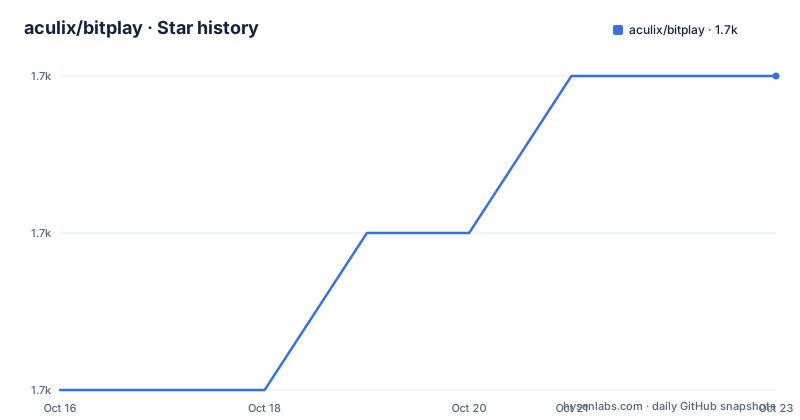
- aculix/bitplay1,715 ★ · +2
| Repository | 2026-10-16 | 2026-10-23 |
|---|---|---|
| aculix/bitplay | 1.7k | 1.7k |
2 Stars in the last 7 days, measured from the daily GitHub snapshot. Compare with other projects
Editorial analysis
Streaming from a magnet link, not from a finished file
The problem BitPlay addresses is narrow: a torrent client normally fills a disk before anything plays, and that is the wrong shape for video you just want to watch once. BitPlay is a Go web application that points a browser at video files inside a torrent and streams them while peers are still delivering. You hand it a magnet link or a torrent file and it creates a session.
The engine underneath is anacrolix/torrent. The go.mod file pins it at v1.61.0, alongside golang.org/x/net at v0.58.0. The module is named torrent-stream, the entry point is main.go, and the browser assets live under client/. Package.json holds only the Tailwind toolchain, with a build script that compiles ./client/assets/index.css into ./client/assets/output.css, so the front end is generated CSS rather than a framework the Go side has to serve state for.
Nothing in the repository wraps this in a client-side library model. There is no public REST surface documented in the README. The configuration story is a web UI plus two environment variables, which shapes who this is for: someone who deploys a service and opens it in a browser, not someone embedding streaming into their own application.
MKV remuxing, audio track pickers, and the escape hatch
Browsers are strict about containers and codecs, which is where most torrent streaming attempts stall. BitPlay answers this with ffmpeg remuxing rather than re-encoding, and the distinction matters because remuxing copies streams without the CPU cost of transcoding. The README puts it plainly: MKV files are remuxed on the fly with ffmpeg and there is no re-encoding. A file with several audio tracks gets a track picker instead of a guess.
The design choice worth arguing with is the failure path. When a codec genuinely cannot play in the browser, BitPlay does not transcode it. It names the codec and hands back the stream URL so you can open it in VLC or mpv. That is an honest boundary, and it also means BitPlay is not a universal answer to video torrents: an exotic codec will still stop at the browser, and the work moves to your desktop player.
Subtitles follow the same convert-don't-recode logic. Embedded SRT subtitles are converted to VTT on the fly, and the player accepts your own .srt or .vtt file during playback.
Running it locally with Go 1.25 or the prebuilt container
Two paths are documented. Locally you need Go 1.25 or later, and ffmpeg is optional but enables MKV remuxing and audio track selection.
git clone https://github.com/aculix/bitplay.git
cd bitplay
go mod download
go run main.go
The server then listens on http://localhost:3347. Without ffmpeg on the path you lose the remux path, and the README does not describe a fallback message for a missing binary, so assume you should install it.
The container route is the one the README calls recommended for deployment. It ships ffmpeg in the final image, built from golang:1.26-alpine with the binary statically linked using CGO_ENABLED=0.
services:
  bitplay:
    image: ghcr.io/aculix/bitplay:latest
    container_name: bitplay
    ports:
      - 3347:3347 # Expose the web UI port
    volumes:
      - ./config:/app/config
      - ./torrent-data:/app/torrent-data
    restart: unless-stopped
Bring it up and open the host address on port 3347:
docker-compose up -dIf you do not mount ./config, the app still runs, and you re-enter your settings after every restart. That is the single most surprising operational detail in the project.
Settings live in settings.json, not in the compose file
BitPlay is configured through the interface after startup rather than through a config file you edit. Settings are saved automatically to /app/config/settings.json inside the container, which is ./config/settings.json on the host when you use the mount above. API keys are never sent back to the browser once saved, which matters because the browser UI is the only place they are visible.
Proxy support covers all torrent traffic, both metadata fetching and peer connections, and it is SOCKS5 only. The README is explicit that HTTP proxies are not currently supported, and the URL format is a full SOCKS5 URL such as socks5://user:pass@host:port with a test button in the UI. If your egress goes through an HTTP proxy, BitPlay simply is not the tool.
Both indexer integrations take a host URL and an API key, with the README giving http://prowlarr:9696 and http://jackett:9117 as the shapes. Jackett is offered as an alternative provider rather than a supplement. Each indexer tab also exposes a search timeout, 30 seconds by default, which the README points at for Jackett setups with many indexers, plus a toggle to skip TLS certificate verification for self-signed instances. That toggle is convenient on a LAN and a real exposure on a network you do not control.
Basic auth is opt-in, and the port is open when you skip it
Because the default posture is an unauthenticated UI on port 3347, the environment variables are the only guard the project offers for a public instance. BITPLAY_AUTH_USERNAME and BITPLAY_AUTH_PASSWORD are documented as the pair that protects it, and both must be set for the protection to engage. There is no mention of reverse proxy integration, TLS termination, or user roles in the README, so anyone relying on BitPlay for access control is relying on a single shared credential pair.
The fourth settings tab is a maintenance panel rather than a security panel. It lists active torrent sessions, shows recent server logs, and offers a Purge Cache button that stops all sessions and deletes everything downloaded to disk. That button is destructive by design and lives next to the log view, so treat it as the first thing to check when a session is stuck.
Session handling and what survives a restart
BitPlay manages multiple torrent sessions and cleans up inactive ones on its own. The maintenance tab's live session stats and log tail are the way to see what the process is doing when a stream stalls, and the README frames the purge button as the reset when that goes wrong.
The persistence story is deliberately thin. Torrent data itself is described as always ephemeral, and only the settings directory is worth mounting. That is a sensible design for a viewer that is not a seedbox, but it also means BitPlay is not an archiving client: nothing is kept between restarts, and a long download is not something it is trying to hold for you.
Where BitPlay differs from a desktop torrent player
The difference from qBittorrent, Transmission or a Jellyfin setup is not performance, it is surface. BitPlay instead runs a web interface for individual streaming sessions. BitPlay runs a single web page that resolves a torrent into a playable stream for the session at hand, and it delegates discovery to Prowlarr or Jackett instead of indexing anything itself.
That delegation is the real architectural choice. It keeps the Go binary small in scope, and it means BitPlay is only as useful as the indexer stack you already maintain. Running it without Prowlarr or Jackett leaves you pasting magnet links by hand, which is still workable for a single title.
On the Go side, maintenance rests on a short release history: v1.0.0 shipped on 2025-07-15 and v1.1.0 on 2026-08-14, and the last push was on 2026-08-14. The project is not archived and the Dockerfile pins the toolchain through go.mod's toolchain go1.26.6, so the dependency set is explicit rather than floating. The project uses the MIT license.
Editorial conclusion
BitPlay fits a self-hoster who already keeps Prowlarr or Jackett running and wants one web page that finds a release and plays it without a desktop client. It is the wrong choice if you need codecs the browser cannot decode without re-encoding, or if HTTP proxy support is a requirement, since the README says HTTP proxies are not currently supported. Before exposing port 3347 beyond your LAN, set BITPLAY_AUTH_USERNAME and BITPLAY_AUTH_PASSWORD, because the default is an open UI, and check that your torrent traffic is legal where you run it.
Frequently asked questions
Does BitPlay need ffmpeg to play MKV files?
Yes for the MKV remux path. ffmpeg is optional when running locally with Go and is what enables MKV remuxing and audio track selection, and it is already included in the Docker image.
Can BitPlay work with an HTTP proxy instead of SOCKS5?
No. Proxy support covers SOCKS5 only, and the README states that HTTP proxies are not currently supported.
Why do my BitPlay settings disappear after a container restart?
Settings are stored inside the container unless you mount a host directory to /app/config. Create the directory with mkdir -p ./config and add the volumes entry from the Compose example, and settings will persist as ./config/settings.json.
Official sources
Add this badge to your README
If you maintain this project, the badge below links readers to this analysis and shows its maintenance status from the daily GitHub snapshot. Paste the markdown into your README; add ?metric=license or ?metric=stars to the image URL for a different field.

[](https://hysenlabs.com/projects/aculix-bitplay)Star history chart for your README
[](https://hysenlabs.com/projects/aculix-bitplay)Was this useful?