Space Agent: A Browser-First Workspace That Extends Itself
The agent that re-shapes the Space
At a glance
- What is it?
- Space Agent places an AI runtime inside the browser interface so it can add pages, tools, widgets, and workflows while a workspace is in use. It is aimed at individual users, teams, and developers who want a modifiable application surface rather than a fixed set of predefined controls.
- Who is it for?
- Space Agent fits users and teams that want the agent to modify the same workspace it operates, with separate personal and shared layers. It is a poor fit for a fixed, narrowly approved interface or for operators who cannot accept agent-written modules.
- Can I use it commercially?
- Yes. MIT is a permissive licence: you can use, modify and sell software built on it, as long as you keep its copyright and licence notices.
- Is it still maintained?
- Yes. The repository last received commits 153 days ago.
- What is it written in?
- Mainly JavaScript, according to GitHub's language statistics.
Answers come from the project's GitHub data, last synced on November 7, 2026, and from our analysis. They are not legal advice.
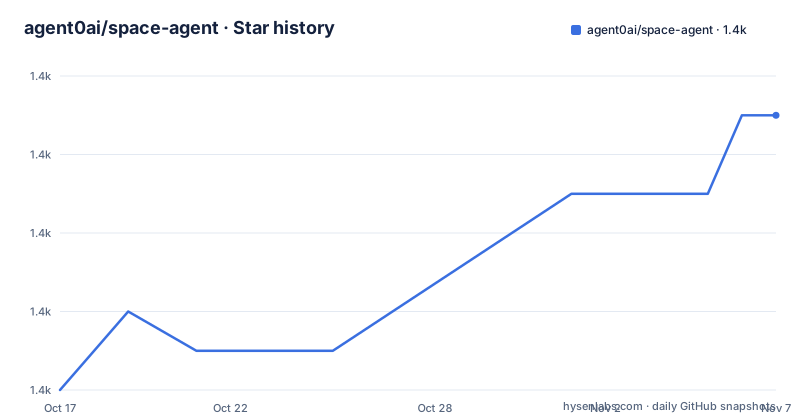
Star history
- agent0ai/space-agent1,419 ★ · +7
| Repository | 2026-10-17 | 2026-11-07 |
|---|---|---|
| agent0ai/space-agent | 1.4k | 1.4k |
7 Stars in the last 21 days, measured from the daily GitHub snapshot. Compare with other projects
Editorial analysis
Why Space Agent Changes the Application Boundary
Space Agent addresses a specific limitation found in many AI assistants: the assistant can usually call predefined tools, but adding a new interface element still requires a developer to modify and release the application. Space Agent instead puts the agent in the frontend runtime, where it can work with the same framework, modules, spaces, and interface that the user sees. The README says a request can produce a page, tool, widget, or workflow directly in the running workspace.
That design makes the project most relevant to individual technical users who want a personal assistant capable of extending its own capabilities, and to teams that want users to build independently before sharing selected tools or behavior. The README also describes hierarchical organization across users and groups, with personal work isolated from other users and shared resources available to teams. This differs from merely attaching an agent to an existing chat window because the generated interface is presented as part of the workspace itself.
The trade-off is equally direct. Giving an agent permission to alter the interface and extend its capabilities also expands the number of moving parts an operator must govern. The README does not document a fixed allowlist for generated code, review rules for module changes, or rollback procedures beyond its statement that Git-backed history can restore user or group changes. Those details matter more for a team deployment than the project's ability to demonstrate an adaptive workspace.
Space Agent's Browser Runtime and Skill Model
The documented architecture has a thin Node.js server and a browser-centered agent. The repository's `package.json` describes Space Agent as a "Browser-first AI agent with a thin Node.js server." The README says that the agent lives in the frontend runtime whether the application is opened in a browser tab or through the desktop app. This placement is central to the project: the agent operates inside the environment containing the interface and modules it is meant to modify.
Space Agent uses text-based skills as an extension mechanism. The README states that new capabilities can live in `SKILL.md` files that the agent can write and extend in plain text. It also describes token-efficient execution because actions can remain as plain text and JavaScript within the same message rather than requiring bulky tool-call JSON. The repository layout supports this description because it separates application, server, commands, packaging, and documentation assets, but the README does not describe the full skill discovery, permission, or execution lifecycle.
Modularity is another architectural constraint. The README describes a small core surrounded by pieces that can be added, removed, or replaced. It also identifies an `AGENTS.md` hierarchy, skills, and focused documentation as the knowledge structure used when AI agents modify the system. This suggests a repository organized around autonomous contribution rules as well as runtime modules. However, the README does not explain how conflicting skill changes are detected, how generated JavaScript is isolated, or whether one user's modules can affect another user's runtime beyond the stated separation of their work layers.
Installing Space Agent for a First Local Server
The repository requires Node.js 20 or newer, according to `package.json`. The clearest self-hosting path starts by cloning the repository, installing its dependencies, creating an administrator, and starting the server. The command below copies the README's server instructions exactly. Replace the shown password before using the account outside a local trial.
git clone https://github.com/agent0ai/space-agent.git
cd space-agent
npm install
After `npm install` completes, create the first administrator with the built-in CLI:
node space user create admin --password "change-me-now" --full-name "Admin" --groups _adminThis command records an admin account and assigns it to the `_admin` group. The README does not describe password policy or account recovery, so those controls should not be assumed.
Start the server after the account exists:
node space serveFor an initial evaluation, this is a real server deployment rather than a packaged desktop build. The README does not document the default browser address for `node space serve`, so it does not support a claim such as an automatic launch at `http://localhost:3000`. The production example explicitly configures `HOST=0.0.0.0` and `PORT=3000`, but readers should not treat those settings as the defaults of the development server.
Developers can instead start the auto-reload server with the package script:
npm run devThe README associates this watcher with the checked-in VS Code launch entry `Dev Server (npm run dev)` and says it auto-attaches to the spawned `node space serve` process across restarts. No model provider, API key, environment variable, or first chat prompt appears in the README, so this flow verifies startup and access rather than claiming a fully documented AI onboarding sequence.
Desktop Packaging, Team Scope, and Git-Backed Recovery
Space Agent offers two distribution paths. The README links to GitHub Releases for a desktop application that runs as one app and requires no terminal. It also provides a server installation for an individual or team. For developers, `package.json` includes separate packaging scripts for host, macOS, Linux, and Windows targets, including architecture-specific builds for `x64` and `arm64`. Those scripts show that desktop delivery is treated as a first-class repository workflow rather than an incidental wrapper.
A production-style host can be configured with a customware directory and supervised on an explicit address and port:
node space set CUSTOMWARE_PATH=/srv/space/customware
node space supervise HOST=0.0.0.0 PORT=3000
The README describes `node space supervise` as providing zero-downtime automatic updates. The exact update mechanism, rollback behavior, process manager, and update interruption policy are not documented in the repository files shown in the README and `package.json`. The separate Git-backed history claim should therefore not be treated as equivalent to automatic database or user-state rollback. It is described specifically in connection with restoring user or group changes.
The hierarchy supports two operating scopes. A user can develop tools and workflows in a personal layer, then a group can share selected tools, workflows, and behavior. Administrators receive a stable control plane for intervention. These features make a team pilot more practical than a purely personal assistant, but they also introduce governance questions: who approves a shared skill, whether it is executable code or only instructions, how versions are promoted, and what happens when a group module depends on a personal module. The README does not answer those questions, so shared-module governance remains an explicit pre-adoption check.
Where Space Agent's Self-Extension Model Creates Risk
Space Agent is the wrong tool when the product surface must remain fixed. A conventional application with a predefined interface, a reviewed set of integrations, and conventional release gates may be easier to certify because agents cannot alter those elements during operation. Space Agent's documented purpose depends on the opposite condition: the agent should be able to create or extend pages, tools, widgets, workflows, skills, and modules while it works.
The most important failure mode is therefore not simply a bad chat response. It is a change to the runtime that influences future behavior or the user's interface. The README provides a stable admin mode and Git-backed history, but it does not state whether generated modules are sandboxed, whether skill execution is permission-gated, whether JavaScript downloads dependencies, or whether every change passes automated tests before becoming visible. It also does not document secrets handling for generated code. A team should not infer those protections from the existence of an admin account.
Operational scope is another limitation. The package is marked `private: true`, and the README offers a guest demo as well as downloadable releases and source-based hosting. A guest account is convenient for evaluation, but the README does not explain guest isolation, data retention, resource limits, or whether all capabilities are enabled. For production evaluation, self-hosting provides more control over process placement and persistence, but it also transfers server operation, upgrades, access control, and recovery responsibility to the adopter.
Version identity also needs attention. `package.json` reports `0.36.0`, while the release list includes v0.66, v0.65, and v0.64. The README does not explain whether the manifest tracks an internal component version, lags behind packaging, or is intentionally different from the distribution tag. That discrepancy should be resolved before automation pins a release.
Space Agent Versus a Manually Built Agent Interface
The real alternative is a manually built agent application in which developers define the interface and integrations in advance, then release updates through normal code review and deployment. Its approach is intentionally different from Space Agent's browser-resident, self-extending model. In the manual model, adding a widget, page, or tool normally requires source changes, tests, and deployment. In Space Agent, the README says the agent can build those elements into the running workspace and maintain capabilities through plain-text skills.
This alternative offers stronger release control because the application surface and permitted actions can be known in advance. It also offers a clearer code review boundary. Space Agent instead reduces the amount of work required to add narrow capabilities, particularly for a user who knows exactly what is missing from the current interface. Its modular and hierarchical design can let users experiment privately and share components later.
Neither approach dominates every case. A manually built interface is more appropriate for regulated workflows, stable product surfaces, or environments where every executable change must be reviewed before release. Space Agent is more appropriate for exploratory workspaces where flexible tools and personalized workflows matter more than a fixed capability list. The deciding issue is not whether an agent can generate code. Both approaches may use language models. It is whether the agent is permitted to change the live application and then remain part of how that application evolves.
MIT Terms, Update Surface, and Adoption Boundaries
The repository is licensed under MIT. That permits use, modification, distribution, and private derivative work under the license's conditions, including preservation of its copyright and permission notice. The repository does not specify a commercial support agreement, hosted-service SLA, or separate policy for generated code, so the MIT file should not be treated as evidence that hosted operations or third-party content are covered by the same terms.
The repository is not archived, and its last push was on 2026-06-08. The listed releases were published on 2026-04-30, 2026-04-29, and 2026-04-23 for v0.66, v0.65, and v0.64 respectively. Those dates show release activity in April 2026, while 2026-06-08 is the repository's recorded last-push date. The README does not provide a stable-version support policy, migration guide, long-term support branch, or compatibility promise for releases and the `package.json` version.
Upgrade cost can include more than replacing application code. Operators may need to review changes to `SKILL.md` capabilities, personal and group modules, administrator configuration, customware stored under `CUSTOMWARE_PATH`, and any Git history used for recovery. The supervised production command suggests an automated update path, but it does not remove the need to understand schema changes, module compatibility, or rollback boundaries. Because Space Agent can extend itself, an upgrade can intersect with organization-specific capabilities that did not exist in the upstream release.
Editorial conclusion
Space Agent fits users and teams that want the agent to modify the same workspace it operates, with separate personal and shared layers. It is a poor fit for a fixed, narrowly approved interface or for operators who cannot accept agent-written modules. Before adoption, verify that Node.js 20 or newer is available, inspect the chosen release because the repository manifest and release list use different versions, and confirm that self-written SKILL.md files fit the required governance model.
Frequently asked questions
What is Space Agent used for?
Space Agent is a browser-first AI agent for personal users and teams. It can add pages, tools, widgets, workflows, and other capabilities to the workspace in which it runs.
How do I install and run Space Agent myself?
The README documents cloning the repository, running `npm install`, creating an admin with `node space user create`, and starting the server with `node space serve`. `package.json` requires Node.js 20 or newer.
Can Space Agent be used as a desktop app?
Yes. The README points to GitHub Releases for a desktop build that runs as one application without a terminal. `package.json` also defines packaging scripts for macOS, Linux, Windows, and host builds.
Official sources
Add this badge to your README
If you maintain this project, the badge below links readers to this analysis and shows its maintenance status from the daily GitHub snapshot. Paste the markdown into your README; add ?metric=license or ?metric=stars to the image URL for a different field.

[](https://hysenlabs.com/projects/agent0ai-space-agent)Star history chart for your README
[](https://hysenlabs.com/projects/agent0ai-space-agent)Was this useful?