ego-lite: a macOS and Windows browser that hands your real logins to an AI agent
The fastest browser for AI agents to run browser automation, built for sharing your logged-in browser state with your AI agents, like Codex or Claude Code, without disturbing you. Zero cost, zero config.
At a glance
- What is it?
- ego lite is an MIT-licensed browser for macOS and Windows that exposes its own page state to Claude Code, Codex and similar CLIs through a skill called ego-browser. The interesting part is the sharing model, not the speed claim.
- Who is it for?
- Adopt ego lite if you are on macOS or Windows, already drive Claude Code or Codex from a terminal, and want an agent to work inside sessions you are already signed into. Do not adopt it if you need Linux (the README puts it on the roadmap), or if you cannot accept a browser-level fork of your Chrome profile.
- Can I use it commercially?
- Yes. MIT is a permissive licence: you can use, modify and sell software built on it, as long as you keep its copyright and licence notices.
- Is it still maintained?
- Yes. The repository last received commits 1 day ago.
- What is it written in?
- Mainly JavaScript, according to GitHub's language statistics.
Answers come from the project's GitHub data, last synced on November 13, 2026, and from our analysis. They are not legal advice.
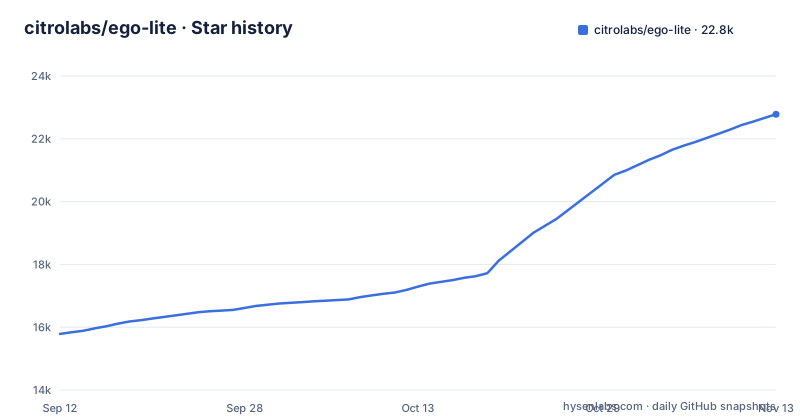
Star history
- citrolabs/ego-lite22,779 ★ · +6,991
| Repository | 2026-09-12 | 2026-11-13 |
|---|---|---|
| citrolabs/ego-lite | 15.8k | 22.8k |
6,991 Stars in the last 62 days, measured from the daily GitHub snapshot. Compare with other projects
Editorial analysis
The tab fight ego lite is trying to end
The README frames the problem as contention rather than capability. Existing tools like browser-use and agent-browser are described as automation frameworks that need a separate browser to drive, where your browser data rarely carries over intact and you and the agent end up fighting for the same tabs. That is a fair description of the usual arrangement: the agent launches its own Chromium profile, hits a login wall, and you either hand it credentials or script a session transfer. ego lite's answer is to be the browser you already use, with a second workspace bolted on for the agent. The target user is narrow and specific. You run an agent CLI such as Claude Code, Codex or Cursor in a terminal, you are on macOS or Windows, and the tasks you want automated sit behind a session you are already authenticated to. If your automation is a scheduled job against public pages, none of this applies to you.
Spaces, snapshots and the ego-browser skill
The architecture has three named parts. Spaces are isolated workspaces inside the single browser instance; the README says each agent or task gets its own, and that you can see which Space has an agent running and take it over or stop it. The Snapshot is the page representation the model reads, and the README claims customization inside the browser engine produces higher-quality snapshots, specifically calling out deeply nested iframes as a case where other approaches break down. Treat that claim as a vendor statement rather than a measured result. The third part is ego-browser, the connection layer. It exposes browser capabilities as in-page JavaScript functions (the README lists snapshot, fill, click, wait, navigate and capture), and the agent writes a snippet that calls them in one pass. This is the design choice worth noting: the agent is expected to compose a multi-step task as code rather than issue a sequence of discrete commands. The README contrasts this with a CLI approach it characterizes as call two commands, look at the result, call two more, and states complex workflows finish far faster, with higher task success rates and far fewer tool calls per task.
Installing it, and what the agent actually types
There are three install paths and they are not equivalent. The first is a download from the CDN links in the README, a .dmg for Apple Silicon or Intel Macs or a Windows .exe installer, which on install adds the ego-browser skill to every agent's skills directory on the machine. The second installs only the skill: npx skills add citrolabs/ego-lite, after which the first browser task walks you through installing the app. The third hands the job to the agent itself, by pasting a prompt that points at https://github.com/citrolabs/ego-lite and instructs it to read skills/ego-browser/references/install.md. That file is the authoritative setup document; the README does not reproduce its contents, so anything beyond the download and the npx line has to come from there. On first launch the app asks one question, whether to migrate Chrome data. Answering yes is what gives the agent your existing logins, cookies, extensions and bookmarks. Invocation at runtime is a slash command in the agent CLI: /ego-browser, a space, then a plain-language task, with the README's example being ego-browser follow @ego_agent on x.com for me. The README also states that browsing data stays on the device and that data collection is limited to simple product signals, like whether you've set ego lite as your default browser.
The Chrome migration is the whole bet, and the sharpest edge
Everything that makes ego lite useful flows from one setup decision: copying your Chrome profile. That is also where the risk concentrates. Copying cookies, extensions and bookmarks means the agent's Spaces inherit your authenticated identity across every site in that profile, not a scoped subset. So the practical question is not whether the agent is trustworthy in the abstract but whether you want a process that can act as you on any site you are logged into. There is a second, quieter failure mode: the README says you and the agent work in parallel and that your tabs stay yours, but it also says you can take over a Space. Takeover implies shared state, and shared state implies that a half-finished agent action (a filled form, a cart, a draft) is something you may encounter. What happens to a Space when you intervene mid-task is worth testing before you point an agent at anything that spends money or sends messages. A third boundary is platform. ego lite runs on macOS and Windows today, with Linux listed on the roadmap.
Where it sits against the frameworks it names
The README's comparison table sets ego lite against browser extensions (Claude/Codex in Chrome), built-in browsers, cloud browsers (Browserbase/Browser Use), browser CLIs (playwright-cli/Browser Harness) and AI browsers (Comet/Dia), while its text names browser-use and agent-browser, and the honest read is that these are different categories. browser-use and agent-browser are libraries: you import them, you supply a browser, and you own the session problem. Their advantage is portability and control. They run on Linux, they run headless, they run in a container, and you decide exactly which profile or proxy they touch. ego lite trades all of that for the session problem being solved at install time. Comet and Dia are the other direction: closed consumer browsers with their own built-in assistant, where the agent is the vendor's, not yours. ego lite's distinguishing position is that the agent is whichever CLI you already pay for, and the browser is a fork of your own data. If you need your automation to run on a build server at 3am, browser-use or agent-browser is the correct tool and ego lite is not, regardless of how the snapshot quality compares.
Licence, upgrades and the cost of staying current
ego lite is MIT-licensed, which permits commercial use, modification and redistribution provided the copyright notice and permission notice are retained. That is a permissive licence with no copyleft obligation, and it means you could fork the skill or the browser if the project's direction stops suiting you. It does not tell you anything about the hosted pieces: the CDN download URLs and the lite.ego.app homepage and docs are separate services, and the licence covers the repository. This is not legal advice; check the LICENSE file and your own obligations. On maintenance, the release cadence is roughly monthly for stable tags (v1.2.3 in August, v2.0.0 in September and v2.1.0 in October 2026). That is a young project on a fast version curve, which means upgrade cost is real: a major bump between v1.2.3 and v2.0.0 suggests the skill interface or the app is still moving. Because the agent-facing surface is a skill installed into your agent's skills directory, an upgrade may require re-running npx skills add citrolabs/ego-lite or re-reading skills/ego-browser/references/install.md rather than just replacing the .dmg. The README also advertises an experience-accumulation feature that distills successful actions into reusable tools, marked coming soon, so that is not something to plan around yet.
Who this is built for, and what to check before you commit
The fit is a developer on macOS who already runs Claude Code or Codex in a terminal and whose browser work is gated by authentication: enriching leads, checking dashboards, pulling data from tools they are signed into. For that person, the install is short and the payoff is not having to rebuild a session. The misfit is anyone automating public pages on a schedule, anyone on Linux, and anyone whose security model requires the agent to hold credentials distinct from their own. One more thing to weigh: the headline numbers in the README (far faster complex workflows, up to 5x faster on similar tasks) come without a task set or measurement detail, and the 5x figure belongs to a feature listed as coming soon. Judge the project on the sharing model, which is concrete and verifiable, and treat the speed claims as unverified until you run your own tasks through it.
Editorial conclusion
Adopt ego lite if you are on macOS or Windows, already drive Claude Code or Codex from a terminal, and want an agent to work inside sessions you are already signed into. Do not adopt it if you need Linux (the README puts it on the roadmap), or if you cannot accept a browser-level fork of your Chrome profile. Before trusting it, verify three things yourself: that the Chrome migration is reversible, that the ego-browser skill resolves in your agent's skills directory, and that a Space can be stopped mid-task without leaving the shared profile in a modified state.
Frequently asked questions
What is Ego Lite?
It is a macOS and Windows browser where you and your AI agents work in parallel, with each agent running its tasks in its own isolated Space inside the same browser while you keep browsing in yours. Agents drive it through an ego-browser skill that exposes in-page JavaScript functions, and it can inherit your existing Chrome logins, cookies, extensions and bookmarks.
What is Ego AI?
The repository documents one product, ego lite, and refers to the agents rather than to a separate system called Ego AI. Each Space gets its own AI agent or its own task, those agents work in parallel without colliding, and the connection point is a skill named ego-browser that any agent command line tool can use, including Claude Code, Codex, Cursor or a custom one.
ego lite alternative
The readme contrasts ego lite with several kinds of tools, including these two. Automation frameworks such as Browser-Use and Vercel's agent-browser are libraries the agent calls, ship no browser of their own, need a separate browser to drive, and rarely carry your logins over cleanly. The other kind is the AI browser you use yourself, such as the two products named in the comparison table, which inherit browser data but are not controllable by an external agent.
Official sources
Add this badge to your README
If you maintain this project, the badge below links readers to this analysis and shows its maintenance status from the daily GitHub snapshot. Paste the markdown into your README; add ?metric=license or ?metric=stars to the image URL for a different field.

[](https://hysenlabs.com/projects/citrolabs-ego-lite)Star history chart for your README
[](https://hysenlabs.com/projects/citrolabs-ego-lite)Was this useful?