agentara/skills: a personal Claude Code skill library with an engineering track
Original and practical skills for AI builders.
At a glance
- What is it?
- A collection of installable SKILL.md prompt extensions for Claude Code, split into AIGC, engineering, health, productivity and entertainment. The engineering set is adapted from Google Engineering Practices under CC-BY 3.0, while the rest of the repository is MIT.
- Who is it for?
- Adopt this if you already run Claude Code and want ready-made prompt scaffolding for code review, PR splitting or presentation design, and you are comfortable installing one skill at a time from a personal repository. Do not adopt it if you need versioned releases, a documented support channel or a single bundle that installs everything at once; none of those appear in the README.
- Can I use it commercially?
- Yes. MIT is a permissive licence: you can use, modify and sell software built on it, as long as you keep its copyright and licence notices.
- Is it still maintained?
- Yes. The repository last received commits 57 days ago.
- What is it written in?
- Mainly HTML, according to GitHub's language statistics.
Answers come from the project's GitHub data, last synced on November 25, 2026, and from our analysis. They are not legal advice.
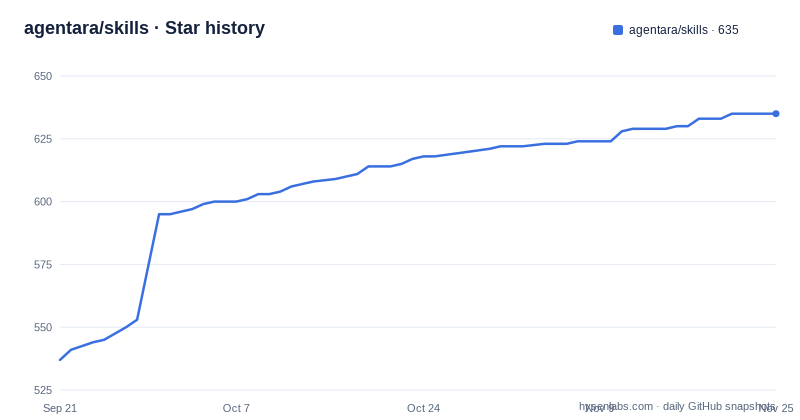
Star history
- agentara/skills635 ★ · +98
| Repository | 2026-09-21 | 2026-11-25 |
|---|---|---|
| agentara/skills | 537 | 635 |
98 Stars in the last 65 days, measured from the daily GitHub snapshot. Compare with other projects
Editorial analysis
What agentara/skills is and who it is aimed at
The repository is described in its README as "a personal library of Claude Code skills", where a skill is an installable prompt extension that gives Claude Code new capabilities. It is not a runtime, a framework or a package with an API. It is a directory tree of SKILL.md files, each one a structured prompt that an agent loads when the user invokes it.
The audience is narrow and clear. You need to be using Claude Code, or an agent that reads the same skill directories, and you need to want pre-written instructions rather than writing your own. The README groups the skills into five categories: AIGC, Entertainment, Health, Engineering and Productivity. The Engineering group covers code review, review comments, small PRs, change descriptions, review feedback and emergency changes. That group is the most conventional software work in the repository and the one most likely to be useful to a working engineer.
The rest of the library is a different proposition. The AIGC skills cover presentation boards, Gunpla posters, torn-paper collage, video planning, storyboards, character design and key art. Health includes emergency triage, lab report interpretation and a Chinese-language parenting assistant. Entertainment contains a single World Cup predictor. These are personal tools published in public, and the README presents them that way rather than as a curated product.
How a skill is structured and how Claude Code finds it
Each skill lives in its own directory under skills/, grouped by category, and the entry point is a SKILL.md file. The README links directly to those files, for example skills/engineering/engineering-code-review/SKILL.md and skills/productivity/doctor-strange/SKILL.md. The repository layout at the top level is small: .gitignore, AGENTS.md, CLAUDE.md, LICENSE, README.md and the skills directory.
The mechanism is directory discovery, not a plugin registry. The manual install instructions say to place the skill directory where agents look for it: the README names ~/.agents/skills/<skill-name>/ and ~/.claude/skills/<skill-name>/ as the two locations, so that "the Claude Code and other agents can discover it". That second path is the convention Claude Code reads, and the first is a more general location for other agents. Nothing in the README describes a manifest, a lockfile, a version field or a dependency resolution step. A skill is a folder with a markdown file in it.
The practical consequence is that updating a skill means replacing the folder. The repository has no published GitHub releases. The last push to the default branch was on 2026-09-14, so the content is recent, but recency of a push is not the same as a maintained release process.
Installing one skill with npx skills add
The README labels NPX as the recommended install path and notes that it installs one skill at a time. The example given is doctor-strange, a productivity skill that runs causal scenario simulations. The -y flag accepts prompts and -g installs globally.
npx skills add https://github.com/agentara/skills/blob/main/skills/productivity/doctor-strange/ -y -gTo install a different skill, the README says to replace the path with that skill's directory URL. So for the code review skill the URL becomes .../skills/engineering/engineering-code-review/. The trailing slash on the directory is part of the example as written. Expect the command to fetch that directory and register it for the agent; the README does not describe the output you should see, so check that the skill appears in your agent's skill list before relying on it.
The manual install path and a first real use
If you would rather keep the source on disk, clone the repository and symlink the directories you want. The README gives this as the manual alternative to NPX.
git clone https://github.com/agentara/skills.git
ln -s /path/to/skills/skills/productivity/doctor-strange ~/.agents/skills/doctor-strange
ln -s /path/to/skills/skills/productivity/doctor-strange ~/.claude/skills/doctor-strange
Both links point at the same source directory, one for the generic agent location and one for Claude Code. If you only use Claude Code, the second link is the one that matters. A symlink is also the reason an update is a git pull rather than a reinstall: the link resolves to whatever is currently in the working tree.
For a first real use, pick something with a visible artifact. article-to-html renders markdown drafts or conversation documents into self-contained paper-style HTML pages with inline CSS, SVG figures, callouts, tables and optional interactivity. Install it the same way, replacing the path with skills/productivity/article-to-html/, then hand it a markdown draft and ask for the rendered page. The output is a single HTML file you can open in a browser, which makes it easy to judge whether the skill's prompt matches your taste before you install more.
Where this library stops being the right tool
The clearest limitation is that there is no bundle. Every install command in the README targets one skill directory, and the NPX form is explicitly described as installing one skill at a time. If you want the whole engineering set available, you are running six commands or writing your own loop over the skills/engineering/ tree. Nothing in the repository automates that.
The second limitation is governance. The engineering skills are adapted from Google Engineering Practices and carry source attribution inside each SKILL.md, with the adaptation licensed under CC-BY 3.0. The README states that the rest of the original content is MIT. That means the licence of the file you are installing depends on which file it is, and the README does not enumerate which skills fall on which side beyond naming the engineering group. If you are vendoring these prompts into a commercial product, read the attribution line in the specific SKILL.md rather than the repository LICENSE alone.
The third is domain risk. emergency-triage and lab-interpreter sit in the Health category. The README describes what they do, not what they are validated against. For anything clinical, a prompt extension is a drafting aid, and the README makes no claim beyond that. Treat those two as the wrong tool for a decision that needs a clinician.
How it compares with writing your own SKILL.md
The alternative is not a competing product. It is your own SKILL.md file in ~/.claude/skills/. The difference is authorship and specificity. A hand-written skill encodes your team's conventions: your review checklist, your commit description format, your definition of a small PR. agentara/skills encodes one author's version of those things, refined across a fairly wide range of tasks.
Where the library wins is speed on generic work. engineering-small-prs, for instance, is described as splitting large features, refactors and migrations into reviewable, testable PR or CL sequences. Writing that prompt from scratch is an afternoon; reading someone else's and adjusting it is twenty minutes. Where it loses is fit. A skill like super-daddy maintains a ~/.super_daddy/ directory, builds child profiles and runs structured visits. That is a very particular workflow, and if your workflow differs you will spend more time editing the prompt than you would have spent writing a simpler one.
The honest comparison is that this repository is a source of drafts. The engineering set has a citable upstream in Google Engineering Practices, which gives it a reason to exist beyond one person's habits. The AIGC set is aesthetic preference expressed as a prompt, and it will either match your taste or it will not.
Maintenance, upgrades and licence boundaries
The repository is not archived and the last push to main was on 2026-09-14. The repository has no published GitHub releases, so there is no version number to pin and no changelog to read. Upgrading a manually installed skill means a git pull in your clone; upgrading an NPX-installed skill means running the same add command again, since the README documents no update subcommand.
That is a real cost if you depend on a skill's behaviour staying stable. A prompt is code in the sense that changing it changes output, and without tags you cannot tell which revision you installed last week. If you need reproducibility, cloning the repository and pinning your own commit is the only mechanism the repository supports.
On licensing, the split matters. MIT covers most original content. The engineering skills are adapted from Google Engineering Practices under CC-BY 3.0 and include source attribution in each SKILL.md. CC-BY 3.0 requires attribution, so if you redistribute an adapted engineering skill you need to keep that attribution intact. This is a description of what the repository states, not legal advice; check the LICENSE file and the individual SKILL.md before you redistribute anything.
Editorial conclusion
Adopt this if you already run Claude Code and want ready-made prompt scaffolding for code review, PR splitting or presentation design, and you are comfortable installing one skill at a time from a personal repository. Do not adopt it if you need versioned releases, a documented support channel or a single bundle that installs everything at once; none of those appear in the README. Before installing, open the SKILL.md for the specific skill you want and check its attribution line, because the engineering skills carry CC-BY 3.0 terms while the rest of the repository is MIT.
Frequently asked questions
How do I install a skill from agentara/skills in Claude Code?
The README recommends the NPX form, which installs one skill at a time, for example npx skills add https://github.com/agentara/skills/blob/main/skills/productivity/doctor-strange/ -y -g. Alternatively, clone the repository and symlink the skill directory into ~/.claude/skills/<skill-name>/.
How do I install skills from GitHub manually?
The README says to clone the repository with git clone https://github.com/agentara/skills.git, then symlink or copy the specific skill directory into ~/.agents/skills/<skill-name>/ and ~/.claude/skills/<skill-name>/ so agents can discover it.
Can I install every agentara/skills skill at once?
The README does not document a bundle install. The NPX path is described as installing one skill at a time, and the manual path symlinks individual skill directories, so installing the full engineering set means repeating the command per directory.
What licence applies to the engineering skills in agentara/skills?
The README states that most original content is MIT, but the engineering skills are adapted from Google Engineering Practices under CC-BY 3.0 and include source attribution in each SKILL.md.
How do I update a skill I installed from agentara/skills?
No update subcommand is documented. A manually installed skill updates through a git pull in your clone, because the symlink points at the working tree, and an NPX-installed skill is refreshed by running the same add command again.
Official sources
Add this badge to your README
If you maintain this project, the badge below links readers to this analysis and shows its maintenance status from the daily GitHub snapshot. Paste the markdown into your README; add ?metric=license or ?metric=stars to the image URL for a different field.

[](https://hysenlabs.com/projects/agentara-skills)Star history chart for your README
[](https://hysenlabs.com/projects/agentara-skills)Was this useful?