Lottie for Android: rendering After Effects JSON without an animation engine
Render After Effects animations natively on Android and iOS, Web, and React Native
At a glance
- What is it?
- Lottie for Android parses Bodymovin-exported After Effects JSON and draws it natively. For Android teams that already ship AE animations, it removes the hand-coded reimplementation, but it carries real constraints around exports, dependencies, and build tooling.
- Who is it for?
- Adopt Lottie for Android if your team produces After Effects animations, exports them with Bodymovin, and wants to ship them without writing animation code by hand. Do not adopt it if your animations are simple enough for built-in Android animators or if your design pipeline cannot commit to Bodymovin-compatible exports.
- Can I use it commercially?
- Yes. Apache-2.0 is a permissive licence: you can use, modify and sell software built on it, as long as you keep its copyright and licence notices.
- Is it still maintained?
- Activity is slowing. The repository last received commits 9 months ago.
- What is it written in?
- Mainly Java, according to GitHub's language statistics.
Answers come from the project's GitHub data, last synced on November 22, 2026, and from our analysis. They are not legal advice.
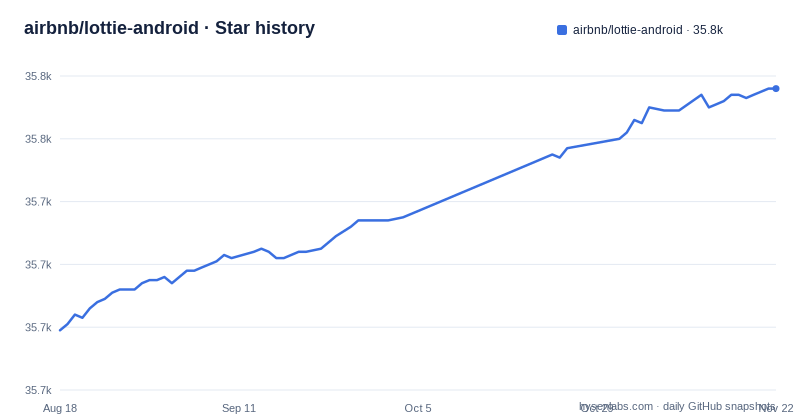
Star history
- airbnb/lottie-android35,776 ★ · +77
| Repository | 2026-08-18 | 2026-11-22 |
|---|---|---|
| airbnb/lottie-android | 35.7k | 35.8k |
77 Stars in the last 96 days, measured from the daily GitHub snapshot. Compare with other projects
Editorial analysis
What Lottie actually replaces
The core value is fidelity. Because Lottie reads the same JSON the designer exported, the animation on screen matches the After Effects composition, within the limits of what the library supports. That is a different promise from a video file. A video plays back pixels; Lottie reconstructs vector shapes, paths, and transforms from the JSON. The result is resolution-independent. But that promise depends entirely on the export pipeline. If the designer uses an After Effects feature that Bodymovin does not export cleanly, the animation will not render as intended. The README does not list which features are safe. That is a gap you must fill by testing your own animations before you commit.
The parsing and rendering mechanism
One consequence of the native renderer is that Lottie animations are interactive. You can control playback, set progress, and respond to events. That is a real advantage over a GIF or a video. But it also means the animation is not a black box. The README does not describe error handling. You should plan to validate every animation in a test harness before shipping it.
Getting it running with Gradle
You add it, sync, and you can load a JSON asset. The README does not show a code example beyond the Gradle line. You would typically create a LottieAnimationView in a layout and set the animation source to a JSON file in res/raw or assets. That is standard usage you can find in the documentation site, but it is not in the README. So the README gives you the dependency, not the API. That is fine for an installation guide, but it means you need the full documentation at airbnb.io/lottie to actually use the library.
A genuine limitation: export dependency and feature coverage
Another limitation is the build tooling. The README's Contributing section states that development has started for Lottie Compose and that Gradle and the Android Gradle Plugin are kept up to date with the latest canaries, which requires contributors to use Android Studio Canary builds. You should pin a Lottie version and test upgrades deliberately. The README does not promise backward compatibility across major versions. You have to read the release notes for each version you adopt.
Alternatives: built-in animators and other renderers
Another alternative is a video or GIF. You render the animation in After Effects, export it as a video or GIF, and play it in an ImageView or VideoView. The approach is straightforward and has no runtime parsing. But it trades file size and quality. A video is resolution-dependent and cannot scale cleanly. A GIF is heavy and limited to 256 colors. Lottie's vector rendering avoids those problems, but only if the JSON is well-formed. The README does not compare Lottie to video, but the choice is clear: if your animation is short and simple, a video may be simpler to ship. If it is long or needs to scale, Lottie's JSON approach is better. You must weigh the export pipeline against the file size and quality requirements.
Maintenance, license, and upgrade cost
The project's development focus on Lottie Compose means the classic Android view API may receive less attention over time. That does not mean the classic API is abandoned, but it suggests where the maintainers are investing. If you start a new project, you might prefer Lottie-Compose. If you maintain an existing app with the classic view, you should watch for deprecation signals in future releases. The README does not promise long-term support for either API. You should check the documentation at airbnb.io/lottie for the current status of each artifact before you commit.
Editorial conclusion
Adopt Lottie for Android if your team produces After Effects animations, exports them with Bodymovin, and wants to ship them without writing animation code by hand. Do not adopt it if your animations are simple enough for built-in Android animators or if your design pipeline cannot commit to Bodymovin-compatible exports. Before adopting, verify that your After Effects version and Bodymovin export settings produce JSON that Lottie parses without errors, and check that your project has migrated to AndroidX, because Lottie 2.8.0 and above requires it. Also confirm that your build environment can handle the current Gradle and Android Plugin versions, since the project tracks canary releases for development.
Frequently asked questions
What is Lottie used for?
Lottie parses Adobe After Effects animations exported as json with Bodymovin and renders them natively on mobile, for Android and iOS. Documentation, FAQ, help and examples are published at airbnb.io/lottie.
How do I use Lottie on Android?
Add implementation 'com.airbnb.android:lottie:$lottieVersion' to the dependencies block of your build.gradle file and supply the version yourself. Gradle is the only supported build configuration, and the README sends you to airbnb.io/lottie for the API.
Does Lottie for Android work with Jetpack Compose?
It ships as a separate artifact, com.airbnb.android:lottie-compose, with its own stable version badge and its own page at airbnb.io/lottie/#/android-compose. The repository keeps a lottie-compose/ module, a sample-compose/ app and a CHANGELOG_COMPOSE.md.
Do I have to migrate my app to androidx before using Lottie?
From 2.8.0 onward Lottie only supports projects migrated to androidx, and the README links Google's migration guide. An app still on the Android support library has to complete that migration before it can take a current release.
What licence is lottie-android under, and is the sponsorship request part of it?
The repository carries an Apache-2.0 licence. The README separately asks teams that ship Lottie in an app to consider sponsoring the project, and names Lottiefiles, Lottielab, Airbnb, Stream Chat, Emerge Tools and Coinbase as lead sponsors.
Official sources
Add this badge to your README
If you maintain this project, the badge below links readers to this analysis and shows its maintenance status from the daily GitHub snapshot. Paste the markdown into your README; add ?metric=license or ?metric=stars to the image URL for a different field.

[](https://hysenlabs.com/projects/airbnb-lottie-android)Star history chart for your README
[](https://hysenlabs.com/projects/airbnb-lottie-android)Was this useful?