VimFx for Firefox: Vim-style navigation with LegacyFox
Vim keyboard shortcuts for Firefox
At a glance
- What is it?
- VimFx is a legacy Firefox extension that adds Vim-style browsing commands, including link hints, search, scrolling, tab management, and caret mode. It is aimed at users who want keyboard-led navigation without adopting a WebExtension replacement, but installation requires the separate LegacyFox shim.
- Who is it for?
- VimFx fits Firefox users who specifically want this legacy Vim shortcut model and can manage LegacyFox. It does not fit users who want a WebExtension-only setup or who need an extension that works without a compatibility shim.
- Can I use it commercially?
- Check first. The repository uses a licence we do not classify automatically, so read its LICENSE file before any commercial use.
- Is it still maintained?
- Yes. The repository last received commits 37 days ago.
- What is it written in?
- Mainly CoffeeScript, according to GitHub's language statistics.
Answers come from the project's GitHub data, last synced on November 7, 2026, and from our analysis. They are not legal advice.
Star history
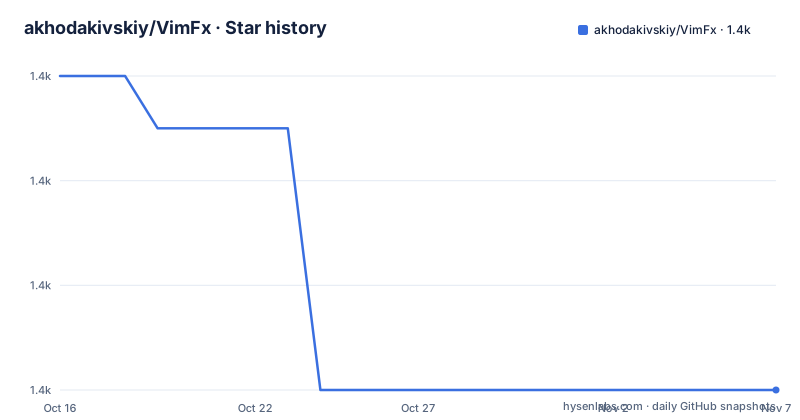
- akhodakivskiy/VimFx1,424 ★ · -6
| Repository | 2026-10-16 | 2026-11-07 |
|---|---|---|
| akhodakivskiy/VimFx | 1.4k | 1.4k |
-6 Stars in the last 22 days, measured from the daily GitHub snapshot. Compare with other projects
Editorial analysis
Why VimFx Exists for Firefox Browsing
VimFx addresses the gap between ordinary Firefox keyboard shortcuts and a larger Vim-inspired navigation layer. The README says it provides shortcuts for browsing and navigation with the aim of supporting a near-mouseless experience. That is useful for people who browse documentation, issue trackers, reference material, and other keyboard-heavy pages, especially when reaching a link or changing tabs with the mouse interrupts their workflow.
The extension does not position itself as a replacement for Firefox controls. Its documented commands often invoke standard Firefox features, which is an important design choice. For example, the README describes opening a new tab with t, closing a tab with x, and reopening one with X. The goal is therefore layered input rather than a separate browser environment. The extension is aimed at both newcomers to Vim-style navigation and users who already understand modal commands, but it does not require a person to be a Vim expert to use the basic link and search commands.
VimFx was created as a Firefox counterpart to the functionality the original author wanted from Vimium for Chrome. The README also mentions Vimperator as an earlier Firefox extension, while explaining that Vimperator changed Firefox's appearance and behavior too aggressively. That background explains the project's emphasis on retaining familiar browser behavior. It does not mean VimFx has no effect on Firefox. It means the extension adds commands while preferring existing Firefox functionality where possible.
VimFx Commands and Page Interaction
The central interaction is a keyboard mode that overlays short commands onto the current page. Pressing f marks links, text inputs, and buttons. The user then enters the displayed hint or the visible text of a marked element to activate it. The README also says the f command has variations for actions such as copying links or opening them in new tabs. This is a page-aware interaction, not a simple fixed keyboard shortcut.
Search has a separate compact workflow. Press / to search, then use n and N to move between matches. The distinction is useful because it lets the user keep search active while moving forward or backward without repeating the search expression. Scrolling follows familiar Vim-style directions: h, j, k, and l move left, down, up, and right. gg and G move to the top or bottom, while space and shift-space move by a page. The d and u commands move by half a page.
Tab navigation is also part of the core model. t opens a tab, x closes the current tab, X reopens the closed tab, and J and K switch between tabs. Caret mode, documented under the V commands, provides a way to copy text without using the mouse. The exact behavior of every mode is delegated to the linked command documentation rather than described in the README, so users should not assume that every Vim command is available.
Press ? to open the shortcut reference, then / to search within it. This gives users a discoverable path through the command set instead of requiring them to memorize a large initial list. Default mappings can be changed through the options page in Firefox's Add-ons Manager, and the repository identifies extension/lib/defaults.coffee as the source for those defaults.
LegacyFox Installation and First Firefox Session
VimFx is described as a legacy extension for Firefox 115 and later that requires the LegacyFox shim. The README gives Linux installation commands for LegacyFox, but it does not provide a separate command for installing VimFx itself. On other operating systems, it says to copy the files from the LegacyFox repository into the Firefox installation directory.
On Linux, the documented sequence is:
git clone https://git.gir.st/LegacyFox.git
cd LegacyFox
sudo make install  # set DESTDIR= for custom install location
The first command obtains the LegacyFox repository, the second enters its directory, and `sudo make install` installs it. The README includes the comment `set DESTDIR= for custom install location` as part of the documented command. The project does not give a matching package-manager command for installing VimFx or a claim that this repository's npm package is the extension installation path.
After LegacyFox is installed, the project directs users to the VimFx add-on page. The README identifies the homepage as the Firefox Add-ons Manager listing at `https://addons.mozilla.org/firefox/addon/vimfx`, but it does not spell out the add-on installation clicks. A first useful check would be to press ? in Firefox and confirm that VimFx's command reference opens. From there, press f on a page containing several links, enter a hint, and use / followed by n and N to search and move through matches. The documentation gives those commands as the observable starting point, not as an installation verification test.
Configuration, Modes, and Site Exceptions
VimFx provides an options page in Firefox's Add-ons Manager, where default shortcuts can be customized. The repository also points to documentation/config-file.md for users who want a configuration file. The documentation directory is therefore part of the project's configuration surface, while extension/lib/defaults.coffee contains the default mappings referenced by the README. A user changing VimFx behavior has a documented file or settings-page route rather than needing to modify the extension source immediately.
The command reference can be searched with /. That is separate from the Ignore mode command. Press i to enter Ignore mode and shift-escape to exit it. The README says Ignore mode temporarily disables VimFx, which is important when a site needs native Firefox input behavior or when a page-specific workflow conflicts with the extension's shortcuts. The options documentation also describes a blacklist for automatically entering Ignore mode on specified sites. This is more deterministic than remembering to press i after every visit, although the README does not describe the matching syntax or edge cases.
The extension's own documentation links to `documentation/options.md`, `documentation/commands.md`, and `documentation/questions-and-answers.md`. Those are the appropriate places to check exact settings and command behavior. The project is primarily written in CoffeeScript, and its package metadata includes development dependencies for CoffeeScript compilation, linting, testing, packaging, and add-on linting. Those repository details indicate a build and test workflow, but the README does not document a complete contributor setup or a supported path for customizing a locally built XPI.
Compatibility, Maintenance, and Licensing Boundaries
The README explicitly labels VimFx a legacy extension for Firefox 115 and later that requires LegacyFox. That compatibility requirement is the main adoption constraint. It also places VimFx outside the normal WebExtension model. The repository's package.json lists `"min": "153.0"` for Firefox versions, but the README's broader statement is about Firefox 115 and later. These are different compatibility descriptions, so users should check the extension listing and their installed Firefox version before depending on it.
The repository is not archived, and its last push was on 2026-10-01. Recent releases listed in the repository data include v0.28.0 on 2026-09-26, v0.27.8 on 2026-09-06, and v0.27.7 on 2026-07-29. Those dates indicate recent project activity, but the README still describes the extension as legacy and the installation path still depends on LegacyFox. Recent release activity does not remove that compatibility requirement.
License information is not consistent across the repository data. The README describes the project as using a custom licence that GitHub cannot classify and points to the LICENSE file. package.json lists `"license": "MIT"`, and the repository also contains LICENSE-MIT. This difference may reflect separate extension and source licensing, but the repository does not explain that relationship. Review LICENSE and LICENSE-MIT directly before redistribution or commercial use; the package metadata alone is not enough to resolve the question. No legal conclusion follows from the README summary.
Legacy VimFx Compared With WebExtension Replacements
The README lists Vimium-FF, Saka Key, Vim Vixen, and Tridactyl as alternatives when a WebExtension replacement is wanted. That list establishes the main architectural difference: VimFx is a legacy extension that needs LegacyFox, while the alternatives are presented as WebExtension replacements. The repository does not document their individual shortcut sets, configuration formats, compatibility ranges, or licensing, so a detailed feature comparison would exceed the documented information.
The practical choice is therefore compatibility first, workflow second. A Firefox user who specifically wants VimFx's documented commands and already accepts the LegacyFox installation path has a reason to consider it. A user who wants an extension installable through the current Firefox extension architecture without a shim should investigate the listed WebExtension alternatives instead. VimFx's own strengths are its compact link hints, search cycling, scrolling keys, tab commands, caret mode, shortcut search, and per-site Ignore mode. Those are concrete workflow choices, not a claim that it supports more than the README documents.
Editorial conclusion
VimFx fits Firefox users who specifically want this legacy Vim shortcut model and can manage LegacyFox. It does not fit users who want a WebExtension-only setup or who need an extension that works without a compatibility shim. Verify Firefox compatibility, the LICENSE file, and the documented configuration options before adoption; package.json lists a minimum Firefox version of 153.0.
Frequently asked questions
Does VimFx require LegacyFox to run in Firefox?
Yes. The README calls VimFx a legacy extension for Firefox 115 and later and says that it requires the LegacyFox shim.
How do I open a link with VimFx?
Press f to mark links, text inputs, and buttons, then enter the displayed hint or visible text for the element you want to activate.
How do I temporarily disable VimFx on a webpage?
Press i to enter Ignore mode and shift-escape to exit it. The options documentation also describes a blacklist for automatically entering Ignore mode on specific sites.
Official sources
Add this badge to your README
If you maintain this project, the badge below links readers to this analysis and shows its maintenance status from the daily GitHub snapshot. Paste the markdown into your README; add ?metric=license or ?metric=stars to the image URL for a different field.

[](https://hysenlabs.com/projects/akhodakivskiy-vimfx)Star history chart for your README
[](https://hysenlabs.com/projects/akhodakivskiy-vimfx)Was this useful?