alexa_media_player: controlling Echo from Home Assistant over an unofficial API
This is a custom component to allow control of Amazon Alexa devices in Home Assistant using the unofficial Alexa API.
At a glance
- What is it?
- alexa_media_player is a HACS-installable Home Assistant custom component that registers Amazon Echo devices as media players, driving playback, volume and now playing metadata through an unofficial Alexa API. It is actively released, but it depends on a private interface Amazon can withdraw at any time, and its configuration instructions live in a wiki rather than the README.
- Who is it for?
- Adopt alexa_media_player if you already run Home Assistant and want your Echo devices exposed as media players with track metadata, and accept that a break in the unofficial API can silence your automations overnight. Do not adopt it for a home that depends on voice control as its only path to music, and do not expect the README to answer configuration questions, because it sends you to the wiki for that.
- Can I use it commercially?
- Yes. Apache-2.0 is a permissive licence: you can use, modify and sell software built on it, as long as you keep its copyright and licence notices.
- Is it still maintained?
- Yes. The repository last received commits 1 day ago.
- What is it written in?
- Mainly Python, according to GitHub's language statistics.
Answers come from the project's GitHub data, last synced on October 23, 2026, and from our analysis. They are not legal advice.
Star history
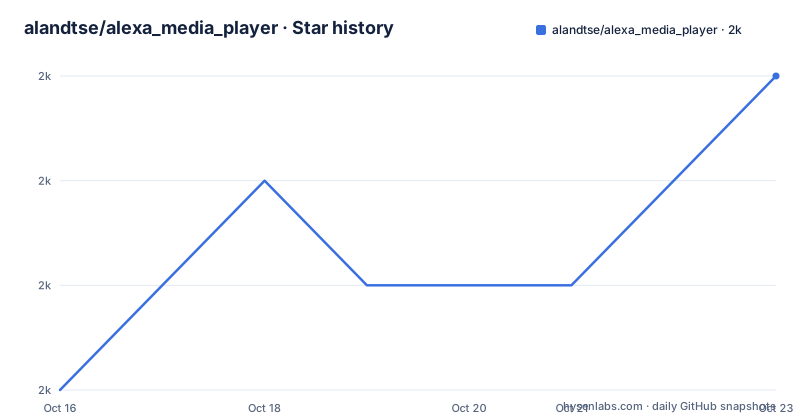
- alandtse/alexa_media_player1,990 ★ · +3
| Repository | 2026-10-16 | 2026-10-23 |
|---|---|---|
| alandtse/alexa_media_player | 2k | 2k |
3 Stars in the last 7 days, measured from the daily GitHub snapshot. Compare with other projects
Editorial analysis
The problem it solves: Echo is invisible to Home Assistant
That gap is narrow and very real. If you have a media player entity, automations gain a familiar vocabulary: play, pause, stop, volume up and down, next track. Without one, a routine that says turn the music down at 10pm has nothing to target.
This component fills that gap. It registers Echo products as Home Assistant media devices, and its stated feature set covers Play/Pause/Stop, Next/Previous on a per track basis, and Volume. On top of control it retrieves display metadata for Home Assistant: song title, artist name, album name and album image.
The target reader is therefore not a developer building a new skill. It is a Home Assistant operator with existing Echo hardware who wants those speakers back inside dashboards, scripts and automations. The project states that it was originally inspired and created by Keaton Taylor, and the maintainers credit both Keaton Taylor and Alan D. Tse in the package metadata.
How it works: a wrapper around alexapy, not a first-party integration
The mechanism is deliberately thin. The component talks to Amazon through an unofficial API using the alexapy library, pinned to a single version in the project metadata.
The dependency set in pyproject.toml is short enough to read in full: aiohttp, wrapt, dictor, packaging and alexapy. Nothing here speaks to Home Assistant as a runtime library in production, because Home Assistant loads the component directly from custom_components/ rather than from a wheel. The dev extras list homeassistant >=2025.2.0 alongside pytest-homeassistant-custom-component >=0.13.107, which tells you what the test harness pins rather than what a running instance needs.
The package declaration names the payload explicitly:
packages = [
    { include = "custom_components/alexa_media" }
]
That single directory is the whole shipped artifact. It is also the directory a HACS install populates, which matters when you are reasoning about upgrades: there is no PyPI release to track, and pyproject.toml even sets upload_to_pypi = false and upload_to_release = false.
The unofficial nature is stated plainly in the project's own description of itself, and it deserves to be stated plainly here too. The component mimics the Alexa app. Anything that depends on it depends on an interface that is not contractually yours.
Installation is a HACS matter, and configuration is deliberately outsourced
The README carries a HACS badge and links to the wiki for both configuration and further documentation. It gives no shell commands, no YAML block, no credential format. That is not an oversight to be filled in with invented steps; it is where the project has chosen to put that information.
So the honest install description is short: get the component into your Home Assistant configuration through HACS, then follow the project's configuration page in the wiki for the settings. If you are not using HACS, the repository layout tells you what a manual install would require, since the shipped package is the custom_components/alexa_media directory and the manifest lives at custom_components/alexa_media/manifest.json alongside a VERSION constant in const.py.
A first real use then looks like this: add the integration in Home Assistant, log in to an Amazon account so the component can authenticate the way the Alexa app does, let it discover your Echo devices, and pick one as the target of a media_player automation. Once the entity exists, the album image and song title show up on a dashboard without any further work.
Worth noting what you will not find in the repository: no sample configuration.yaml is presented as documentation, even though a configuration.yaml sits at the repository root, and no rollback or upgrade procedure is documented in the README. The release history is the place to check what changed between versions.
Maintenance is current, and versioned in three places at once
The last push was on 2026-10-16, and the repository is not archived. Recent releases came out steadily: v5.16.2 on 2026-10-12, v5.16.1 on 2026-09-13, and v5.16.0 on 2026-09-12.
That cadence is not accidental. Releases are produced by semantic-release, configured to write the version into three separate places:
version_variables = [
  "custom_components/alexa_media/const.py:VERSION",
  "custom_components/alexa_media/manifest.json:version"
]
alongside pyproject.toml:tool.poetry.version. The changelog sections are declared as feature, fix, breaking, documentation, performance and refactor, and the commit subject pattern is [skip ci] {version}. For an operator this means the upgrade cost is low but not zero: a version bump rewrites files inside the component directory, which is also the directory HACS manages, so a stale local edit can collide with a future pull.
Runtime requirements are stated outright: python = ">=3.13,<4.0". An older Home Assistant host that cannot provide Python 3.13 has no path to this version at all, which is a harder constraint than the docs suggest.
The failure mode is Amazon, and no amount of maintenance changes it
The component's own documentation carries the caveat that Amazon may cut off access at any time. That sentence is the most important line in the README, and it defines the real limitation.
There are two distinct failure shapes. The loud one is an outright break: the authentication flow or the endpoints change, the component stops working, and there is no supported channel to report it upstream because the API is not supported. Fixing it means whatever maintainer time is available, not a vendor patch. The quiet one is more annoying: authentication expires, or an Echo that was previously discovered stops answering, and the entity remains in Home Assistant while doing nothing.
The metadata side has its own edge. Now playing data covers song title, artist, album and album image. Stations, voice assistant responses and anything that is not a track have no fields to populate, so the friendly display goes blank rather than showing something useful.
If your household depends on Echo as its only music interface, an unattended API break is a genuine outage, not an inconvenience. This component is a better fit as a secondary path that adds dashboards and automations to hardware you already control by voice.
Where the alternative approach differs
The alternative is not another third-party wrapper. It is leaving the Echo devices out of Home Assistant media control entirely and driving playback with the tools the speaker already trusts: voice routines, Bluetooth pairing from a host that can play audio directly, or a different speaker that exposes a local protocol Home Assistant can speak to.
The difference in approach is worth being precise about. This component reproduces a remote cloud account session on the user's behalf so that a device on the local network becomes addressable from a local automation system. The alternative does not cross that boundary at all. Bluetooth pairing keeps the audio path local and needs no Amazon account, but it gives you transport control, not the song title, artist and album image this component reports. A speaker with a local integration gives Home Assistant a media entity without borrowing an unofficial cloud API.
So the trade is metadata and dashboard convenience against dependency on a private interface. A different path is not strictly better; it is a different dependency.
Licence and what to check before you install
The project is licensed Apache-2.0, with the LICENSE file at the repository root. The README notes that contributions are licensed under Apache-2.0 and calls this a requirement for Home Assistant contributions, which is the usual arrangement for custom components intended for upstream submission. Nothing in the licence text changes the fact that using this component means sending your Amazon credentials through third-party code.
Practical checks before committing to it: confirm your host can run Python 3.13 or newer; read the wiki configuration page rather than assuming the README covers it; look at the release history for breaking changes between your current version and the one HACS will offer; and decide in advance what happens to your automations if the entity goes unresponsive, since no mechanism in the repository offers a fallback path.
Editorial conclusion
Adopt alexa_media_player if you already run Home Assistant and want your Echo devices exposed as media players with track metadata, and accept that a break in the unofficial API can silence your automations overnight. Do not adopt it for a home that depends on voice control as its only path to music, and do not expect the README to answer configuration questions, because it sends you to the wiki for that. Verify first that your Python runtime satisfies >=3.13,<4.0 and decide what your fallback is if the unofficial API stops answering.
Frequently asked questions
Does alexa_media_player use an official Amazon API?
No. The project describes itself as a component that controls Alexa devices using the unofficial Alexa API and states that it mimics the Alexa app, adding that Amazon may cut off access at any time.
What can I control on an Echo from Home Assistant once it is installed?
Play, pause and stop, next and previous track, and volume. The component also retrieves song title, artist name, album name and album image for display in Home Assistant.
How do I install and configure alexa_media_player?
The README carries a HACS badge and directs configuration to the project wiki, providing no shell commands or YAML of its own. The shipped package is the custom_components/alexa_media directory, with the manifest at custom_components/alexa_media/manifest.json.
What Python and Home Assistant versions does it need?
pyproject.toml declares python = ">=3.13,<4.0". The development dependencies target homeassistant >=2025.2.0 with pytest-homeassistant-custom-component >=0.13.107.
How is the component versioned and released?
semantic-release writes the version into pyproject.toml, const.py:VERSION and manifest.json:version. Releases v5.16.0, v5.16.1 and v5.16.2 shipped on 2026-09-12, 2026-09-13 and 2026-10-12 respectively, with the last push on 2026-10-16.
Official sources
Add this badge to your README
If you maintain this project, the badge below links readers to this analysis and shows its maintenance status from the daily GitHub snapshot. Paste the markdown into your README; add ?metric=license or ?metric=stars to the image URL for a different field.

[](https://hysenlabs.com/projects/alandtse-alexa-media-player)Star history chart for your README
[](https://hysenlabs.com/projects/alandtse-alexa-media-player)Was this useful?