WhisperLiveKit: the streaming policy is the product, not the model
Real-time, local speech-to-text with streaming ASR, speaker diarization, translation, and OpenAI/Deepgram-compatible APIs.
At a glance
- What is it?
- WhisperLiveKit wraps several speech research projects behind one `wlk` command and one server, with OpenAI-compatible and Deepgram-compatible endpoints. What it actually sells is the decision about when to commit text: chunked Whisper loses words mid-syllable, and each backend here uses a different policy to avoid that.
- Who is it for?
- WhisperLiveKit fits a team that needs transcripts to stay on its own hardware and already speaks either the OpenAI transcription API or the Deepgram WebSocket shape, because the OpenAI-compatible and Deepgram-compatible endpoints let existing clients point at the local server.
- Can I use it commercially?
- Yes. Apache-2.0 is a permissive licence: you can use, modify and sell software built on it, as long as you keep its copyright and licence notices.
- Is it still maintained?
- Yes. The repository last received commits 1 day ago.
- What is it written in?
- Mainly Python, according to GitHub's language statistics.
Answers come from the project's GitHub data, last synced on November 14, 2026, and from our analysis. They are not legal advice.
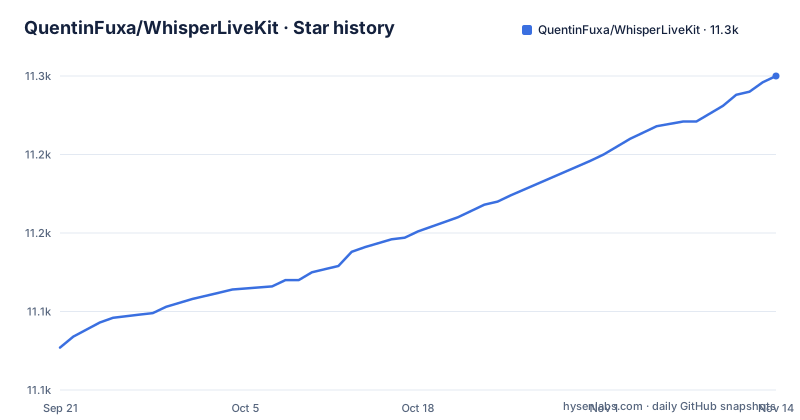
Star history
- QuentinFuxa/WhisperLiveKit11,250 ★ · +173
| Repository | 2026-09-21 | 2026-11-14 |
|---|---|---|
| QuentinFuxa/WhisperLiveKit | 11.1k | 11.3k |
173 Stars in the last 54 days, measured from the daily GitHub snapshot. Compare with other projects
Editorial analysis
Whisper is built for whole utterances, so streaming needs a policy, not a smaller batch size
The project answers the question it expects, and the question is why not just run Whisper on every incoming chunk. The answer given is that Whisper is designed for complete utterances rather than real-time chunks, that processing small segments loses context and cuts off words mid-syllable, and that the result is poor transcription.
That framing explains the rest of the design. WhisperLiveKit is an assembly of streaming research rather than one model, and the page names each piece and what it contributes: Simul-Whisper and Streaming transcription using the AlignAtt policy, WhisperStreaming using the LocalAgreement policy, Streaming Sortformer for real-time speaker diarization, NLLW for simultaneous translation to and from 200 languages based on a distilled NLLB, Qwen3-ASR-causal as a causal streaming audio encoder where each audio block is encoded exactly once for constant compute per audio second and append-only transcripts, and AlignAtt4LLM for simultaneous translation with decoder-only LLMs using attention-gated commits.
Two transcription policies appear in that list: AlignAtt and LocalAgreement.
One wlk entry point, two transcription policies and three translation paths
The server is described as supporting multiple concurrent users, with Voice Activity Detection reducing overhead when nobody is speaking.
The `wlk` command is the whole surface. One form starts a server with an explicit model and language, another pulls a model and starts in one step, and a third transcribes a file with no server involved at all.
# Start the server, then open http://localhost:8000 and start talking
wlk --model base --language en

# Auto-pull model and start server
wlk run whisper:tiny

# Transcribe a file (no server needed)
wlk transcribe meeting.wav
Model management is part of the same command rather than a separate tool: `wlk models` shows what is installed, `wlk pull large-v3` downloads, `wlk rm large-v3` deletes. Subtitles come out of the same path, where a `--format srt` flag and an `-o` output name turn a podcast into a subtitle file, and `wlk bench` measures speed and accuracy on your own hardware.
The file mode matters for anyone building a pipeline. Batch transcription needs no server, no WebSocket and no session, which makes it the cheap way to check whether a model and a language setting behave before wiring up anything live.
Translation, diarization and GPU backends live behind named extras, and one of them is capped at Python 3.12
The install is one line, and the optional parts are declared as extras with separate spellings for `uv sync` and `pip install -e`. The base package pulls fastapi, uvicorn, websockets, faster-whisper, torch, torchaudio, librosa, soundfile, huggingface-hub, tiktoken, python-multipart and starlette. Everything beyond that is opt-in.
The list is long enough that choosing badly costs real time: Apple Silicon MLX Whisper, FunASR SenseVoiceSmall, Voxtral on either MLX or the Hugging Face backend, a CPU PyTorch stack, a CUDA 12.9 PyTorch stack, translation, a sentence tokenizer, Qwen3-ASR under vLLM or under HF with CUDA, MPS or CPU, a vLLM Metal variant for Apple Silicon that requires installing vLLM with the official vllm-metal script first, Canary-1b-v2, and two separate diarization extras.
The constraint the README calls out is diarization. The Diart extra is marked not recommended and works only on Python 3.11 and 3.12, because Diart 0.9.2 requires NumPy below 2. The instruction for Python 3.13 is to use Sortformer instead.
So a team standardising on 3.13 does not get a choice, it gets Sortformer. The package itself supports Python 3.11 through 3.13.
The API is OpenAI-shaped and Deepgram-shaped, and the native socket has an undocumented-by-default mode
Three endpoints are offered, and the point of the first two is that existing code does not have to change.
# OpenAI-compatible REST API
curl http://localhost:8000/v1/audio/transcriptions -F [email protected]

# Works with the OpenAI Python SDK
client = OpenAI(base_url="http://localhost:8000/v1", api_key="unused")

# Deepgram-compatible WebSocket
# See docs/API.md for supported options and current SDK setup

# Native WebSocket for real-time streaming
ws://localhost:8000/asr
The OpenAI path is a compatibility-oriented subset, not the full API, and the api_key value is literally the string unused. The Deepgram path is the same idea for WebSocket clients. The native socket is what the bundled web UI uses.
The native socket takes per-session query parameters, and they are where the real behaviour lives. `language` sets the transcription language for that session, and one shared engine serves mixed-language sessions, which means two clients in different languages do not need two processes. `target_language` requests translation, and the server must have been started with `--target-language`. `context` passes terminology, names or a phrase list to condition the session, supported by the Whisper-family and SimulStreaming backends. `mode` is the interesting one: setting it to diff switches to an incremental snapshot and diff protocol instead of resending the whole state. That mode is labelled experimental, is meant for people building their own client, and is not what the bundled UI does.
`token` supplies an API token when the server runs with `--api-token`, and is also accepted as a Bearer header. Without that flag there is no token on the WebSocket, so an exposed instance is open.
The diff protocol is experimental and the bundled UI ignores it
The `mode` parameter deserves its own look because it is labelled experimental.
The default behaviour of the native socket is to resend the full state on every update. That is simple and correct, and it is what the bundled web UI does. Setting `mode=diff` replaces it with an incremental snapshot and diff protocol.
Three limits are stated on the same line. It is experimental. It is for integrators building their own client. And the implementation lives in a file called `diff_protocol.py`, so anyone depending on its wire format is depending on an internal module of a project whose version numbering has not reached 1.0.
The practical consequence is a client decision. A browser tab that shows a live caption does not care much about payload size and can stay on the default. A mobile client streaming an hour-long session might care a great deal, in which case you are writing against an interface that the project reserves the right to change. Choose the default until you have measured the payload, because the default path is the one that will keep working.
The CPU container and the GPU container both claim host port 8000
The compose file defines three services and the port map is where the trap is. The GPU Sortformer service publishes 8000 to 8000. The GPU Voxtral service publishes 8001 to 8000, clearly to get out of the way. The CPU service publishes 8000 to 8000 again.
So `wlk-gpu-sortformer` and `wlk-cpu` cannot run at the same time without editing the file. Nothing in the compose configuration prevents starting both, and Docker will fail on the second bind rather than on anything that points at the collision. If you are standing up a CPU fallback next to a GPU primary, that edit is a required step, not an optimisation.
The rest of the compose setup is careful in ways worth copying. The Hugging Face cache lives in a named volume mounted at the root cache path, so models survive container rebuilds instead of being re-downloaded every time. HF_TOKEN is passed through the environment, and a commented-out line shows the alternative of mounting a token file read-only. Each service passes its extras as a comma-separated build argument, defaulting to cu129 and diarization-sortformer for the Sortformer image, cu129, voxtral-hf and translation for the Voxtral image, and cpu, diarization-diart and translation for the CPU one.
Note that the CPU default asks for the diarization extra that is capped at Python 3.12.
The Docker build needs initialised submodules, and it installs Python 3.12 whatever the host runs
The GPU image is built in two stages. The builder stage starts from nvidia/cuda:12.9.2-cudnn-devel-ubuntu24.04 and installs build-essential and python3-dev, then copies the uv binary from a pinned astral-sh/uv:0.12.21 image. It installs Python 3.12 into its own directory rather than using the system interpreter, and creates a dedicated install path for it.
Extras are passed in as a comma-separated build argument, defaulting to cu129, and the same argument string is turned into a series of `--extra` flags by a shell loop before uv runs. Dependencies are synced with `--frozen` from uv.lock before the source is copied, so a dependency change busts the cache and a source change does not.
The build will fail on a fresh clone, and the Dockerfile says why in a comment. The qwen3 extras resolve qwen3-asr-causal from the submodule path through the tool.uv.sources configuration, so the build context must have submodules initialised with `git submodule update --init` before the copy of third_party. The repository root carries a .gitmodules file and a third_party directory, so this is the first thing to run after cloning if you are building the image.
The runtime stage switches to the cudnn-runtime flavour of the same CUDA tag and installs ffmpeg and ca-certificates. There is a separate Dockerfile.cpu for the non-CUDA path, which is the one to look at if you are not running an NVIDIA GPU.
Editorial conclusion
WhisperLiveKit fits a team that needs transcripts to stay on its own hardware and already speaks either the OpenAI transcription API or the Deepgram WebSocket shape, because the OpenAI-compatible and Deepgram-compatible endpoints let existing clients point at the local server. It does not fit a deployment that wants one backend choice forever: the optional extras split by Python version and by accelerator, and the CPU container in compose.yml binds host port 8000, the same port as the GPU Sortformer service, so the two cannot run side by side. Before you commit, pick your diarization backend first, since the Diart extra is limited to Python 3.11 and 3.12 while Sortformer is the one to use on 3.13.
Frequently asked questions
How do I install WhisperLiveKit and start a transcription server?
Run `pip install whisperlivekit`, then start the server with `wlk --model base --language en` and open http://localhost:8000. Running `wlk run whisper:tiny` pulls the model and starts the server in one step, and `wlk transcribe meeting.wav` handles a file with no server at all.
Does WhisperLiveKit work with the OpenAI Python SDK?
Yes, through a compatibility-oriented subset rather than the full API. Point the client at http://localhost:8000/v1 and pass any api_key value, since the example uses the literal string "unused". A Deepgram-compatible WebSocket is offered as well, and the native streaming socket is ws://localhost:8000/asr.
How do I turn on speaker diarization in WhisperLiveKit?
Diarization is an opt-in extra with two implementations, and they are not equivalent across Python versions. Sortformer is `uv sync --extra diarization-sortformer` or `pip install -e ".[diarization-sortformer]"`, while Diart is marked not recommended and is limited to Python 3.11 and 3.12 because Diart 0.9.2 requires NumPy below 2. On Python 3.13, use Sortformer.
Official sources
Add this badge to your README
If you maintain this project, the badge below links readers to this analysis and shows its maintenance status from the daily GitHub snapshot. Paste the markdown into your README; add ?metric=license or ?metric=stars to the image URL for a different field.

[](https://hysenlabs.com/projects/quentinfuxa-whisperlivekit)Star history chart for your README
[](https://hysenlabs.com/projects/quentinfuxa-whisperlivekit)Was this useful?