SCUT_CS: A Student-Run Exam Archive and RAG Assistant for South China University of Technology
A collection of study materials for the School of Computer Science and Engineering at South China University of Technology (SCUT): second-round selection info, curriculum plans, course slides for various subjects, a skill marketplace for students, past final exam papers, and a RAG-powered study assistant. Maintained by SCUTCSWeaver, aiming to close the information gap and weave SCUTCSer's future together.
At a glance
- What is it?
- SCUT_CS aggregates lecture notes, past exams, and lab reports for computer science students at South China University of Technology. It also hosts an in-development RAG-based review assistant and a skill index, with clear limits on storage and access.
- Who is it for?
- Adopt SCUT_CS if you are a current SCUT computer science student who needs past exams, lecture notes, or lab reports, and you accept the repository's storage and access constraints. Do not rely on it if you expect a complete, stable archive or a fully functional RAG assistant, as the assistant is still in iteration 2 with no live deployment.
- Can I use it commercially?
- Yes. MIT is a permissive licence: you can use, modify and sell software built on it, as long as you keep its copyright and licence notices.
- Is it still maintained?
- Yes. The repository last received commits 37 days ago.
- What is it written in?
- Mainly Python, according to GitHub's language statistics.
Answers come from the project's GitHub data, last synced on October 22, 2026, and from our analysis. They are not legal advice.
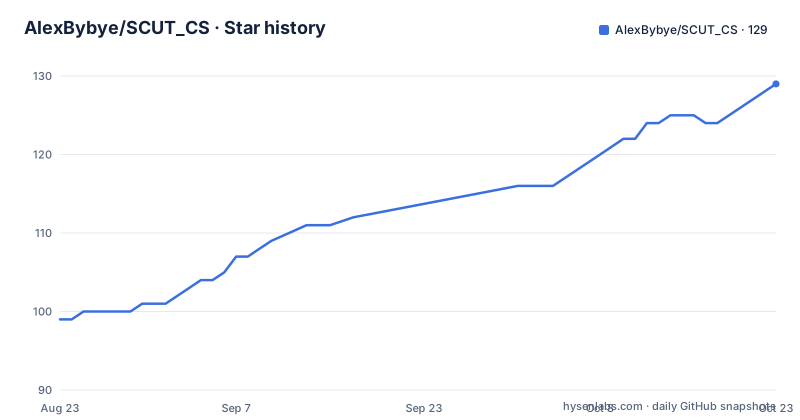
Star history
- AlexBybye/SCUT_CS128 ★ · +29
| Repository | 2026-08-23 | 2026-10-22 |
|---|---|---|
| AlexBybye/SCUT_CS | 99 | 128 |
29 Stars in the last 60 days, measured from the daily GitHub snapshot. Compare with other projects
Editorial analysis
What SCUT_CS Actually Solves
The repository targets a narrow but real pain: SCUT computer science students who need past exams, lecture notes, and lab reports that are current, specific to their department, and free. The README lists three complaints about existing GitHub projects: they are outdated, they are not tailored to the SCUT CS department, and they charge for exam prep materials. SCUT_CS answers those by collecting resources for over 50 courses, from core CS classes like operating systems and compilers to general education requirements like political theory and English. The intended audience is current students, especially those preparing for finals or course design projects. The repository also serves as a distribution point for the SCUT Huawei Intelligent Base internal open-source materials, though that context is secondary to the archive itself.
Repository Structure and the Encryption Trade-off
The materials are organized by course category, with separate folders for lecture notes, past exams, and lab reports. A key design choice is the split between open and encrypted content. Open resources include lecture notes, practice problems, and past exam papers. Encrypted materials cover homework, lab reports, course designs, and condensed review notes. The README gives four reasons for encryption: to avoid mass duplication that could trigger department action, to protect the balance of review difficulty, to hide contributor identities before graduation, and to manage git-lfs storage limits. The encryption is implemented with per-file SHA-256 hashes, and access is sold per course, with prices like 1 USD for one course and 7 USD for three. The money funds git-lfs quota expansion. This is a pragmatic but controversial choice: it makes the archive partially paid, which contradicts the stated goal of openness. The trade-off is explicit, but users should know that the free portion is not the whole story.
How to Get and Use the Materials
The README offers specific commands and workflows, though it does not provide a one-line install. The recommended method is to star the repository and download individual files via the 'view raw' option, rather than cloning the whole repository. For folder downloads, the README points to a Chrome extension with the ID ffabmkklhbepgcgfonabamgnfafbdlkn. The extension is confirmed to work for entire folders, but the README warns that the repository has a monthly git-lfs download limit of 10 GB, and large files consume that quota. Forking the repository does not bypass the limit, as a fork is just a pointer to the parent repository. The README advises against downloading the entire repository before at least 2027, because the content is not stable and a full download would exhaust the quota. For contributors, adding a skill to the index only requires editing Summary_Skill.md and submitting a pull request, without touching other files.
The RAG Assistant and Skill Market: Work in Progress
The repository includes a sub-project called 'SCUT老学长' (SCUT Senior), an intelligent review assistant built on retrieval-augmented generation. The README states it is in iteration 2, with a fixed scope of 10 courses. Of those, only 2 Markdown files have passed manual review by 'Klosure' and can serve as candidate inputs; 21 others are pending, and 8 are pure image files that still await review. The formal corpus is not yet activated, and the system defaults to a synthetic fixture. There is no live online address, only source code and local development instructions in apps/scut-senior/. The skill market is also in early form: SCUT_SKILL及模版/ contains a list of third-party Agent skills for tools like Claude Code, Codex, and Cursor, but only links and descriptions, not the skill files themselves. The README warns that skills can be executed by agents and pose prompt injection and data exfiltration risks, and recommends scanning any third-party skill with the listed skill-scanner before use.
Limits and Failure Modes
The most obvious limitation is the git-lfs quota. The README states the repository has a monthly download limit of 10 GB, and once that is reached, large files cannot be downloaded for the rest of the month. This is a hard constraint that can make the archive unusable during peak exam periods, which is exactly when students need it most. The README even says 'I really cried this month' after buying the quota himself. Another limitation is the encryption paywall: some materials are not free, contradicting the project's open-source claim. The RAG assistant is not ready for production, and the skill market is an index, not a curated collection, with no responsibility taken for third-party content. For non-SCUT users, the repository is largely irrelevant, as the materials are specific to one university's curriculum and exams. The README also notes that the repository is a trial maintenance phase for 2026-2027, which implies the content may change or disappear.
Alternatives and How They Differ
The main alternative is the general-purpose open-source study archive, such as the popular 'CS-Notes' or university-specific repositories from other institutions. These typically offer a broader range of topics but lack the SCUT-specific exam papers and course structure. Another alternative is the paid note-sharing platforms like Stuvia or Course Hero, which charge per document but have a more stable hosting model. The key difference is that SCUT_CS is free at the point of use (for open materials) but relies on a single maintainer's quota and goodwill. In contrast, a platform like Stuvia distributes storage costs across users. For the RAG assistant, a simpler alternative is to use a general-purpose AI chatbot with a custom prompt, but that lacks the course-specific corpus that SCUT_CS aims to build. The README also mentions an external alternative: KK学长的语雀笔记, which is a separate paid or free note collection that can replace the encrypted review notes.
Maintenance, Cost, and License
The repository is under active development, with the last push on 2026-08-28 and two releases for the RAG assistant: RAG-senior-v1 (tokenless-RAG) and RAG-senior-v2 (steady-RAG). The project is in its third iteration, with a target size of 15 GB. The maintainer covers git-lfs costs through donations and paid access to encrypted materials, but the README shows this is a financial strain. The license is MIT, which allows reuse with attribution, but the encrypted materials are not covered by the open license, as they are distributed separately. The README also warns about academic integrity, noting that the repository can save time but students are responsible for their own work, especially with plagiarism checkers. For a user, the maintenance cost is low: you can star the repository and download what you need, but you must monitor the quota. For a contributor, the cost is higher: you need to follow the contribution guidelines, and your submitted materials may be subject to review. The project's reliance on a single maintainer is a risk, as the README mentions the 'current chairman' and a development team, but the long-term sustainability is uncertain.
Editorial conclusion
Adopt SCUT_CS if you are a current SCUT computer science student who needs past exams, lecture notes, or lab reports, and you accept the repository's storage and access constraints. Do not rely on it if you expect a complete, stable archive or a fully functional RAG assistant, as the assistant is still in iteration 2 with no live deployment. Before using any third-party skill from the index, scan it with the provided skill-scanner, and before downloading large files, check the monthly git-lfs quota. The repository is a living, community-driven project, so verify the freshness of any specific course material yourself.
Frequently asked questions
What does the SCUT_CS repository contain?
It collects study material for the School of Computer Science and Engineering at South China University of Technology, covering 50 or more subjects across core CS courses, programming, maths and physics, and general education. The tree holds subject material, a study plan directory, a SCUT_SKILL and templates panel, and the RAG assistant source under apps/scut-senior/.
Is the SCUT_CS material free to download?
Partly. Class notes, practice problems, past final exam papers and selection material are open. Coursework, lab reports, course design projects and high-level summary notes are encrypted and sold, at 1 USD for one subject or 2 USD for three, with the stated purpose of expanding the git-lfs quota.
Why should I not clone the whole SCUT_CS repository?
The repository is around 20GB against a monthly git-lfs download limit of 10GB, so a full download spends the quota. The project recommends starring it in the cloud and fetching individual files as raw, notes that a fork is only a pointer that hits the same limit, and states that a full local download is not recommended at least before 2027.
What is the SCUT老学长 assistant in SCUT_CS?
It is a retrieval assistant for the collected material, completed to what the project calls PLAN-3. It handles single-subject question answering, exam review, wrong-answer explanation, close reading of pasted material, and optional user-level cross-subject retrieval, with a user-bound seven-day private knowledge store and a separate maintainer review platform.
Does SCUT_CS check the third-party Agent Skills it lists?
No. The project states it inspects no third-party skill, acts only as an index and accepts no responsibility. The panel holds hyperlinks and descriptions rather than copies, and the README advises running a skill-scanner from the list first because a skill is executed by an agent and carries prompt injection and data exfiltration risk.
How are contributions to SCUT_CS handled?
For the skill panel you write the skill in your own repository and open a pull request that adds one line to Summary_Skill.md. For study material the project invites pull requests or contact with the maintainers. For the assistant, contributed material is downloaded, reviewed and filed manually by a maintainer, with no automatic pull request or commit creation.
Official sources
Add this badge to your README
If you maintain this project, the badge below links readers to this analysis and shows its maintenance status from the daily GitHub snapshot. Paste the markdown into your README; add ?metric=license or ?metric=stars to the image URL for a different field.

[](https://hysenlabs.com/projects/alexbybye-scut-cs)Star history chart for your README
[](https://hysenlabs.com/projects/alexbybye-scut-cs)