FastFlowLM: MIT for the orchestration, completely free for the kernels, and a credit line in between
Run LLMs on AMD Ryzen™ AI NPUs in minutes; purpose-built and deeply optimized for the AMD NPUs.
At a glance
- What is it?
- FastFlowLM runs language, vision, audio, embedding and mixture of experts models on AMD Ryzen AI NPUs from a 17 MB runtime with no GPU. Its licensing is split across three artefacts, its headline power claim is the one number the front page does not show, the Dockerfile it ships is a build environment that ends in a shell, and it checks for updates at startup unless told not to.
- Who is it for?
- FastFlowLM suits someone with a Ryzen AI NPU who wants local inference from a small runtime and does not need a GPU, and it is a young project with the documentation inconsistencies that implies. Check the licence before anything else, because the MIT grant covers the orchestration code and CLI while the NPU kernels are described as free for any use under a separate terms file, and a mandatory credit line sits between those two statements.
- Can I use it commercially?
- Check first. The repository uses a licence we do not classify automatically, so read its LICENSE file before any commercial use.
- Is it still maintained?
- Yes. The repository last received commits 1 day ago.
- What is it written in?
- Mainly C++, according to GitHub's language statistics.
Answers come from the project's GitHub data, last synced on November 14, 2026, and from our analysis. They are not legal advice.
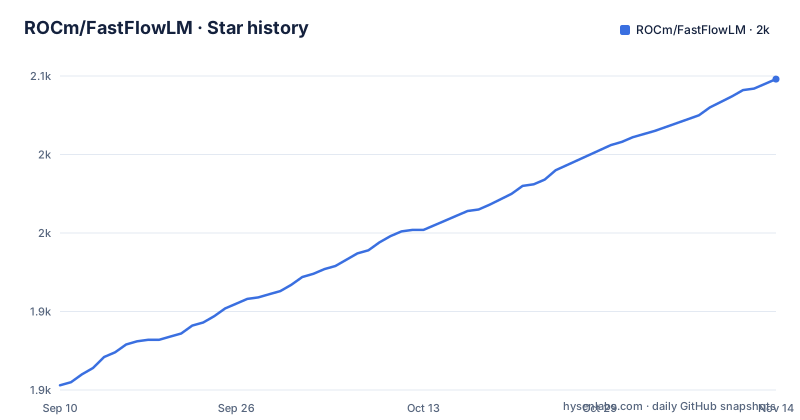
Star history
- ROCm/FastFlowLM2,048 ★ · +195
| Repository | 2026-09-10 | 2026-11-14 |
|---|---|---|
| ROCm/FastFlowLM | 1.9k | 2k |
195 Stars in the last 65 days, measured from the daily GitHub snapshot. Compare with other projects
Editorial analysis
MIT covers the orchestration code, the kernels are called completely free, and a credit line sits in between
The licence section makes three separate statements and they do not compose into one grant.
The first covers orchestration code and CLI tools under the MIT licence, and points at a file called `LICENSE_RUNTIME.txt`. The second covers the NPU accelerated binary kernels, and says they are completely free for any use, including commercial use. The third asks you to acknowledge FastFlowLM in your README, project page or product, with a supplied credit line.
Only the first of those is a licence. The MIT grant is a real one: use, copy, modify, merge, publish, distribute, sublicense, sell, with notice retention as the only condition. The second sentence is an assertion about absence of restriction rather than a set of granted permissions, which means there is no stated warranty disclaimer, no stated redistribution terms and no stated patent position for the part of the system that actually does the work on the NPU. The third is a condition, and it is attached to a claim of being unencumbered.
A kernel set that is free for any use and a mandatory credit line cannot both be unconditional. Either the credit is a request outside the terms, in which case it is not enforced, or it is a condition on use, in which case the kernels are not free for any use.
The repository metadata says MIT. The tree contains `LICENSE_RUNTIME.txt` and `TERMS.md` and no file named `LICENSE`, so the string an automated scanner reads points at a differently named file, and the document that appears to govern the kernels is the one the licence section never names. Read both files before you ship anything built on this.
The one quantified claim on the front page is the one it does not show
The headline block makes four specific assertions: a 17 MB runtime, installation within 20 seconds, context lengths up to 256k tokens, and being over ten times more power efficient.
Three of those are numbers you can check against the artefact. 17 MB describes a download. 20 seconds describes an install. 256k describes a model, and the page names the model it means, Qwen3-4B-Thinking-2507.
The fourth is different in kind. Nothing on the front page states a baseline, a workload, a power measurement method, or a figure more precise than the multiplier. A faster claim with no comparator is unfalsifiable as written, and the power figure is the one a buyer would most want to check, since the whole proposition is running on an NPU instead of a GPU.
The quick links row does point to a benchmarks page and a model list page, so the evidence is elsewhere and the headline is a summary of it. That is a normal arrangement. It is worth noticing that the summary contains exactly one unverifiable number and that the verifiable ones are all about size and time rather than about speed or watts.
The context figure has its own scale caveat. The 256k example is a 4B model, while the newest release in the record adds a 27B model with speculative decoding. So the largest context claim is demonstrated on the smallest class of model on the page, and the flagship model in the most recent release is roughly seven times its parameter count.
Seventeen megabytes is the runtime, and one note uses the word kernels for two different downloads
The 17 MB figure is the runtime and the CLI. It is not a model, and models are fetched separately, which the page is clear about in the notes under the first command.
So a reader who takes 17 MB and starts a session will find the first run blocked on a download from HuggingFace, which the same notes state is required. The size claim is about what you install, not about what you run.
The ambiguity is in what gets downloaded. One note says internet access to HuggingFace is required to download the optimised model kernels. A second mechanism in the same list, a force re-pull of a model tag, is described as fixing corrupted downloads. Those are two different artefacts under one description: the binary kernels that the licence section calls free for any use and that ship in the repository, and the model weights that obviously do not ship in it.
Whichever the note means, the practical consequence is the same and it is worth stating plainly. The runtime is self contained, the models are not, and a first session requires network access to a single host.
That host is also a regional problem the page acknowledges. Where HuggingFace is not reachable, the instruction is to download the model manually and place it in the chosen directory, and it points at an issue thread for the details rather than documenting the layout itself.
Corrupted downloads are a documented routine outcome, not an edge case
The failure modes section treats a bad download as expected. Sometimes downloads from HuggingFace may get corrupted, and the remedy is to re-download with a force flag naming the model tag.
Two things follow. A user on a slow or proxied connection should expect to run that command rather than being unlucky, and nothing in the note distinguishes a corrupted download from a truncated one, so the symptom the user sees is not described. A model that starts and produces nonsense is a different problem from one that fails to load, and the note covers only the second.
The same cluster of notes covers the update check, the model paths, and the regional workaround, all in one list under the first command. That is a lot of behaviour to attach to a single example.
Two of the path rules are worth separating because they are not symmetric. On Windows the model directory sits under the user profile, and a different base folder can be chosen during installation, which means the location is fixed at install time and there is no environment variable to change it afterwards. On Linux the default is a configuration directory, and the location can be overridden by setting an environment variable. A Windows install that picked the wrong folder has no supported way to move the models other than reinstalling.
A third note documents a startup version check, and how to turn it off. That one deserves its own attention and gets it below.
The driver floor is a cutoff, and the only older Windows route is a forum link marked at your own risk
The requirement is stated as a floor with a warning attached: a driver version of 32.0.203.311 or above, checked through Task Manager or Device Manager, and earlier versions are no longer supported.
That is unusual phrasing for a driver requirement. Most projects state a minimum and let older work. This one states a minimum and then closes the door below it, which means a machine on an older driver is not degraded but excluded, with no fallback path and no stated reason.
The recommended routes are ordinary: run Windows Update, or take the driver from AMD's own download page, or follow AMD's installation documentation, which the page notes requires an AMD account.
The fourth option is the interesting one. The page offers unofficial forum downloads and labels them in the same note: third party content not verified by AMD, download and use at your own risk. On a Windows build that cannot receive current drivers through normal channels, that link is the only documented way to reach the version the project requires, and the project is simultaneously telling you it is unverifiable.
That is an honest disclosure and an uncomfortable position. It is worth knowing before you install on a machine whose driver delivery is constrained, because the project's own compatibility floor and its own recommended workarounds point in opposite directions.
The local server swaps models on request, listens on 52625, and documents no authentication
There are two run modes. Terminal mode takes a model tag and opens a session, with a slash command to toggle performance reporting and another to exit. Server mode takes an optional model tag that sets the initial model, and the page states that if another model is requested the runtime will automatically switch to it.
So the local server is a long lived process that loads, unloads and reloads model weights on demand. On an NPU that means reallocating device memory per switch, and the page documents no warm swap, no pinning, no maximum resident model count and no way to see what is currently loaded other than asking it.
The port is 52625 by default. It is an unusual number, and the page gives no configuration option for it, so a second instance on the same host is a port conflict rather than a flag.
The interface section says the runtime offers a REST API and an OpenAI compatible API. Nothing on the page says what listens on 52625 in particular, so it is not possible to tell from this page whether that port is the REST endpoint, the OpenAI compatible one, or both. In either case, a server that executes model inference and can be asked to swap its loaded model is being exposed on a fixed port, and the page documents no authentication, no token, and no binding restriction.
If you run this on anything but a loopback interface, that is the first thing to check and the first thing to put in front of.
The shipped Dockerfile is a build environment that ends in a shell
The Dockerfile in the repository does not run FastFlowLM. Its own label says it is a build environment with all dependencies pre-installed, and it ends like this:
WORKDIR /workspace

CMD ["/bin/bash"]
There is no entrypoint for the runtime, no exposed port, and no command that starts the CLI or the server. It is a developer container, and the related search terms people use for it include Docker, which suggests some readers expect otherwise.
The base image is not pinned here either. The file opens with a build argument for the base image and a `FROM` that consumes it, with no default value, so a build fails unless the caller supplies one.
Two more build arguments control optional package sources. One adds an Ubuntu PPA when non-empty, the other adds a Debian backports suite and installs `libxrt-dev` from it. So the same image can be built against an official backports archive or against a third party PPA, and neither is the default.
The dependency list is long and explains the feature set. It includes the full ffmpeg development stack across the codec, format, utility, resample and scale libraries, which is what the audio support needs, plus FFTW, Boost with its program options component, DRM, readline, curl and the XDNA runtime. Then the toolchain: a C++ build environment, CMake, Ninja, Rust with Cargo, nasm for assembly, and patchelf for binary rewriting. On top of that sit the packaging tools, `debhelper-compat`, `dpkg-dev` and `fakeroot`, and a `debian/` directory at the repository root to match.
The tree also has `.gitmodules` and a `third_party/` directory, so some of that dependency set arrives as submodules rather than from the package manager.
It advertises private and offline while checking for updates at startup by default
One of the three selling points is fully private and offline. The claim is about inference: your prompts and completions do not leave the machine.
Read the notes in the same section and the picture is narrower. The runtime requires internet access to download models and their kernels on first use. It runs a version check at startup. And it is distributed as a download from the release page, with the documentation, the model list and the benchmarks all on a remote site.
The startup check is the one with a switch. There is an environment variable that disables it, and the page tells you the name. That it is documented at all, rather than simply omitted, is to the project's credit, and it means the behaviour is deliberate and controllable.
So the honest reading is that inference is local and the tool still talks to the network. That is the normal shape for a local inference runtime in 2026, and a reader who needs a genuinely air gapped install has to know about the disable switch rather than assume it.
Two other things the page states about scope are narrower than the headline. The top block advertises vision, audio, embedding and mixture of experts support, while the section further down describes the same capability as language models and now vision language models. The news section adds a vision language action robotics policy, which is a third scope statement. The underlying capability list has grown faster than the prose describing it, which is the expected shape for a project at this stage and is worth keeping in mind when reading either description.
Editorial conclusion
FastFlowLM suits someone with a Ryzen AI NPU who wants local inference from a small runtime and does not need a GPU, and it is a young project with the documentation inconsistencies that implies. Check the licence before anything else, because the MIT grant covers the orchestration code and CLI while the NPU kernels are described as free for any use under a separate terms file, and a mandatory credit line sits between those two statements. Read `LICENSE_RUNTIME.txt` and `TERMS.md` yourself and settle the attribution question with the project rather than assuming the metadata's MIT covers the whole thing. Verify the power claim before you act on it, since over ten times more efficient is the one number on the front page with no baseline, no workload and no measurement method, while the benchmarks live on a separate site. Plan for the network: the runtime is 17 MB, the models are not, the first run needs a reachable model host, downloads are documented to corrupt sometimes, and a version check runs at startup unless you set the environment variable that disables it. If you run the local server anywhere but loopback, establish what is listening on 52625 and whether authentication is enabled before you expose it, and remember it will switch models on request. Install from a release package rather than from the Dockerfile, which is a build environment that ends in a shell and has no pinned base image. If you are on an older Windows driver, note that the project states a hard cutoff below which it is unsupported and offers forum downloads as the only documented route, flagged as unverified by AMD. Two model path rules are not symmetric, and on Windows the folder is fixed at install time with no environment variable to move it.
Frequently asked questions
what is fastflowlm
A 17 MB runtime and single command CLI that runs large language models on AMD Ryzen AI NPUs with XDNA2, covering the Strix, Strix Halo, Kraken and Gorgon Point series. It claims no GPU or CPU load, context up to 256k tokens, and supports vision, audio, embedding and mixture of experts models, with both a terminal mode and a local server mode.
how to use fastflowlm
Install the packaged Windows installer, then open PowerShell and run flm with a model tag to start a terminal session, or flm serve with a tag to start the local server, which listens on port 52625 by default. flm list shows available models, flm pull with a force flag re-downloads a corrupted one, and slash commands inside a session toggle performance reporting and exit.
fastflowlm vs llama cpp
The front page names llama.cpp and Ollama as inspirations and draws no comparison beyond that. The differences it does state are that FastFlowLM targets AMD Ryzen AI NPUs rather than CPUs and GPUs, ships as a 17 MB runtime, requires no low level tuning, and reaches 256k context on a 4B model.
fastflowlm vs ollama
Ollama is named as an inspiration and no head to head comparison appears anywhere in the documentation. The stated differences are target hardware, where FastFlowLM runs entirely on the NPU, the 17 MB runtime, and a 20 second install. Model storage paths also differ: a user profile directory on Windows, a configuration directory on Linux.
lemonade vs fastflowlm
They are integrated rather than alternatives. FastFlowLM was integrated into AMD's Lemonade Server on 10/01/2025, and the Linux quick start routes through Lemonade Server documentation and a Lemonade walkthrough video. The front page does not describe Lemonade's feature set or draw a comparison.
Official sources
Add this badge to your README
If you maintain this project, the badge below links readers to this analysis and shows its maintenance status from the daily GitHub snapshot. Paste the markdown into your README; add ?metric=license or ?metric=stars to the image URL for a different field.

[](https://hysenlabs.com/projects/rocm-fastflowlm)Star history chart for your README
[](https://hysenlabs.com/projects/rocm-fastflowlm)Was this useful?