AList: A Go-Based File List and WebDAV Gateway for Multi-Storage Aggregation
GitHub describes it as A file list/WebDAV program that supports multiple storages, powered by Gin and Solidjs. The repository metadata lists Go as its primary language. The metadata lists the AGPL-3.0 license. This article stays within the project description and details documented in the GitHub repository README.
At a glance
- What is it?
- AList is an open-source Go program that unifies dozens of cloud storage backends behind a single file list and WebDAV interface. It is practical for self-hosters who want one access point for many accounts, but its AGPL license and reliance on third-party APIs carry real caveats.
- Who is it for?
- Adopt AList if you manage multiple cloud storage accounts and want a single, self-hosted WebDAV endpoint with a web UI for browsing, previewing, and transferring files. Do not use it if you need a stable, API-guaranteed integration for every backend, since each driver depends on a third-party provider's interface, which can change.
- Can I use it commercially?
- Yes, with strict conditions. AGPL-3.0 is a network copyleft licence: if people use a modified version over a network, for example as a hosted service, you must offer them its source code under the same licence.
- Is it still maintained?
- Yes. The repository last received commits 25 days ago.
- What is it written in?
- Mainly Go, according to GitHub's language statistics.
Answers come from the project's GitHub data, last synced on November 15, 2026, and from our analysis. They are not legal advice.
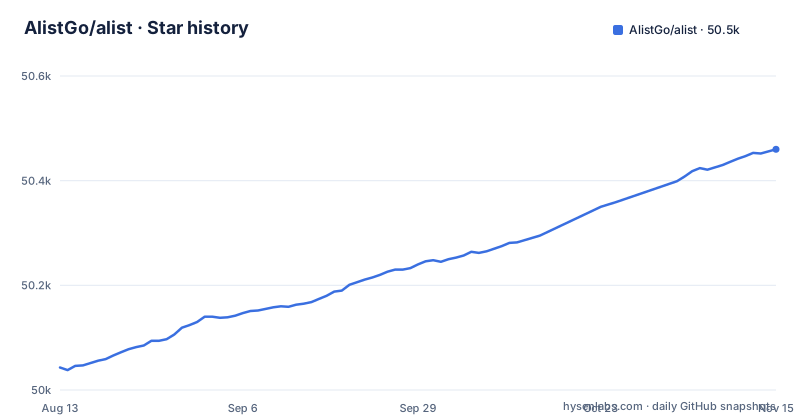
Star history
- AlistGo/alist50,460 ★ · +417
| Repository | 2026-08-13 | 2026-11-15 |
|---|---|---|
| AlistGo/alist | 50k | 50.5k |
417 Stars in the last 94 days, measured from the daily GitHub snapshot. Compare with other projects
Editorial analysis
What AList Solves and Who It Targets
AList addresses a common annoyance: having files scattered across many cloud providers, each with its own web interface and no common protocol. The project is a file list program that aggregates multiple storages into one browsable web front end, and it exposes the same content over WebDAV. That means a user can mount a single WebDAV URL in an operating system or a client application and reach files stored on, say, OneDrive, Google Drive, and S3 without logging into each service separately. The intended audience is self-hosters, homelab users, and small teams who want a unified view of their own or shared cloud accounts. It is not a backup tool or a sync client; it is a gateway and a catalog. The README lists over 30 supported backends, from mainstream services like Dropbox and Mega to regional ones like 189cloud and Lanzou. The breadth is the core value proposition.
The Mechanism: Gin Backend, Solidjs Frontend, and 302 Redirects
The architecture is straightforward from the repository description: the backend is written in Go using the Gin web framework, and the front end uses Solidjs. The README explains that the program only does 302 redirect or traffic forwarding for file access. That is a key design choice. When a user requests a file, AList does not proxy the bytes through its own server. Instead, it returns a redirect to the actual storage location, or it forwards the request. This reduces bandwidth load on the AList instance and avoids storing or intercepting user data, as the disclaimer states. The program calls official SDKs or interfaces for each storage provider, according to the README, and does not modify the official interface behavior. For WebDAV support, it implements the protocol on top of the aggregated storages, which allows standard clients to read and write files. The front end handles rendering, previews, and user interactions, while the backend manages authentication, routes, and storage abstraction.
Getting It Running: Docker and Beyond
The README points to Docker Hub for deployment, with the image xhofe/alist. That is the most direct path: pull the image, run a container, and map a port. The documentation at alistgo.com covers more options, but the repository itself does not list a one-line install command beyond Docker. For a non-Docker setup, the project is a Go application, so building from source is possible by cloning the repository and using go build, though the README does not provide explicit steps. The README lists WebDAV, with details on alistgo.com, and protected routes with password protection and authentication. The demo at al.nn.ci gives a live example, but you should expect to configure each storage driver individually, as each has its own required fields.
The Real Limitation: Unofficial APIs and Account Risk
The biggest limitation is not in the code but in the dependency on third-party services. The README says the program is implemented by calling official sdk/interfaces; how each driver talks to its provider is not described. The disclaimer itself warns that users should understand and bear risks including account ban and download speed limits. This is a genuine failure mode: a storage provider can change its internal API at any time, breaking the corresponding driver until the AList project releases a fix. For a self-hosted service that is meant to be reliable, this is a serious operational concern. It is only as available as the underlying storage.
Comparing Approaches: AList vs. rclone
The most direct alternative is rclone, a command-line program that also supports many cloud storage backends and exposes them via WebDAV, SFTP, and other protocols. The difference in approach is fundamental. rclone is a client that mounts a remote as a filesystem or syncs files, and it runs as a process on a single machine. AList is a server application with a web UI, designed for multiple users and browser access. AList bundles the front end and the WebDAV server into one deployable unit, which is simpler for non-technical users. However, rclone's command-line nature makes it more scriptable and easier to integrate into backup pipelines. The choice depends on whether you want a user-facing portal or a tool for your own file operations.
Feature Depth: Previews, Uploads, and Multi-Threading
Beyond basic listing, AList includes a set of features that make it a usable file manager. It supports file preview for PDF, markdown, code, and plain text, plus image gallery mode and video/audio playback with lyrics and subtitles. Office documents like docx, pptx, and xlsx can be previewed in the browser. Users can upload, delete, create directories, rename, move, and copy files, with the option to allow visitors to upload. There is also offline download, which lets the server fetch files from a URL, and a multi-thread download acceleration for single-thread downloads or streams. Copying files between two storages is supported, which is useful for migrating data. These features are listed as completed in the README, but the README does not give limits on file size or concurrency. The web upload and management features suggest that AList is not just a read-only index but a functional remote file manager.
Licensing and Maintenance Costs
AList is licensed under AGPL-3.0. That is a strong copyleft license. If you modify the code and run it as a network service, you may be required to provide the source code to users who interact with the service. This is a real consideration for organizations that do not want to disclose modifications. The release history shows frequent updates: v3.65.0 (2026-10-13) and v3.66.0 (2026-10-21) are the latest releases, and a beta release is dated August 2024. That indicates active development, but it also means you should expect breaking changes between versions. The upgrade cost is moderate: because it is a single binary or container, replacing the version is straightforward, but you must re-test each storage driver and any custom configuration. The README sends general questions to the GitHub discussion forum, keeps issues for bug reports and feature requests, and also links Discord and a Telegram group.
Editorial conclusion
Adopt AList if you manage multiple cloud storage accounts and want a single, self-hosted WebDAV endpoint with a web UI for browsing, previewing, and transferring files. Do not use it if you need a stable, API-guaranteed integration for every backend, since each driver depends on a third-party provider's interface, which can change. Before deploying, verify that each storage driver you depend on is actively maintained in the current release, and review the AGPL-3.0 obligations for any network service you expose. Also check the latest release notes for breaking changes, as the project moves quickly with frequent version bumps.
Frequently asked questions
What is AList?
A file list and WebDAV program that supports multiple storages, powered by Gin and SolidJS. It puts around thirty storage backends behind one web interface and one WebDAV endpoint.
Does AList store my files or just forward requests?
It only does 302 redirect and traffic forwarding, and does not intercept, store or tamper with any user data. Your files stay with the provider whose storage you mounted.
How do I deploy AList with Docker Compose?
The repository ships a compose file using the xhofe/alist:latest image with ports 5244 and 5245 published and /etc/alist mounted to /opt/alist/data. Note that it sets PUID=0 and PGID=0, so the process runs as root unless you change those values.
Can AList mount OneDrive or SharePoint over WebDAV?
Yes. The feature list marks WebDAV as supporting OneDrive and SharePoint without their API, as an alternative to the OneDrive and Sharepoint storage drivers, which are listed separately with global, cn, de and us endpoints.
What licence is AList released under?
AGPL-3.0. The README states that AList is open-source software licensed under the AGPL-3.0 license, and a LICENSE file sits at the root of the repository.
Official sources
Add this badge to your README
If you maintain this project, the badge below links readers to this analysis and shows its maintenance status from the daily GitHub snapshot. Paste the markdown into your README; add ?metric=license or ?metric=stars to the image URL for a different field.

[](https://hysenlabs.com/projects/alistgo-alist)Star history chart for your README
[](https://hysenlabs.com/projects/alistgo-alist)Was this useful?