Diffractsim makes scalar diffraction a script, not a figure
✨🔬 A flexible diffraction simulator for exploring and visualizing physical optics.
At a glance
- What is it?
- Diffractsim is a Python diffraction simulator built around the angular spectrum method, where each example is a script that produces a picture, and the whole library is written to be differentiable under JAX so optical setups can be optimised rather than just drawn. The release history has not moved since 2022.
- Who is it for?
- Adopt Diffractsim if you want to compute diffraction patterns and optical setups in Python rather than in a commercial ray tracer, especially if you plan to optimise the setup with gradient methods, since the JAX backend makes the propagation differentiable. Do not adopt it for incoherent light, because the feature list marks that as coming soon, and treat the release history as a signal, since the only tagged release is from 2022 even though the code has moved since.
- Can I use it commercially?
- Check first. The repository uses a licence we do not classify automatically, so read its LICENSE file before any commercial use.
- Is it still maintained?
- Yes. The repository last received commits 107 days ago.
- What is it written in?
- Mainly Python, according to GitHub's language statistics.
Answers come from the project's GitHub data, last synced on November 7, 2026, and from our analysis. They are not legal advice.
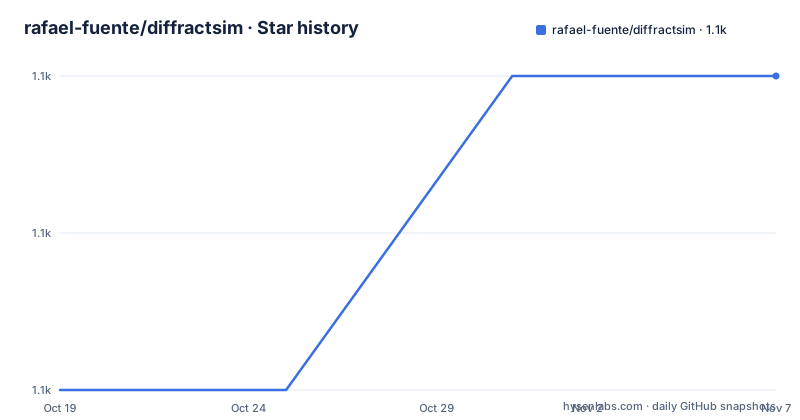
Star history
- rafael-fuente/diffractsim1,082 ★ · +2
| Repository | 2026-10-19 | 2026-11-07 |
|---|---|---|
| rafael-fuente/diffractsim | 1.1k | 1.1k |
2 Stars in the last 19 days, measured from the daily GitHub snapshot. Compare with other projects
Editorial analysis
The angular spectrum method as the base
The simulator uses mainly scalar diffraction techniques for light propagation, and the base method is the angular spectrum method, which is described in a companion article on the author's site. The pitch is a flexible and easy-to-use Python diffraction simulator that focuses on visualizing physical optics phenomena, and the features list spells out what that means in practice: arbitrary apertures and light spectrums, full-path optical propagation with arbitrary zoom in the region of interest, lenses, phase holograms generation and reconstruction, GPU acceleration, and differentiable propagation. The one entry that is not ticked is incoherent light, marked as coming soon, and that single gap defines the boundary of the tool, since a scalar diffraction model assumes coherent light.
Every example is a script you run
The examples directory is the documentation, and each entry is a file you execute. The set covers the canonical problems in physical optics: a hexagonal aperture in monochromatic and in polychromatic light, rectangular and hexagonal gratings, a binary grating, rings, a Bahtinov mask, a double slit interference in the near and far field, the diffraction of text, and a Fresnel zone plate focus spot. There are lens examples too, including a circular aperture lens, a hexagonal aperture lens, a lens aberration, a lens point spread function, an object behind the lens, and an optical imaging system computed directly and also by convolution, with a polychromatic variant. To compute your own pattern you specify the aperture as an image and give its size:
python hexagon_monochromatic.pyand the run produces the corresponding image. The examples are linked to from the README next to each result, so a pattern you see in the documentation maps directly to the script that produced it.
The JAX backend is what makes it a design tool
The property that separates this from a plotting script is stated in the package description: the implemented methods are differentiable when using the JAX backend, enabling optimization and design of the optical setups. That is a much stronger claim than fast. A differentiable propagation means the optical parameters, the aperture, the propagation distance, are inputs to a function whose output has a gradient, so you can optimise a phase profile to produce a target field rather than searching for it by hand. The GPU acceleration is separate and simpler, and it comes in two flavours. CuPy gives speed, and JAX gives speed plus differentiability:
diffractsim.set_backend("JAX")Neither CuPy, JAX nor CUDA is required to use the package, and both are described as offering a significant speed boost. The first GPU accelerated run can be slow because Python is caching the required functions, after which it can be about 10x and 100x faster than a CPU backend depending on the GPU, and the speed boost rises as the grid gets larger.
Longitudinal profiles are embarrassingly parallel
Diffractsim can also compute and visualize longitudinal profiles, which is where the GPU recommendation is strongest. The argument is that since the computation of each propagation distance is independent, it can be fully parallelised, and therefore GPU use is highly recommended. Two example scripts show it, one for a lens and one for an axicon, and both produce a profile along the propagation axis rather than a single plane. This is the case where a scalar method has an advantage over a ray tracer, because there is no ray to trace, only a field to propagate, and a field can be evaluated at every distance at once.
Phase retrieval and beam shaping are included
The library includes an implementation of the classic phase retrieval problem, which arises when you want to retrieve a wavefront from two intensity measurements acquired in two different planes. The example recovers the GitHub logo at the Fourier plane from a coherently illuminated square-shaped aperture: the script generates a phase mask, stores it as an image using an HSV colourmap, and places it on the aperture to reconstruct the desired image, and the mask can be reproduced with spatial light modulators or metasurfaces. Beyond iterative algorithms, for rotationally symmetric profiles there is a high fidelity method for beam shaping using phase profiles, described in a paper in Optics Express, which allows generating flat-top or ring-shaped beams from Gaussian beams, and the library implements that too, with scripts for flat-top and ring-shaped beam generation. A generalisation for non-rotationally symmetric profiles is implemented with physics-informed neural networks in a separate repository, and Diffractsim is used there to validate the generated phase profiles.
Dependencies and a version story worth reading carefully
The requirements file is modest for a physics library: numpy at 1.19.4 or newer, scipy at 1.6.0 or newer, pillow at 8.3.2 or newer, matplotlib at 3.3.3 or newer, plus progressbar, pyparsing, kiwisolver, cycler, dateutil and six. The setup.py lists the install requirements as numpy, scipy, Pillow, matplotlib, progressbar and jax, and declares the version as 2.2.13 with the licence MPL 2.0. The discrepancy with the tag list is worth noting: the only GitHub release is v2.2.3 from 2022-02-18, while the packaging metadata says 2.2.13, so the version in the package is ahead of the last tag. The last push to the main branch was on 2026-07-24, so the code is still being worked on.
The colour handling is a physics decision, not a styling one
One detail in the package description deserves more attention than it gets: the plotting options include counting with CIE Color matching functions for accurate color reproduction. In a diffraction simulator, colour is not decoration. A polychromatic simulation has a physical wavelength axis, and mapping that to RGB by a convenient shortcut produces colours that do not correspond to any real illuminant. Using the CIE colour matching functions means the simulated spectrum is converted to tristimulus values the way a real detector would, so a rendered pattern can be compared with a photograph of the same experiment. The project also carries a DOI badge and a CITATION.cff file, and the citation it asks for is the Zenodo DOI for the software, which is the convention for research code that other papers build on.
Editorial conclusion
Adopt Diffractsim if you want to compute diffraction patterns and optical setups in Python rather than in a commercial ray tracer, especially if you plan to optimise the setup with gradient methods, since the JAX backend makes the propagation differentiable. Do not adopt it for incoherent light, because the feature list marks that as coming soon, and treat the release history as a signal, since the only tagged release is from 2022 even though the code has moved since. Verify first that the version you install matches the setup.py version of 2.2.13 rather than the 2.2.3 tag, and that your numpy and scipy versions satisfy the pinned requirements.
Frequently asked questions
What is Diffractsim?
It is a flexible and easy-to-use Python diffraction simulator that focuses on visualizing physical optics phenomena. It uses mainly scalar diffraction techniques for light propagation, provides an interface for simulation set up, and includes several plotting options using CIE Color matching functions for accurate color reproduction.
How do I install Diffractsim?
Run `pip install diffractsim`, or clone the repository and run `python setup.py install` from the project folder, which also gives you the examples and the aperture files.
How do I enable GPU acceleration in Diffractsim?
Install either CuPy or JAX along with CUDA, then call `diffractsim.set_backend("CUDA")` for CuPy or `diffractsim.set_backend("JAX")` for JAX. Neither is required to use the package, and the first GPU run is slow because Python is caching the required functions.
What makes Diffractsim useful for optical design rather than just pictures?
The implemented methods are differentiable when using the JAX backend, so the optical setup can be optimised by gradient methods rather than searched by hand. The CuPy backend gives speed without the differentiability.
Does Diffractsim handle incoherent light?
Not yet. The feature list marks Incoherent Light as coming soon, and the simulator uses mainly scalar diffraction techniques, which assume coherent light.
Official sources
Add this badge to your README
If you maintain this project, the badge below links readers to this analysis and shows its maintenance status from the daily GitHub snapshot. Paste the markdown into your README; add ?metric=license or ?metric=stars to the image URL for a different field.

[](https://hysenlabs.com/projects/rafael-fuente-diffractsim)Star history chart for your README
[](https://hysenlabs.com/projects/rafael-fuente-diffractsim)Was this useful?