Alloy 6: a self-contained jar with the model finder and SAT solvers inside
Alloy is a language for describing structures and a tool for exploring them. It has been used in a wide range of applications from finding holes in security mechanisms to designing telephone switching networks. This repository contains the code for the tool.
At a glance
- What is it?
- Alloy is a language for describing structures and a tool for exploring them, and this repository holds the code for the tool, packaged as Alloy 6, a single executable jar that bundles an extended Kodkod model finder, several SAT solvers, the standard Alloy library and tutorial samples. The judgement is that the packaging decision is the engineering story here, since the same jar can be used as a command line tool or dropped into another application as an API.
- Who is it for?
- Alloy fits a modelling or verification team that wants to state a system's structure in a small formal language and let a solver search it for counterexamples, and it suits an application that wants Alloy as a library rather than a separate tool, since the same jar can be embedded.
- Can I use it commercially?
- Check first. The repository uses a licence we do not classify automatically, so read its LICENSE file before any commercial use.
- Is it still maintained?
- Yes. The repository last received commits 150 days ago.
- What is it written in?
- Mainly Java, according to GitHub's language statistics.
Answers come from the project's GitHub data, last synced on November 7, 2026, and from our analysis. They are not legal advice.
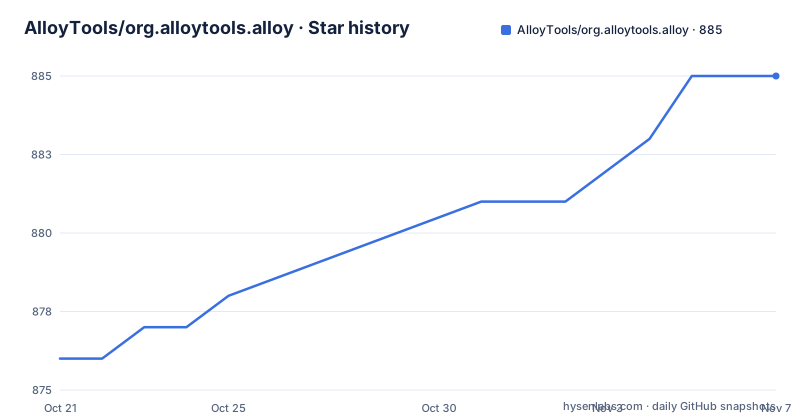
Star history
- AlloyTools/org.alloytools.alloy885 ★ · +9
| Repository | 2026-10-21 | 2026-11-07 |
|---|---|---|
| AlloyTools/org.alloytools.alloy | 876 | 885 |
9 Stars in the last 17 days, measured from the daily GitHub snapshot. Compare with other projects
Editorial analysis
A language for structures, and a tool to explore them
Alloy is described as a language for describing structures and a tool for exploring them, and the range of uses named in the repository description runs from finding holes in security mechanisms to designing telephone switching networks. That is a useful signal about the kind of problem the language is for. You write down a domain as relations and constraints, a set of facts that must hold, and some assertions that should follow, and the tool searches the space of structures for a counterexample. The point is that the search is exhaustive over a bounded scope, so a counterexample is a real instance that breaks your claim, and the absence of one is a statement about that scope rather than about the world. This repository contains the code for the tool, and the tool is a Java application with a long history, which shapes everything about how it is packaged and how you get it.
The jar carries the model finder and the solvers with it
Alloy 6 is packaged as a self-contained executable. Inside the jar sits an extended version of the Kodkod model finder, a variety of SAT solvers, the standard Alloy library and a collection of tutorial samples, and the same jar file can be incorporated into other applications to use Alloy as an API, and it includes the source code. That last point matters when you evaluate a tool like this, because you can read what the model finder is doing rather than treating it as a black box. The solver set is deliberately mixed. Sat4j is the cross-platform solver that always works, and then there are more efficient native solvers, minisat, lingeling and plingeling, and glucose, which run as native code for speed. The requirements are modest in the useful sense, since Alloy runs on all operating systems with a recent JVM, and the README specifies Java 17 or later.
Building it with Gradle in about four commands
The README keeps a TL;DR section for the build, and the sequence is short. You clone the repository with its submodules, change into the directory, run the Gradle wrapper, and then start the resulting jar:
$ git clone --recursive https://github.com/AlloyTools/org.alloytools.alloy.git
$ cd org.alloytools.alloy
$ ./gradlew build
$ java -jar org.alloytools.alloy.dist/target/org.alloytools.alloy.dist.jar
The clone needs the --recursive flag because the native solver code and other components arrive as submodules, and the output jar is the one built by the dist project. The wrapper is the normal convenience here, since the README describes it as a script that downloads the correct version of Gradle and runs the build scripts, with the settings in gradle.properties and settings.gradle. What you get is the GUI, so the build produces an interactive modelling environment rather than a library you link against, and the embedding story is handled by including the same jar in your own application.
Behind a proxy, the build needs explicit options
One practical warning in the README deserves its own section, because it is the kind of thing that costs an afternoon. If you are behind a proxy, the call to gradlew is likely to fail, unless you pass it further options about the http and https proxies, and possibly your login and password on that proxy. The README gives a concrete invocation, with the XXXXX values to be replaced by the adequate settings:
$ ./gradlew -Dhttps.proxyHost=XXXXX -Dhttp.proxyHost=XXXXX -Dhttp.proxyPort=XXXXX \
          -Dhttps.proxyPort=XXXXX -Dhttp.proxyUser=XXXXX -Dhttp.proxyPassword=XXXXX \
          -Dhttps.proxyUser=XXXXX -Dhttps.proxyPassword=XXXXX \
          build
So the proxy configuration is passed as Java system properties rather than through a settings file, and both the http and the https sides need them, including credentials when the proxy requires authentication. If your first build attempt fails while resolving dependencies, this is the reason and this is the fix.
Six bnd projects, and the files that hold them together
The build uses a bnd workspace with a maven layout, which is what lets the same code be built with Gradle or worked on interactively in the Eclipse IDE. The workspace divides into a handful of projects, and the names say what each one does. The cnf directory is the setup directory, where dependencies are specified in cnf/central.xml using the maven POM layout. org.alloytools.alloy.application holds the main application code, the parser, the AST, the visualiser and the application layer. org.alloytools.alloy.dist is the project that creates the distribution executable JAR. org.alloytools.alloy.extra holds models and examples. org.alloytools.pardinus is a Kodkod extension without native code, and org.alloytools.kodkod.nativesat holds the native code libraries for Kodkod, which is the layer where the faster solvers live. Three files have special meaning in a bnd workspace, since cnf/build.bnd carries the settings shared between projects, each bnd.bnd holds the settings for its own project and drags code into a JAR, and cnf/central.mvn lists dependencies from Maven Central.
Two supported IDE paths and a snapshot release channel
Interactive development is a first class path here, and the README covers two IDEs in detail. For Eclipse you install the IDE, install the Bndtools plugin, and import the existing projects from the Git workspace, and Bndtools then continuously creates the final executable and the projects update automatically when a downstream project changes. For IntelliJ IDEA, the README is specific that it is the Ultimate Edition only, that the Osmorc plugin must be enabled for Bndtools support, and that you import from an external Bnd or Bndtools model rather than linking the Gradle project, since linking it prevents running Alloy inside the IDE. The instructions also tell you to choose 17 as the project SDK and to mark the jni folder as a resource root, and then run the SimpleGUI class in the application project. On the automation side, GitHub Actions builds after every commit and releases snapshots to the Sonatype OSS snapshot repository for every CI build, which is a useful channel if you want a nightly jar. Packaging for macOS is less settled, since only the executable jar is currently built and the DMG for OSX systems is handled in the conveyor directory.
The wider tree, the release history and the licence
The top level of the repository shows how the tool has grown beyond the six projects the README describes. Alongside the application, dist and extra projects there are org.alloytools.alloy.cli, org.alloytools.alloy.core, org.alloytools.alloy.lsp and org.alloytools.alloy.wrappers, plus an org.alloytools.api project and two Pardinus projects, org.alloytools.pardinus.core and org.alloytools.pardinus.native. The presence of an LSP project and a CLI project says the tool is being packaged for machine consumption rather than only for the desktop. The releases show a long history with a slow cadence: v5.1.0 in 2019, v6.0.0 in November 2021 as the major new release, and v6.2.0 in January 2025. The last push was on 2026-06-11 and the repository is not archived, so work continues on the master branch without a new tagged release. The licence field is recorded as a custom licence that GitHub cannot classify, so the LICENSE file at the root is the authoritative text, and CONTRIBUTING.md is where the contribution process is set out.
Editorial conclusion
Alloy fits a modelling or verification team that wants to state a system's structure in a small formal language and let a solver search it for counterexamples, and it suits an application that wants Alloy as a library rather than a separate tool, since the same jar can be embedded. It is the wrong choice if you need a text editor and a deployment pipeline rather than a modelling environment, and it is a poor fit for machine learning work, because the analysis is over the relational structure you write down rather than over data you collect. Before you build it, confirm your JDK is 17 or newer, and if you sit behind a proxy read the proxy options the README gives, because the Gradle build will otherwise fail on the first dependency download.
Frequently asked questions
What do I need to run Alloy?
A recent JVM, with Java 17 or later as the stated requirement, since Alloy runs on all operating systems. The runnable jar is self-contained and already includes the extended Kodkod model finder, the standard Alloy library and several SAT solvers, both the cross-platform Sat4j and the faster native ones such as minisat, lingeling and glucose.
How do I build Alloy from source?
Clone the repository with the --recursive flag, change into the directory, run ./gradlew build, and then start the result with java -jar org.alloytools.alloy.dist/target/org.alloytools.alloy.dist.jar. The clone needs submodules because the native solver code arrives that way.
What happens if I build Alloy behind a proxy?
The call to gradlew is likely to fail, because the wrapper has to download Gradle and the dependencies itself. The README says to pass further options about the http and https proxies, and possibly your login and password, in the form of Java system properties such as https.proxyHost and http.proxyPort on the gradlew command line.
Official sources
Add this badge to your README
If you maintain this project, the badge below links readers to this analysis and shows its maintenance status from the daily GitHub snapshot. Paste the markdown into your README; add ?metric=license or ?metric=stars to the image URL for a different field.

[](https://hysenlabs.com/projects/alloytools-org-alloytools-alloy)Star history chart for your README
[](https://hysenlabs.com/projects/alloytools-org-alloytools-alloy)Was this useful?