OrigamiSimulator: GPU WebGL Simulation for Crease Patterns
Realtime WebGL origami simulator
At a glance
- What is it?
- OrigamiSimulator is a browser-based JavaScript application for exploring how SVG and FOLD crease patterns behave when all creases fold together. It uses WebGL fragment shaders for iterative geometry solving, with import, visualization, export, and limited VR support.
- Who is it for?
- Adopt OrigamiSimulator when you need an interactive WebGL view of a crease pattern or an exported folded model, rather than a sequential paper-folding tutorial. Do not treat it as a validated structural analysis package or a replacement for a solver with documented engineering tolerances.
- Can I use it commercially?
- Yes. MIT is a permissive licence: you can use, modify and sell software built on it, as long as you keep its copyright and licence notices.
- Is it still maintained?
- Yes. The repository last received commits 26 days ago.
- What is it written in?
- Mainly JavaScript, according to GitHub's language statistics.
Answers come from the project's GitHub data, last synced on November 7, 2026, and from our analysis. They are not legal advice.
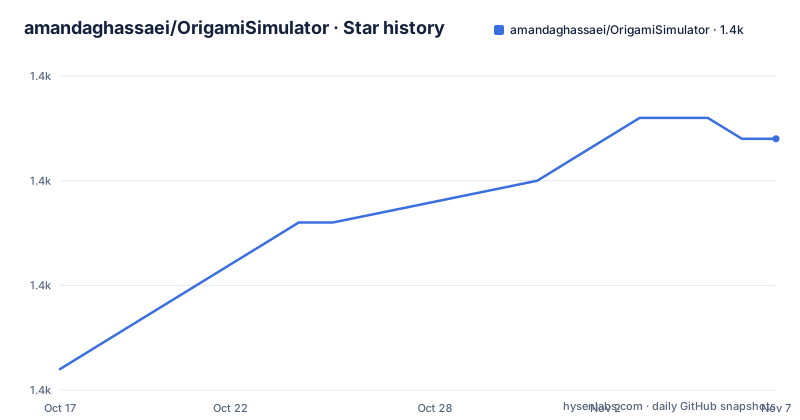
Star history
- amandaghassaei/OrigamiSimulator1,407 ★ · +11
| Repository | 2026-10-17 | 2026-11-07 |
|---|---|---|
| amandaghassaei/OrigamiSimulator | 1.4k | 1.4k |
11 Stars in the last 21 days, measured from the daily GitHub snapshot. Compare with other projects
Editorial analysis
What OrigamiSimulator Models
OrigamiSimulator addresses a specific limitation of ordinary origami demonstrations: a physical sheet is usually folded through a sequence of actions, while this application attempts to fold every crease at once. That distinction matters for crease patterns whose geometry depends on the entire structure. The solver starts with an initially flat sheet and iteratively calculates small geometric displacements caused by the crease constraints and applied forces.
The intended users are people working with crease-pattern geometry, including origami designers, researchers, students, and engineers who want to inspect a design interactively. The README presents it as a realtime WebGL simulator rather than a paper craft instruction set. Its interface exposes a Fold Percent control, a 3D model, import controls, advanced visualization, and export options. It can show the internal strain of the model while it folds.
The project does not claim that its result is a complete engineering model of paper, hinges, thickness, friction, or material failure. Its documented scope is geometric simulation based on crease behavior and GPU computation. That makes it useful for visual exploration and design inspection, but users should check whether their required physical quantities are represented before drawing conclusions from the geometry.
GPU Fragment Shaders and Geometry Solving
The core technical choice is to execute the simulation methods in parallel GPU fragment shaders. According to the README, the application iteratively solves for small displacements in the geometry of the flat sheet. Forces associated with creases influence those displacements, and the process repeats until the simulated structure reaches a selected fold state.
This is different from treating each crease as an independent animation. In a simultaneous solver, changing the fold percentage affects the constraints across the pattern at once. The README links this implementation to the paper Fast, Interactive Origami Simulation using GPU Computation, as well as work on structural origami and freeform variations. The repository also uses ruling-aware triangulation to import curved crease patterns and preprocess the bending between creases.
The visible application layer is built with three.js. The README identifies three.js as the library responsible for rendering and 3D interaction. FOLD serves as the internal data structure, while numeric.js handles linear algebra operations. Earcut and cdt2d triangulate arbitrary polygonal faces from imported geometry. This division makes the project more than a display shell: parsing, triangulation, solving, rendering, and export are separate concerns represented by different libraries and directories in the repository.
Importing SVG and FOLD Patterns
The application accepts crease patterns in SVG and FOLD formats. The README points users to in-application import instructions, but it does not reproduce the exact file preparation steps, supported SVG elements, or validation rules. That omission matters because an import failure can reflect an unsupported drawing convention rather than an invalid crease pattern.
FOLD is more than a file extension in this project. The README says that FOLD is used as the internal data structure and that methods from the FOLD API are used for SVG parsing. The repository links to the FOLD API documentation. The presence of `CreasePatternScripts/` indicates that pattern-related scripts are part of the repository layout, while `js/` contains the application code.
The simulator also supports curved crease patterns through ruling-aware triangulation. This preprocessing is intended to represent bending between creases more realistically than treating the whole sheet as a collection of flat panels. The README does not define numerical tolerances, convergence criteria, or accepted curve density, so those details remain unconfirmed rather than being treated as guarantees.
Using Fold Percent and 3D Inspection
The README does not provide a local installation command. It directs users to the live demo at `https://origamisimulator.org/` and to the repository for source access. For a first use, open the demo, select an example from the Examples menu, and use the Fold Percent slider. The documented range is 0% for an unfolded sheet, 100% for the assigned fold, and -100% for the opposite mountain and valley assignments.
After changing the fold percentage, drag the model to rotate it and scroll to zoom. These controls provide the basic inspection loop: select a pattern, change its fold state, rotate the geometry, and inspect the result from different viewing angles. The model is interactive because the rendering and 3D interaction layer is handled by three.js.
The Advanced Options menu contains Strain Visualization. This gives a way to inspect internal strain as the sheet moves rather than relying only on the final silhouette. For a design review, compare several fold percentages and watch whether the geometry changes smoothly or develops visible artifacts. The README does not define an artifact threshold, so the application should be used as an interactive inspection tool unless the project documentation provides additional validation criteria.
Exports, Media, and VR Boundaries
The simulator can export the folded state as a FOLD file or as a 3D model in STL or OBJ format. These export paths are available through `File > Save Simulation as...`. The README does not specify export options, precision settings, units, or whether material properties are included. Consequently, an exported mesh should be checked in another suitable viewer or application before it is used as a final manufacturing model.
GIF and WebM video export uses CCapture, according to the external library list. This means the project can record changes over time rather than only presenting a static folded state. The README does not document supported recording settings or browser limitations, so the exact output behavior must be checked in the application.
The README also mentions interactive virtual reality mode for a computer connected to a VR headset and hand controllers. It immediately qualifies this feature with “sorry I think this may be deprecated now!” That is an explicit maintenance warning from the project documentation. VR should therefore be treated as an uncertain feature. The repository's last push was on 2026-10-13, which confirms recent repository activity, but it does not establish that every older feature has been refreshed.
License, Alternatives, and Adoption Boundaries
The repository identifies its license as MIT. The README does not add project-specific licensing instructions or discuss obligations beyond the license designation. Organizations using the code should review the repository `LICENSE` file themselves rather than relying on this article for legal interpretation. No GitHub releases are listed, so there is no documented release channel or versioned upgrade path in the repository record.
A real alternative is a sequential origami simulator or a CAD system that applies crease hinges one after another. Such tools can be more appropriate when the order of folds, explicit hinge constraints, or manufacturing steps are the central question. OrigamiSimulator instead targets simultaneous, force-responsive folding in GPU fragment shaders, which is a different computational and interaction model.
It is also the wrong choice for a user who needs documented material stress, thickness, friction, or experimentally calibrated paper behavior. The README confirms strain visualization, but it does not claim that the strain field is a substitute for structural validation. OrigamiSimulator is most defensible for visual geometry exploration, crease-pattern iteration, and producing a folded-state preview before more specialized analysis.
Editorial conclusion
Adopt OrigamiSimulator when you need an interactive WebGL view of a crease pattern or an exported folded model, rather than a sequential paper-folding tutorial. Do not treat it as a validated structural analysis package or a replacement for a solver with documented engineering tolerances. Verify first that your SVG or FOLD input is interpreted as expected, then inspect the Fold Percent, strain visualization, and exported geometry before using results in a design workflow. The repository was last pushed on 2026-10-13 and has no GitHub releases.
Frequently asked questions
How do I install OrigamiSimulator?
The README provides a live demo at `https://origamisimulator.org/` and links to the GitHub repository, but it does not document a local installation command. The repository includes `index.html`, `css/`, `js/`, and `dependencies/`, which indicate a browser application layout, but the README does not state a complete local setup procedure.
Can OrigamiSimulator import SVG crease patterns?
Yes. The README says that users can upload their own crease patterns in SVG or FOLD formats. It also says that FOLD methods are used for SVG parsing, while curved crease patterns are preprocessed using ruling-aware triangulation.
Does OrigamiSimulator model folding one crease at a time?
Not according to its stated design. The README says the simulation attempts to fold every crease simultaneously by iteratively solving for small geometric displacements caused by crease forces. It does not present the application as a sequential paper-folding workflow.
Can OrigamiSimulator export a folded model?
Yes. The README lists FOLD, STL, and OBJ exports through `File > Save Simulation as...`. It does not document mesh precision, units, or material properties in the exported files.
Official sources
Add this badge to your README
If you maintain this project, the badge below links readers to this analysis and shows its maintenance status from the daily GitHub snapshot. Paste the markdown into your README; add ?metric=license or ?metric=stars to the image URL for a different field.

[](https://hysenlabs.com/projects/amandaghassaei-origamisimulator)Star history chart for your README
[](https://hysenlabs.com/projects/amandaghassaei-origamisimulator)Was this useful?