Three.js r187: A Practical Look at the WebGL and WebGPU 3D Library
three.js is an easy-to-use, lightweight, cross-browser JavaScript 3D library with WebGL and WebGPU renderers, plus SVG and CSS3D renderers available as addons.
At a glance
- What is it?
- Three.js is a JavaScript 3D library that targets cross-browser rendering with WebGL and WebGPU. This article reviews its core mechanism, setup, limitations, and alternatives for engineers deciding whether to adopt it.
- Who is it for?
- Adopt Three.js if you need a general-purpose, cross-browser 3D library with a large ecosystem of examples and addons, and you are comfortable with frequent releases and a migration path between WebGL and WebGPU. Do not choose it if you require a minimal, hand-rolled WebGL implementation or if you need a fully stable API with long-term support; the project's active release cycle (r185 on 2026-07-01, r186 on 2026-09-24, r187 on 2026-10-30) means breaking changes are possible.
- Can I use it commercially?
- Yes. MIT is a permissive licence: you can use, modify and sell software built on it, as long as you keep its copyright and licence notices.
- Is it still maintained?
- Yes. The repository received new commits within the last day.
- What is it written in?
- Mainly JavaScript, according to GitHub's language statistics.
Answers come from the project's GitHub data, last synced on November 13, 2026, and from our analysis. They are not legal advice.
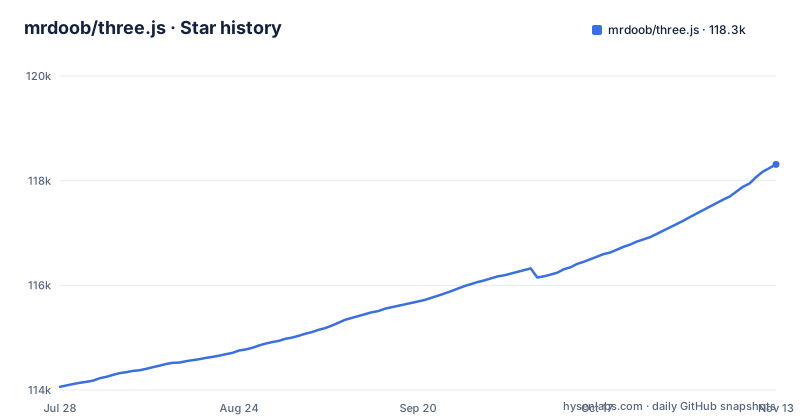
Star history
- mrdoob/three.js118,310 ★ · +4,248
| Repository | 2026-07-28 | 2026-11-13 |
|---|---|---|
| mrdoob/three.js | 114.1k | 118.3k |
4,248 Stars in the last 108 days, measured from the daily GitHub snapshot. Compare with other projects
Editorial analysis
What Problem Three.js Solves and Who It Is For
Three.js solves the problem of writing raw WebGL or WebGPU code for every 3D scene. Without it, an engineer must manage buffers, shaders, and the render loop manually, which is error-prone and time-consuming. The library provides a high-level scene graph, camera abstractions, and renderer backends, so you can focus on content rather than graphics pipeline plumbing. It is aimed at developers who need a general-purpose 3D library for the browser, whether for product visualizations, data visualization, or interactive web experiences. The README describes the goal as an easy-to-use, lightweight, cross-browser, general-purpose 3D library, which signals a broad audience. The current builds include WebGL and WebGPU renderers, with SVG and CSS3D renderers available as addons, so it covers both hardware-accelerated and fallback rendering paths. This is not a niche tool; it is a generalist's toolkit, which means it suits teams that want a single library for multiple 3D tasks rather than a specialized engine.
How the Rendering Architecture Works
The core mechanism is a scene graph that you populate with objects, then render each frame. The README's example shows the pattern: you create a PerspectiveCamera, a Scene, a geometry (BoxGeometry), a material (MeshNormalMaterial), and a Mesh that combines geometry and material. You add the mesh to the scene, create a WebGLRenderer, set its size, and call setAnimationLoop with an animate function. That function updates the scene and triggers rendering on each frame. The renderer abstracts the underlying WebGL or WebGPU API, so you do not touch shaders or buffers directly. Data flow is straightforward: the scene graph holds objects, the renderer traverses it, and for each visible object it uploads geometry and material data to the GPU, then issues draw calls. The library also handles camera matrices and projection, so you only set camera position and properties. This design trades control for convenience: you lose fine-grained GPU management, but you gain a consistent API across renderers. The documentation states that the current builds only include WebGL and WebGPU renderers, which means the core is focused on modern hardware acceleration, while older 2D renderers are addons.
Getting Started: Installation and First Scene
The README gives a clear starting point using ES modules. You install the package via npm (import * as THREE from 'three'), then write a minimal scene. The example code creates a camera with a 70-degree field of view, a scene, a box geometry of 0.2 units, a MeshNormalMaterial, and a mesh. It sets the camera position to z=1, creates a WebGLRenderer with antialias: true, sets the size to the window dimensions, and appends the renderer's canvas to the document body. The setAnimationLoop method takes an animate function, which you define to update the scene. This is the entire boilerplate for a spinning cube. For local development, the README suggests cloning the repository with git clone --depth=1 to avoid the full 2 GB history, which is a practical tip for working on the source itself. For most users, installing via npm is simpler, and the package name is 'three'. The example is minimal, but it shows the core API surface: Scene, PerspectiveCamera, BoxGeometry, MeshNormalMaterial, Mesh, and WebGLRenderer. This is enough to build a first 3D scene, and the linked jsfiddle provides a live demo.
Limitations and Failure Modes
The most obvious limitation is that Three.js is a general-purpose library, not a game engine. Another failure mode is API instability: the release list shows r185 on 2026-07-01, r186 on 2026-09-24 and r187 on 2026-10-30. This rapid pace means breaking changes can appear between releases, and the project maintains a Migration Guide for that reason. If you adopt Three.js, you must budget time for upgrades and regression testing. Additionally, the library's size is a concern: the build-size badge points to a bundlephobia result, which source does not quantify. Tree-shaking only helps if you use ES modules carefully. Finally, WebGL and WebGPU are not universally supported on all devices, especially older browsers, so you may need fallbacks or feature detection. The SVG and CSS3D renderers exist as addons, but they are not the primary path, so performance will suffer if you rely on them.
Alternative Approaches: Raw WebGL and Specialized Engines
The main alternative is writing raw WebGL or WebGPU code yourself, which gives you full control over performance and bundle size but requires deep graphics knowledge and significantly more code. Three.js abstracts away shader compilation, buffer management, and matrix math, but at the cost of flexibility. Another alternative is a specialized 3D engine like Babylon.js, which offers a more opinionated framework with built-in physics and scene management. The difference is approach: Babylon.js is a full-featured engine with a steeper learning curve, while Three.js is a library that you compose with your own code. For teams that need a game engine's features out of the box, Babylon.js is a better fit. For teams that want a minimal, hackable core, raw WebGL or a thin wrapper like regl might be preferable. The choice hinges on how much abstraction you want: Three.js sits in the middle, providing a high-level API but not a complete engine. If you need to render simple 3D content without heavy dependencies, Three.js is a reasonable choice, but if you need a physics engine or a node-based editor, you will have to add those yourself.
Maintenance, Upgrades, and License Implications
The project is actively maintained, with regular releases and a public dev branch. The last push was on 2026-11-02, a few days after the r187 release on 2026-10-30, indicating continuous development. The license is MIT, which means you can use, modify, and distribute the library in commercial and open-source projects with minimal restrictions, as long as you retain the copyright notice. This is a permissive license, so there are no copyleft obligations. However, the rapid release cycle means you must track changes. The README links a Migration Guide for upgrading. For example, moving from r185 to r187 in four months suggests you should check the migration guide before upgrading. The repository's history is large (2 GB), but that only matters if you clone the full repo. For maintenance, you should pin your three.js version in your package.json and test upgrades in a staging environment. The project's documentation and examples are extensive, which helps with learning, but they are also tied to the latest version, so older code may not work with newer releases. Overall, the MIT license is a strong positive, but the upgrade cadence is a real cost that you must plan for.
Editorial conclusion
Adopt Three.js if you need a general-purpose, cross-browser 3D library with a large ecosystem of examples and addons, and you are comfortable with frequent releases and a migration path between WebGL and WebGPU. Do not choose it if you require a minimal, hand-rolled WebGL implementation or if you need a fully stable API with long-term support; the project's active release cycle (r185 on 2026-07-01, r186 on 2026-09-24, r187 on 2026-10-30) means breaking changes are possible. Before adopting, verify that your target browsers support WebGL2 (or WebGPU if you plan to use that renderer), check the migration guide for any changes between your current version and r187, and confirm that the bundle size fits your performance budget. The library's strength is its breadth, not its stability, so plan for upgrades as part of your maintenance cycle.
Frequently asked questions
Is threejs worth learning?
The repository does not make that argument, it states the aim: an easy-to-use, lightweight, cross-browser, general-purpose 3D library whose current builds include only the WebGL and WebGPU renderers, with SVG and CSS3D available as addons.
What does 3 js mean?
The project is published as mrdoob/three.js on GitHub and as three on npm, and describes itself simply as a JavaScript 3D library. The repository does not explain where the name comes from.
Is ThreeJS a framework?
It calls itself a library rather than a framework, and the packaging is a library layout: an ES module and a CommonJS build for the main entry, an addons entry pointing at examples/jsm, and separate entries for the WebGPU and TSL builds.
how to use three.js
Import the package, create a PerspectiveCamera and a Scene, add a BoxGeometry with a MeshNormalMaterial to a Mesh, then create a WebGLRenderer with antialias, call setSize, pass an animate function to setAnimationLoop, and append the renderer element to document.body. The README points at a hosted fiddle for the expected result.
how to install three.js
The package is three on npm, published as an ES module and a CommonJS build, with the manifest version 0.187.0 lining up with the r187 release tag. Cloning the repository with all its history is a ~2 GB download, so a shallow clone is the suggested approach.
how to use three js in react
The repository does not discuss React. What it exposes is the entry points: three.module.js for import, three.cjs for require, ./addons for the addons bundle, ./webgpu for the WebGPU build, and ./tsl for the shading language build.
Official sources
Where developers are discussing it
Posts on Hacker News, dev.to and Lobsters that link to this repository, found by our scan of those communities. 1 in the last 30 days; newest first.
- High Roughness, Sharp Highlights: Auditing a glTF Material in Three.jsdev.to · Oct 27, 2026 · 6 points · 1 comments
Add this badge to your README
If you maintain this project, the badge below links readers to this analysis and shows its maintenance status from the daily GitHub snapshot. Paste the markdown into your README; add ?metric=license or ?metric=stars to the image URL for a different field.

[](https://hysenlabs.com/projects/mrdoob-three-js)Star history chart for your README
[](https://hysenlabs.com/projects/mrdoob-three-js)Was this useful?