BubbleTransition: A Swift Modal Transition with a Bubble Effect
GitHub describes it as A custom modal transition that presents and dismiss a controller with an expanding bubble effect.. The repository metadata lists Swift as its primary language. The metadata lists the MIT license. This article stays within the project description and details documented in the GitHub repository README.
At a glance
- What is it?
- BubbleTransition is a Swift library that presents and dismisses view controllers with an expanding bubble animation. It is a focused tool for iOS developers who want a specific visual effect without building the transition logic themselves.
- Who is it for?
- Adopt BubbleTransition if you need a polished, one-off bubble transition for a modal presentation and you are comfortable with its limited maintenance. Avoid it for complex or frequently updated projects, or if you need extensive customization beyond its few properties.
- Can I use it commercially?
- Yes. MIT is a permissive licence: you can use, modify and sell software built on it, as long as you keep its copyright and licence notices.
- Is it still maintained?
- Probably not. The repository last received commits 72 months ago, on November 4, 2020.
- What is it written in?
- Mainly Swift, according to GitHub's language statistics.
Answers come from the project's GitHub data, last synced on October 22, 2026, and from our analysis. They are not legal advice.
Star history
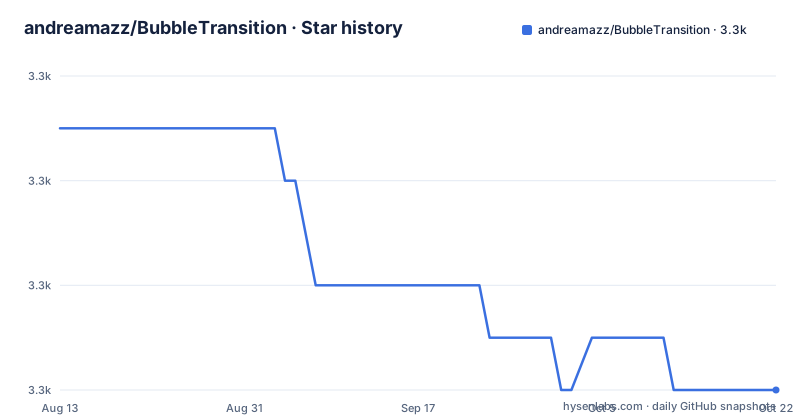
- andreamazz/BubbleTransition3,298 ★ · -5
| Repository | 2026-08-13 | 2026-10-22 |
|---|---|---|
| andreamazz/BubbleTransition | 3.3k | 3.3k |
-5 Stars in the last 70 days, measured from the daily GitHub snapshot. Compare with other projects
Editorial analysis
The Problem: A Specific Visual Effect Without Custom Transition Code
iOS developers who want a modal presentation that expands from a point, like a bubble, normally have to write a custom UIViewControllerAnimatedTransitioning class. That involves managing the animation context, the container view, the snapshot, and the dismissal logic. BubbleTransition packages this into a small Swift library. It is for app developers who want this exact effect and prefer to configure a few properties rather than maintain their own transition code. The library is not a general-purpose animation framework. It does one thing: present and dismiss a controller with an expanding and shrinking bubble.
How the Bubble Mechanism Works
The core is a BubbleTransition class that conforms to UIViewControllerAnimatedTransitioning. You set three properties before presentation: transitionMode, startingPoint, and bubbleColor. The transitionMode is an enum with .present, .dismiss, and .pop cases. The startingPoint is a CGPoint that defines where the bubble originates. The bubbleColor must match the destination controller's background color, as the README notes. The transition animates a circular view from the starting point, scaling it to cover the screen for presentation, and reverses that for dismissal. The duration property controls the animation speed, with a default of 0.5 seconds. This is a straightforward mechanism: a single animated shape, no complex layers or physics.
Getting It Running: Installation and Setup
Installation is available through CocoaPods, Carthage, and Swift Package Manager. For CocoaPods, add 'pod 'BubbleTransition', '~> 3.2.0'' to your Podfile and use use_frameworks!. For Carthage, add 'github "andreamazz/BubbleTransition"' to your Cartfile. For SPM, use Xcode's File > Swift Packages > Add Package Dependency and enter the repository URL. After installation, your presenting view controller must conform to UIViewControllerTransitioningDelegate. You create a BubbleTransition instance, set its transitionMode to .present, set startingPoint and bubbleColor, and assign it as the transitioningDelegate. The presented controller needs modalPresentationStyle = .custom and modalPresentationCapturesStatusBarAppearance = true. The README provides a code snippet for prepare(for:sender:).
Interactive Dismissal: The Swipe Gesture
BubbleTransition includes an interactive dismissal gesture. You use a BubbleInteractiveTransition class, attach it to the presented controller, and implement interactionControllerForDismissal in the presenting controller. The README shows how to set interactionThreshold and swipeDirection. The threshold is a value like 0.5, and the swipeDirection can be .up, among others. The presented controller must call finish() on the interactive transition if a button triggers dismissal, otherwise the gesture may conflict. This is a useful addition, but it adds complexity. The gesture handling is separate from the main transition class, so you manage two objects. The README points to sample code for the full implementation, but the provided snippet is enough for basic setup.
Properties and Customization Limits
The library exposes four properties: startingPoint, duration, transitionMode, and bubbleColor. That is the entire customization surface. There is no option for bubble shape, easing curve, or animation spring. The bubble is always a circle that expands from a point. The bubbleColor must match the destination background, which is a constraint. If you want a different visual, you must fork the code or write your own transition. The duration is a simple TimeInterval, so you cannot specify per-phase timing. This is fine for a single effect, but it is limiting for apps that need varied transitions.
Limitations and Wrong Use Cases
The most obvious limitation is maintenance. The last release, 3.1.1, was pushed in August 2018. The README copyright notice says 2018-2020, but no releases after 2018 exist in the supplied data. Swift has evolved since then, and the library may not compile with the latest Swift versions without modification. The README also mentions an Objective-C equivalent via a gist, but that is a separate resource. The library is not suitable for apps that need accessibility support for reduced motion, as there is no mention of such an option. It is also a poor fit for complex modal presentations that need multiple animations or custom backgrounds, because the bubble effect is all-or-nothing. If your app targets iOS 13 or later, you may need to check compatibility with the new modal presentation styles, though the README does not address this.
Alternatives: Writing Your Own Transition vs. Other Libraries
The main alternative is to write a custom UIViewControllerAnimatedTransitioning. That gives you full control over the animation, easing, and interaction. The cost is more code and more testing. Another alternative is to use a general-purpose transition library like Hero, which offers a variety of effects and uses a declarative syntax. Hero is more complex and has a larger API surface. BubbleTransition is simpler but limited to one effect. If you need multiple transition styles, Hero or a custom solution is better. If you only need the bubble effect, BubbleTransition saves you time, provided it works with your toolchain.
Maintenance and License Considerations
The project is licensed under MIT, which permits commercial use, modification, and distribution, with the requirement to include the copyright notice. The license text in the README includes a copyright notice for 2018-2020, but the repository has not seen a push since 2018. This means the code is frozen. There is no indication of ongoing maintenance or issue resolution. The author, Andrea Mazzini, is the primary contributor, and the README mentions accepting pull requests. However, the lack of recent releases suggests that you should not expect updates for new Swift versions or iOS features. The maintenance cost is on you: you may need to patch the code to compile with your Swift version. The sample project is available, but the README truncates the full implementation, so you may need to clone the repository to see the complete setup.
Editorial conclusion
Adopt BubbleTransition if you need a polished, one-off bubble transition for a modal presentation and you are comfortable with its limited maintenance. Avoid it for complex or frequently updated projects, or if you need extensive customization beyond its few properties. Before integrating, verify that the library compiles with your Swift version and iOS deployment target, and test the interactive dismissal on your target devices, as the gesture threshold and direction may need tuning. The last release is from 2018, so treat it as a stable but frozen dependency.
Frequently asked questions
What does BubbleTransition do?
It is a modal presentation transition for iOS. A controller is presented with a circle expanding from a point you choose until it fills the screen, and dismissed with the same circle contracting back, rather than the default slide. The transition also supports an interactive swipe to dismiss, with a threshold and a swipe direction you set.
How do you install BubbleTransition?
Three routes are given. CocoaPods asks for the pod name with a pessimistic 3.2.0 constraint and use_frameworks!. Carthage takes the repository path. Swift Package Manager is added through the Swift Packages menu with the repository URL and the latest release. Note that the newest release published is 3.1.1, so the pod constraint is above anything published.
Why does my BubbleTransition show a visible edge while animating?
Because the bubble colour does not match the destination. The documentation states that the bubble colour property should match the destination controller's background colour, and that property defaults to white. During the animation the circle and the uncovered area are both visible, so a mismatch reads as a moving edge for the whole duration.
Is BubbleTransition still being worked on?
There is no recent activity to point to. The default branch was last pushed on 2020-11-04, the newest release is 3.1.1 from 2018-08-22, and three issues are open. The licence text carries a copyright range of 2018 to 2020.
Official sources
Add this badge to your README
If you maintain this project, the badge below links readers to this analysis and shows its maintenance status from the daily GitHub snapshot. Paste the markdown into your README; add ?metric=license or ?metric=stars to the image URL for a different field.

[](https://hysenlabs.com/projects/andreamazz-bubbletransition)Star history chart for your README
[](https://hysenlabs.com/projects/andreamazz-bubbletransition)