ARKit-CoreLocation: pinning GPS coordinates into an AR scene on iOS
Combines the high accuracy of AR with the scale of GPS data.
At a glance
- What is it?
- ARCL combines SceneKit rendering with CoreLocation so that real-world coordinates can be placed as nodes in an ARKit world, and it tries to sharpen GPS accuracy using movement through that world. It is an iOS-only Swift library with a 2019 release history and a 2026 repository push.
- Who is it for?
- Adopt ARCL if you are building an iOS app that needs real-world coordinates rendered as annotations in an ARKit scene and you accept the True North calibration step and the experimental status of the improved-location feature. Do not adopt it for Android, for a Mac app, or for anything where a 2019-era release line and an iOS 11 baseline are a problem.
- Can I use it commercially?
- Yes. MIT is a permissive licence: you can use, modify and sell software built on it, as long as you keep its copyright and licence notices.
- Is it still maintained?
- Yes. The repository last received commits 166 days ago.
- What is it written in?
- Mainly Swift, according to GitHub's language statistics.
Answers come from the project's GitHub data, last synced on November 15, 2026, and from our analysis. They are not legal advice.
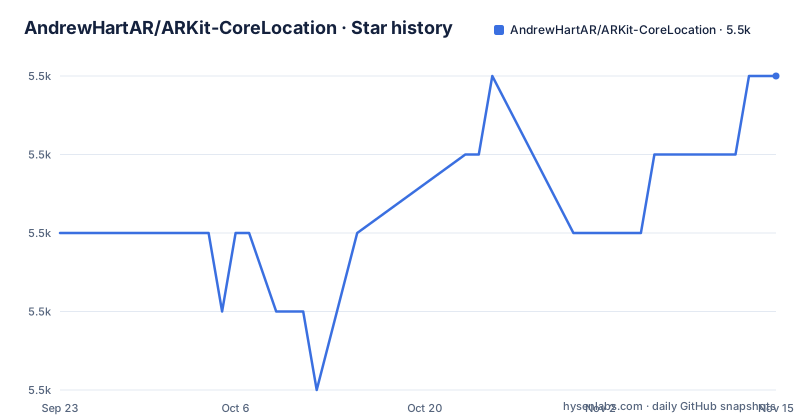
Star history
- AndrewHartAR/ARKit-CoreLocation5,527 ★ · +2
| Repository | 2026-09-23 | 2026-11-15 |
|---|---|---|
| AndrewHartAR/ARKit-CoreLocation | 5.5k | 5.5k |
2 Stars in the last 53 days, measured from the daily GitHub snapshot. Compare with other projects
Editorial analysis
What ARCL actually solves for an iOS developer
CoreLocation gives you a global position with a stated low degree of accuracy. ARKit gives you a locally consistent world that is accurate at short range but has no idea where it sits on the planet. ARCL exists to weld the two together: it lets you attach a real-world CLLocation to an object that lives inside a SceneKit scene, so a pin can hover over Canary Wharf rather than over an abstract origin point.
The audience is narrow by design. The README lists ARKit's requirements as iOS 11 and a device set of iPhone 6S and upwards, iPhone SE, iPad (2017), and all iPad Pro models. There is no Android story and no Mac story. If your app is cross-platform, this library only covers the Apple half, and the second feature it advertises, improved location accuracy, is described in the README as being in an experimental phase.
The SceneLocationView and LocationNode mechanism
The library is built around a single class, SceneLocationView. You call run() when the view is in focus and pause() when it is interrupted, such as when the user moves to another view or leaves the app. That lifecycle split is not optional bookkeeping: an AR session that keeps running in the background keeps consuming camera and motion data.
Placement goes through LocationNode, which subclasses SCNNode and carries a real-world location alongside its scene properties. LocationAnnotationNode is the ready-made subclass for 2D content that always faces the camera. It has three initializers: a UIImage, a UIView, or a CALayer. The distinction matters. A UIView is converted internally into a UIImage, so the README states plainly that you cannot update the content dynamically; the CALayer path exists precisely for cases where you want to update contents live.
Adding a node happens in one of two ways. addLocationNodeWithConfirmedLocation places a node whose coordinate you already trust. addLocationNodeForCurrentPosition positions the node at the device's own place in the world first and then assigns it a coordinate. There is also a scaleRelativeToDistance flag on LocationAnnotationNode. Left at its default, a 100x100 image renders at 100x100 on screen regardless of distance, so a far-away pin looks the same size as a near one. Setting the flag to true makes annotations shrink with distance instead.
Installing ARCL and placing your first pin
The README documents three setup routes: CocoaPods, Swift Package Manager, and adding the source files manually. The CocoaPods route is the one with the most detail. Add the pod to your Podfile under the name ARCL, then run pod update and pod install from your project folder. The manual route means copying every file from the ARKit+CoreLocation/Source directory into your project and importing ARKit, SceneKit, CoreLocation and MapKit yourself.
The CocoaPods and manual routes share one requirement: your Info.plist needs NSCameraUsageDescription and NSLocationWhenInUseUsageDescription, each with a brief explanation. The README points at the demo project for an example. Skip this and the app will fail at runtime when ARKit asks for the camera.
Once the dependency is in, declare the view as a property on your view controller and start the session. The README's own snippet looks like this, with the import and the property declaration first:
import ARCL
import CoreLocation

class ViewController: UIViewController {
  var sceneLocationView = SceneLocationView()
}
You then call run() and add the view as a subview, and set its frame in viewDidLayoutSubviews so it fills the screen:
override func viewDidLoad() {
  super.viewDidLoad()

  sceneLocationView.run()
  view.addSubview(sceneLocationView)
}

override func viewDidLayoutSubviews() {
  super.viewDidLayoutSubviews()
  sceneLocationView.frame = view.bounds
}
After run() has been called, build a coordinate and wrap it in a CLLocation with an altitude, then hand that to a LocationAnnotationNode together with an image. The README uses Canary Wharf as the example coordinate:
let coordinate = CLLocationCoordinate2D(latitude: 51.504571, longitude: -0.019717)
let location = CLLocation(coordinate: coordinate, altitude: 300)
let image = UIImage(named: "pin")!

let annotationNode = LocationAnnotationNode(location: location, image: image)
The final step is adding it to the scene, and this is the call that decides how the node is anchored:
sceneLocationView.addLocationNodeWithConfirmedLocation(locationNode: annotationNode)What you should see, per the README, is the pin hovering above Canary Wharf once the view's frame is set. If you are building the package from the command line rather than through Xcode, the README gives a swift build invocation that passes an explicit SDK path and a simulator target through -Xswiftc flags.
True North calibration is a step you cannot skip
The README does not bury this, but it is easy to miss: the Usage section says to be sure to read the True North calibration section. That warning is the honest part of the documentation. ARKit's world tracking has its own idea of forward, and the compass heading from CoreLocation has its own, and the two do not agree out of the box. Any annotation you place will be rotated by whatever error exists between them.
If your use case depends on a pin sitting within a few degrees of true, budget time for testing on real hardware in real environments, because a simulator cannot reproduce the magnetic conditions that make this hard.
Where ARCL is the wrong tool
The improved location accuracy feature, which the README calls potentially the most important component, is explicitly in an experimental phase. Do not build a product whose core promise is centimetre-grade positioning on top of it without your own validation.
The device floor is another boundary. ARKit on iOS 11 with an iPhone 6S baseline means older hardware is out. If your user base includes older iPhones, ARCL is simply not the layer to solve that.
There is also a rendering constraint that catches people out. LocationAnnotationNode built from a UIView cannot be updated dynamically because the view is rasterised to a UIImage on init. Teams that want a live-updating annotation, a countdown, a changing label, need the CALayer initializer instead. Choosing the wrong one shows up as an annotation that renders once and then never changes, which looks like a bug in ARCL but is documented behaviour.
Finally, the release cadence is worth stating plainly. The most recent tagged release is 1.2.1 from 2019-08-23, following 1.2.0 in June 2019 and 1.1.0 in March 2019. The repository's last push was on 2026-06-02, so there is activity on the develop branch, but the tags have not moved in years. Anyone pinning to a released version is pinning to code from 2019.
How ARCL differs from building on ARKit alone
Plain ARKit with SceneKit is the obvious alternative, and the difference is not cosmetic. ARKit alone anchors everything to an arbitrary world origin established when the session starts. A node at position (0, 0, -5) is five metres in front of wherever you happened to be standing. It has no relationship to latitude or longitude, and it does not survive the session.
To get a real-world coordinate with plain ARKit you would have to maintain the mapping yourself: read CLLocationManager updates, compute a local tangent plane around some reference point, convert every coordinate into scene units, and handle the drift as the user walks. ARCL packages that conversion into LocationNode and the two add-location methods. The trade-off is that you inherit ARCL's opinions about altitude handling, its calibration approach, and its experimental accuracy work, rather than tuning those yourself.
For apps that only need to know where the user is, not to draw anything in 3D, CoreLocation alone is the right answer and ARCL adds an entire rendering stack you will not use.
Licence and the cost of staying current
ARCL is MIT licensed, and the repository carries a LICENSE file at the top level alongside an MIT badge in the README. MIT is permissive: it allows commercial and closed-source use provided the copyright notice and permission notice are retained. That is a summary of the licence text, not legal advice; if your organisation has specific obligations around attribution, have counsel read the actual file.
Upgrade cost is the more practical question. Because the tagged releases stop at 1.2.1 from 2019-08-23 while the develop branch received a push on 2026-06-02, there is a real gap between what a version pin gives you and what the repository currently contains. If you depend on a tag, you get a frozen snapshot. If you depend on develop, you get whatever landed most recently with no release note attached. The changelog.md file at the repository root is the place to look for what changed between those points.
Editorial conclusion
Adopt ARCL if you are building an iOS app that needs real-world coordinates rendered as annotations in an ARKit scene and you accept the True North calibration step and the experimental status of the improved-location feature. Do not adopt it for Android, for a Mac app, or for anything where a 2019-era release line and an iOS 11 baseline are a problem. Before committing, verify three things: that your target device appears in the supported list in the README, that you have added NSCameraUsageDescription and NSLocationWhenInUseUsageDescription to your plist, and that the develop branch at commit level still builds against your current Xcode, since the last push was on 2026-06-02 and the most recent tagged release, 1.2.1, dates from 2019-08-23.
Frequently asked questions
Which iPhones support ARKit-CoreLocation?
The README states that ARKit requires iOS 11 and supports iPhone 6S and upwards, iPhone SE, iPad (2017), and all iPad Pro models. There is no Android support.
What does ARKit do in this library?
The README describes ARKit as using camera and motion data to map out the local world as you move around, while CoreLocation supplies the global position. ARCL combines the two so real-world coordinates can be placed as nodes in the AR scene.
How do I install ARKit-CoreLocation?
The README documents CocoaPods, Swift Package Manager, and manual installation. With CocoaPods you add pod 'ARCL' to your Podfile, run pod update and pod install, and add NSCameraUsageDescription and NSLocationWhenInUseUsageDescription to your plist.
Can ARKit-CoreLocation run on Android or macOS?
No. ARCL is a Swift library built on ARKit, SceneKit and CoreLocation, and the README's requirements list only iOS 11 and specific iPhone and iPad models.
Why does my ARKit-CoreLocation annotation not update when I change its content?
If you initialize LocationAnnotationNode with a UIView, the README states the view is converted internally into a UIImage, so the content cannot be updated dynamically. Use the CALayer initializer instead when you need live updates.
Official sources
Add this badge to your README
If you maintain this project, the badge below links readers to this analysis and shows its maintenance status from the daily GitHub snapshot. Paste the markdown into your README; add ?metric=license or ?metric=stars to the image URL for a different field.

[](https://hysenlabs.com/projects/andrewhartar-arkit-corelocation)Star history chart for your README
[](https://hysenlabs.com/projects/andrewhartar-arkit-corelocation)Was this useful?