SwiftSoup: a WHATWG HTML5 parser with a jsoup vocabulary bolted on
SwiftSoup: Pure Swift HTML Parser, with best of DOM, CSS, and jquery (Supports Linux, iOS, Mac, tvOS, watchOS)
At a glance
- What is it?
- SwiftSoup parses HTML for macOS, iOS, tvOS, watchOS, and Linux in pure Swift, and its API reads like the Java library jsoup because it descends from it. The parts that surprise Swift developers are the XML sniffing on every parse call, the three-layer output wrapper, and a profiler that does not exist until you compile it in.
- Who is it for?
- SwiftSoup suits Swift work that wants jsoup shaped scraping without a Java dependency, and it holds up on Linux as well as Apple targets. Read the parse mode rules before feeding it XML, expect `document.html()` to add structure you did not write, and remember that the in-code profiler is compiled out by default.
- Can I use it commercially?
- Yes. MIT is a permissive licence: you can use, modify and sell software built on it, as long as you keep its copyright and licence notices.
- Is it still maintained?
- Yes. The repository last received commits 2 days ago.
- What is it written in?
- Mainly Swift, according to GitHub's language statistics.
Answers come from the project's GitHub data, last synced on November 14, 2026, and from our analysis. They are not legal advice.
Star history
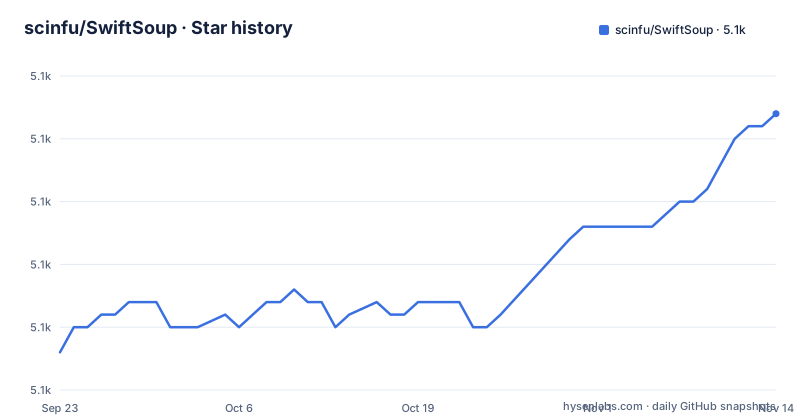
- scinfu/SwiftSoup5,142 ★ · +19
| Repository | 2026-09-23 | 2026-11-14 |
|---|---|---|
| scinfu/SwiftSoup | 5.1k | 5.1k |
19 Stars in the last 52 days, measured from the daily GitHub snapshot. Compare with other projects
Editorial analysis
One declaration decides which parser handles your document
Every call to `SwiftSoup.parse(...)` looks at the first characters of the input. An `<?xml` declaration at the start routes the content to the XML parser, and everything else goes to the HTML parser. That is why feeds and OPML files work without a special call:
let xml = """
<?xml version="1.0" encoding="UTF-8"?>
<opml version="1.0">
  <body>
    <link>I'm link</link>
    I'm img</img>
  </body>
</opml>
"""

let document = try SwiftSoup.parse(xml) // auto-detects XML
print(try document.select("link").first()?.text()) // Output: I'm link
print(try document.select("body > img").first()?.text()) // Output: I'm img
The sniffing is positional, not a search. An XML document that omits the declaration takes the HTML path, where the parser will normalise your tags and synthesise missing elements. When that matters, force the mode yourself:
// Force XML parsing (no HTML5 tag normalization)
let xmlDoc = try SwiftSoup.parseXML(xmlString)

// Force HTML parsing (always applies HTML5 rules, even if input has <?xml>)
let htmlDoc = try SwiftSoup.parseHTML(htmlString)

// Explicit parser argument (unchanged from before)
let doc = try SwiftSoup.parse(input, baseUri, Parser.xmlParser())
The third form is the older signature and the only one that takes a base URI.
Whitelists start narrow and grow one tag at a time
Sanitizing user submitted HTML runs through the same whitelist machinery that jsoup uses, and the naming follows it. `Whitelist.basic()` is the starting point, and it removes the script element while leaving ordinary inline markup in place:
let dirtyHtml = "<script>alert('Hacked!')</script><b>Important text</b>"
let cleanHtml = try SwiftSoup.clean(dirtyHtml, Whitelist.basic())
print(cleanHtml) // Output: <b>Important text</b>
Anything beyond the basic set is added explicitly, one call per category. Tags, then attributes for a given tag, then which CSS properties survive inside a style attribute:
let dirtyHtml = #"<p style="color:red; position:absolute">Styled text</p>"#
let whitelist = try Whitelist()
    .addTags("p")
    .addAttributes("p", "style")
    .addCSSProperties("p", "color")
let cleanHtml = try SwiftSoup.clean(dirtyHtml, whitelist)
print(cleanHtml) // Output: <p style="color:red">Styled text</p>
The output shows what the three calls together do: the paragraph survives, the style attribute survives, and `position:absolute` disappears because it was never allowed. For a rich text editor that keeps styling, the whitelist becomes a list of every property you intend to permit, which means a new CSS property in your own template is dropped until you add it here.
Serializing a fragment hands back a whole document
Parsing a bare div and asking for the output back produces more structure than you put in:
var document = try SwiftSoup.parse("<div id='content'></div>")
let div = try document.select("#content").first()
try div?.append("<p>New content added!</p>")
print(try document.html())
// Output:
// <html><head></head><body><div id="content"><p>New content added!</p></div></body></html>
The html, head, and body elements were not in the input. An empty head appears even though nothing was put in it. That is correct HTML5 behaviour rather than a bug, but it changes what you do downstream. If you are rewriting a fragment inside an existing page, serialising the whole document and splicing it back in will wrap your content twice. If you store the output and diff it against the input later, every diff will show those three added elements.
Reading is unaffected. Text extraction and attribute reads go through the same parsed tree:
let html = "<a href='https://example.com'>Visit the site</a>"
let document = try SwiftSoup.parse(html)
let link = try document.select("a").first()

if let link = link {
    print(try link.text()) // Output: Visit the site
    print(try link.attr("href")) // Output: https://example.com
}
The Swift Package Manager floor trails the current release
Two version lines sit at the top of the project page, and they describe toolchains rather than library versions: Swift 5 pairs with `>=2.0.0` and Swift 4.2 pairs with `1.7.4`. The library version lives elsewhere. The package manager snippet asks for `from: "2.6.0"`, while the newest tagged release is 2.14.3, published on October 16, 2026, with 2.14.2 on October 12 and 2.14.1 on October 10.
The dependency block that Swift Package Manager writes for you:
...
dependencies: [
    .package(url: "https://github.com/scinfu/SwiftSoup.git", from: "2.6.0"),
],
targets: [
    .target( name: "YourTarget", dependencies: ["SwiftSoup"]),
]
...
An open lower bound like that resolves to the newest 2.x tag your toolchain accepts, so the version you land on is decided by your Swift compiler rather than by your manifest. If you need a specific behaviour, pin an exact version instead of the `from` range and record why. The default branch is master, the licence is MIT, and the project documentation is hosted at scinfu.github.io/SwiftSoup.
Three package managers, three different starting points
The same library arrives three ways, and the difference is what you end up maintaining.
CocoaPods puts one line in your Podfile:
pod 'SwiftSoup'Carthage expects a Cartfile entry:
github "scinfu/SwiftSoup"Swift Package Manager uses the manifest block above. What differs is the surrounding project. The repository carries an Example directory with its own Podfile, an Example.xcodeproj, and an Example.xcworkspace, so the CocoaPods route is the one with a checked in Xcode project, while the package manager route plugs into a manifest you write. There is also a SwiftSoup.podspec at the top level and a SwiftSoup.xcodeproj, so an Xcode user has more than one entry point to choose between.
The rest of the layout is split along the same lines: Sources/ holds the library, Tests/ and Tests-macOS/ hold the suites, Benchmarks/ holds performance work, Tools/ holds tooling, and Resources/ holds data. A CHANGELOG.md and an AGENTS.md sit beside a mise.toml and a .travis.yml, so the build is described in more than one config file.
The profiler does not exist until you compile it in
No benchmark numbers ship with the library. The profiler type is only built when `PROFILE` is defined, which means a normal build has no timing code at all. To get it, build the CLI target with the flag:
swift run -c release -Xswiftc -DPROFILE SwiftSoupProfile --fixtures /path/to/fixturesThe profiler summary prints at the end of that run. The same executable without the flag still works, it just parses a fixture corpus and reports wall time:
swift run -c release SwiftSoupProfile --fixtures /path/to/fixturesThe workload changes with one flag. `--text` adds `Document.text()` to what gets measured, so the benchmark can separate parsing cost from text extraction cost. The corpus path is yours to supply, which is worth noting when you compare numbers: the figure you get is only as meaningful as the fixtures you point it at.
A missing `-Xswiftc -DPROFILE` produces no error. The run simply finishes without a summary, which is easy to mistake for a profiler that found nothing to report.
Foundation's encoding guess is why you parse the response bytes
The URL example comes with a warning attached. If Foundation cannot determine a page's text encoding, reading the body with `String(contentsOf:)` is the wrong move, because the misdecoded string then reaches the parser already damaged. Parse the raw response instead:
import SwiftSoup

let url = URL(string: "https://example.com")!
let document = try SwiftSoup.parse(url)
print(try document.title())
The trap is quiet.
If you already hold a string, `SwiftSoup.parse(html)` takes it directly. If you hold bytes, hand those to the parser. Deciding between the two calls is the part of using this library that needs a decision from you rather than a default.
Selector syntax came across from jsoup unchanged
Selection is CSS first, with a few extensions that only make sense in an HTML document. A tag name finds elements by tag, `#id` by identifier, `.class` by class, and `[attribute]` by the presence of an attribute. Value matching follows CSS conventions: `[attr=value]` compares exactly and can be quoted, `[attr^=value]`, `[attr$=value]`, and `[attr*=value]` test the start, the end, and a substring, and `[attr~=regex]` matches with a regular expression.
Two of those are not standard CSS. `[^attrPrefix]` matches elements carrying an attribute name that starts with the given prefix, so `[^data-]` finds elements with HTML5 dataset attributes. `[^attrPrefix]` is the one to reach for when parsing modern markup, because dataset values are not addressable by class or id.
Using them:
let document = try SwiftSoup.parse(html)
let messages = try document.select("p.message")

for message in messages {
    print(try message.text())
}
`select` returns every match and `first()` takes one. Reading either one throws, so both call sites need a `try`, which is the visible cost of a parsing API that reports failure rather than returning nil.
Editorial conclusion
SwiftSoup suits Swift work that wants jsoup shaped scraping without a Java dependency, and it holds up on Linux as well as Apple targets. Read the parse mode rules before feeding it XML, expect `document.html()` to add structure you did not write, and remember that the in-code profiler is compiled out by default. Verify the tag you install against the release notes, since the package manager floors trail the current release.
Frequently asked questions
How does SwiftSoup decide between HTML and XML parsing?
SwiftSoup.parse looks for an <?xml declaration at the start of the content. When it finds one the XML parser runs, otherwise the HTML parser applies HTML5 rules. Call parseXML or parseHTML to force a mode when the declaration is missing or misleading.
How do I allow a CSS property through SwiftSoup's sanitizer?
Build the whitelist with the tag, the attribute, and the property, using addTags, addAttributes, and addCSSProperties. A paragraph with position:absolute in its style attribute comes back with only the permitted color, since the unlisted property is stripped.
Why does SwiftSoup add html, head, and body when I print document.html()?
Parsing a bare div and serializing it produces a full HTML5 document, including an empty head element, because the parser normalizes the tree the way a browser would. Expect that wrapper when you read the output back for splicing into an existing page.
Which platforms does SwiftSoup build for?
macOS, iOS, tvOS, watchOS, and Linux. It installs through CocoaPods, Carthage, or Swift Package Manager, and the repository holds both an Xcode project and a Package.swift manifest.
Does SwiftSoup ship benchmark results?
No timings are published with the library. The profiler is compiled in only when the PROFILE flag is passed, using swift run -c release -Xswiftc -DPROFILE SwiftSoupProfile --fixtures, which prints a summary at the end of the run against fixture files you supply.
Official sources
Add this badge to your README
If you maintain this project, the badge below links readers to this analysis and shows its maintenance status from the daily GitHub snapshot. Paste the markdown into your README; add ?metric=license or ?metric=stars to the image URL for a different field.

[](https://hysenlabs.com/projects/scinfu-swiftsoup)Star history chart for your README
[](https://hysenlabs.com/projects/scinfu-swiftsoup)Was this useful?