ConfigureDefender writes Defender policy keys a group policy refresh will undo
Utility for configuring Windows 10 built-in Defender antivirus settings.
At a glance
- What is it?
- ConfigureDefender is a portable Windows GUI that reconfigures Microsoft Defender Antivirus through PowerShell cmdlets, with three preset protection levels and detailed notes on how those settings interact with Group Policy. It suits an individual hardening their own PC, and the README explicitly says the MAX level is not for business environments.
- Who is it for?
- ConfigureDefender is a portable way to inspect and adjust Microsoft Defender settings on supported Windows systems. On managed devices, first check the effective Group Policy or other management configuration with the administrator: policy refresh can override conflicting local changes.
- Can I use it commercially?
- Check first. The repository uses a licence we do not classify automatically, so read its LICENSE file before any commercial use.
- Is it still maintained?
- Yes. The repository last received commits 19 days ago.
- What is it written in?
- GitHub does not report a main language for this repository.
Answers come from the project's GitHub data, last synced on November 7, 2026, and from our analysis. They are not legal advice.
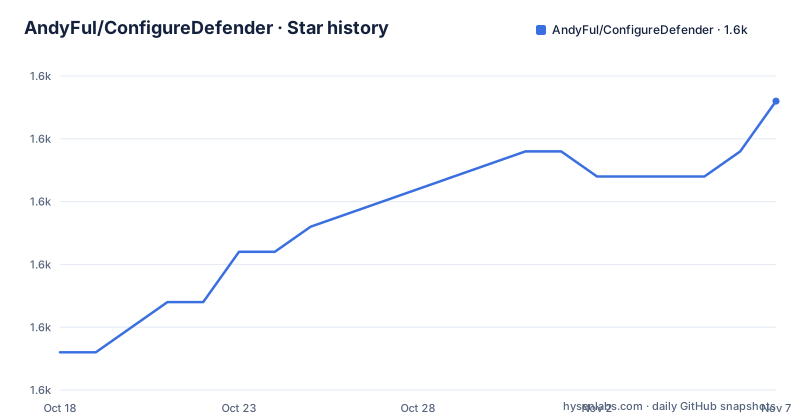
Star history
- AndyFul/ConfigureDefender1,599 ★ · +10
| Repository | 2026-10-18 | 2026-11-07 |
|---|---|---|
| AndyFul/ConfigureDefender | 1.6k | 1.6k |
10 Stars in the last 20 days, measured from the daily GitHub snapshot. Compare with other projects
Editorial analysis
A single portable executable, no installer, both architectures
ConfigureDefender is distributed as ConfigureDefender.exe and the README is explicit that no installation is needed. The same executable runs on 32-bit and 64-bit Windows. Documentation ships alongside it as ConfigureDefenderHelp.pdf.
It is part of a larger project, Hard_Configurator, and the source for ConfigureDefender lives in that project's src/ directory. The repository here contains the built binary, the help PDF, a What_is_new.txt, a License.txt, and a directory of other hardening tools in H_C_HardeningTools/.
The target platforms are Windows 10, Windows 11 and Windows Server 2019 or later. The README states a minimum of version 1809, with one specific exception noted: the Attack Surface Reduction rule for blocking persistence through WMI event subscription requires version 1903 or later.
There is no GitHub release history, so the version string in the README header, stable version 4.1.0.0 from December 2025, is the only version marker. There is also no scripted or unattended mode described anywhere; the application is a GUI you operate by hand.
Three levels plus DEFAULT, and the reboot you cannot skip
The utility can view and configure important Defender settings, and it uses PowerShell cmdlets with a few exceptions to make the changes. It also offers pre-defined protection levels: DEFAULT, HIGH, INTERACTIVE and MAX.
Applying one of the levels requires a reboot to take effect. That is worth internalising before you start, because the natural reaction to a settings tool that appears to have done nothing is to run it again, and running it again does not speed up the reboot.
The MAX level is described with a warning that is more useful than a feature list. It combines Attack Surface Reduction, Controlled Folder Access, SmartScreen and cloud protection settings in a restrictive profile. These controls reduce particular risks but do not guarantee that every suspicious item is blocked. The README states these settings are very restrictive, can produce many false positives even in a home environment, and are not recommended in a business environment.
That warning is consistent with everything else in this project: the tool is aimed at someone hardening their own machine, not at an administrator rolling out a policy.
The registry conflict: two keys, one owner each, and a refresh timer
The most useful part of this README is the explanation of why Defender settings behave strangely.
Defender stores most settings under a key owned by SYSTEM:
Computer\HKEY_LOCAL_MACHINE\SOFTWARE\Microsoft\Windows DefenderGroup Policy writes to a different key, owned by ADMINISTRATORS:
Computer\HKEY_LOCAL_MACHINE\SOFTWARE\Policies\Microsoft\Windows DefenderAnd the README warns that GPOs do not delete the normal Defender settings, so both can exist at once with the policy one winning.
The dangerous interaction is manual registry editing under the Policies key. The README says it is not recommended on editions that support the Group Policy Management Console, such as Pro and Enterprise, for three stated reasons. Those settings are not recognised by the Group Policy console. They can temporarily overwrite the GPO setup because the keys are shared. And after some hours, Group Policy Refresh back-overwrites them automatically and silently.
That third point is the one that wastes people's time: a setting you applied by hand appears to work for a while, and then reverts with no message.
Check effective policies before changing settings
The project notes that policy settings can override local Defender preferences. On Windows Home, it offers to remove settings under the Defender policy registry path; on Pro and Enterprise, it recommends inspecting relevant Defender Group Policy settings before using the utility. Do not treat either instruction as a reason to remove all existing policy: identify who manages the device, inspect the effective settings and understand the impact of any change first. On an organisation-managed device, coordinate with its administrator, since centrally enforced policy may return at refresh. Back up relevant configuration and verify the resulting effective Defender state after changes.
Three supported ways to set Defender, and where each one hides
For advanced users, the README lists three mechanisms for managing Defender settings.
The Group Policy Management Console, gpedit.msc, which is not available on Windows Home. Direct registry editing, manually or through .reg files and scripts. And PowerShell cmdlets, naming set-mppreference, add-mppreference and remove-mppreference on PowerShell 5.0.
The theme running through all of it is that most Defender settings are not reachable from the Windows Defender Security Center. That is why a utility like this exists at all: the settings that matter for hardening are the ones the normal GUI does not show you.
The linked Microsoft documentation is the Attack Surface Reduction rules reference, and the README also links Palantir's written analysis of ASR recommendations plus a Tech Community board on demystifying the rules. Those are worth reading before choosing a level, because ASR rule behaviour is the part of Defender configuration that most often breaks legitimate software, and the interaction between rules, Controlled Folder Access and exclusions is not something a level name tells you.
For versions, the README notes the ASR WMI event subscription rule needs 1903 or later, and otherwise 1809 is the floor.
Licensing, maintenance and the binary you are being asked to trust
The repository carries a licence GitHub cannot classify, with the terms in License.txt. The repository does not show GitHub releases in the observed snapshot; that alone does not establish whether the executable is signed or whether a checksum is available elsewhere. The last push was on 2026-10-11, and the README header names version 4.1.0.0 from December 2025, which puts the binary a little behind the most recent repository change.
That gap is the thing to weigh. The executable makes privileged changes to antivirus configuration, and the source lives in a different repository under src/. The README does provide that source path, which is the right thing for a project like this to do, but the build you are handed is not verified against it in the repository.
The last point is the one to act on. If you are hardening a machine you care about, download the binary, compare against the source, and check What_is_new.txt for what changed in the version you are running rather than assuming the newest download is the one described.
Editorial conclusion
ConfigureDefender is a portable way to inspect and adjust Microsoft Defender settings on supported Windows systems. On managed devices, first check the effective Group Policy or other management configuration with the administrator: policy refresh can override conflicting local changes. Do not clear policies wholesale merely to use the utility. Evaluate the restrictive MAX profile against your applications, review the project's licence and backup or recovery procedures, and reboot when the project says a profile change requires it.
Frequently asked questions
Does ConfigureDefender require installation?
No. It is a portable application: download ConfigureDefender.exe and run it. The same executable works on both 32-bit and 64-bit Windows, and documentation is provided as ConfigureDefenderHelp.pdf.
Why do my ConfigureDefender settings revert after a while?
Configured Group Policy can reapply its settings and override conflicting local registry changes. Inspect the effective policies and device-management configuration first; on an organisation-managed machine, coordinate changes with its administrator instead of clearing policies indiscriminately.
What does the ConfigureDefender MAX protection level do?
The project describes MAX as a restrictive combination of Attack Surface Reduction, Controlled Folder Access, SmartScreen and cloud protection settings. It warns of false positives and does not recommend the profile for business environments. No profile guarantees detection of every threat; test application compatibility before applying it.
Which Windows versions does ConfigureDefender support?
Windows 10, Windows 11 and Windows Server 2019 or later, requiring version 1809 as the minimum. The Attack Surface Reduction rule for blocking persistence through WMI event subscription additionally requires version 1903 or later.
Official sources
Add this badge to your README
If you maintain this project, the badge below links readers to this analysis and shows its maintenance status from the daily GitHub snapshot. Paste the markdown into your README; add ?metric=license or ?metric=stars to the image URL for a different field.

[](https://hysenlabs.com/projects/andyful-configuredefender)Star history chart for your README
[](https://hysenlabs.com/projects/andyful-configuredefender)Was this useful?