angular-split: draggable split panes on CSS grid in Angular
🍌 Angular UI library to split views and allow dragging to resize areas using CSS grid layout.
At a glance
- What is it?
- angular-split is an Angular UI library that splits views and lets the user drag to resize areas using CSS grid layout. The scope is narrow, the release line tracks Angular majors, and the licence is a custom one you have to read yourself.
- Who is it for?
- angular-split suits Angular teams that need a draggable split pane on several screens and want the implementation already written and tested. Skip it for a single one-off split where a short grid and pointer routine would do, and skip it if collapsing, keyboard control or nested splits are hard requirements, because the documentation does not describe them.
- Can I use it commercially?
- Check first. The repository uses a licence we do not classify automatically, so read its LICENSE file before any commercial use.
- Is it still maintained?
- Yes. The repository last received commits 155 days ago.
- What is it written in?
- Mainly TypeScript, according to GitHub's language statistics.
Answers come from the project's GitHub data, last synced on November 7, 2026, and from our analysis. They are not legal advice.
Star history
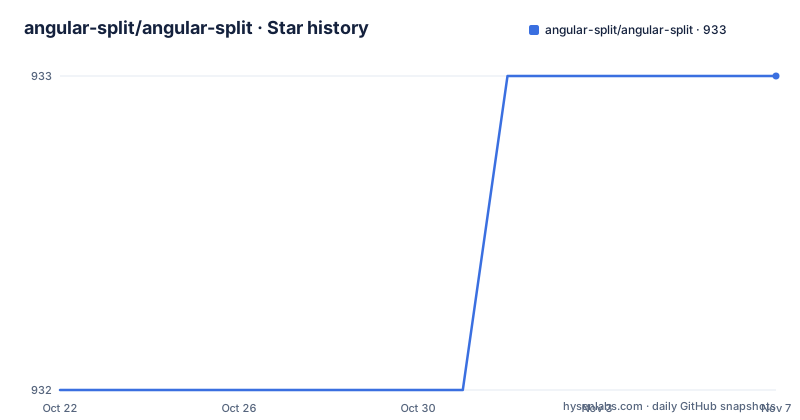
- angular-split/angular-split933 ★ · +1
| Repository | 2026-10-22 | 2026-11-07 |
|---|---|---|
| angular-split/angular-split | 932 | 933 |
1 Stars in the last 16 days, measured from the daily GitHub snapshot. Compare with other projects
Editorial analysis
The problem: a resizable pane without a hand written pointer handler
Writing a resizable two pane layout in Angular looks like fifteen minutes of markup and turns into a weekend of pointer event bookkeeping. angular-split exists to take that work away: it is an Angular UI library whose stated purpose is to split views and allow dragging to resize areas using CSS grid layout. The audience is narrow and specific, namely Angular application teams that need side by side panes a user can drag, such as a file tree next to an editor, a list next to a detail view, or a master and preview arrangement inside an admin console. It is not a general purpose layout kit. The repository topic tags list angular, css-flexbox-layout, flexbox, split-area and split-pane, which sets the scope: one family of widget, built with grid.
How the resizing is wired to CSS grid tracks
The mechanism is grid based. The library description says resizing works using CSS grid layout, so pane sizes are expressed as track sizing rather than as pixel widths written from a script on every pointer move. That distinction matters to anyone who has maintained a hand written splitter, because a grid track can hold a fractional unit and a pane can keep a proportion of its container while remaining draggable. Based on the repository layout, the published library lives under projects/, next to a documentation application in src/, with angular.json at the root and Cypress configured through cypress.config.ts and a cypress/ directory. The root package.json is private and named angular-split-app, and every script in it is delegated to wireit, so build, test and lint tasks are described in a dependency graph file rather than inline. The publishing entry points are lib_pub_latest, lib_pub_next and lib_tgz.
Adding angular-split to a workspace and making the first split
The README does not print an install command. Its route is the npm package named angular-split, and the documentation and examples are published at https://angular-split.github.io. Since no command line appears in the project's own pages, the dependable path is to install the published package from npm and follow the guide there for the Angular major you run. The repository build shows the toolchain the project itself expects. From the root package.json you can read the supported runtime and the framework line the documentation app is compiled against:
{
  "name": "angular-split-app",
  "engines": {
    "node": "^18 || ^20 || ^22"
  }
}
The same file pins the Angular dependencies at the 20.1.x line and lists bootstrap ^5.3.1, ngx-bootstrap ^20.0.0, rxjs ~7.8.0 and zone.js ~0.15.0. For a first real use, build the arrangement the documentation examples show: a grid container holding two panes, a drag handle between them, and content on each side, then confirm that dragging the handle changes the proportion of the two tracks and that the panes reflow when the window resizes.
What the project does not say about collapsing, nesting and keyboard control
Two gaps are visible in what the project publishes. First, the documentation lives on a separate GitHub Pages site rather than inside the repository, so a reader working offline or auditing the source finds no API reference, no props table and no migration notes beyond the changelog files. The root holds both CHANGELOG.md and ARCHIVED_CHANGELOG.md, which shows that older release history was set aside rather than merged, so reconstructing what changed means reading two files. Second, the README does not document a rollback procedure, keyboard handling, touch behaviour or accessibility affordances for the handle, and it does not state whether nested splits are supported. The description mentions only dragging to resize areas using CSS grid layout, so a requirement such as a collapsible pane, a minimum size or programmatic resizing from application code has no stated answer. Confirm those in the docs before committing to it.
The alternative is a grid container and a pointer handler you own
The alternative here is not another package, it is doing it yourself. A team can implement the same behaviour with a container styled as CSS grid holding two fractional tracks, a separator element listening for pointer movement, and a small routine that writes the new track sizing back to the element. That route gives full control over keyboard support, minimum sizes and snap points, and adds no dependency to an application that already owns its layout system. What it costs is the part angular-split already paid for: pointer handling, the boundary cases when a drag leaves the container, and tests around them. The library's benefit is that the behaviour exists and the examples are published. The trade is accepting the library's defaults for everything the documentation leaves unsaid. For one splitter in an internal tool, writing it is often cheaper than adapting to somebody else's model. For a product where many screens need identical behaviour, the shared implementation earns its dependency.
Releases follow Angular majors and the licence is not a standard one
Maintenance is the part to weigh carefully. The repository is not archived, and the last push was on 2026-06-06. The published releases follow the Angular major version line: v18.0.0 on 2024-11-04, v19.0.0 on 2025-02-01 and v20.0.0 on 2025-07-21. That pattern means an upgrade usually arrives alongside a framework upgrade rather than on a schedule of its own, and it means the package is coupled to the Angular major your application already runs, so a major bump for the framework implies a major bump for this library too. The licence field on the repository says Other, described as a custom licence GitHub cannot classify, with the terms held in the LICENSE file at the root, so a legal reading of that file belongs before use in a commercial product. The README credits Bertrand Gaillard as the original builder, Bram Borggreve as a maintainer from 2020 to 2024, and Jeffrey Bosch, Sander Elias and harpush as maintainers as of 2024.
Editorial conclusion
angular-split suits Angular teams that need a draggable split pane on several screens and want the implementation already written and tested. Skip it for a single one-off split where a short grid and pointer routine would do, and skip it if collapsing, keyboard control or nested splits are hard requirements, because the documentation does not describe them. Before adopting, check the angular-split version published on npm against your Angular major, read the LICENSE file at the root of the repository, and open https://angular-split.github.io to confirm the handle behaviour your layout depends on.
Frequently asked questions
How do I install angular-split in an Angular application?
The README does not print an install command, so the route is the npm package named angular-split and the guide published at https://angular-split.github.io. The repository's own package.json is a private workspace root named angular-split-app that depends on @angular/core ^20.1.2 and requires Node ^18, ^20 or ^22.
Does angular-split support the current Angular version?
The releases track Angular majors: v18.0.0 on 2024-11-04, v19.0.0 on 2025-02-01 and v20.0.0 on 2025-07-21. The workspace package.json depends on the Angular packages at ^20.1.2, and the last push was on 2026-06-06.
What licence is angular-split released under?
The licence field on the repository says Other, described as a custom licence GitHub cannot classify. The actual terms sit in the LICENSE file at the root of the repository, and that file is the one to review before shipping the library in a commercial product.
Can a pane be collapsed or resized from code in angular-split?
The README does not document collapse behaviour, keyboard handling or programmatic resizing, and it does not say whether nested splits are supported. The stated capability is limited to dragging to resize areas using CSS grid layout, so check the documentation site for your specific requirement.
Official sources
Add this badge to your README
If you maintain this project, the badge below links readers to this analysis and shows its maintenance status from the daily GitHub snapshot. Paste the markdown into your README; add ?metric=license or ?metric=stars to the image URL for a different field.

[](https://hysenlabs.com/projects/angular-split-angular-split)Star history chart for your README
[](https://hysenlabs.com/projects/angular-split-angular-split)Was this useful?