Angular 22: A Full-Stack Framework for Teams That Want Structure, Not Assembly
Angular brings routing, forms, dependency injection, and build tooling into one framework for large web applications.
At a glance
- What is it?
- Angular bundles routing, forms, dependency injection, and build tooling into one TypeScript framework. This review covers what it offers, how it runs, and where its all-in-one approach becomes a burden.
- Who is it for?
- Adopt Angular if you manage a large team that benefits from a single, opinionated platform where routing, forms, DI, and build tools share one mental model. Skip it if you prefer composing small libraries or need maximum flexibility in tooling, since Angular's integrated approach means you accept its conventions or fight them.
- Can I use it commercially?
- Yes. MIT is a permissive licence: you can use, modify and sell software built on it, as long as you keep its copyright and licence notices.
- Is it still maintained?
- Yes. The repository received new commits within the last day.
- What is it written in?
- Mainly TypeScript, according to GitHub's language statistics.
Answers come from the project's GitHub data, last synced on November 13, 2026, and from our analysis. They are not legal advice.
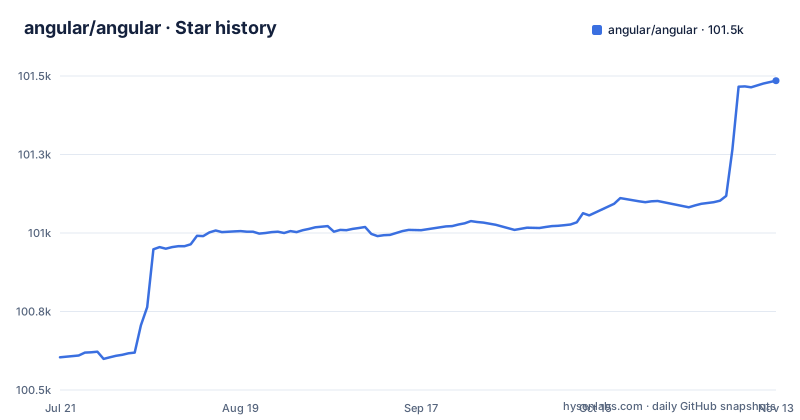
Star history
- angular/angular101,485 ★ · +881
| Repository | 2026-07-21 | 2026-11-13 |
|---|---|---|
| angular/angular | 100.6k | 101.5k |
881 Stars in the last 115 days, measured from the daily GitHub snapshot. Compare with other projects
Editorial analysis
What Angular Actually Solves
Angular solves the problem of assembling a web application from disparate pieces. Many projects end up wiring together a router, a form library, a dependency injection container, and a build pipeline. Angular provides all of these as one platform, so you do not choose and integrate them yourself. The README calls it a development platform, not a library, and that distinction matters. It is for teams building large web applications where consistency across modules and developers outweighs the desire to pick each tool independently. If you have ever spent days reconciling version mismatches between a router and a state library, Angular removes that class of problem entirely.
The Architecture: One Platform, One Mental Model
The architecture visible in the documentation is a single framework that owns the application lifecycle. The README links to documentation on architecture, components and templates, and forms. Data flows through components, which are plain TypeScript classes decorated with metadata, and templates bind to those classes. Dependency injection is built into the core, so services are provided and injected without importing a separate library. Lazy loading is a documented feature that ties into the router's route definitions. The build tooling is separate but official, accessed through the Angular CLI. What you get is a system where every piece expects the same conventions, from decorator syntax to module boundaries. That coherence is the main architectural advantage, but it also means you learn Angular's way of doing things, not a general-purpose approach.
Getting Started: Commands That Hide the Complexity
The README gives a straightforward path to a running app. You install the CLI globally with npm install -g @angular/cli, then create a workspace with ng new [PROJECT NAME], and run it with ng serve. Three commands get you a development server. The CLI does more than serve; it scaffolds components, generates schematics, and manages builds. The documentation references schematics as an advanced topic, which are code generators that automate repetitive tasks. The setup requires Node.js and npm, which is the only prerequisite mentioned. The speed of getting started hides the framework's depth. A new project has a default structure, and the CLI decides where those files go. For a solo developer or a small prototype, this is overhead. For a team, it is a shared starting point that reduces onboarding friction.
Where It Falls Short: The Integrated Approach Has a Cost
The all-in-one design has a genuine downside: you cannot swap out parts without fighting the framework. Angular's routing and forms are not optional plugins; they are core features. If your team prefers React Router or a custom form solution, you will either duplicate functionality or work against the built-in systems. The README does not mention any mechanism to replace the router or forms with third-party alternatives. Another limitation is the learning curve. The README lists advanced topics like server-side rendering, animations, and schematics, all of which are part of the platform. A new developer must understand decorators, dependency injection, observables (implied by the framework's design), and the CLI's conventions before being productive. For a small project, this is heavier than a minimal library. The README describes building applications with TypeScript/JavaScript and other languages, though the codebase is TypeScript, so TypeScript familiarity helps.
The Alternative: Composing Libraries vs. Adopting a Platform
The direct alternative is a library-based approach like React or Vue, where you choose routing, forms, and state management separately. React, for example, does not include routing or forms in its core; you add react-router and a form library like Formik or react-hook-form. That approach gives you flexibility to swap components, but it requires you to make those choices and maintain integration. Angular's difference is that it makes those choices for you, which is faster for teams that do not want to evaluate options. The trade-off is that your project's architecture is Angular's architecture, not one you designed. If your team values the ability to mix tools freely, Angular will feel restrictive. If your team values a single source of truth for application structure, the library-based approach will feel fragmented.
Maintenance and Upgrade Cost: Version Jumps Are a Fact of Life
Angular's release history shows a fast cadence, with v21.2.26 and v20.3.35 both released on 2026-11-02 and v22.3.0-next.3 on 2026-10-29. That means regular updates and a continuous stream of changes. The README points to an upgrade guide at angular.dev/update-guide, which implies that upgrading is not a simple npm install. Major version bumps, like from v21 to v22, likely involve breaking changes that require migration steps. The presence of a dedicated upgrade guide confirms that the team anticipates migration work. The license is MIT, which is permissive and does not impose restrictions on commercial use, but it also means there is no commercial support contract. You rely on the community and the Angular team's release schedule. For a long-lived enterprise application, you must budget time for regular upgrades to stay on supported versions. The fast release cycle is a benefit for features but a cost for maintenance.
Who Should Adopt Angular, and What to Verify First
Angular is the right choice for teams that want a coherent platform and are willing to accept its conventions. It is especially suited for large applications where multiple developers need a consistent structure. Before adopting, verify that your team is comfortable with TypeScript, since the framework is built around it. Check the upgrade guide to understand the migration effort from any existing version you have. Also, confirm that the built-in routing and forms meet your requirements, because replacing them is not straightforward. Teams that prefer to assemble their own stack with minimal framework constraints should look elsewhere. The key is to decide whether you want a platform that makes structural decisions for you, or a set of libraries you control. Angular is the former, and it does not pretend otherwise.
Editorial conclusion
Adopt Angular if you manage a large team that benefits from a single, opinionated platform where routing, forms, DI, and build tools share one mental model. Skip it if you prefer composing small libraries or need maximum flexibility in tooling, since Angular's integrated approach means you accept its conventions or fight them. Before committing, verify your team's TypeScript experience and check the upgrade guide at angular.dev/update-guide, because major version jumps require planned migration work. The decision hinges on whether you want a framework that makes structural choices for you, not on raw feature count.
Frequently asked questions
What is Angular and why use it?
Angular is described as a development platform for building mobile and desktop web applications using TypeScript/JavaScript and other languages. The repository description frames it as bringing routing, forms, dependency injection, and build tooling into one framework for large web applications.
Is Angular a frontend or backend?
It is a frontend framework, described in package.json as a web framework for modern web apps. Server rendering is part of the picture, since the documentation includes a Server Side Rendering guide and the repository has a modules/ssr-benchmarks target in its CI test exclusions.
What language is used in Angular?
TypeScript is the repository's primary language, and the front page describes building applications with TypeScript/JavaScript and other languages. The root package is named angular-srcs and ships tslint.json and tsconfig-tslint.json at the top level, with the lint script running tslint before checking formatting.
how to install angular
The README's path is to install Node.js, which includes the Node Package Manager, then install the CLI globally with npm install -g @angular/cli, create a workspace with ng new [PROJECT NAME], and start the application with ng serve after changing into that directory.
how to install angular cli
Install it globally with npm install -g @angular/cli once Node.js is present. Inside the repository itself a different rule applies, since package.json pins [email protected] as the packageManager and its engines block asks for pnpm instead of NPM or Yarn.
Official sources
Where developers are discussing it
Posts on Hacker News, dev.to and Lobsters that link to this repository, found by our scan of those communities. 0 in the last 30 days; newest first.
- Zone.js Hijacked Your Browser for 8 Years. Here's What Replaced It.dev.to · Oct 14, 2026 · 15 points · 1 comments
- Angular compiler rewritten in Rust, PR merged to mainHacker News · Oct 10, 2026 · 2 points · 0 comments
Add this badge to your README
If you maintain this project, the badge below links readers to this analysis and shows its maintenance status from the daily GitHub snapshot. Paste the markdown into your README; add ?metric=license or ?metric=stars to the image URL for a different field.

[](https://hysenlabs.com/projects/angular-angular)Star history chart for your README
[](https://hysenlabs.com/projects/angular-angular)Was this useful?