Shapeshift: one text box that morphs into the card you meant
An input that becomes what you mean: one text box that morphs into the right UI as you type. Powered by TypeSafe Jev, works offline.
At a glance
- What is it?
- Shapeshift is a Next.js application where a single text field reinterprets what you type as a typed intent and swaps itself for the right card, from an event to a bill split to a colour picker. A model classifies the intent while deterministic code does the arithmetic, and the whole thing runs offline with a built-in classifier when you have no API key.
- Who is it for?
- Shapeshift is worth a look if you are interested in interface design that starts from a single input, and the calm UI state machine plus the split between model judgement and deterministic parsing are the two ideas worth taking away. It is the wrong choice if you need a component library to drop into a product, since the project is a private application with a version of 0.1.0 and no releases, and the online path depends on a third party model service.
- Can I use it commercially?
- Yes. MIT is a permissive licence: you can use, modify and sell software built on it, as long as you keep its copyright and licence notices.
- Is it still maintained?
- Yes. The repository last received commits 45 days ago.
- What is it written in?
- Mainly TypeScript, according to GitHub's language statistics.
Answers come from the project's GitHub data, last synced on November 7, 2026, and from our analysis. They are not legal advice.
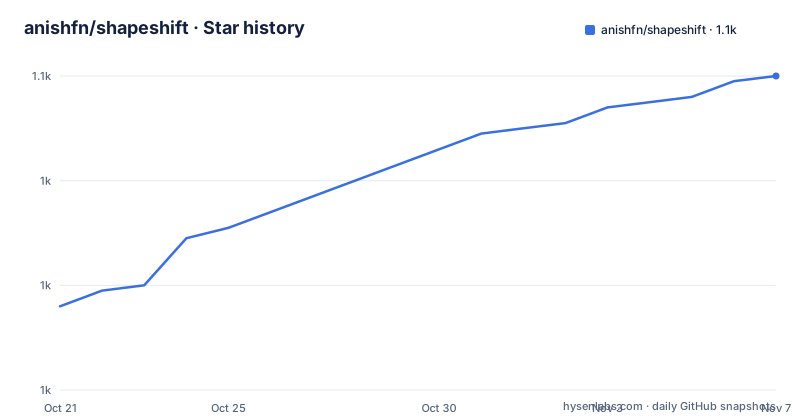
Star history
- anishfn/shapeshift1,060 ★ · +44
| Repository | 2026-10-21 | 2026-11-07 |
|---|---|---|
| anishfn/shapeshift | 1k | 1.1k |
44 Stars in the last 17 days, measured from the daily GitHub snapshot. Compare with other projects
Editorial analysis
Twenty card types behind one field
The pitch of the project is that the input becomes what you mean. You type into a single text box and the box turns into the interface the text implies. The readme's examples are the clearest statement of it: dinner with priya friday 8pm on zoom becomes an event card with Friday, 8 PM, Priya and a video call; buy milk, eggs, bread and coffee becomes a shopping checklist; split 2400 between 3 becomes a per person amount; and minecraft diamond becomes a hex colour, #4AEDD9. The card catalogue covers event, reminder, checklist, timer, habit, colour, split, expense, convert, calculate, trip, poll, contact, bookmark, countdown, time zone, random, goal and a note fallback for anything else. Nineteen shapes, one entry point, and the interesting part is that the text is not parsed into a form, it is replaced by one. Saved cards live in the browser's localStorage until you delete them, and clicking one lets you edit it.
Jev decides, code computes
The architecture draws a firm line between the part a model does and the part code does. Intent is classified by TypeSafe AI's Jev model, and one call answers 14 typed questions in parallel, which card it is plus signals such as is it a video call and is it urgent. Everything else, dates, amounts, units and arithmetic, is deterministic code. The slogan in the readme is Jev decides, code computes, and it is the right way to split the problem. A model is good at recognising intent in messy text and bad at arithmetic, and a date parser is good at arithmetic and bad at guessing what a sentence means. The type system carries the boundary: the answers come back as typed questions rather than free text, so the code that follows can rely on a shape. The online model is optional, and the project is explicit that a card type is added with a non-overlapping criterion in the question schema, so the classification questions are written to be distinguishable from each other rather than left to the model's judgement.
The state machine that stops the flicker
Raw model output flickers as you type, and the project treats that as a design problem rather than a rounding error. A small state machine turns confidence into calm UI states, and the rule is concrete: a card only changes when a challenger wins twice in a row, or is very sure. Signal badges use an on and off hysteresis band, so a value that hovers around the threshold does not strobe. The states themselves are drawn in a diagram, and they are input, a faint ghost preview, choosing between two chips for a did you mean suggestion, and the committed card. The keyboard follows the same logic. Enter saves the card, Escape clears or cancels an edit, Tab keeps a faint preview, the arrow keys move between the did you mean chips, and slash opens the list of every card type. URL flags exist for the same reason: debug=1 shows every probability, and demo=1 with loop=1 plays a scripted demo. A user who can see the raw probabilities can tell the difference between the model being unsure and the interface hiding uncertainty.
It runs offline, and the key never reaches the browser
The default path needs no account. Shapeshift works fully offline with a built-in keyword classifier, so you can run it without a key, and the latency readout in the corner says jev-offline. To use the online model you copy the environment file and set a key:
cp .env.example .env.localThen set TYPESAFE_API_KEY, obtainable from the TypeSafe console. The key is only ever read on the server, on the /api/intent route, and it never reaches the browser. If the API is unreachable or rate limited, Shapeshift quietly falls back to offline mode, so a network problem degrades the experience instead of breaking it. The environment variables are small and each has a clear job. TYPESAFE_API_KEY enables the online model, and empty or placeholder values keep you offline. JEV_MODEL pins the model version, jev-1.13.0 by default, and the comment in the environment file explains why: pinning means the answers do not change under you, whereas the jev-latest alias does. NEXT_PUBLIC_USE_MOCK forces the offline classifier even when a key is present, which is what you want while working on the interface. NEXT_PUBLIC_SITE_URL is used for Open Graph metadata. The offline classifier lives in src/lib/jev/mock.ts and produces the same output shape as the model, so the rest of the code does not know which one is running.
Twenty parsers do the actual work
Behind the cards is a directory of deterministic parsers, one per card type, under src/lib/parse, with each registered in src/lib/parse/index.ts. These are ordinary code, and the dependencies explain what they do: chrono-node parses dates and natural language times, convert-units handles unit conversion, date-fns supplies date arithmetic, and zod validates the results. The card types in the readme show what each parser recognises. An event wants lunch with rahul and anna tomorrow, a reminder wants remind me to pay rent tomorrow urgent, a split wants split 2400 between 3, a convert wants 5 miles in km or 72f to c, a calculate wants 18% of 3450, a contact wants rahul 98200 12345 [email protected], a time zone wants 3pm pst in ist, a random wants roll 2d6 or flip a coin, and a goal wants read 12 books this year, 4 done. The split between classification and parsing is visible in these examples: the model decides that a number between three people is a split, and the parser does the division. That division is what keeps the answers right.
Adding a card type is five steps and a type checker
The extension point is a registry, src/components/intents/registry.ts, with one entry per card type, and the readme walks through adding one in five steps. Add the key to INTENT_KEYS in src/lib/jev/types.ts. Add a non-overlapping criterion to the intent in src/lib/jev/questions.ts. Write a parser in src/lib/parse and register it in src/lib/parse/index.ts. Write a card component in src/components/intents and add the registry entry. Then teach the offline classifier in src/lib/jev/mock.ts and add tests. The promise at the end of that list is that TypeScript will point at anything you missed, which is the practical payoff of typing the intent keys and the registry together. The stack is Next.js with the App Router, React 19, TypeScript in strict mode, Tailwind CSS v4, shadcn/ui, Motion for animation, and zod for validation. The development commands are the usual ones, with a single check target that runs the type check, the linter and the tests together:
bun run check
bun test
bun run build
The tests cover the parsers, the decision logic, the signal logic and the classifier, which is the right split, since those are the four places where a mistake would be invisible to a type checker.
What you get, and what state the project is in
Running it needs Bun 1.2 or newer, and the start is short:
bun install
bun dev
Then you open http://localhost:3000 and start typing, and the live version is at shapeshiftui.vercel.app, with a demo animation in the docs folder and the architecture and state diagrams kept as Excalidraw files you can open and edit. The repository is a single Next.js application rather than a reusable library, and the package is marked private with version 0.1.0, so there is no published package to install and no GitHub releases, while the last push was on 2026-09-23. The licence is MIT. The honest way to read the project is as a design piece rather than a product: it shows one idea, that the interface should follow the intent, and it shows the engineering that keeps that idea usable, which is the state machine, the typed question schema and the deterministic parsers.
Editorial conclusion
Shapeshift is worth a look if you are interested in interface design that starts from a single input, and the calm UI state machine plus the split between model judgement and deterministic parsing are the two ideas worth taking away. It is the wrong choice if you need a component library to drop into a product, since the project is a private application with a version of 0.1.0 and no releases, and the online path depends on a third party model service. Before you run it, read the offline classifier in src/lib/jev/mock.ts, since that is what you actually get without a key, and pin the model version rather than following an alias.
Frequently asked questions
What is Shapeshift?
Shapeshift is a Next.js application where a single text field morphs into the right card as you type, covering events, checklists, timers, colour, bill splits, conversions, calculations, polls and more. Intent is classified by a Jev model while dates, amounts, units and math are handled by deterministic parsers.
How do I run Shapeshift locally?
Install Bun 1.2 or newer, then run bun install and bun dev and open http://localhost:3000. Press slash to see every card type, and use ?debug=1 to show the raw probabilities or ?demo=1&loop=1 for the scripted demo.
Does Shapeshift need an API key?
No. It works fully offline with a built-in keyword classifier and no account. To use the online Jev model, copy .env.example to .env.local and set TYPESAFE_API_KEY; the key is only read on the server route /api/intent and never reaches the browser, and the app falls back to offline mode if the API is unreachable or rate limited.
How do I add a new card type to Shapeshift?
Add the key to INTENT_KEYS in src/lib/jev/types.ts, add a non-overlapping criterion to the intent in src/lib/jev/questions.ts, write and register a parser in src/lib/parse, write the card component and add a registry entry, then teach the offline classifier in src/lib/jev/mock.ts and add tests.
Where are saved Shapeshift cards stored?
In the browser's localStorage, until you delete them. Clicking a saved card lets you edit it, and the keyboard shortcuts are Enter to save, Escape to clear or cancel an edit, Tab to keep a faint preview and the arrow keys to move between the did you mean chips.
Official sources
Where developers are discussing it
Posts on Hacker News, dev.to and Lobsters that link to this repository, found by our scan of those communities. 1 in the last 30 days; newest first.
- Leadfinder: evidence-backed WhatsApp pitches for Lagos freelancers, on Gemma for $0.32 per 1,000 leadsdev.to · Oct 18, 2026 · 5 points · 0 comments
Add this badge to your README
If you maintain this project, the badge below links readers to this analysis and shows its maintenance status from the daily GitHub snapshot. Paste the markdown into your README; add ?metric=license or ?metric=stars to the image URL for a different field.

[](https://hysenlabs.com/projects/anishfn-shapeshift)Star history chart for your README
[](https://hysenlabs.com/projects/anishfn-shapeshift)Was this useful?