Vibe Research keeps the Agent off by default, and its API key lives in browser localStorage
Vibe-Research: your personal trading research agent for A-share, US, and Hong Kong stocks — daily review, news radar, stock data, sector hub, holdings tracker, research log, and backtesting. Built on the open-source Codex Harness, it equips your own agent with the data and features to drive investment research.
At a glance
- What is it?
- Vibe Research is a personal investor workbench for A-share, US and Hong Kong stocks, with thirteen sections from a daily review to backtesting, and it explicitly does not place orders. What makes it unusual is how much of its documentation is about not trusting it blindly: a provider list that marks untested templates, an abort button that does not promise the work stopped, and a key stored in localStorage with no encryption.
- Who is it for?
- Its restraint is the feature: research only, no broker connection, an Agent you have to switch on, and documentation that labels its own untested paths. Check three things before adopting it, the six-stage company research only covers A-shares, the API key is stored unencrypted in browser localStorage, and LAN mode shares the whole workbench with anyone who can reach the port.
- Can I use it commercially?
- Yes. MIT is a permissive licence: you can use, modify and sell software built on it, as long as you keep its copyright and licence notices.
- Is it still maintained?
- Yes. The repository last received commits 2 days ago.
- What is it written in?
- Mainly TypeScript, according to GitHub's language statistics.
Answers come from the project's GitHub data, last synced on November 14, 2026, and from our analysis. They are not legal advice.
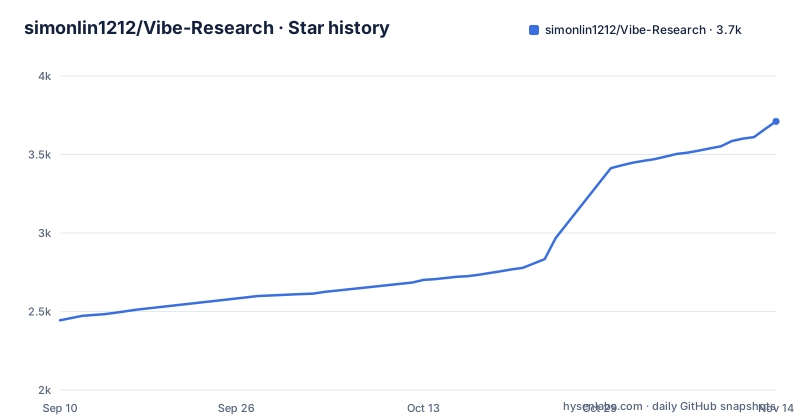
Star history
- simonlin1212/Vibe-Research3,711 ★ · +1,267
| Repository | 2026-09-10 | 2026-11-14 |
|---|---|---|
| simonlin1212/Vibe-Research | 2.4k | 3.7k |
1,267 Stars in the last 65 days, measured from the daily GitHub snapshot. Compare with other projects
Editorial analysis
Thirteen sections, and one of them exists to say it will not place orders
The product is organised as thirteen first-level sections grouped for reading only, since the grouping does not change the names in the interface. They run from a home page for talking to the model, through a daily review, a news radar, an industry signal page and a sector centre, into a six-stage company research flow, a bull and bear debate, and a backtest, then to a watchlist, a holdings ledger, an imported report library, a research record and the screen where a model is connected. The holdings section is the one worth reading first, because its own description says it organises personal holdings and a ledger against live quotes and does not provide order placement. There is no broker connection anywhere in that list. This is a desk for thinking on paper, and the documentation says so in the row rather than in a disclaimer. What each section consumes is also specific: the daily review covers market action, fund flow and limit-up chain data, the news radar gathers news, company announcements and event leads, and the industry signal page tracks GPU rental rates, monthly industry figures, raw materials and hiring as upstream and downstream signals.
The Agent is off when you arrive, and switching it on costs tokens and time
The default state is the interesting design decision. A normal conversation is for organising thoughts, explaining concepts and translating, and the documentation says plainly that turning on the Agent is what you do when you need to look things up online, fetch data, calculate, or run a multi-step piece of research. It also warns that enabling it makes things deeper but usually slower and more expensive in tokens. The toggle keeps whatever AI source you already chose, so you are not asked to reconnect. Background research only starts after confirmation, and an ordinary conversation will not silently become a full research run, which means a chat that looks finished usually is finished. You can browse every section before connecting a model at all. The conversation box offers example questions appropriate to the current mode, and the function entries below it are sorted into five categories. Deliberate mode choices are preserved, and re-testing the same source does not reset them. The bull and bear debate and the backtest both need the Agent on, and a backtest is only called one once the tool actually ran: missing conditions are asked for, and an unsupported condition or a tool failure is reported as a failure rather than dressed up as a result. One honest limitation is stated outright: an ordinary conversation on a subscription still needs the matching client running on your machine, and no fixed response time is promised.
Six stages, one market, and an abort button that does not promise a stop
Company research for an A-share runs through six named stages in order: company profile, financials, earnings expectations, valuation, risk and report. The point of the sequence is not the conclusion but the record, since each stage keeps the source it used, the basis of its calculations, any conflict between sources and any gap in the data. The stated discipline around those gaps is the most unusual thing in the documentation: a missing value is not recorded as zero, an unverifiable result is not recorded as finished, and having a citation is not treated as proof that the inference is right, so the original text and the calculation conditions still have to be checked. The imported report library works the same way, accepting PDF, DOCX, TXT, MD and CSV files, keeping page numbers for text-based PDFs, and asking for text recognition first on scanned ones. You can watch progress, request an abort and check state again after a refresh. That last point is documented with unusual care: issuing an abort request does not mean the work has stopped, and the page distinguishes a requested state from a confirmed one. The full six stages are currently A-share only, and for Hong Kong and US stocks the supported range is narrower and documented separately. Each stage also runs as its own session, and in the research path those sessions may only call the product's controlled MCP. One privacy detail sits underneath all of this: imported documents are stored and parsed on the machine, but the text fragments that a search matches are sent to whichever model you selected, so keeping reports local is not the same as working offline.
Direct model access is a different product, and the interface says so out loud
A connection can be a subscription login or your own model provider API, and those two paths do not behave the same. Direct model access does not run an Agent, calls no tools and has no Agent task memory, so the six-stage research, the debate and the Agent backtest each raise an explicit prompt asking you to switch the Agent back on. The documentation states this will not be downgraded silently, which is the right way to handle it. In the other direction, the per-source agents are kept apart on purpose: the Codex subscription runs through Codex Harness, the Claude subscription through the Claude Code Agent and WorkBuddy or CodeBuddy through the CodeBuddy Code Agent, and the three are never substituted for one another mid-run. Normal conversation disables all tools and the MCP layer entirely; six-stage research disables built-in tools and opens only the product's controlled MCP. User configuration and automatic memory stay switched off throughout, and if a bundled older CodeBuddy command line lacks the parameter that forbids writing a session to disk, the whole answer is rerun inside a throwaway user directory that is deleted afterwards.
The provider list marks its own untested entries, and one template is a placeholder
Built-in provider templates cover OpenAI, DeepSeek, Qwen, GLM, Kimi and MiMo, plus a self-hosted entry that is described as untested and as a placeholder. The interface distinguishes between a provider that has actually been measured and one that only has a template, and the documentation says plainly that having a template is not the same as having passed a compatibility matrix, and that ordinary conversation will not present an unverified source as a verified direct connection. There is a concrete limitation behind that caution: the Codex Harness API channel supports only the Responses API, while the direct channel uses whichever protocol a provider template declares and has been verified against. Connection testing is real rather than simulated, since the system starts an actual model conversation and saves only on success, and it records whether that provider passed the direct capability check. A failed probe leaves the configuration that was already working untouched, and the documentation asks you not to read every connection error as an expired subscription. On the subscription side, the Claude path is detected automatically so no Anthropic key is ever typed in, and the Codex path authorises through a product-specific ChatGPT login rather than reusing your own session. None of these subscriptions come with the product.
An API key in localStorage, next to a Codex home directory it promises not to touch
Two storage decisions are worth knowing before you paste a key. In API mode the key is persisted in the current browser's local storage so it works next time. It is not the system keychain, no encryption is promised, and the documentation recommends only a trusted personal computer. The key travels to the local backend with requests, but does not enter the repository, the backend configuration, the runtime ledger or the logs, and shared machines are told to clear it when finished. Subscription connections take a different route: the Codex path uses the product's own directory and explicitly does not read or overwrite your own Codex home, while the Claude and CodeBuddy paths reuse the login state already on your machine and never ask you for a key. When local state becomes unclear, there is a repair script to run, with a separate PowerShell version on Windows, rather than a reinstall. One more storage decision is worth its own mention: holdings and watchlist entries can be drafted from a screenshot or a table, but the draft is never written straight into the ledger, you confirm it after checking by hand, and whatever you select is passed to the current model, so unrelated sensitive detail has to be removed first.
LAN mode opens the frontend to the network and keeps the backend on loopback
Sharing the workbench across a home network is an opt-in flag, and the boundary is described precisely. From the repository root the documented invocation is:
VRA_LAN=1 bash scripts/startwith a PowerShell variant that sets the environment variable and then runs the start script, and an alternative that runs the desktop dev server with the same variable once the backend is already up. Only the frontend is exposed, the backend stays bound to loopback, and the proxy checks the browser same origin before normalising the Origin header. Remote model addresses must be HTTPS while a local model may use loopback HTTP. The warnings are not cosmetic: this is single-user workbench sharing and not account isolation, anyone on the network who can reach the port can operate the workbench, the transport is plain HTTP so API keys and research material can cross it in clear text, and it should not be opened on an untrusted network or the public internet. The default is the safe one, and the flag is the only thing standing between the two states.
The Mac client was withdrawn, and the DMG was pulled from the releases
The current release is a source workbench with a local browser interface, and the packaged Mac client is gone. The v1.2.0 release is titled as the source workbench with the Mac client withdrawn, the v1.1.0 release as a historical version whose Mac installer has been taken down, and the installer itself was removed from GitHub on 2026-09-10 while the release record and the source archive were kept. Data from the old client does not migrate itself, and the documentation asks you not to delete the old data directory while you work out the move. One naming trap: the desktop directory in the repository is the browser front end, not the withdrawn Mac application. The record also shows a fix in v1.0.4 for issue 44, where a global MCP configuration made both conversation and the connection test fail outright. Running the current version has its own environment contract: Windows 11, macOS or Linux, with Windows running natively and no WSL requirement, Node 22.18 or newer with the 24 LTS line recommended, Python 3.11 or newer with 3.12 the verified choice, and a Codex Harness pinned to a specific build that ships with the dependencies so no global install is needed. One requirement is easy to miss, because a Node build without TypeScript support produces an unknown file extension error for .ts files or a missing TypeScript error, and the test command checks for it before it runs anything else. The tree itself is organised by function, with separate directories for the backtest, calculations, data sources, knowledge, orchestration, providers and the documentation site.
Editorial conclusion
Its restraint is the feature: research only, no broker connection, an Agent you have to switch on, and documentation that labels its own untested paths. Check three things before adopting it, the six-stage company research only covers A-shares, the API key is stored unencrypted in browser localStorage, and LAN mode shares the whole workbench with anyone who can reach the port.
Frequently asked questions
What is Vibe Research?
A workbench for individual investors covering A-share, US and Hong Kong stocks, with thirteen sections including a daily review, a news radar, industry signals, company research, a bull and bear debate, a backtest, a watchlist and a holdings ledger. It is built on the open source Codex Harness and runs locally in a browser.
Does Vibe Research place trades or connect to a broker?
No. The holdings section is described as organising your positions and ledger against quotes and explicitly not providing order placement, and no broker connection appears anywhere in the thirteen sections.
What does the Agent toggle in Vibe Research do?
It is off by default. Ordinary conversation is for organising thoughts, explaining concepts and translating. Switching it on is what enables online lookup, data fetching, calculation and multi-step research, at the cost of more time and tokens, and the toggle keeps the AI source you already selected.
Which markets does Vibe Research cover?
Watchlists and holdings accept A-share, US and Hong Kong tickers, but the complete six-stage company research currently supports A-shares only. For the other markets the supported range is narrower and documented separately, and imported scanned PDFs need text recognition before they can be searched.
How does Vibe Research store my API key?
In the current browser's local storage, so it works on the next visit. It is not the system keychain, no encryption is promised, and only a trusted personal computer is recommended. It goes to the local backend with requests but not into the repository, the backend configuration, the runtime ledger or the logs.
Is it safe to put Vibe Research on a local network?
LAN mode is optional and off by default, and enabling it exposes only the frontend while the backend stays on loopback. The documentation is explicit that this is single-user sharing and not account isolation, that anyone who can reach the port can operate the workbench, and that the unencrypted transport can carry API keys and research material in clear text.
Official sources
Add this badge to your README
If you maintain this project, the badge below links readers to this analysis and shows its maintenance status from the daily GitHub snapshot. Paste the markdown into your README; add ?metric=license or ?metric=stars to the image URL for a different field.

[](https://hysenlabs.com/projects/simonlin1212-vibe-research)Star history chart for your README
[](https://hysenlabs.com/projects/simonlin1212-vibe-research)Was this useful?