strong_migrations refuses the migration that would lock your table
Catch unsafe migrations in development
At a glance
- What is it?
- A small MIT licensed Ruby gem that inspects Active Record migrations before they run, blocks the operations that hold locks or break running code, and prints the safer rewrite. It supports PostgreSQL, MySQL and MariaDB, and its protection depends on how carefully you use the escape hatches it hands you.
- Who is it for?
- Take strong_migrations when your team ships schema changes through Rails and wants the obvious footguns caught in development rather than in production. Skip it if you run raw SQL migrations nobody reviews, since safety_assured and disabled checks let any of it through unchecked.
- Can I use it commercially?
- Yes. MIT is a permissive licence: you can use, modify and sell software built on it, as long as you keep its copyright and licence notices.
- Is it still maintained?
- Yes. The repository last received commits 11 days ago.
- What is it written in?
- Mainly Ruby, according to GitHub's language statistics.
Answers come from the project's GitHub data, last synced on November 14, 2026, and from our analysis. They are not legal advice.
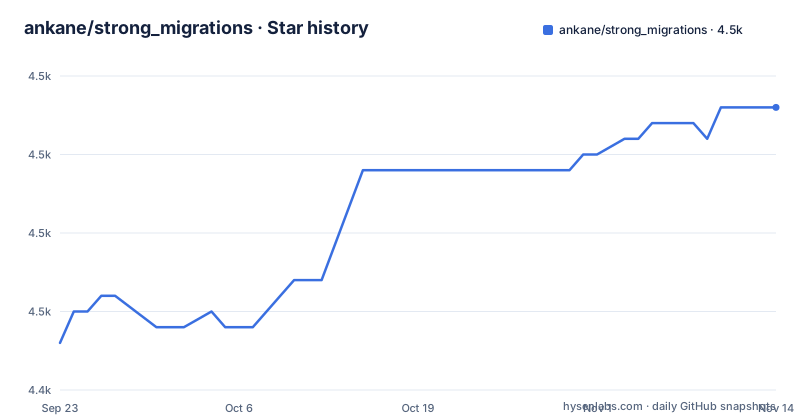
Star history
- ankane/strong_migrations4,463 ★ · +15
| Repository | 2026-09-23 | 2026-11-14 |
|---|---|---|
| ankane/strong_migrations | 4.4k | 4.5k |
15 Stars in the last 52 days, measured from the daily GitHub snapshot. Compare with other projects
Editorial analysis
One gem line and one generator change your migration timeout
The installation is three lines. Add the gem to the application Gemfile:
gem "strong_migrations"Then run:
bundle install
rails generate strong_migrations:install
Strong Migrations sets a long statement timeout for migrations, which lets your application keep a short statement timeout of its own. Supported databases are PostgreSQL, MySQL and MariaDB, and the checks are split by which of the three you are on, so a Postgres only branch exists. The file credits the gem as battle-tested at Instacart, with a link to their open source page and no other supporting detail.
Dangerous means a lock held for seconds or errors waiting to happen
An operation is classified as dangerous if it either blocks reads or writes for more than a few seconds, after a lock is acquired, or has a good chance of causing application errors. Those two tests are the entire policy, and both are about the application on the other side of the connection rather than about your migration code. When one trips, the run stops with output like this:
=== Dangerous operation detected #strong_migrations ===

Active Record caches attributes, which causes problems
when removing columns. Be sure to ignore the column:

class User < ApplicationRecord
  self.ignored_columns += ["name"]
end

Deploy the code, then wrap this step in a safety_assured { ... } block.

class RemoveColumn < ActiveRecord::Migration[8.1]
  def change
    safety_assured { remove_column :users, :name }
  end
end
Read that message as a sequence rather than a suggestion: ignore the column in your model, deploy that code, then write the migration. The order is the point, because Active Record caches columns at runtime, so a dropped column can throw exceptions in your app until it reboots.
The Postgres check list runs longer than the MySQL one
Eleven checks apply to every supported database: removing a column, changing the type of a column, renaming a column, renaming a table, creating a table with the force option, adding an auto-incrementing column, adding a stored generated column, adding a foreign key, adding a check constraint, executing SQL directly, and backfilling data.
Postgres carries nine of its own: adding an index non-concurrently, adding a reference, adding a unique constraint, adding an exclusion constraint, adding a json column, adding a column with a volatile default value, setting NOT NULL on an existing column, renaming an enum value, and renaming a schema. MySQL and MariaDB add three: using the COPY algorithm, using shared or exclusive locking, and adding a column with an expression default value. One item is filed as a best practice rather than a check, keeping non-unique indexes to three columns or less.
Two escape valves sit at the end of the list: you can add custom checks, and you can disable specific checks.
Type changes are judged against a whitelist table per database
Changing a column type causes the entire table to be rewritten. During that time reads and writes are blocked in Postgres, while writes are blocked in MySQL and MariaDB.
Some changes do not require a table rewrite and are safe in Postgres:
| Type | Safe Changes | | --- | --- | | `cidr` | Changing to `inet` | | `citext` | Changing to `text` if not indexed, changing to `string` with no `:limit` if not indexed | | `datetime` | Increasing or removing `:precision`, changing to `timestamptz` when session time zone is UTC | | `decimal` | Increasing `:precision` at same `:scale`, removing `:precision` and `:scale` | | `interval` | Increasing or removing `:precision` | | `numeric` | Increasing `:precision` at same `:scale`, removing `:precision` and `:scale` | | `string` | Increasing or removing `:limit`, changing to `text`, changing `citext` if not indexed | | `text` | Changing to `string` with no `:limit`, changing to `citext` if not indexed | | `time` | Increasing or removing `:precision` | | `timestamptz` | Increasing or removing `:limit`, changing to `datetime` when session time zone is UTC |
And some in MySQL and MariaDB:
| Type | Safe Changes | | --- | --- | | `string` | Increasing `:limit` from under 63 up to 63, increasing `:limit` from over 63 to the max (the threshold can be different if using an encoding other than `utf8mb4` - for instance, it is 85 for `utf8mb3` and 255 for `latin1`) |
That single MySQL row encodes the byte boundary in the column type, so the same limit change is judged differently depending on the table encoding, and several Postgres rows only hold when the column is not indexed.
Dropping a column takes a deploy before the migration exists
Removing a column is the clearest case, because Active Record caches database columns at runtime and a drop causes exceptions until the app reboots:
class RemoveSomeColumnFromUsers < ActiveRecord::Migration[8.1]
  def change
    remove_column :users, :some_column
  end
end
The replacement spans two deploys in five steps. First tell Active Record to ignore the column from its cache:
class User < ApplicationRecord
  self.ignored_columns += ["some_column"]
end
Then deploy the code, write the removal migration wrapped in a safety_assured block, deploy and run the migration, and remove the line added in step 1 once the column is gone.
Renaming a column and renaming a table are blocked for a different reason: renaming something in use causes errors in your application. Their fix is the same six step shape, with tables substituted for columns where it applies: create the new table, write to both, backfill from old to new, move reads to the new one, stop writing to the old one, then drop it. Nothing here is quick, which is the point.
safety_assured and disabled checks are unguarded exits
The column-removal pattern ends with an escape: wrap the operation in a safety_assured { ... } block. The gem prints that wrapper inside its own error output, which means the correct migration and the overridden one look the same in a diff. Once a block is wrapped, the check does not run, and nothing reminds you later that this particular migration was forced through. Disabling specific checks is the broader version of the same decision.
What that leaves is a division of labour. The gem catches the accidental cases, the migrations nobody meant to write, and it hands the deliberate cases to whoever reads the pull request. If your team cannot tell a wrapped migration from an ordinary one during review, the protection is thinner than a list of twenty three checks suggests. The value of the gem is the refusal, not the waiver.
No release is attached, and several checks are only named
There is no GitHub release attached to this repository and no homepage recorded for it. A CHANGELOG.md sits at the root next to CONTRIBUTING.md, Gemfile, Rakefile, LICENSE.txt, strong_migrations.gemspec, gemfiles/, lib/ and test/.
Editorial conclusion
Take strong_migrations when your team ships schema changes through Rails and wants the obvious footguns caught in development rather than in production. Skip it if you run raw SQL migrations nobody reviews, since safety_assured and disabled checks let any of it through unchecked. Before trusting it, confirm which database you run (the Postgres list is much longer than the MySQL one) and check CHANGELOG.md in the repository, since no release version is attached to the project itself.
Frequently asked questions
What are migrations in Ruby on Rails?
They are versioned Ruby classes that change your schema and data, and strong_migrations inspects those classes. Its own examples are written as ActiveRecord::Migration[8.1] subclasses with a change method, and a dangerous operation is prevented from running by default rather than logged and passed over.
What does SQL migration mean?
Putting raw SQL in a migration instead of using the schema helpers. strong_migrations treats executing SQL directly as one of the eleven checks that apply to every supported database, which is PostgreSQL, MySQL and MariaDB.
How do I install strong_migrations in a Rails app?
Add gem "strong_migrations" to the application Gemfile, run bundle install, then run rails generate strong_migrations:install. Strong Migrations sets a long statement timeout for migrations so your application can keep a short statement timeout.
How do I force a migration that strong_migrations blocks?
Wrap the operation in a safety_assured { ... } block, which is what the gem's own error message tells you to do. For a column removal it also asks you to add the column to self.ignored_columns in your model and deploy that code before the migration runs.
Official sources
Add this badge to your README
If you maintain this project, the badge below links readers to this analysis and shows its maintenance status from the daily GitHub snapshot. Paste the markdown into your README; add ?metric=license or ?metric=stars to the image URL for a different field.

[](https://hysenlabs.com/projects/ankane-strong-migrations)Star history chart for your README
[](https://hysenlabs.com/projects/ankane-strong-migrations)Was this useful?