ActiveRecord-Import trades per-record saves for one INSERT per table, and defaults decide how much you get
A library for bulk insertion of data into your database using ActiveRecord.
At a glance
- What is it?
- The Ruby gem activerecord-import exists to collapse the N+1 insert problem: a batch that walks publishers, books and reviews turns into one INSERT per table instead of about four million. The mechanism is small, the option surface is documented well, and two defaults matter more than the headline: validations run unless you opt out, and batch_size defaults to the whole batch as a single statement.
- Who is it for?
- activerecord-import earns its place when a job inserts many rows across associations, because replacing per-record saves with one INSERT per table is a change you can reason about without a profiler.
- Can I use it commercially?
- Yes. MIT is a permissive licence: you can use, modify and sell software built on it, as long as you keep its copyright and licence notices.
- Is it still maintained?
- Yes. The repository last received commits 19 days ago.
- What is it written in?
- Mainly Ruby, according to GitHub's language statistics.
Answers come from the project's GitHub data, last synced on November 14, 2026, and from our analysis. They are not legal advice.
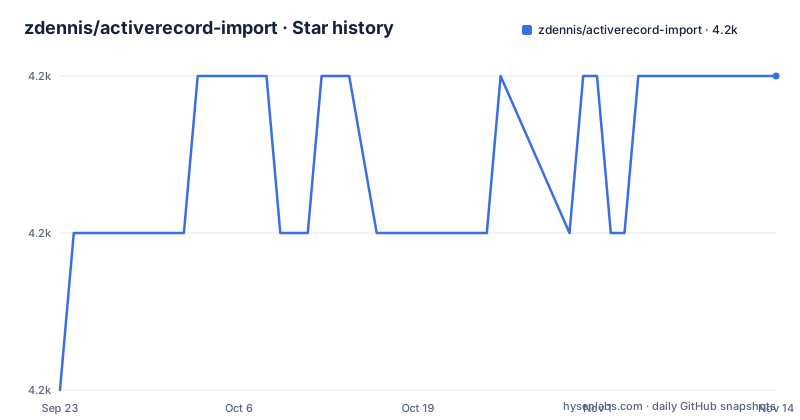
Star history
- zdennis/activerecord-import4,155 ★ · +2
| Repository | 2026-09-23 | 2026-11-14 |
|---|---|---|
| zdennis/activerecord-import | 4.2k | 4.2k |
2 Stars in the last 52 days, measured from the daily GitHub snapshot. Compare with other projects
Editorial analysis
Four input shapes, and the fastest one requires opting out of validations
`import` accepts several kinds of argument and the README orders them by speed. Raw columns plus arrays of values are the fastest and also the most primitive; an array of model objects comes next; validations are a separate cost you can pay on top of either; and duplicate key handling is the fourth feature. The ordering hides a consequence that is easy to miss. `:validate` defaults to true, so the fastest route only happens when you pass `validate: false` yourself.
columns = [ :title, :author ]
values = [ ['Book1', 'George Orwell'], ['Book2', 'Bob Jones'] ]

# Importing without model validations
Book.import columns, values, validate: false

# Import with model validations
Book.import columns, values, validate: true

# when not specified :validate defaults to true
Book.import columns, values
The method is also available as `bulk_import`, which exists for compatibility with gems such as `elasticsearch-model`. The table of contents goes well past these two options, adding batching, recursion, duplicate key ignore, duplicate key update, return info, counter cache, timestamp handling and callbacks.
The 18 hour batch figure is the project's own account, with nothing behind it
The headline argument is arithmetic. Insert 100 publishers with 10,000 books each and 3 reviews per book, and standard `save` visits every association: 100 statements for publishers, 100 * 10,000 for books, then 100 * 10,000 * 3 for reviews, which the README puts at about 4 million insert statements. Following the associations in one pass produces 3. The stated result is that a batch process went from 18 hours to under 2.
Both wall-clock numbers are the author's account of one deployment. No hardware, row width, index set, database configuration or concurrent load is attached to them, so they illustrate the shape of the N+1 insert problem and cannot be used as a benchmark. The repository does carry a `benchmarks/` directory, so measurement tooling exists in the tree even though no figures from it appear in the documentation. The statement counts do not need that trust; the hours do.
Duplicate key updates need a specific database and a version floor
On duplicate key updates require MySQL, SQLite 3.24.0+ or Postgres 9.5+, and that version floor is the only hard requirement stated in the feature list. The table of contents splits the topic into duplicate key ignore and duplicate key update, which matches the fact that these are different SQL idioms on three different engines rather than one portable statement. Adapters outside that set are handled by separate sections titled Supported Adapters and Additional Adapters, whose contents are not enumerated in the opening text.
The same engine spread shows up in the test environment. `docker-compose.yml` starts `mysql:8.0` with `--default-authentication-plugin=mysql_native_password` and a pinned `platform: linux/x86_64`, plus `postgis/postgis:10-2.5` for Postgres, both publishing their usual ports to the host. The MySQL service sets `MYSQL_ALLOW_EMPTY_PASSWORD: yes` and Postgres sets `POSTGRES_HOST_AUTH_METHOD: trust`, which is right for a throwaway container and wrong anywhere else. The x86_64 pin means the test stack runs under emulation on Apple Silicon.
Hash input with mismatched keys raises instead of guessing
The hash form has a sharp edge. Every hash in the array must carry the same keys, and when they do not an exception is raised:
arr = [
  { bar: 'abc' },
  { baz: 'xyz' },
  { bar: '123', baz: '456' }
]

# An exception will be raised
Foo.import arr

# better
arr.map! { |args| Foo.new(args) }
Foo.import arr

# better
arr.group_by(&:keys).each_value do |v|
 Foo.import v
end
The two documented workarounds are to turn each hash into a model object, or to group the array by its key set and import each group separately. The neighbouring form, passing column names alongside hashes, is more forgiving: only the named columns are written and everything else lands as NULL, which the README shows by importing `:title` alone and printing `author` as NULL for both rows. Model objects behave the same way when a column list is passed.
batch_size defaults to the entire batch, so one INSERT is the default behaviour
`batch_size` sets how many rows go into each INSERT statement, and its default is the total number of records being inserted, so the out-of-the-box behaviour is a single statement no matter how large the batch is. That default is also the risk: one enormous INSERT is one enormous transaction, and the option exists to break it up when a database complains about packet size, lock duration or memory.
The example that demonstrates batching is where the README stops. It opens an array of `Book.new` calls, reaches a repeated title with a different author, and ends mid-line, so the demonstration itself is incomplete in the file. Everything the table of contents promises after it, the return value object, counter cache handling, timestamp behaviour, callbacks, the adapter lists, the loading instructions under Requiring and Load Path Setup, and the Conflicts With Other Gems section, is named as a heading with no text following it. Those are the parts to read in the repository before trusting the option surface.
The development image pins ActiveRecord 7.0 on Ruby 3.2 and waits for you
The local environment is defined by two files. `Dockerfile` builds on `ruby:${RUBY_VERSION}-bullseye` with `ARG RUBY_VERSION=3.2`, installs `default-mysql-client`, `postgresql`, `postgresql-contrib` and `vim`, sets `ENV AR_VERSION=7.0`, copies the tree in, renames `test/database.yml.sample` to `test/database.yml` and runs `bundle install`. Its command is `irb` rather than a test runner, and the compose app service runs `tail -f /dev/null`, so the container exists to be attached to.
`AR_VERSION` appears in both the Dockerfile and the compose app service, and a `gemfiles/` directory at the top level holds per-version gemfiles, which is how a gem gets exercised against more than one ActiveRecord release while the container defaults to 7.0. Rakefile and the tests under `test/` complete the picture. The README's body text follows its table of contents in order and ends inside the batching example, so the version matrix and the commands under Running Tests are not spelled out in the file's opening text.
No GitHub releases, so the version history lives in the changelog
This project publishes no GitHub releases at all. Version history sits in `CHANGELOG.md` at the root beside `activerecord-import.gemspec`, and the repository's last push is dated 2026-08-28 with no archive flag set. The default branch is `master`, the licence is MIT, and the readme file is `README.markdown` rather than the more usual `README.md`, which matters if you are grepping a checkout or mirroring the project.
Two other top-level entries say something about working on the code. `.rubocop.yml` sits next to `.rubocop_todo.yml`, so part of the style baseline is recorded as deferred violations, which means the codebase is not clean against its own lint configuration. `Brewfile` and `docker-compose.yml` cover the two local environment routes, one native and one containerised. The homepage field points at `http://www.continuousthinking.com`, over plain HTTP, and the README links an issue thread about the hash key mismatch as the place where that design discussion lives.
Editorial conclusion
activerecord-import earns its place when a job inserts many rows across associations, because replacing per-record saves with one INSERT per table is a change you can reason about without a profiler. Its sharp edges are documented but easy to skip: `:validate` defaults to true, so the fastest documented path is opt-in, hashes with mismatched keys raise instead of filling NULLs, `batch_size` defaults to the entire batch as one statement, and duplicate key updates need MySQL, SQLite 3.24.0+ or Postgres 9.5+. Before adopting it, check the database and version you actually run, set the validation and batching policy for your own data instead of inheriting the defaults, and treat the 18 hour figure in the README as one team's account rather than a result you can plan around.
Frequently asked questions
What is ActiveRecord in Rails?
The README does not introduce ActiveRecord, it assumes you already have it. What this repository adds is an `import` method on ActiveRecord classes, also available as `bulk_import` for compatibility with gems such as `elasticsearch-model`, plus options for validation, batching, recursion, duplicate key ignore and update, return info, counter cache, timestamps and callbacks.
What does data import mean in activerecord-import?
It means inserting many rows with one INSERT per table instead of one per record. The README's arithmetic: 100 publishers with 10,000 books each and 3 reviews per book would take about 4 million insert statements through standard `save`, while this gem generates 3, one for publishers, one for books and one for reviews.
How do I skip validations in activerecord-import?
Pass `validate: false`. The `:validate` option defaults to true, so validations run unless you opt out, and the README calls the raw columns and arrays form the fastest mechanism while listing validations as a separate cost. The same option is available on the columns and values, the hashes and the array of models forms.
Which databases support on duplicate key updates in activerecord-import?
MySQL, SQLite 3.24.0 or later, and Postgres 9.5 or later. The table of contents separates duplicate key ignore from duplicate key update, and lists Supported Adapters and Additional Adapters as separate sections for anything outside that set.
What does batch_size do in activerecord-import?
It controls how many rows are inserted per INSERT statement, and its default is the total number of records being inserted, so by default the whole batch goes out as a single statement. The README's batching example begins an array of model objects but ends partway through it, so the demonstration is unfinished in the file.
How do I run the activerecord-import test environment?
The repository ships a Dockerfile based on the Ruby 3.2 bullseye image with `AR_VERSION=7.0`, `default-mysql-client` and `postgresql` installed, and a compose file starting `mysql:8.0` with an empty password alongside `postgis/postgis:10-2.5` with trust authentication. The app container runs `tail -f /dev/null` and the image command is `irb`, so it waits for you to attach and run the tests yourself.
Official sources
Add this badge to your README
If you maintain this project, the badge below links readers to this analysis and shows its maintenance status from the daily GitHub snapshot. Paste the markdown into your README; add ?metric=license or ?metric=stars to the image URL for a different field.

[](https://hysenlabs.com/projects/zdennis-activerecord-import)Star history chart for your README
[](https://hysenlabs.com/projects/zdennis-activerecord-import)Was this useful?