SlipNet Android VPN setup for DNS tunnels
Android VPN client with DNS tunneling (DNSTT, NoizDNS & Slipstream), NaiveProxy, SSH, Tor, and DoH support — featuring a built-in DNS scanner.
At a glance
- What is it?
- SlipNet is an open-source Android VPN client for DNS tunneling, SSH, Tor, NaiveProxy, and DNS over HTTPS, with a cross-platform Go CLI. It offers broad protocol selection but requires a compatible server.
- Who is it for?
- SlipNet fits users who already have a compatible SlipGate server and need selectable Android tunnel types without relying on app stores. It is a poor fit for users seeking a turnkey consumer VPN or a documented one-command Android build.
- Can I use it commercially?
- Yes, with strict conditions. AGPL-3.0 is a network copyleft licence: if people use a modified version over a network, for example as a hosted service, you must offer them its source code under the same licence.
- Is it still maintained?
- Yes. The repository last received commits 63 days ago.
- What is it written in?
- Mainly C, according to GitHub's language statistics.
Answers come from the project's GitHub data, last synced on October 23, 2026, and from our analysis. They are not legal advice.
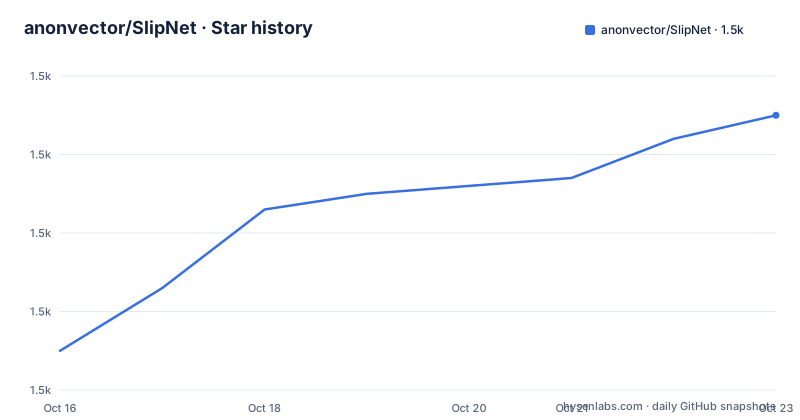
Star history
- anonvector/SlipNet1,515 ★ · +30
| Repository | 2026-10-16 | 2026-10-23 |
|---|---|---|
| anonvector/SlipNet | 1.5k | 1.5k |
30 Stars in the last 7 days, measured from the daily GitHub snapshot. Compare with other projects
Editorial analysis
SlipNet's role in Android connectivity under censorship
SlipNet addresses a specific connectivity problem: Android devices may need access to the wider internet through transports that remain usable when ordinary direct connections are blocked or selectively filtered. Its stated users are people in countries where internet censorship restricts access, and the README describes the software as a voluntary, client-side privacy tool. It is comparable to Tor, Psiphon, Outline VPN, and dnstt, although it combines several transport ideas in one Android application rather than focusing on one network.
The app is built with Jetpack Compose, Kotlin, and Material 3, while the repository also contains a cross-platform CLI written in Go. The Android application requires Android 7.0, corresponding to API 24, or higher. A device, an app, and the word VPN are not enough to create a working service, however. SlipNet needs a compatible server. The officially supported server route named by the README is SlipGate, a Linux installer that configures DNSTT, NoizDNS, VayDNS, Slipstream, SSH, NaiveProxy, and VLESS.
That server dependency is the main boundary around adoption. SlipNet is a client for operator-controlled infrastructure, not a hosted VPN service. Users therefore need compatible server settings, credentials where the selected transport requires them, and a way to reach that server through the network conditions the client is intended to handle. The repository does not provide a homepage or hosted sign-up path. The README also states that no marketplace build is published by its maintainers and warns that listings elsewhere may be outdated, modified, or unsafe.
DNSTT, Slipstream, and SlipNet's tunnel architecture
SlipNet does not expose one fixed tunnel. Its central design is a selectable chain of client transports, with SSH optionally added to several of them. DNSTT uses KCP with Noise, while NoizDNS also uses KCP with Noise but is described as resistant to deep packet inspection. VayDNS uses KCP with Noise and permits control over the wire format, including QNAME lengths, record types, and rate limiting. Slipstream takes a different path by carrying its tunnel over QUIC.
Standalone options cover several distinct use cases. SSH can operate without DNS tunneling. NaiveProxy uses HTTPS with Chromium-derived TLS fingerprint behavior, and the README describes it as an HTTPS tunnel with authentic Chrome TLS fingerprinting. DNS over HTTPS is limited to DNS encryption and follows RFC 8484 rather than carrying other application traffic through a tunnel. Tor connects through the Tor network and supports Snowflake, obfs4, Meek, and custom bridges.
Optional SSH chaining changes the architecture. DNSTT, NoizDNS, VayDNS, Slipstream, and NaiveProxy can be combined with SSH. The README says these variants add another encrypted layer and can prevent DNS leaks. That claim matters because selecting a base tunnel without understanding the associated resolver path may not provide the intended privacy properties. SSH itself can use TLS with custom SNI, WebSocket over `ws` or `wss`, or an HTTP CONNECT proxy with custom `Host` headers. The app also supports sending raw bytes before the SSH handshake as payload injection. These are distinct traffic-shaping mechanisms, not interchangeable names for the same feature.
SlipNet installation prerequisites and first connection
The README points new users to `docs/SlipNet_User_Guide_EN.pdf`, `docs/USER_GUIDE.md`, or the Persian editions for the complete step-by-step process. The visible README does not provide a complete installation command, release download instruction, or exact first-profile example. Its build section is truncated after listing prerequisites, so it would be misleading to manufacture an APK build command or a server address.
For the Android app, the documented prerequisites are Android 7.0 or higher, Android Studio Hedgehog 2023.1.1 or later, JDK 17, a Rust toolchain for the native library, and Android NDK 29. For the CLI, the documented requirement is Go 1.24 or later, with the toolchain downloaded automatically through `GOTOOLCHAIN` when needed. The CLI is described as self-contained and says it does not require native `ssh` or `sshpass` binaries.
The first practical use begins with server preparation, not with scanning or selecting a tunnel in the app. Set up SlipGate on a compatible Linux server, then consult the English user guide for transferring the resulting settings into SlipNet. The README confirms that the app manages multiple profiles and allows a custom proxy listen address and port, but it does not expose the exact field layout needed for a reproducible profile. After a profile is configured, choose the tunnel type that matches the server. DNSTT is the stated default and recommended choice for most users; NoizDNS is intended for networks where deep packet inspection resistance is needed.
After connecting, the Quick Settings tile can toggle the VPN from the notification shade, and optional auto-connect behavior can reconnect it after device startup. Debug logging provides detailed traffic logs for troubleshooting. Those controls help with an initial connection, but the README does not specify a verification command or a documented pass/fail test for leak prevention, so the user guide is the appropriate source for that check.
SlipNet's DNS scanner and profile management workflow
The built-in DNS scanner is aimed at the server-discovery side of using DNS tunneling. According to the README, it automatically discovers and tests compatible DNS servers through EDNS probing, detects NXDOMAIN hijacking, and can scan country-based IP ranges. That makes it more specialized than a generic reachability checker because it looks for servers that behave correctly for the supported DNS tunnel protocols.
The value of that feature depends on the network environment and the implementation, neither of which can be assessed from the README alone. The project does not publish scanner accuracy figures, a default country list, a timeout policy, or an explanation of how ambiguous scan results are presented. A user should therefore treat discovered addresses as candidates to test through a configured tunnel, not as proof that a server is trustworthy. The documentation does not say whether scanner results can be imported directly into a profile.
Profiles are persistent units in the app. Users can create and manage multiple server configurations, which is useful when switching among direct DNS transports, standalone SSH, Tor bridges, and chained tunnels. The scanner, multiple profiles, and configurable proxy reduce repeated setup, but they also create several security-sensitive choices. A resolver option, base tunnel, SSH chain, bridge, and custom proxy can each alter the resulting route. The README identifies DNSTT as the default recommendation, while it separately presents DoH as DNS-only encryption. Those options should not be treated as equivalent just because both encrypt DNS.
Where SlipNet differs from dnstt and standalone SSH
Compared with dnstt, SlipNet is a broader mobile client rather than a description of one tunnel implementation. dnstt is named as a comparable project and as the default protocol within SlipNet, but SlipNet packages DNSTT alongside NoizDNS, VayDNS, Slipstream, SSH, NaiveProxy, DoH, Tor, chaining options, profiles, scanning, an Android interface, and a CLI. The repository layout includes directories such as `dnstt`, `dnstt-mobile`, `noizdns`, `vaydns`, `vaydns-mobile`, `snowflake-mobile`, and `meek-mobile`, which is consistent with multiple transport components being packaged in the project.
Compared with standalone SSH, SlipNet offers alternate entry paths and Android integration. A standalone SSH profile has no DNS tunneling, while chained SSH profiles carry SSH through DNSTT, NoizDNS, VayDNS, Slipstream, or NaiveProxy. SSH traffic can also be wrapped in TLS, WebSocket, or HTTP CONNECT, and payload injection can precede the SSH handshake. Users who need only conventional SSH proxying may prefer a general-purpose SSH client, while users whose primary need is censorship-resistant Android transport may find those alternatives relevant.
The trade-off is configuration complexity. A client with many transports offers choices for different filtering conditions, but protocol choice affects privacy, compatibility, and troubleshooting. The documentation recommends DNSTT for most users instead of presenting all options as equally suitable. No performance measurements or deployment success rates are included, so the repository does not support a claim that one listed mode is faster or more reliable under a particular censorship system.
SlipNet maintenance, releases, and AGPL obligations
The repository is not archived, and its last push was on 2026-08-21. The listed release `v2.5.5` is dated 2026-05-26, while `v2.5.3` is identified as a CLI release and is dated 2026-04-26. These dates confirm recent repository and release activity, but they do not establish the cadence or stability of future updates.
SlipNet is licensed under AGPL-3.0. That matters for engineers who may read, modify, redistribute, or offer the licensed software as part of another networked service. The license text governs the applicable obligations, and this review does not interpret them as legal advice. The repository includes a `LICENSE` file and a `SECURITY.md`, but the visible README does not summarize either document. A team should inspect those files directly before incorporating source code or publishing a modified build.
Upgrade cost depends on the client, native Rust components, mobile application code, Go CLI, and server compatibility requirements visible across those components. Development uses JDK 17, Rust, Android NDK 29, and Go 1.24 or later. This makes source builds more involved than installing a self-contained CLI, although the precise migration steps and compatibility policy are not documented in the visible README.
Editorial conclusion
SlipNet fits users who already have a compatible SlipGate server and need selectable Android tunnel types without relying on app stores. It is a poor fit for users seeking a turnkey consumer VPN or a documented one-command Android build. Before adoption, verify the official repository identity, confirm that the selected server protocol and SSH chain match the client profile, and review the English user guide for the exact profile, scanner, leak-prevention, backup, and troubleshooting procedures.
Frequently asked questions
What operating system and build tools does SlipNet require?
The Android app requires Android 7.0, or API 24, or higher. Building it also requires Android Studio Hedgehog 2023.1.1 or later, JDK 17, Rust, and Android NDK 29.
Can I install SlipNet from Google Play or the Apple App Store?
No marketplace build is published by the project. The README names the GitHub repository and the SlipNet Telegram channel as the official sources.
Does a new SlipNet user need a server?
Yes. SlipNet is a client for compatible server infrastructure, and the README names SlipGate as the officially supported Linux installer for the protocols it supports.
Official sources
Add this badge to your README
If you maintain this project, the badge below links readers to this analysis and shows its maintenance status from the daily GitHub snapshot. Paste the markdown into your README; add ?metric=license or ?metric=stars to the image URL for a different field.

[](https://hysenlabs.com/projects/anonvector-slipnet)Star history chart for your README
[](https://hysenlabs.com/projects/anonvector-slipnet)Was this useful?