masscan: the ad hoc TCP/IP stack is both its speed and its footgun
TCP port scanner, spews SYN packets asynchronously, scanning entire Internet in under 5 minutes.
At a glance
- What is it?
- masscan trades per-host depth for address-space width, scanning by sending raw SYN packets asynchronously rather than completing handshakes. The design choice that makes it fast is the same one that makes it dangerous on your own network, because it ships its own TCP/IP stack that collides with the host's, and the documentation spends a long passage on firewalling that collision.
- Who is it for?
- masscan suits a network engineer who already knows which address ranges they are responsible for and wants to inventory them fast, particularly for IPv6 space or a wide port range across a large internal segment. It is a poor fit for detailed single-host analysis, and for anyone scanning ranges they do not own, since the documentation itself warns that some networks react badly and ban-list scanners.
- Can I use it commercially?
- Yes, with strict conditions. AGPL-3.0 is a network copyleft licence: if people use a modified version over a network, for example as a hosted service, you must offer them its source code under the same licence.
- Is it still maintained?
- Yes. The repository last received commits 39 days ago.
- What is it written in?
- Mainly C, according to GitHub's language statistics.
Answers come from the project's GitHub data, last synced on November 13, 2026, and from our analysis. They are not legal advice.
Star history
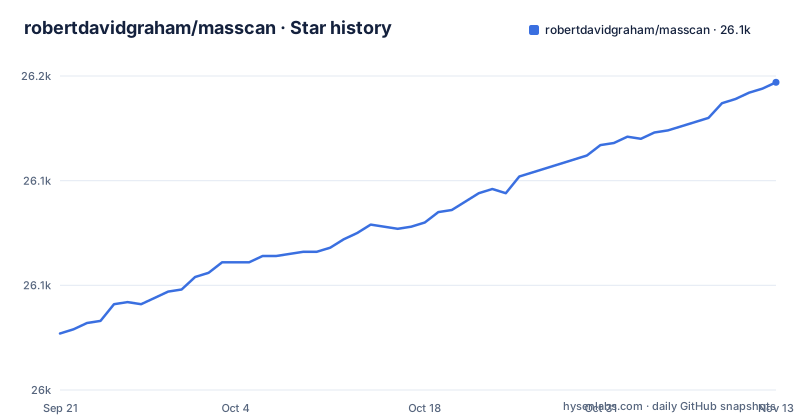
- robertdavidgraham/masscan26,147 ★ · +120
| Repository | 2026-09-21 | 2026-11-13 |
|---|---|---|
| robertdavidgraham/masscan | 26k | 26.1k |
120 Stars in the last 53 days, measured from the daily GitHub snapshot. Compare with other projects
Editorial analysis
The scope is deliberately asymmetric with nmap, and the README says so
masscan is not trying to be nmap. The README positions it as an Internet-scale port scanner, and the guidance to users is explicit about the division of labour: when in doubt, use nmap's features, because masscan supports the operations needed to scan many machines widely and does not support in-depth scanning of single machines.
Mechanically the difference is what happens during a scan. masscan sends SYN packets asynchronously, without completing the three-way handshake, and judges a port open from the response. That is why it can cover a very large address space in a short time from one machine, and it is also why the answers it gives are thin: a port is open or it is not, and that is most of what it knows.
It sits in a family of Internet-scale scanners along with scanrand, unicornscan and ZMap, all of which use the same asynchronous approach, and the README notes masscan is more flexible than those in allowing arbitrary port and address ranges.
Consequence: pick it when the question is what is listening across a wide range, and reach for something else when the question is what version is running and how is it configured. It also means its output needs enriching before it is useful in most workflows.
Its own TCP/IP stack is why banner grabbing breaks without help
This is the mechanism to understand before running anything, and the README flags it in capitals: masscan uses its own ad hoc TCP/IP stack, and anything other than simple port scans may conflict with the local stack.
The failure is specific and it is caused by the operating system, not by masscan. When the local system receives a SYN-ACK from a probed target, the host's own TCP/IP stack responds with a RST packet, which kills the connection before masscan can complete it and grab the banner. The masscan stack sees the SYN-ACK fine; the kernel does not know it is not supposed to answer it.
This matters for every feature that needs a completed connection, not just banners. The `--heartbleed` check is described as being the same kind of problem, since it is a form of banner checking.
Two mitigations are documented, and choosing between them is the practical decision. Either give masscan its own source IP address that the host is not using, or pick source ports and firewall them locally so the host stack never sees the reply. The next two sections cover each in turn, because which one is available to you depends on your network.
A spare local address is the clean fix, and picking a bad one hurts another machine
The preferred solution is to assign masscan a separate IP address so the host stack never sees the responses. The requirement is narrow and the README is careful about it: the address you choose has to be on the local subnet and not otherwise be used by another system.
The warning about getting it wrong is the part to read twice. masscan will warn you that you have made a mistake, but by then you might have already messed up another machine's communications for several minutes. Assigning an address that is in use elsewhere does not produce a clean error, it produces a second device answering on the same address, and the symptom shows up on the other machine as network weirdness rather than as a problem with your scanner.
So this fix is available when you control the subnet and can identify a free address, and it is not always available. The README calls out WiFi specifically as a case where it is not possible. The next section covers the workaround for that situation.
On a network you run, this is the cleaner of the two options because it requires no firewall changes and nothing that is lost on reboot.
Firewalling a source port works everywhere but evaporates on reboot
The alternative is to choose which source ports masscan uses and firewall those ports locally, so the host stack never sees the reply while masscan still does, since it bypasses the local stack.
The subtlety is choosing a port range that does not collide with the ports the operating system picks for itself. The README points at the place to look, which is a file in the kernel's view of the network configuration:
/proc/sys/net/ipv4/ip_local_port_rangeIt gives a concrete example: on the Kali Linux of August 2018, that range was 32768 to 60999, so the advice is to choose ports either below 32768 or at 61000 and above. The kernel picks these automatically for outbound connections, so a source port inside that range can be stolen mid-scan, and a Linux firewall rule targeting a port the kernel also uses will drop unrelated traffic.
The per-platform details differ. On macOS and BSD the equivalent ranges are read with a sysctl command, FreeBSD and older macOS use ipfw, and newer macOS and OpenBSD use pf with a block rule added to the configuration file and enabled with pfctl. The README also notes the practical maintenance cost: an iptables rule lasts only until the next reboot, and you need iptables-save or iptables-persistent to make it survive.
That last point is the real drawback. A configuration that silently disappears on the next restart turns a working scan into a broken one, and the breakage looks like a masscan bug.
The author tells you not to scan the whole Internet, and explains what happens if you do
The README is unusually candid about this. It says plainly that scanning the entire Internet is bad, and gives two reasons. Some parts of the Internet react badly to being scanned. Some sites track scans and add you to a ban list, which will get you firewalled from useful parts of the Internet.
That second consequence is the one that bites in practice. A ban list entry does not just block the target that flagged you; it can cut you off from parts of the Internet you actually need, which is a strange outcome for a tool you are running to learn about your own estate.
The consequence for a reader is that the famous masscan command is a demonstration of capability rather than a suggestion:
# masscan 0.0.0.0/0 -p0-65535The documentation's guidance is to exclude large numbers of ranges from any wide scan, with a blacklist syntax provided for the purpose. That is the right default whether or not you own the target: if you cannot enumerate the ranges you are responsible for and confirm you are authorised for each, the wide scan is the wrong command regardless of intent.
The same warning applies to the internal case. Scanning a range that belongs to someone else, even a neighbouring business on shared infrastructure, is the same act as scanning the Internet with a smaller number.
The build is one compiler and no dependencies, but parallelism has a memory cost
Building is about as light as C projects get. The README states it does not really have any dependencies other than a C compiler such as gcc or clang, and on Debian or Ubuntu the sequence is to install git, make and gcc, clone, and run make. The binary lands in the masscan bin subdirectory, and make install puts it on the system on Linux.
There is a performance note that is easy to miss and matters on small hardware. The source consists of a lot of small files, so building is considerably faster with the multi-threaded target, which is make with the parallel flag. The catch is stated plainly: that requires more than 2GB on a Raspberry Pi, where it breaks, so you would use a smaller number such as four jobs rather than every available thread.
Platform support is broad but uneven, and the Makefile is candid about it. Linux is the primary target and the environment where the automated regression tests run. On macOS the author develops occasionally but it is not part of the regular regression environment, so something may be broken at any time, and the Makefile comment says so. Windows via MinGW works in a way the author describes as accidental, arising from having once mistyped make for git, and not as the intended environment. Cygwin will not work at all. Visual Studio and Xcode projects are provided for Windows and macOS respectively, and there is a fallback of compiling all the source files together with cc.
For a scanner you will run occasionally, a prebuilt package is usually less work than any of this.
A dated release history means the macOS caveat matters more than it looks
The maintenance picture is worth weighing before you commit to it. The last push to the master branch was on 2026-10-05, and the most recent tagged releases are all from January 2021, at 1.3.2, 1.3.1 and 1.3.0. That is a gap of several years between the newest tag and the current state of the tree, so the releases are not a reliable indicator of what is actually in master, and building from source is the more honest way to get a current version.
This interacts directly with the platform caveats above. The macOS support is described as untested in the regular regression environment with the explicit admission that something might be broken at any time, and the Windows support is described as unintentional. Neither of those statements is a promise about the current state, and both are the kind of thing that ages.
For a tool whose primary use is time-sensitive network inventory, a project whose tagged releases stopped in 2021 is a real consideration. It is still a working, widely used scanner with a simple build and a well-documented set of sharp edges, and the documentation on those edges is more thorough than most tools manage. But if you need ongoing support or a maintained package for a platform other than Linux, factor that in rather than discovering it when a scan misbehaves.
Test on your own network before you rely on the results.
Editorial conclusion
masscan suits a network engineer who already knows which address ranges they are responsible for and wants to inventory them fast, particularly for IPv6 space or a wide port range across a large internal segment. It is a poor fit for detailed single-host analysis, and for anyone scanning ranges they do not own, since the documentation itself warns that some networks react badly and ban-list scanners. Before running it, verify three things: that you have authorisation for every range in the target list, that you have a spare local address or a firewall rule ready, because the host stack will send RST packets that kill banner grabs, and that your port range choices avoid the local ephemeral range.
Frequently asked questions
What is a masscan?
masscan is an Internet-scale TCP port scanner written in C that transmits SYN packets asynchronously, which lets it cover a very large address space in a short time from a single machine. It is designed for wide scanning of many machines rather than in-depth analysis of individual hosts, and it uses its own ad hoc TCP/IP stack. It is licensed under the AGPL-3.0.
What are the key differences between Nmap and Masscan?
The README frames the difference as a division of labour: masscan supports the operations needed to scan many machines widely, and for anything more detailed on a single machine you should use nmap's features instead. masscan works by sending SYN packets asynchronously without completing the handshake, judging a port open from the response, which is what makes wide scans fast and the results thin. It also maintains its own ad hoc TCP/IP stack, separate from the host's.
how to use masscan
Give it a port specification and an address range, and it prints results to standard output. Because its own TCP/IP stack collides with the host stack, you normally also pass --source-ip with an address on the local subnet that nothing else is using, or --source-port with a port you have firewalled locally. To see the full set of options, use the --echo feature, which dumps the current configuration and exits, and that output can be saved and fed back with -c.
how to install masscan
From source on Debian or Ubuntu, install git, make and gcc, clone the repository, and run make, which puts the binary in the masscan bin subdirectory; make install then installs it on Linux. The only dependency is a C compiler. The multi-threaded make -j is faster but needs more than 2GB, so on a small machine such as a Raspberry Pi use a lower job count.
How do I scan all ports using Masscan?
The port specification accepts ranges, so all ports is 0-65535, and the address specification accepts CIDR ranges including IPv6. The README is direct that scanning the entire Internet is bad, because some networks react badly to being scanned and some sites track scans and ban-list you, which can get you firewalled from useful parts of the Internet. It recommends excluding large numbers of ranges with a blacklist syntax instead.
Official sources
Add this badge to your README
If you maintain this project, the badge below links readers to this analysis and shows its maintenance status from the daily GitHub snapshot. Paste the markdown into your README; add ?metric=license or ?metric=stars to the image URL for a different field.

[](https://hysenlabs.com/projects/robertdavidgraham-masscan)Star history chart for your README
[](https://hysenlabs.com/projects/robertdavidgraham-masscan)Was this useful?