ansible-lint: the playbook checker Ansible ships with a rules catalogue behind it
ansible-lint checks playbooks for practices and behavior that could potentially be improved and can fix some of the most common ones for you
At a glance
- What is it?
- A Python linter that parses your playbooks as Ansible would run them, applies a documented rule set, and can rewrite some violations for you, with a GitHub Action so CI needs nothing installed.
- Who is it for?
- ansible-lint earns its keep as a pull request check rather than a local habit, because most of its rules only fire in a full parse of the playbook and its collection dependencies, which is expensive to run on every keystroke. Start with the GitHub Action from the README, pin a release tag rather than `main` once the workflow is stable, and expect the first run to be noisy.
- Can I use it commercially?
- Yes, with conditions. GPL-3.0 is a copyleft licence: if you distribute software that includes it, you must release that software's source code under the same licence. Running it internally without distributing it does not trigger that obligation.
- Is it still maintained?
- Yes. The repository last received commits 1 day ago.
- What is it written in?
- Mainly Python, according to GitHub's language statistics.
Answers come from the project's GitHub data, last synced on October 22, 2026, and from our analysis. They are not legal advice.
Star history
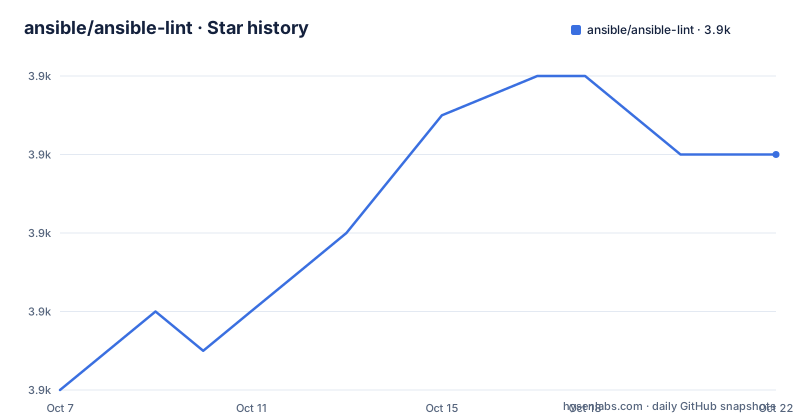
- ansible/ansible-lint3,924 ★ · +6
| Repository | 2026-10-07 | 2026-10-22 |
|---|---|---|
| ansible/ansible-lint | 3.9k | 3.9k |
6 Stars in the last 15 days, measured from the daily GitHub snapshot. Compare with other projects
Editorial analysis
What the linter actually parses
The repository metadata describes ansible-lint as a tool that checks playbooks for practices and behavior that could potentially be improved and can fix some of the most common ones for you. The second half of that sentence is the interesting one. Most YAML linters read text. ansible-lint loads your playbook the way Ansible loads it, which means it needs a resolvable collection and role graph, and it needs to know where your inventory and variables live.
That dependency is visible in `pyproject.toml`, where the runtime dependencies include `ansible-compat>=26.3.0` and `ansible-core>=2.16.19,!=2.17.*`, along with `jsonschema>=4.10.0` for schema validation, `ruamel-yaml>=0.18.11` and `pyyaml>=6.0.1` for YAML parsing, `wcmatch>=8.1.2` for glob matching, and `black>=25.2.0`, which is what the autofixer uses to reformat the YAML it rewrites. The `pyyaml` entry is split into two lines conditioned on Python version, one for below 3.14 and one for 3.14 and above, so the project is tracking new Python releases explicitly.
The Python requirement is `>=3.10`, and the classifiers list 3.10 through 3.14. The README states the support policy plainly: as a community-backed project, ansible-lint supports only the last two major versions of Ansible. That is the constraint to design around, since a playbook written for an unsupported Ansible core will eventually fail to lint for reasons that have nothing to do with the playbook.
Running it in CI through the GitHub Action
The README's main installation path is not pip. It is a GitHub Action, so a repository can be linted without installing anything. The workflow file it gives is complete and copyable:
# .github/workflows/ansible-lint.yml
name: ansible-lint
on:
  pull_request:
    branches: ["main", "stable", "release/v*"]
jobs:
  build:
    name: Ansible Lint # Naming the build is important to use it as a status check
    runs-on: ubuntu-24.04
    steps:
      - uses: actions/checkout@v6
      - name: Run ansible-lint
        uses: ansible/ansible-lint@main # or vX.X.X version
Two details in that file are load-bearing. The `name` field of the job has to be set for the check to appear as a status on the pull request, which is the comment the README puts on that line. And the action reference defaults to `main`, with the README recommending a specific release tag in the format v.X.X.X for production or stable workflows.
Everything below the `uses:` line is optional. The inputs are `args` for passing command line arguments, `requirements_file` pointing at the requirements.yml used to install role and collection dependencies, `setup_python` which defaults to `true`, `python_version` defaulting to `3.14`, and `working_directory` defaulting to `github.workspace`, which is what you change when you want to lint only a subdirectory of a monorepo. The `gh_action_ref` input is marked not recommended for standard use and exists mainly for composite actions where the environment variable is set by the parent action.
The rule set, profiles and the autofixer
The README links a badge labelled Ansible-lint rules pointing at docs.ansible.com/projects/lint/rules, and that page is the actual specification of what gets checked. The repository itself carries the machinery: `src/` holds the linter, `test/` holds the test suite, `conftest.py` is the pytest configuration, and `examples/` is a large directory of deliberately broken playbooks used as fixtures.
Those example directories are the best available index of what the rules cover. Names like `examples/broken/`, `examples/broken_collection_meta_runtime/`, `examples/ee_broken/`, `examples/galaxy_tags/`, `examples/no_changelog/` (under `examples/.no_changelog/`) and `examples/meta_runtime_version_checks/` tell you the linter has opinions about execution environments, collection metadata, galaxy tags and runtime version constraints. There are also `examples/inventory/`, `examples/host_vars/`, `examples/group_vars/` and `examples/lineno.yml`, which is a fixture for line number reporting.
The autofixer deserves a note of caution. Release v26.9.0, published on 2026-09-22, includes fixes such as honoring `warn_list` after `--fix` rewrites task names and skipping auto-fix on `no-jinja-when` when the jinja is embedded in a string. Those are the kinds of bugs that appear when a tool is rewriting your files automatically, and the fact that they are being fixed one at a time is the honest signal: `--fix` is a convenience, not a guarantee. Run it on a branch and read the diff.
Configuration for the linter lives in a `.ansible-lint` file, and the repository has one at its root along with a `.ansible-lint-ignore` file. For a large existing codebase, expect to spend time in those two files before the linter is quiet.
Why a linter like this is slow, and what the releases say about it
The search data for this project includes a question about why the linter is slow, and the answer is structural rather than incidental. A full parse means resolving imports, so a playbook that pulls in a collection from Galaxy needs that collection downloaded first. v26.8.0 added support for honoring `ANSIBLE_VAULT_PASSWORD_FILE` for vault decryption, which is a good example: linting an encrypted variable file requires decrypting it, and that is a credential-handling problem before it is a linting problem.
The dependency graph is the rest of the cost. Each collection in the dependency set brings its own schemas and its own rules, and the release notes show this work item by item. v26.9.0 includes fixes to resolve short mock modules during syntax check, to propagate `extra_vars` to an `import_playbook` syntax check, to resolve nested `include_tasks` relative paths, and to resolve `include_tasks` paths from the playbook directory. Each of those is a case where the linter could not resolve something and either failed or gave a wrong answer.
Two more entries point at the performance work directly: a fix to apply the profile-level skip list during linting, and one entry describing a switch to `ThreadPoolExecutor` for the syntax check phase. The v26.8.0 notes are more about maintenance, with SonarCloud recursion complexity fixes and a batch of Renovate dependency updates including a security-tagged bump.
The practical takeaway for adoption is that the first run over a large repository is slow and produces a large report, and that this is expected. The `skip_list` and `.ansible-lint-ignore` mechanisms exist so you can converge on a green build incrementally rather than reformatting everything at once.
Licensing, maintenance and what the repository does not tell you
The licence arrangement is unusual and the README explains it in two paragraphs. ansible-lint as a distributed package is GPLv3, because its runtime dependencies like `ansible` and `yamllint` are GPLv3. For historical reasons its own codebase stays under the more liberal MIT licence, and contributions are accepted under MIT. Both texts are in the repository: `COPYING` for GPLv3 and `docs/licenses/LICENSE.mit.txt` for MIT. For most teams this only matters if you redistribute the tool, which running a linter in CI does not.
Maintenance is current. The last push was on 2026-09-22, the same day as release v26.9.0, and v26.8.0 came on 2026-08-12. The project was created by Will Thames and is now maintained as part of the Ansible project by Red Hat, which shows in the `pyproject.toml` maintainers field as Ansible by Red Hat. The repository topics include `ansible-dev-tools`, `pep-621`, `pre-commit-hook` and `hacktoberfest`.
The pre-commit hook is worth knowing about because it is the cheapest way to find out whether the linter suits you before committing to CI. The tree has both `.pre-commit-config.yaml` for the project itself and `.pre-commit-hooks.yaml` for consumers, so the same hook is usable in your own repository.
What the README does not cover is the rule documentation itself, the profile definitions such as `production` or `safety`, and the full command line surface. All of that is at docs.ansible.com/projects/lint, and the README is essentially an index to it plus the GitHub Action recipe.
Where ansible-lint sits against a plain YAML linter
The comparison worth making is with yamllint, which appears in ansible-lint's own dependency reasoning. yamllint reads a file as text and reports line length, trailing spaces, indentation and duplicate keys. It knows nothing about Ansible, so it cannot tell you that your task names are uninformative or that a `command` should have a `changed_when`.
ansible-lint knows about Ansible, and that costs you a full environment resolution. It is the difference between a grammar checker and a compiler. In exchange for the slower run you get findings that are actually about behaviour, and an autofixer for the subset of rules that have an unambiguous rewrite, which is the FQCN rewrite that turns a bare `apt` into `ansible.builtin.apt`.
There is a middle option worth naming. ansible-lint does syntax checking, and Ansible itself has a syntax check mode. For a repository where the goal is only to catch YAML that will not parse, the built-in check is cheaper and needs none of this setup. The linter earns its cost when you want the full rule set, not the parse.
For teams not ready to adopt Ansible tooling, the honest alternative is a plain YAML linter with a pre-commit hook, accepting that it will never look at what the playbook does. Choose based on whether the playbook is code you maintain deliberately or something generated and rarely touched, because the two want opposite amounts of tooling.
Editorial conclusion
ansible-lint earns its keep as a pull request check rather than a local habit, because most of its rules only fire in a full parse of the playbook and its collection dependencies, which is expensive to run on every keystroke. Start with the GitHub Action from the README, pin a release tag rather than `main` once the workflow is stable, and expect the first run to be noisy. The documentation site at docs.ansible.com/projects/lint is where the rule catalogue and profile definitions live; the README itself covers installation through the action and little else, so the rules page is the file to read before you decide what to skip.
Frequently asked questions
What does ansible-lint do?
It checks Ansible playbooks for practices and behaviour that could be improved, and can fix some of the most common issues automatically. Unlike a plain YAML linter, it parses the playbook the way Ansible loads it, resolving collections, roles and includes, so it can report on task naming, FQCN usage, `changed_when` and similar Ansible-specific concerns. The full rule list is documented at docs.ansible.com/projects/lint/rules.
How do I install ansible-lint?
The README leads with the GitHub Action rather than a package manager, and the workflow it shows runs ansible-lint on ubuntu-24.04 without installing anything. For local use the package is on PyPI as `ansible-lint`, requiring Python 3.10 or newer, and `pyproject.toml` requires `ansible-core>=2.16.19`. The project also ships `.pre-commit-hooks.yaml` so you can run it as a git hook.
Why is ansible-lint slow on a large repository?
Because a full lint means resolving the playbook's dependency graph rather than reading text. Each imported collection and role has to be found, downloaded and parsed, and v26.8.0 added support for `ANSIBLE_VAULT_PASSWORD_FILE` because encrypted variables have to be decrypted first. v26.9.0 also switched part of the syntax check to a `ThreadPoolExecutor`, which suggests this was a known cost. Caching dependencies and using `.ansible-lint-ignore` for existing violations are the practical mitigations.
Official sources
Add this badge to your README
If you maintain this project, the badge below links readers to this analysis and shows its maintenance status from the daily GitHub snapshot. Paste the markdown into your README; add ?metric=license or ?metric=stars to the image URL for a different field.

[](https://hysenlabs.com/projects/ansible-ansible-lint)Star history chart for your README
[](https://hysenlabs.com/projects/ansible-ansible-lint)Was this useful?