Red-DiscordBot: a self-hosted, cog-based Discord bot you run yourself
A multi-function Discord bot
At a glance
- What is it?
- Red-DiscordBot is a modular Python Discord bot that you host on your own machine or server. It is aimed at server owners who want control over data and features, and its cog system is the main reason to pick it over a hosted bot.
- Who is it for?
- Adopt Red-DiscordBot if you want a bot you control, can run on Windows, macOS or Linux, and are willing to maintain the host yourself. Do not adopt it if you want a zero-setup hosted bot or expect the project to fix third-party cogs.
- Can I use it commercially?
- Yes, with conditions. GPL-3.0 is a copyleft licence: if you distribute software that includes it, you must release that software's source code under the same licence. Running it internally without distributing it does not trigger that obligation.
- Is it still maintained?
- Yes. The repository last received commits 1 day ago.
- What is it written in?
- Mainly Python, according to GitHub's language statistics.
Answers come from the project's GitHub data, last synced on November 15, 2026, and from our analysis. They are not legal advice.
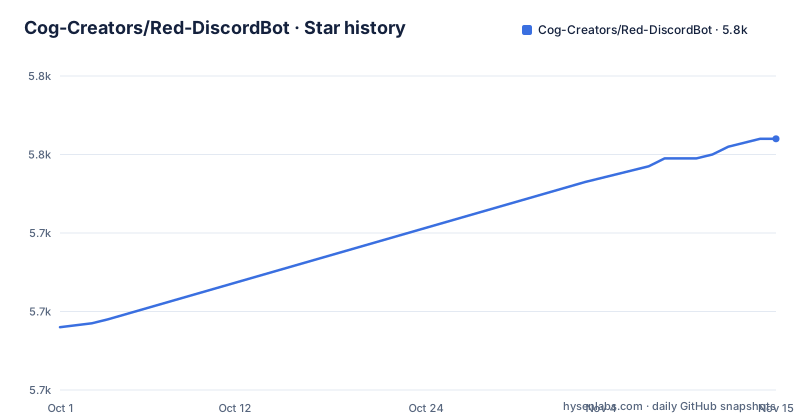
Star history
- Cog-Creators/Red-DiscordBot5,764 ★ · +48
| Repository | 2026-10-01 | 2026-11-15 |
|---|---|---|
| Cog-Creators/Red-DiscordBot | 5.7k | 5.8k |
48 Stars in the last 45 days, measured from the daily GitHub snapshot. Compare with other projects
Editorial analysis
What Red-DiscordBot solves, and who it is actually for
Most Discord bots are hosted services. You invite them, you get their commands, and you accept whatever data policy, uptime and feature set the operator chooses. Red-DiscordBot inverts that. The README calls it a "self-hosted bot", which means you run the process, you hold the token, and you decide which features exist. For a server owner who wants moderation, music, trivia and stream alerts in one place without inviting five separate bots, that consolidation is the point.
The audience is narrower than the feature list suggests. The README claims you do "NOT need to know anything about coding" and that aside from installing and updating, every part of the bot can be controlled from within Discord. That is true of day-to-day operation, but not of the initial setup: you still install Python, create a bot application on Discord, and run a setup command. Someone who has never opened a terminal will spend an evening on the install guides before the first command works. The pyproject.toml classifier lists both "Intended Audience :: Developers" and "Intended Audience :: End Users/Desktop", which matches reality: the maintainers expect both coders and non-coders, and the docs are written for the second group.
How the cog system and data flow work
Red's architecture is a core plus cogs. The core handles Discord connectivity, the command framework, configuration storage and permissions; cogs are the feature packages. The README describes the bot as "fully modular", with all features and commands enabled or disabled to your liking. In practice that means a cog can be loaded, unloaded and configured at runtime without restarting the bot, and the default set ships with moderation, trivia, music, stream alerts, a bank, custom commands, Imgur/gif search and admin automation.
The interesting part is third-party cogs. The README states that 3rd party plugins can be installed "directly from Discord", and points to an index at index.discord.red. That is a real architectural decision with a real consequence: installing a cog means running code from a stranger on your host, with the same access to your token and your server as the core. If you run a public server and let moderators install cogs, you have effectively given them shell access to your bot process.
On the data side, setup.py builds extras from files in requirements/, and the extras_require logic adds a dev extra and an all extra that combines the postgres extra. The README does not document the storage backend, so the choice between the default and Postgres is something to confirm in the install guides rather than assume.
Installing Red-DiscordBot and starting your first instance
The README points to platform-specific guides rather than inline steps: Windows, macOS and most major Linux distributions each have a page under docs.discord.red/en/stable/install_guides/. Follow the guide for your platform, because the Python packaging steps differ. The project is published on PyPI as Red-DiscordBot, and pyproject.toml declares two console scripts, redbot and redbot-setup.
Once the environment is ready, the setup entry point is the redbot-setup script. pyproject.toml defines it as redbot.setup:run_cli, so the command below is the one the repository declares.
redbot-setupThe README does not describe what redbot-setup asks, so treat the install guide for your platform as the source of truth.
After setup, the bot itself is started with the other declared console script. The README's overview says every part of the bot can then be controlled from within Discord, so this is the last terminal command you should need for routine use.
redbotIf you installed from a source checkout instead of PyPI, the Makefile provides a development path: make newenv creates a virtual environment with python -m venv --clear .venv, and make syncenv installs from tools/dev-requirements.txt. That route is for contributing to Red, not for running a production instance.
Where Red-DiscordBot is the wrong tool
The self-hosted model is the limitation. If your bot process dies at 3am, nobody restarts it but you. There is no managed uptime, no support contract, and no operator to escalate to. The README directs users with problems to the official Discord server's #support channel, which is community help, not a service-level commitment.
Python version pinning is a second constraint worth reading carefully. setup.py sets python_requires to ">=3.8.1" and appends ",<3.12" unless the TOX_RED environment variable is set and the interpreter is 3.12 or newer. The pyproject.toml classifiers list 3.8 through 3.11. If your server image ships Python 3.12 or newer, a plain pip install will not resolve as expected. This is not a bug, but it does mean the install is not as version-agnostic as "pip install Red-DiscordBot" implies.
The third case is scale. If you only need moderation and a welcome message, Red is a large dependency tree for two features. A small single-purpose bot, or Discord's own built-in AutoMod, covers that with less surface area. Red pays off when you want many features from one process and one configuration store.
Red-DiscordBot compared with a hosted bot like Betty
Hosted bots take the opposite approach: the operator runs the infrastructure, you invite the bot and configure it through a dashboard or commands, and you accept their hosting, their data handling and their feature roadmap. The trade is convenience for control. Red gives you the control and hands you the operational work.
A second alternative is a custom bot written directly against discord.py, which the README lists as a dependency badge. That gives you exactly the features you write and nothing else, but you lose the existing cog ecosystem, the permission system and the command framework that Red already ships. Red is essentially a batteries-included framework that happens to be distributed as a finished bot.
If you want a hosted bot with a dashboard and no server to maintain, Red is the wrong side of that comparison. If you want a bot whose cogs you can audit, patch and replace, it is the right one.
Licence, maintenance and upgrade cost
Red is released under GPL-3.0, as stated in the README and in the pyproject.toml classifier. For most server owners this changes nothing, because you are running the bot rather than distributing it. It matters if you fork Red, ship a modified version to others, or bundle it into a product: GPL-3.0 is a copyleft licence, and the project also vendors the MIT-licensed discord.ext.menus package, with its licence kept in redbot/vendored/discord-ext-menus.LICENSE. Keep both files when you redistribute. This is a description of the licence text, not legal advice.
On maintenance, the repository is not archived and the last push was on 2026-09-07. The most recent tagged release is 3.5.24 from 2026-03-06, following 3.5.23 two days earlier and 3.5.22 in September 2025. That pattern suggests the project is maintained, with release cadence clustered rather than regular.
Upgrade cost is mostly in the cogs. Upgrading the core is a package upgrade, but third-party cogs from the index are maintained by their own authors and may lag a core release. The README's "continuous development" language applies to Red itself, not to every cog in the community index. Before upgrading, check whether the cogs you rely on declare compatibility with the version you are moving to.
Editorial conclusion
Adopt Red-DiscordBot if you want a bot you control, can run on Windows, macOS or Linux, and are willing to maintain the host yourself. Do not adopt it if you want a zero-setup hosted bot or expect the project to fix third-party cogs. Before committing, check that your Python version satisfies the >=3.8.1,<3.12 range in setup.py, confirm the install guide for your platform at docs.discord.red, and decide whether you need the postgres extra for your data volume.
Frequently asked questions
What is Red-DiscordBot?
It is a self-hosted, modular Discord bot written in Python and released under GPL-3.0. The README describes it as fully modular, so features and commands can be enabled or disabled, and it ships with moderation, trivia, music, stream alerts and other modules.
How do I install Red-DiscordBot?
The README links to platform-specific install guides for Windows, macOS and most major Linux distributions under docs.discord.red/en/stable/install_guides/. The package is published on PyPI as Red-DiscordBot, and the repository declares the redbot-setup and redbot console scripts.
How do I use Red-DiscordBot after it is running?
The README states that aside from installing and updating, every part of the bot can be controlled from within Discord. Setup is done once with the setup command, and after that you manage cogs and commands through Discord itself.
Is there an alternative to Red-DiscordBot?
Hosted bots are the main alternative: the operator runs the infrastructure and you configure the bot through their interface. Red takes the opposite approach, giving you control of the host in exchange for maintaining it yourself.
Official sources
Add this badge to your README
If you maintain this project, the badge below links readers to this analysis and shows its maintenance status from the daily GitHub snapshot. Paste the markdown into your README; add ?metric=license or ?metric=stars to the image URL for a different field.

[](https://hysenlabs.com/projects/cog-creators-red-discordbot)Star history chart for your README
[](https://hysenlabs.com/projects/cog-creators-red-discordbot)Was this useful?