Google2FA: TOTP and HOTP two-factor authentication for PHP without a framework dependency
A One Time Password Authentication package, compatible with Google Authenticator.
At a glance
- What is it?
- Google2FA is a PHP library implementing HOTP (RFC 4226) and TOTP (RFC 6238), compatible with Google Authenticator and any compliant OTP app. Version 9.0.0 raised the default secret key length from 16 to 32 characters, a change that may require database schema updates and test fixes before upgrading.
- Who is it for?
- Use Google2FA when you need TOTP or HOTP verification in a PHP project and are prepared to handle QR code generation, session management, and account lockout as separate concerns. It fits any PHP framework through the agnostic core, and Laravel projects have the bridge package at antonioribeiro/google2fa-laravel.
- Can I use it commercially?
- Yes. MIT is a permissive licence: you can use, modify and sell software built on it, as long as you keep its copyright and licence notices.
- Is it still maintained?
- Yes. The repository last received commits 71 days ago.
- What is it written in?
- Mainly PHP, according to GitHub's language statistics.
Answers come from the project's GitHub data, last synced on October 23, 2026, and from our analysis. They are not legal advice.
Star history
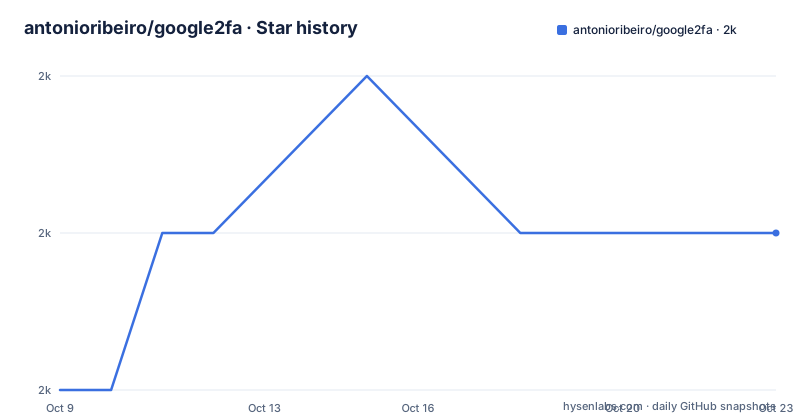
- antonioribeiro/google2fa2,011 ★ · +1
| Repository | 2026-10-09 | 2026-10-23 |
|---|---|---|
| antonioribeiro/google2fa | 2k | 2k |
1 Stars in the last 14 days, measured from the daily GitHub snapshot. Compare with other projects
Editorial analysis
HMAC-Based and Time-Based One-Time Passwords: the two standards the library covers
Google2FA is a PHP implementation of two one-time password standards. The first is the HMAC-Based One-time Password algorithm defined in RFC 4226, which generates codes from a shared secret and a counter value. The second is the Time-based One-time Password algorithm defined in RFC 6238, which replaces the counter with the current Unix timestamp divided into 30-second windows. Both produce the numeric codes that Google Authenticator and other compatible apps display.
The distinction between the two algorithms determines how the server-side verification loop is structured and how long a code remains usable after it leaves the screen. HOTP codes remain valid until used, because the counter advances only on a successful check, meaning a code generated at login time is still acceptable minutes later if the user has not yet submitted it. TOTP codes expire when the 30-second window closes, which reduces the usable window for a stolen code and is why most new integrations choose TOTP over HOTP. Most web applications that want phone-based second factors pick TOTP, since the flow of opening an authenticator app and reading a fresh code is what users expect from any 2FA prompt. Google2FA covers both algorithms, handling code generation and verification on the server side.
What the package does not handle is sessions, cookies, or any part of the HTTP request lifecycle. It takes a secret key and a code to verify, then returns a result with no side effects on session state, meaning the surrounding application decides when to call it, how many failed attempts to allow, and what to do with the outcome. Account lockout, rate limiting, and backup code management are not part of the library and must be built in the layer above it.
Packagist availability, PHP version floor, and the first call that matters
The package is published on Packagist under the name pragmarx/google2fa. PHP version support covers PHP 7.4 through 8.4. The compatibility table in the README extends the supported list to 8.5 and marks 8.6-beta as CI-tested but not yet an officially declared target.
Once installed, the first step in any 2FA enrollment flow is generating a secret for the user and storing it against their account record. Google2FA provides a generateSecretKey method for that purpose, and its return value is the Base32-encoded string that goes into the database and into the QR code or manual entry prompt shown to the user. In v8.x and below, the method returned a 16-character string by default, which encodes 80 bits of entropy. In v9.0.0 and later, the same call returns 32 characters, encoding 160 bits, a change described in full in the next section.
// This now generates 32-character secrets by default
$secret = $google2fa->generateSecretKey();
The secret is what the user stores in their authenticator app, either typed manually or encoded into a QR code that the application generates separately. Google2FA does not generate QR codes, a boundary described in a later section.
The README points to a playground at pragmarx.com/playground/google2fa for trying the full enrollment and verification flow without writing code first. For code examples beyond secret generation, the docs/ directory in the repository holds further material.
v9.0.0 changed the default secret length from 16 to 32 characters, and four integration points break
Version 9.0.0, released on 2025-09-19, is labeled a breaking change in the README. The change is to the default output of generateSecretKey: it now returns 32 characters instead of 16. The README gives the cryptographic reasoning: 16 characters encode 80 bits of entropy, which satisfies the RFC 6238 minimum but leaves limited room against brute force. 32 characters encode 160 bits. Both lengths remain compatible with Google Authenticator.
For new installations the change is transparent. For upgrades, the README names four areas to check. First, database schemas: if the column storing the secret was created to hold 16 characters, the new default will produce a value that either triggers an error or is silently truncated, depending on the database mode. Second, validation rules: any length check that enforces exactly 16 characters will reject the new default. Third, tests: assertions that compare output to a 16-character string will fail. Fourth, UI components: form fields and QR code displays need to accommodate the longer value.
Existing 16-character secrets are not invalidated. The library continues to verify them correctly after an upgrade. Only new secrets generated by the default call are longer.
If an application needs to keep generating 16-character secrets after upgrading, the explicit length argument preserves the old behavior:
// New way to get 16-character secrets (v9.0+)
$secret = $google2fa->generateSecretKey(16);
The CHANGELOG.md file in the repository is the place to check for other changes in the 9.x series beyond this one.
QR code delivery is outside the package scope, and two options exist for adding it
QR code generation is absent from the package scope. The library produces and verifies secrets but stops before the enrollment step where a user scans a QR code into their authenticator app, and any application using Google2FA must handle that step itself.
Two options exist for adding it. A companion package, google2fa-qrcode, is available at antonioribeiro/google2fa-qrcode and integrates the core library with the BaconQRCode library to produce QR code output in one install. The README also lists manual approaches under a QR Code Packages section for developers who prefer a different QR library or need to control rendering themselves.
The separation serves a clear purpose. A project that delivers the secret through a different channel, such as a printed recovery sheet or an API call to a mobile client that renders its own QR display, gains nothing from the BaconQRCode dependency and avoids it entirely by using the core library alone. Any project that needs a scannable QR code in the enrollment step will end up with at least two packages regardless of which approach it takes.
The agnostic design and the separate Laravel bridge
No framework dependency is required. The repository topics include the word agnostic, a choice that the library's design reinforces: the core handles only the cryptographic steps and returns a value, leaving request handling, middleware, and session logic entirely to the application. That means it installs and runs in plain PHP scripts, Symfony applications, and other frameworks without modification.
A Laravel bridge lives at a separate repository, antonioribeiro/google2fa-laravel. The README names it but does not describe what it adds beyond calling it a bridge. A bridge for a specific framework typically wires request handling, session-based state, and middleware into the framework's authentication stack, saving the developer from writing that glue code manually. A Laravel project has two options: use the agnostic package and write that integration by hand, or use the bridge and get the wiring pre-built.
The CI pipeline in the repository runs two workflows: a PHPUnit test suite and a separate static analysis check. The static analysis configuration files phpstan.neon and psalm.xml both appear at the repository root, which means two different analysis tools run on every push to the 9.x branch.
Version support: 9.x gets features, 8.x gets security fixes, and 7.x is unsupported
The README documents a three-tier support policy. Version 9.x is labeled Active and receives new features, bug fixes, PHP and PHPUnit compatibility updates, and dependency updates. Version 8.x is in Maintenance mode: only security fixes and low-risk maintenance items, such as CI bumps and documentation fixes, are merged there. Version 7.x and everything older is labeled Unsupported, and the README asks users on those versions to upgrade.
The policy tracks PHP's own supported versions window. That means Google2FA drops a PHP version from active support roughly when PHP itself does. PHP 7.4 and 8.0 are both past their official end-of-life dates, which makes any application still on those versions a candidate for planned migration.
Security vulnerabilities should go to SECURITY.md rather than to the public GitHub issue tracker, and the README links to that file. A RELICENSED.md file at the repository root records a licensing change at some point in the project's history. The current license is MIT, as documented in LICENSE.md and the repository metadata. The last push to the repository was on 2026-08-15.
Where TOTP-based OTP is the wrong layer: hardware keys, SMS codes, and passkeys
Google2FA covers TOTP and HOTP. It does not cover hardware security keys, passkeys, or any authentication mechanism outside those two algorithms. A PHP application that needs FIDO2 or WebAuthn support, which underpins YubiKeys, platform authenticators like Face ID, and browser-based passkeys, requires a separate library. The two approaches are not mutually exclusive: some systems register multiple second-factor types and let users choose between them.
SMS-based OTP is also outside the library's scope. Google2FA works entirely on shared secrets and time, with no dependency on an external service. Adding SMS delivery requires an SMS gateway in addition to this library, and the one-time codes delivered by SMS are not the same as those generated by TOTP, even though they appear similar to end users.
Account lockout, rate limiting on failed code attempts, and backup codes are absent from the library. Those features appear in most production 2FA systems but are the application's responsibility when using Google2FA. Any deployment that needs them must implement them in the layer above the library.
Editorial conclusion
Use Google2FA when you need TOTP or HOTP verification in a PHP project and are prepared to handle QR code generation, session management, and account lockout as separate concerns. It fits any PHP framework through the agnostic core, and Laravel projects have the bridge package at antonioribeiro/google2fa-laravel. Skip it when you need hardware key or passkey support, since FIDO2 and WebAuthn are outside its scope, or when you need QR code generation without adding a second library. Before deploying v9.0.0 on an existing application, run a check on the database column storing secrets: if it was sized to 16 characters, the default call now generates 32 and an insert will fail or truncate silently.
Frequently asked questions
What is Google2FA?
Google2FA is a PHP library implementing the HMAC-Based One-time Password algorithm from RFC 4226 and the Time-based One-time Password algorithm from RFC 6238. It generates and verifies the codes used by Google Authenticator and compatible apps.
How do I install Google2FA?
The package is published on Packagist under the name pragmarx/google2fa. The README lists PHP 7.4 through 8.5 as supported versions, with 8.6-beta listed as CI-tested. A playground is available at pragmarx.com/playground/google2fa for trying the flow before installing.
What changed in Google2FA version 9.0.0?
The default output of generateSecretKey increased from 16 characters to 32 characters, raising entropy from 80 bits to 160 bits. Existing 16-character secrets remain valid, but database columns sized to 16 characters, validation rules checking for exactly 16 characters, and tests asserting on that length all need updating before upgrading.
Does Google2FA generate QR codes?
No. The README states that this package does not generate QR codes for 2FA. A companion package, google2fa-qrcode, integrates the core library with the BaconQRCode library to add that step.
Is Google2FA compatible with Laravel?
The core package is framework-agnostic and works with any PHP project using Composer. A separate bridge package at antonioribeiro/google2fa-laravel exists for tighter Laravel integration.
Official sources
Add this badge to your README
If you maintain this project, the badge below links readers to this analysis and shows its maintenance status from the daily GitHub snapshot. Paste the markdown into your README; add ?metric=license or ?metric=stars to the image URL for a different field.

[](https://hysenlabs.com/projects/antonioribeiro-google2fa)Star history chart for your README
[](https://hysenlabs.com/projects/antonioribeiro-google2fa)Was this useful?