wallabag: a read-later server you install with make, then keep alive yourself
wallabag is a self hostable application for saving web pages: Save and classify articles. Read them later. Freely.
At a glance
- What is it?
- wallabag is a small PHP application that saves web pages and strips them down to article text, and it is meant to live on your own server rather than in someone else's account. The install is two shell commands, but everything after that, virtual host, cookies, volumes and container permissions, is on you.
- Who is it for?
- wallabag fits a reader who wants one person holding their own article archive and is willing to run PHP, a web server and a database behind it. It does not fit anyone expecting a hosted turnkey service or a feature list beyond saving, classifying and extracting.
- Can I use it commercially?
- Yes. MIT is a permissive licence: you can use, modify and sell software built on it, as long as you keep its copyright and licence notices.
- Is it still maintained?
- Yes. The repository received new commits within the last day.
- What is it written in?
- Mainly PHP, according to GitHub's language statistics.
Answers come from the project's GitHub data, last synced on November 14, 2026, and from our analysis. They are not legal advice.
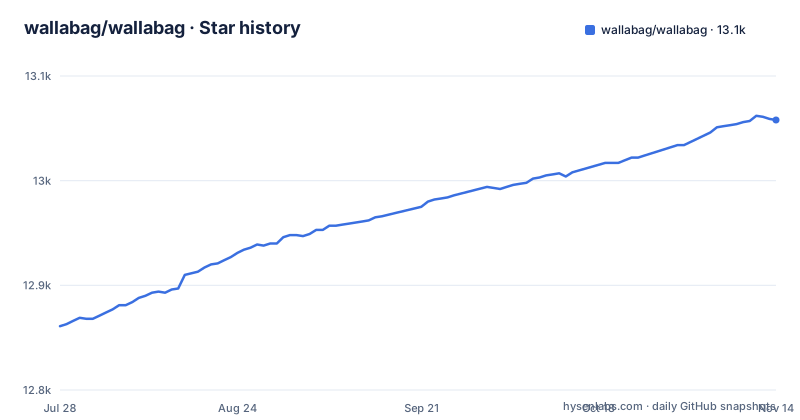
Star history
- wallabag/wallabag13,058 ★ · +197
| Repository | 2026-07-28 | 2026-11-14 |
|---|---|---|
| wallabag/wallabag | 12.9k | 13.1k |
197 Stars in the last 109 days, measured from the daily GitHub snapshot. Compare with other projects
Editorial analysis
gmake install, because the Makefile demands GNU make
The entire documented installation is this:
git clone https://github.com/wallabag/wallabag.git
cd wallabag && make install
The catch is in the first line of the Makefile, which states that the file requires GNU make and tells you to use gmake if your system's default make is not GNU make. On a machine where make is BSD make or another variant, the documented command fails on syntax the Makefile assumes, including its use of bash as SHELL and its GNU-specific functions. The README handles this in one sentence: use gmake install instead. That means the two-line install works as written only where make is GNU make. After the install finishes, the next required step is not a command but a configuration task: setting up a virtual host so a real hostname points at the application.
Changing PORT renames three cookies and drops every logged in session
The compose file builds its cookie names out of the port variable, so identity in wallabag is tied to the port you happened to pick:
WALLABAG_BASE_URL: "${WALLABAG_BASE_URL:-http://127.0.0.1:${PORT:-8000}}"
WALLABAG_SESSION_COOKIE_NAME: "PHPSESSID_${PORT:-8000}"
WALLABAG_REMEMBER_ME_COOKIE_NAME: "REMEMBERME_${PORT:-8000}"
WALLABAG_TRUSTED_DEVICE_COOKIE_NAME: "wllbg_trusted_computer_${PORT:-8000}"
The intent is clear: two instances on different ports cannot fight over the same cookie. The consequence for a single instance is that this scheme binds your login to a number you will eventually want to change. Move from port 8000 to 443 for a real deployment and the browser is holding a PHPSESSID_8000 the server no longer recognises, and the same applies to the remember-me and trusted-device cookies, so you are logged out everywhere until people sign in again. Set PORT before your first login, not after. The base URL variable can be set separately, overriding its default that is built from PORT, so a mismatch between it and the port is possible and is not checked for you.
Rootless Docker needs a different target and an uncommented tmpfs
The php service builds from the docker/php context and names target: default, with a comment beside it saying to use target rootless if you run rootless Docker. Further down, a commented block explains that a limitation blocks permissions on root Docker, linking moby issue 40881, and offers the workaround as a commented tmpfs for /var/www/html/var/cache. Copying compose.yaml verbatim therefore works on one kind of Docker host and not the other. On a rootless setup the default target and the disabled tmpfs leave the cache path in a state the project has already flagged as broken. The fix is manual: switch the target and uncomment the tmpfs lines. Nothing detects this for you and nothing in the README warns that the compose file is conditional on your Docker daemon, so the failure shows up as a permissions problem inside the container rather than as a clear configuration message.
Your saved articles live in a named volume, not in your checkout
Four volume lines decide where state lives:
- .:/var/www/html
- assets:/var/www/html/web/assets
- data:/var/www/html/data
- cache:/var/www/.cache
The first mounts your working copy over the application directory, which is convenient for editing on the host and means the code you run is whatever is in that directory. The other three are named volumes, mounted over web/assets, data and the cache directory. Copy the checkout to another machine without those volumes and whatever they hold stays behind, so a backup plan that only copies the checkout misses them. One more manual step waits in the same file: the environment section points at ./docker/php/env, and the comment tells you to copy docker/php/env.example to docker/php/env for Docker-specific overrides. A related comment says to set DATABASE_URL in .env.local and .env.test.local when you switch from SQLite, which means the default is SQLite and moving to another engine is a deliberate edit rather than a setting in the interface.
Extraction rests on three upstream projects, and the fix path is commented out
The one thing wallabag does beyond storing a URL is extract readable content, and the README names its dependencies for that job: Graby for content extraction, php-readability for the readability pass, and ftr-site-config for site-specific handling. When a particular site extracts badly, the change lives in one of those three projects, not here. The compose file anticipates that: a block of commented volumes can mount local checkouts of graby-site-config, php-readability, graby, HTMLawed, PHPePub and guzzle-site-authenticator straight into vendor. So the escape hatch is real but manual, and it requires you to have those repositories checked out at matching versions. The README documents no option for swapping in a different extractor, which means a reader whose archive quality depends on site-specific fixes has to maintain forks alongside the app.
The GNOME client and the browser extension are not this project's problem
The README is explicit about which pieces sit outside the repository. The GNOME application is read-it-later, hosted on the GNOME GitLab, and the parenthetical note says plainly that it is not maintained by this project. The browser extension is wallabagger and the Android and iOS clients are separate repositories. The main repository holds the server, the web interface under templates/ and web/, migrations/, and the sources for the documentation in doc/, which are published at doc.wallabag.org. The consequence is a support boundary a new user discovers the hard way: an extraction problem in the server is a wallabag bug, while a sync or capture failure in the extension or the phone app is not, and no single issue tracker covers the ecosystem. The wiki page listing all ecosystem resources exists for exactly that reason, since the main README cannot answer for the pieces it only links.
The newest tag is almost a year older than the last commit
The most recent releases are 2.6.13 on 2025-06-04, 2.6.14 on 2025-10-07 and 2.6.15 on 2026-10-28, a gap of about a year before the latest tag. The last push is dated 2026-10-31, three days after 2.6.15. The version strings also disagree with each other: package.json still says 2.6.0 while the release list is at 2.6.15, so the manifest is not a reliable way to tell which build you have. The repository carries CHANGELOG.md, RELEASE_PROCESS.md and SECURITY.md at the top level, which are the places to look before deciding whether to follow a tag or the branch tip.
The name is all lowercase, and there is no forgiving alias
The README opens with a note marked important and makes a single demand: the name of this project is wallabag, all lowercase, always. It rules out Wallabag and WallaBag and any other variation, and it does so in a way that reads as a correction of a common mistake rather than a style preference. Translations run through Weblate, and the contribution guide sits in .github/CONTRIBUTING.md, so the two public entry points for helping are a hosted translation platform and a markdown file in the repository.
Editorial conclusion
wallabag fits a reader who wants one person holding their own article archive and is willing to run PHP, a web server and a database behind it. It does not fit anyone expecting a hosted turnkey service or a feature list beyond saving, classifying and extracting. Before installing, read the requirements page, decide whether your make is GNU make, and check whether your Docker runs as root before you copy the compose file unchanged.
Frequently asked questions
What is wallabag?
wallabag is a web application for saving web pages so you can read them later, and it extracts the content so pop-ups do not get in the way. You can run it on your own server or create an account on wallabag.it.
How does wallabag work?
You click to save a page and wallabag keeps an extracted copy of the article for later reading. The extraction step relies on Graby, php-readability and ftr-site-config.
Is wallabag free?
The source is released under the MIT License, with copyright held by Nicolas Lœuillet from 2013 onwards. You can also create an account on the hosted wallabag.it instead of running it yourself.
Can wallabag be self-hosted?
Yes. You clone the repository, run the install command, and then configure a virtual host to point at it. The requirements page in the documentation lists what the server needs first.
How do I install wallabag?
Run git clone https://github.com/wallabag/wallabag.git, then cd wallabag && make install. If your default make is not GNU make, use gmake install instead, then set up a virtual host.
Official sources
Where this project is recommended
Add this badge to your README
If you maintain this project, the badge below links readers to this analysis and shows its maintenance status from the daily GitHub snapshot. Paste the markdown into your README; add ?metric=license or ?metric=stars to the image URL for a different field.

[](https://hysenlabs.com/projects/wallabag-wallabag)Star history chart for your README
[](https://hysenlabs.com/projects/wallabag-wallabag)Was this useful?