J.A.R.V.I.S: a Python voice assistant that runs your desktop by voice
Voice-controlled AI desktop assistant in Python. Speech recognition, text to speech, real-time web search, image generation, computer vision and WhatsApp automation, inspired by Iron Man's JARVIS.
At a glance
- What is it?
- An Iron Man inspired voice assistant in Python with speech recognition, spoken replies, web search, image generation, computer vision and WhatsApp automation, built as swappable modules.
- Who is it for?
- J.A.R.V.I.S fits learners and tinkerers who want a readable, modular reference for building a Python voice assistant, especially on Windows, and who will treat the WhatsApp and desktop-control modules as experiments on a machine they can risk. Skip it if you want a dependable daily-driver assistant, cross-platform guarantees, or code with a settled licence; the badge and the LICENSE file disagree.
- Can I use it commercially?
- Yes, with conditions. GPL-3.0 is a copyleft licence: if you distribute software that includes it, you must release that software's source code under the same licence. Running it internally without distributing it does not trigger that obligation.
- Is it still maintained?
- Yes. The repository last received commits 103 days ago.
- What is it written in?
- Mainly Python, according to GitHub's language statistics.
Answers come from the project's GitHub data, last synced on November 22, 2026, and from our analysis. They are not legal advice.
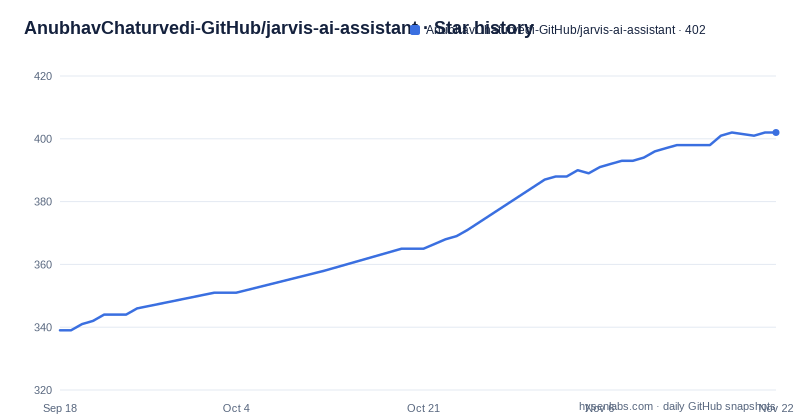
Star history
- AnubhavChaturvedi-GitHub/jarvis-ai-assistant402 ★ · +63
| Repository | 2026-09-18 | 2026-11-22 |
|---|---|---|
| AnubhavChaturvedi-GitHub/jarvis-ai-assistant | 339 | 402 |
63 Stars in the last 65 days, measured from the daily GitHub snapshot. Compare with other projects
Editorial analysis
A voice assistant built from swappable parts
J.A.R.V.I.S, by Anubhav Chaturvedi, is what the name promises: a Python voice assistant in the Iron Man mold. You speak, it recognizes the intent, runs the matching module, and answers out loud. The README's framing is candid about scope: it listens, thinks, speaks and controls your computer, combining speech recognition, text to speech, real-time web search, image generation, computer vision and WhatsApp automation.
The design decision that lifts it above a demo script is modularity. Rather than one giant file, the assistant is built as separate, swappable subsystems, and the README says outright that you can use only the parts you need. For a learner, that structure matters more than any single feature: each module is a readable example of one capability, from speech to text to browser automation, and the whole is a map of how those capabilities bolt together.
Installing and the first wake word
The prerequisites are plain: Python 3.10 or newer, a working microphone and speakers, and Google Chrome, which the browser automation modules drive. Installation is the standard three commands:
git clone https://github.com/AnubhavChaturvedi-GitHub/jarvis-ai-assistant.git
cd jarvis-ai-assistant
pip install -r requirements.txt
Then either python jarvis.py for the terminal experience or python ui.py for a desktop window. Usage is conversational, and the README's example phrases show the intent range: asking for the weather in a city, opening Chrome and searching for a topic, generating an image of a red sports car at sunset, sending a WhatsApp message to a named contact, or asking what is in the news right now.
The requirements list is long and installed in one shot: opencv-python, pyaudio, selenium, pywhatkit, and Windows-oriented packages like wmi, comtypes and pycaw among roughly twenty dependencies.
The parts, module by module
Each directory is one capability with a clear seam. NetHyTechSTT is a custom speech-to-text engine that, per the README, needs no paid API, which keeps the base assistant cost-free to run. TextToSpeech produces spoken replies, and Brain with its co_brain.py handles language-model reasoning and conversation memory. Real_Time performs live web search so answers are not trapped in training data, and TextToImage generates images from a spoken prompt.
The control modules go further: Automation opens apps and runs system tasks, Vision captures and interprets camera images, Weather_Check looks up weather by location, and Time_Operations handles alarms, reminders and scheduling. Whatsapp_automation sends messages hands free, built on PyWhatKit. The intent router in jarvis.py decides which of these fires for a given utterance. As a curriculum, the layout teaches the canonical voice-assistant pipeline, capture, understand, act, respond, with each stage isolated enough to replace.
The tech stack tells you the platform
The README names its stack plainly: Python, SpeechRecognition, Selenium, PyWhatKit, OpenCV, Requests and Tkinter. The requirements file fills in the rest, and reading it closely reveals a platform skew the README never states: wmi, comtypes and pycaw are Windows libraries, handling system management, COM interfaces and audio control respectively. The assistant leans Windows for its desktop-control ambitions, even though core pieces like speech recognition are cross-platform.
Chrome's presence in the prerequisites is structural rather than incidental: Selenium drives a real browser for web search and WhatsApp automation, so the environment needs Chrome and the matching driver tooling, which webdriver_manager in the requirements handles. playsound is pinned to 1.2.2, a version pin that usually encodes a solved compatibility battle. None of this is hidden; it is all in the dependency list, which is the most honest part of the repository.
Honest limits of a learning project
The repository presents itself as what it is: an ambitious personal project. There are no releases or tags, no test suite in the tree, and the commit hygiene shows artifacts checked in that normally stay ignored, a captured_image.png, a PyWhatKit_DB.txt database file, a __pycache__ directory and a personal Alam_data.txt at the root. Reading those as signals rather than flaws, the project is a portfolio and teaching artifact more than production software.
Two features deserve specific caution. WhatsApp automation drives the WhatsApp Web interface programmatically, which sits on the fragile edge of the platform's expectations, and accounts can face restrictions; treat that module as an experiment. And a voice assistant with desktop control and browser automation is, by construction, software that can act on your machine; run it on a machine whose keys and accounts you can afford to have automated. The author's NetHyTech community of thirty thousand members, cited in the README, explains the project's teaching orientation.
The licence: read the file, not the badge
There is a discrepancy worth surfacing. The README badge declares MIT, and the licence section repeats it. GitHub's own licence detection, however, reports GPL-3.0 for the repository, which typically means the LICENSE file's contents read as GPL rather than MIT. Both cannot be true at once, and the difference matters: MIT lets you embed the code in nearly anything, while GPL obligations follow derived works.
The practical instruction is the one licence pedants always give, and here it actually bites: before reusing any module in your own project, open the LICENSE file at the repository root and read which licence it actually contains, because the badge and the file disagree. For learning purposes the distinction is academic. For a company that wants to lift the WhatsApp module into a product, it is the whole question.
Against commercial assistants and build-your-own stacks
The commercial assistants, Siri, Google Assistant, Copilot's voice modes, are more accurate and far more limited: locked ecosystems that will not open arbitrary desktop apps or send WhatsApp messages on your behalf. J.A.R.V.I.S trades polish for control, and its Python source is the product; every module can be read, modified, or replaced with an API-backed equivalent.
The build-it-yourself route is the other alternative, and this repository is arguably its best argument: a working reference for the capture, understand, act, respond pipeline with each stage in its own folder. Developers assembling a serious assistant would swap the custom STT for a hosted service, replace keyword-ish intent handling with a proper language model, and keep the module seams exactly as laid out here. As a starting skeleton that someone else already debugged into working, it occupies a niche the polished products deliberately leave empty.
Editorial conclusion
J.A.R.V.I.S fits learners and tinkerers who want a readable, modular reference for building a Python voice assistant, especially on Windows, and who will treat the WhatsApp and desktop-control modules as experiments on a machine they can risk. Skip it if you want a dependable daily-driver assistant, cross-platform guarantees, or code with a settled licence; the badge and the LICENSE file disagree. Verify before reuse: clone it, run python jarvis.py with only the weather and time modules exercised, read the LICENSE file yourself to settle the MIT or GPL question, and then decide which modules are worth keeping.
Frequently asked questions
What is Jarvis used for?
This project is a Python voice assistant: you speak, it recognizes the intent, runs the matching module, and answers out loud. Modules cover speech to text, spoken replies, web search, image generation, vision, desktop control, WhatsApp messaging, weather and alarms.
Is Jarvis AI free?
The code is public and the built-in speech engine needs no paid API, so the assistant runs at zero licence cost. Check the LICENSE file before reuse: the README badge says MIT while GitHub's detection reports GPL-3.0.
Does J.A.R.V.I.S work offline?
The README calls it offline-friendly, and speech recognition runs on a custom engine with no paid API. Live web search, weather, image generation and WhatsApp messaging still need connectivity and reach external services.
Official sources
Add this badge to your README
If you maintain this project, the badge below links readers to this analysis and shows its maintenance status from the daily GitHub snapshot. Paste the markdown into your README; add ?metric=license or ?metric=stars to the image URL for a different field.

[](https://hysenlabs.com/projects/anubhavchaturvedi-github-jarvis-ai-assistant)Star history chart for your README
[](https://hysenlabs.com/projects/anubhavchaturvedi-github-jarvis-ai-assistant)Was this useful?