Apache SkyWalking Java Agent: attaching tracing to a JVM without code changes
The Java agent for Apache SkyWalking
At a glance
- What is it?
- The agent half of Apache SkyWalking instruments Java processes at the bytecode level and reports to a SkyWalking backend. This looks at how the agent attaches, how the images and archives are built, and what the repository still leaves undocumented.
- Who is it for?
- Adopt skywalking-java when you run many Java services on containers or Kubernetes and want traces without editing application code, and check the agent against your JVM versions before you roll it out. Do not adopt it as a complete monitoring system: the tree holds the agent modules only, so a SkyWalking backend and a configuration plan are still yours to arrange, and the README does not document either.
- Can I use it commercially?
- Yes. Apache-2.0 is a permissive licence: you can use, modify and sell software built on it, as long as you keep its copyright and licence notices.
- Is it still maintained?
- Yes. The repository last received commits 5 days ago.
- What is it written in?
- Mainly Java, according to GitHub's language statistics.
Answers come from the project's GitHub data, last synced on November 7, 2026, and from our analysis. They are not legal advice.
Star history
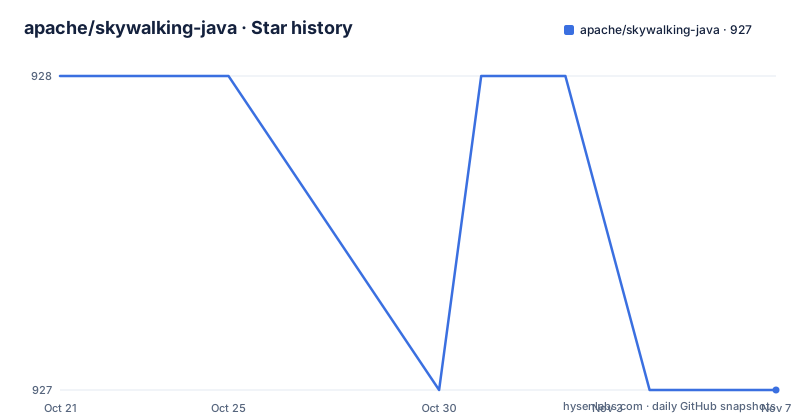
- apache/skywalking-java927 ★ · -1
| Repository | 2026-10-21 | 2026-11-07 |
|---|---|---|
| apache/skywalking-java | 928 | 927 |
-1 Stars in the last 17 days, measured from the daily GitHub snapshot. Compare with other projects
Editorial analysis
What the agent adds to a running JVM
Apache SkyWalking is an APM system designed for microservices, cloud native and container based architectures, and skywalking-java is the piece that makes a JVM application visible to it. The project describes itself as providing native tracing, metrics and logging abilities for Java projects. Operationally, that means the service does not need a hand written client: the agent attaches to the running process and reports what it observes. The audience is therefore teams running Java on Kubernetes or Docker who want trace context and service level metrics without editing application code. Teams that need to control every span name and every reported tag, or that cannot accept bytecode level instrumentation inside a production JVM, are a different fit, and this project does not pretend otherwise.
The environment variable that attaches the agent inside a container
The Dockerfile at the repository root shows the attachment point precisely. The image is built from eclipse-temurin:8-jre by default, the skywalking-agent distribution directory is added under /skywalking/agent, and the JVM is told to load the agent through an environment variable rather than a command line flag:
ENV JAVA_TOOL_OPTIONS=-javaagent:/skywalking/agent/skywalking-agent.jarThat one line is what lets the image work without editing the entrypoint of the application image. Because the value sits in JAVA_TOOL_OPTIONS, the JVM picks it up regardless of how the container is started, which suits Kubernetes deployments where the command is defined in a manifest. The image also copies the swctl binary from an apache/skywalking-cli build stage into /usr/bin/swctl, so the command line tool sits in the same container as the agent. The last piece is a soft dependency:
RUN apk add --no-cache openssl || trueThe trailing condition tolerates a base image that already ships the package, and it also means a failed install will not stop the build.
The dist target signs and checksums the agent archive
Building from source goes through the Maven wrapper rather than an installed Maven:
./mvnw --batch-mode clean package -Dmaven.test.skip=trueThe Makefile build target runs that with tests skipped, and the dist target then packages the agent directory into an archive named after the TAG variable, which defaults to latest:
COPYFILE_DISABLE=1 tar czf apache-skywalking-java-agent-$(TAG).tgz --exclude '._*' --exclude .DS_Store $(AGENT_PACKAGE)The archive does not ship unsigned. The same target produces a detached GPG signature and a SHA-512 checksum file:
gpg --armor --detach-sig apache-skywalking-java-agent-$(TAG).tgz
shasum -a 512 apache-skywalking-java-agent-$(TAG).tgz > apache-skywalking-java-agent-$(TAG).tgz.sha512
So a team that prefers a tarball over a container image can verify what it downloaded before unpacking it into its own base image, and the release download page linked from the README is the stated place to get it.
Six base images and a separately pinned CLI version
The Makefile lists the platforms the project builds against in a single line:
base.all := alpine java8 java11 java17 java21 java25Each entry maps to a concrete image, Eclipse Temurin for the Java versions and alpine:3 for the Alpine build. This matters for adoption because the agent has to run on a JVM the service itself is happy with, and the project matrix covers releases from Java 8 up to Java 25. The command line tool version is pinned separately, with a comment that the CLI version inside the agent image should always use an Apache released artifact. The default is 0.13.0, a number that moves as the project moves, so a team building its own image from this Dockerfile has a variable to check rather than a value to inherit silently. The image metadata names a maintainer address and the agent jar path, which is useful when you inventory what runs in production.
What the repository leaves to the upstream documentation
Several things a team would want to know are simply not written down in this tree. The README points to the official documentation for the agent and to the downloads page for releases, and it does not document how to configure the agent, which configuration file it reads, how to point it at a backend address, or how to roll the agent back after a bad release. Nor does it state which backend versions the agent is compatible with. The modules listed at the top level, apm-sniffer, apm-protocol, apm-commons and apm-application-toolkit, describe the agent side of the system only. There is no server or collector here, so the backend that receives the data is a separate deployment decision this project cannot answer for you. Treat the missing configuration detail here as a reason to budget time for reading the upstream docs, not as evidence that the agent is self contained.
Automatic bytecode instrumentation versus the application toolkit
There are two ways to get Java traces into SkyWalking, and the repository layout shows both. The automatic route is the agent itself, with apm-sniffer as the module doing the bytecode level work. The second sits beside it as apm-application-toolkit, an application facing toolkit that lets a team call tracing APIs from its own code. The difference is where the knowledge of the call structure lives. With the agent, the runtime reconstructs the call graph from the bytecode it observes, so spans appear without edits to business code, and you inherit the agent's view of framework internals and its own instrumentation choices. With the toolkit, you decide exactly which spans exist and what they are called, which gives control over cardinality and cost, at the price of adding code to every service. A platform team running many services usually ends up using the agent for breadth and the toolkit for the few services where span shape is a business concern. Nothing in the repository states which to pick.
Three tagged releases and a last push on 2026-10-15
Maintenance signals here are recent and specific. The most recent release was v9.8.0 on 2026-10-08, preceded by v9.7.0 on 2026-08-14 and v9.6.0 on 2026-02-16, and the last push to the main branch was on 2026-10-15. The project is not archived. The gaps between those tags are not uniform, with roughly six months between the February and August releases, so a plan that assumes a fixed release cadence would be a guess. The licence field on the repository says Apache-2.0, the same terms the wider Apache SkyWalking distribution uses, and it carries the standard notice and licence header obligations into any image built from the Dockerfile. For a derived image, compliance is a notice and header exercise rather than a proprietary licensing question, and the repository keeps a dedicated .licenserc.yaml entry to enforce that.
Editorial conclusion
Adopt skywalking-java when you run many Java services on containers or Kubernetes and want traces without editing application code, and check the agent against your JVM versions before you roll it out. Do not adopt it as a complete monitoring system: the tree holds the agent modules only, so a SkyWalking backend and a configuration plan are still yours to arrange, and the README does not document either. Verify first that the agent settings documented upstream match the release you pin, and that any tarball you download matches its published SHA-512 file.
Frequently asked questions
How do I attach the Apache SkyWalking Java Agent to my Java application?
Point the JVM at skywalking-agent.jar with the -javaagent option. The Dockerfile in this repository does it through JAVA_TOOL_OPTIONS, which sets -javaagent:/skywalking/agent/skywalking-agent.jar for every process in the container, and the official documentation linked from the README covers the rest.
Can I build the Apache SkyWalking Java Agent from source?
Yes. The Makefile build target runs the Maven wrapper in batch mode with tests skipped, and the dist target packages the agent directory into a tarball together with a detached GPG signature and a SHA-512 checksum file.
Which Java versions does the Apache SkyWalking Java Agent build against?
The build matrix in the Makefile lists alpine, java8, java11, java17, java21 and java25, with Eclipse Temurin images for the Java versions and alpine:3 for the Alpine build. The Dockerfile defaults to the Java 8 base image.
Does the Apache SkyWalking Java Agent include the SkyWalking server?
No. The repository holds the agent modules, among them apm-sniffer, apm-protocol, apm-commons and apm-application-toolkit, plus the packaging for the agent, so the backend that receives the data is a separate deployment.
Official sources
Add this badge to your README
If you maintain this project, the badge below links readers to this analysis and shows its maintenance status from the daily GitHub snapshot. Paste the markdown into your README; add ?metric=license or ?metric=stars to the image URL for a different field.

[](https://hysenlabs.com/projects/apache-skywalking-java)Star history chart for your README
[](https://hysenlabs.com/projects/apache-skywalking-java)Was this useful?