A Solid-First Tauri Starter: What the Template Bundles and What It Omits
Tauri + Solid + Tailwind CSS + TypeScript + Vite + ESLint + Prettier Starter template
At a glance
- What is it?
- This starter template wires Tauri, Solid, Tailwind, TypeScript, Vite, ESLint, and Prettier into one scaffold. It is a practical baseline for desktop apps, but it leaves several configuration decisions to you.
- Who is it for?
- Adopt this template if you want a preconfigured Tauri + Solid + Tailwind + TypeScript + Vite stack and you are comfortable editing Cargo.toml, tauri.conf.json, and package.json yourself. Do not use it if you need a batteries-included starter with routing, state management, or testing already set up; this template deliberately leaves those out.
- Can I use it commercially?
- Yes. MIT is a permissive licence: you can use, modify and sell software built on it, as long as you keep its copyright and licence notices.
- Is it still maintained?
- Yes. The repository last received commits 1 day ago.
- What is it written in?
- Mainly TypeScript, according to GitHub's language statistics.
Answers come from the project's GitHub data, last synced on October 21, 2026, and from our analysis. They are not legal advice.
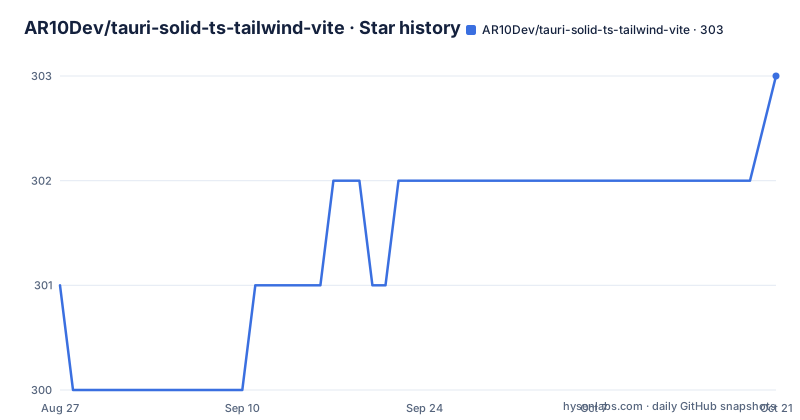
Star history
- AR10Dev/tauri-solid-ts-tailwind-vite303 ★ · +2
| Repository | 2026-08-27 | 2026-10-21 |
|---|---|---|
| AR10Dev/tauri-solid-ts-tailwind-vite | 301 | 303 |
2 Stars in the last 55 days, measured from the daily GitHub snapshot. Compare with other projects
Editorial analysis
What This Template Actually Solves
The template solves a narrow but real problem: assembling a desktop app toolchain that is known to work together. Tauri gives you a Rust backend and a webview frontend, Solid provides reactive UI primitives, Tailwind handles styling, and Vite bundles the frontend. The README lists these as features, but the value is in the preconfiguration. You do not have to wire Vite's dev server to Tauri's CLI, or figure out how Solid compiles under Tailwind's PostCSS pipeline. The template does that for you. It is aimed at developers who want a starting point for a Tauri app with Solid, rather than React or Svelte, and who want TypeScript, linting, and formatting set up from the first commit.
The Mechanism: How the Pieces Fit Together
The architecture is visible from the commands and file references. The frontend is a Solid app built by Vite, and the Rust crate lives in src-tauri. The dev command, npm run dev:tauri, presumably launches the Vite dev server and the Tauri CLI together, so the webview loads from the dev server with HMR. The README says that edits to the webview update automatically, and edits to Rust files trigger a rebuild and restart. The build command, npm run build:tauri, compiles Solid to a dist folder and then embeds that into a single binary with the Rust code. The output lands in src-tauri/target/release/[app name], with installers in the bundle subfolder. That is the standard Tauri flow, and the template's contribution is that the configuration files are already adjusted for Solid and Vite.
Getting It Running: Commands and Config Keys
Two paths are documented. You can create a repo from the GitHub template, or clone locally with npx degit AR10Dev/tauri-solid-ts-tailwind-vite my-app, then run npm install or an equivalent. The README warns that the first dev run takes several minutes because Rust crates must be downloaded and built. The dev command is npm run dev:tauri, and the build command is npm run build:tauri. Both accept pnpm, yarn, or bun equivalents. The checklist is the real configuration guide. You must rename the name, version, and author in package.json, then the version, description, authors, and repository in src-tauri/Cargo.toml, then productName, version, and identifier in src-tauri/tauri.conf.json. The identifier is a reverse-DNS string that Tauri uses for app identity, and it must be unique per app. The build configuration in tauri.conf.json also needs to match your package manager; the README specifically calls out changing it if you are not using bun. Finally, you should update the author in LICENSE and remove the .github and .devcontainer folders if you do not want them.
What the Template Does Not Include
The template is minimal by design. The README lists no routing library, no state management solution, no testing framework, and no component library. For a Solid app, you would typically add solid-router for navigation and a state store like solid-js/store or a third-party library. The template also does not include any backend logic or Tauri command examples beyond the default. That means you start with a blank canvas, which is fine for a scaffold, but it means the first few hours of a project are spent adding the same boilerplate that other starters might include. The README also does not mention how to handle environment variables, API calls, or error boundaries. If you want a template that comes with a sample application structure, this is not it.
A Genuine Limitation: The Icon and Config Burden
The most concrete limitation is the icon setup. The README points to a Tauri guide for generating icons, then says to update the icon field in tauri.conf.json with new path names. That is a manual step that is easy to miss. If you skip it, your app will ship with the default Tauri icon. Another limitation is the build configuration mismatch. The README explicitly says to change the build configuration in tauri.conf.json if you use a package manager other than bun. That suggests the template's default build command is tailored to bun, even though the install and dev commands list alternatives. If you use npm, you must remember to adjust that config, or the build may fail. These are not showstoppers, but they are the kind of details that trip up developers who expect a template to be plug-and-play.
How It Compares to Other Tauri Starters
The main alternative is the official Tauri create-tauri-app, which supports Solid as a frontend option. The difference is in the extras. The official tool gives you a minimal setup with Tauri and your chosen UI framework, but it does not include Tailwind, ESLint, or Prettier by default. This template adds those, so you get a more complete development environment out of the box. The trade-off is that the official tool is maintained by the Tauri team and is more likely to stay in sync with Tauri releases. This template is a community project, so it may lag behind when Tauri changes its configuration schema. Another alternative is to use a generic Vite + Solid template and add Tauri yourself, but then you lose the preconfigured integration that this template provides. For a developer who wants the full stack without running multiple scaffolding tools, this template is the more direct path.
Maintenance and License Implications
The repository is under the MIT license, which is permissive. You can use it in commercial projects, modify it, and redistribute it, as long as you preserve the copyright notice. The README includes a checklist item to change the author in the LICENSE, which means you should replace the original author's name with your own if you distribute your app. That is a legal detail, but it is worth taking seriously. Maintenance cost is a real factor. The template pins specific versions of Tauri, Solid, Tailwind, and Vite, and those ecosystems move quickly. When Tauri releases a new version, you may need to update the Rust crates in Cargo.toml and the config schema in tauri.conf.json. The README does not mention any upgrade guidance, so you would rely on Tauri's migration docs. The .github folder includes a cross-compilation action, which is useful, but it is optional and can be removed. The .devcontainer folder provides a containerized dev environment, which is a nice touch for consistent builds. Both add maintenance surface area if you keep them.
Editorial conclusion
Adopt this template if you want a preconfigured Tauri + Solid + Tailwind + TypeScript + Vite stack and you are comfortable editing Cargo.toml, tauri.conf.json, and package.json yourself. Do not use it if you need a batteries-included starter with routing, state management, or testing already set up; this template deliberately leaves those out. Before you start, verify your Rust and platform prerequisites, and check the checklist items: rename the identifier in src-tauri/tauri.conf.json, update the build command if you are not using bun, and regenerate icons. The template is a clean starting point, but it is your job to fill in the application-specific pieces.
Frequently asked questions
What does the tauri-solid-ts-tailwind-vite template include?
It is a starter template for a Tauri application with a Solid frontend, preconfigured with Vite, TypeScript, Tailwind CSS, ESLint, Prettier and hot module replacement. The build script compiles the frontend and embeds it into a single binary built by the Rust toolchain.
How do I create a project from the tauri-solid-ts-tailwind-vite template?
Either create a repository from the template on GitHub, or clone it locally with degit into a directory of your choice, change into it, and install dependencies. The install step is offered under npm, pnpm, yarn and bun, and Tauri itself needs its own environment prerequisites set up first.
What must I rename after using the tauri-solid-ts-tailwind-vite template?
The name, version and author fields in the JavaScript package manifest, the version, description, authors and repository fields in the Rust manifest, the product name, version and identifier in the Tauri configuration, and the author name in the licence file. You also need to change the build configuration if you are not using bun, and clean up the readme files.
What does the tauri-solid-ts-tailwind-vite template use for styling?
Tailwind CSS, described as a utility-first CSS framework for rapid UI development. It is wired in through the Tailwind plugin for Vite plus a Tailwind config file at the repository root, and there is a Prettier plugin that keeps class order consistent.
Where do the built app files go in the tauri-solid-ts-tailwind-vite template?
The frontend is compiled into the dist folder and then embedded into a single binary with the Rust code. That binary is written to the release directory inside the Rust side, named after your app, and the installers are placed in the bundle subdirectory of the same location.
Official sources
Add this badge to your README
If you maintain this project, the badge below links readers to this analysis and shows its maintenance status from the daily GitHub snapshot. Paste the markdown into your README; add ?metric=license or ?metric=stars to the image URL for a different field.

[](https://hysenlabs.com/projects/ar10dev-tauri-solid-ts-tailwind-vite)Star history chart for your README
[](https://hysenlabs.com/projects/ar10dev-tauri-solid-ts-tailwind-vite)