ArcBox: a Rust container and microVM runtime for macOS, aimed at Docker Desktop and OrbStack
Run AI agents on real and isolated machines — own kernel, filesystem, and network — with <100ms boot. Local first, OCI compatible, pure Rust.
At a glance
- What is it?
- ArcBox is an open-source macOS runtime that puts containers, Firecracker microVM sandboxes, Linux VMs and macOS guests behind one daemon and one CLI. Its sandbox tier is the part worth evaluating closely.
- Who is it for?
- Adopt ArcBox if you want an open-source Docker Desktop replacement on macOS, and the sandbox tier is the reason you are looking. Do not adopt it if you need a runtime with a long production track record, since the README calls this a public beta.
- Can I use it commercially?
- Yes. Apache-2.0 is a permissive licence: you can use, modify and sell software built on it, as long as you keep its copyright and licence notices.
- Is it still maintained?
- Yes. The repository last received commits 6 days ago.
- What is it written in?
- Mainly Rust, according to GitHub's language statistics.
Answers come from the project's GitHub data, last synced on November 14, 2026, and from our analysis. They are not legal advice.
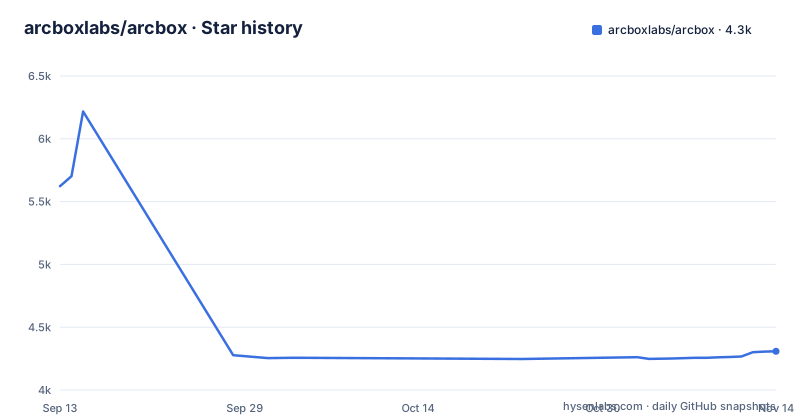
Star history
- arcboxlabs/arcbox4,308 ★ · -1,315
| Repository | 2026-09-13 | 2026-11-14 |
|---|---|---|
| arcboxlabs/arcbox | 5.6k | 4.3k |
-1,315 Stars in the last 62 days, measured from the daily GitHub snapshot. Compare with other projects
Editorial analysis
The macOS gap ArcBox is trying to close, and who feels it
Docker Desktop is the default way to run Linux containers on a Mac, and OrbStack is the closed-source alternative. The README states the case plainly: OrbStack "set the bar for running Docker on a Mac quickly and with little overhead, but it is closed-source." ArcBox is the response to that, an open-source runtime under MIT/Apache-2.0, written from scratch in Rust, with its own VMM, VirtIO devices, filesystem sharing and network datapath. The stated aim is to match OrbStack, not to beat it on features OrbStack lacks.
The audience is narrower than "Mac developers." The interesting tier is sandboxes: disposable microVMs for AI agents and untrusted code, with `abctl claude` as the finished ergonomics around that primitive. If you are running coding agents on your laptop and want them off your host filesystem, that is the problem ArcBox addresses. The container tier exists so you do not have to run two tools. The README also notes that these workloads run locally and do not require a Platform account or a cloud control plane.
Four workload tiers behind one daemon
ArcBox presents one daemon and one CLI serving four kinds of workload. Containers are a drop-in Docker engine plus a local k3s cluster. Sandboxes are disposable microVMs. Linux machines are full VMs with their own kernel, disk and distro. macOS guests are throwaway macOS VMs cloned from a base image. The CLI entry points are `docker …` and `abctl k8s` for containers, `abctl claude` and `abctl sandbox` for sandboxes, `abctl machine` for Linux VMs, and `abctl macos` for macOS guests.
That is a lot of surface area for one project. What it does describe is the nesting: sandboxes are Firecracker microVMs booted inside the guest. So the isolation boundary for an agent is not the outer macOS VM, it is a second VM inside it. The README states that `abctl claude` switches off the agent's permission prompts "because the microVM is the isolation boundary instead." That is a design position, not a convenience feature, and it is the reason the sandbox tier is worth taking seriously rather than treating as a wrapper script.
How Docker compatibility is actually wired
ArcBox does not reimplement the Docker engine. The README says it "exposes a Docker-compatible socket and proxies to a guest `dockerd`." So the Docker CLI, your scripts and your Compose files talk to a socket on the host, and the work happens in a guest daemon. `abctl docker enable` creates and activates a Docker context named "arcbox", which is how the CLI gets redirected without you editing anything by hand.
The documented working set is specific: containers, images, builds through BuildKit/Buildx, Compose, port forwarding, bind mounts, named volumes and interactive `exec`. `abctl docker setup` installs and manages matching `docker`, `buildx` and `compose` binaries. For `linux/amd64` images on Apple Silicon, x86-64 is translated inside the guest by FEX, an open-source emulator, with nothing to configure; the README's example is `docker run --platform linux/amd64 alpine uname -m` printing `x86_64`. Because a guest `dockerd` is doing the work, Docker semantics should track upstream more closely than a hand-written container implementation would. The cost is that you are running a real Docker daemon inside a VM.
Getting it running, and what the commands assume
Installation is two documented paths: `brew install --cask arcboxlabs/tap/arcbox`, or `curl -fsSL https://get.arcbox.dev | bash`. Then `abctl daemon start` brings the daemon up, `abctl docker enable` turns on Docker compatibility, and `docker run -d -p 8080:80 nginx` followed by `curl http://localhost:8080` is the smoke test. `abctl doctor` checks the runtime and `abctl --help` lists commands.
For the sandbox tier the setup is `export ANTHROPIC_API_KEY=sk-...` then `abctl claude`. The README says the first run builds the image and later runs start in about one second. Sessions are named with `--id review`, and anything after `--` goes to the agent, for example `abctl claude -- --model opus`.
Check `abctl doctor` before assuming the sandbox commands will work.
The host filesystem at ~/ArcBox, and why it is read-only
One of the more unusual choices is that the guest's Docker data is mounted on the host at `~/ArcBox/docker`, served over NFSv4 through a vsock relay. Named volumes, container state and image layers become browsable in Finder and readable by ordinary host tools. The README's example is `open ~/ArcBox/docker` and then `grep -r "panic" ~/ArcBox/docker/volumes/my-app-data/_data`, which is a real workflow improvement over `docker cp` when you are hunting through logs or volume contents.
The mount is read-only. That is the correct default for a view into a VM's disk, and it also means you cannot use this path to write files into a container. It is an inspection surface, not a transfer mechanism. For writes you still go through the Docker CLI. Worth noting that the NFSv4-over-vsock relay is another piece of the datapath ArcBox implements itself, so it is another place where behaviour can differ from a stock Docker Desktop setup.
Migration is scripted, with one documented blocker
ArcBox ships an import path for both competitors: `abctl migrate from orbstack` and `abctl migrate from docker-desktop`. Images with every tag, named volumes, user-defined bridge networks and containers come across, and containers that were running on the source are started again at the end. `--no-start` leaves them stopped. `--dry-run` shows the plan without changing anything, and `--json` combined with `--dry-run` produces a machine-readable plan, which is what you want if you intend to gate the migration in CI or review it before committing.
The README is honest about a failure case: containers using `--network container:<id>` are reported as blocking and must be removed from the source, or migrated by hand, before the run proceeds. That is a small but real category, and it is the kind of thing that only surfaces when the migration refuses to start. Running the dry run first is the documented way to find out. Because the migration reads from a live source runtime, the plan you get today may not match the state tomorrow.
Where ArcBox is the wrong tool
The first boundary is maturity. The README calls ArcBox a public beta. The release cadence in the repository listing is dense, with v0.10.4, v0.10.5 and v0.11.0 all landing within about two weeks, which is what you expect from a project still filling in its surface. A drop-in Docker engine that proxies to a guest daemon is a large amount of behaviour to get right, and a beta label on a tool that sits between your laptop and your containers is a real operational consideration if your team depends on it daily.
Alternatives and the actual difference in approach
The comparison the README makes is OrbStack, and the difference it names is licensing rather than behaviour: OrbStack is closed-source, ArcBox is MIT/Apache-2.0 and written from scratch in Rust. That distinction matters if you need to read the VMM, patch the network datapath, or ship the runtime inside a product. It does not matter if you only need containers to work and you are happy with the binary you have. The README says ArcBox "aims to match" OrbStack, which is an explicit statement that it is not claiming to be ahead.
Docker Desktop is the other named alternative, and the migration command exists for both. The structural difference between ArcBox and Docker Desktop is the same as with OrbStack: ArcBox owns the VMM, the VirtIO devices, the filesystem sharing and the network datapath rather than assembling them from components it does not control. That is more code to maintain and more places for bugs, but it is also why the sandbox tier can nest Firecracker inside the guest at all.
Against a plain cloud sandbox service, the difference is locality. ArcBox runs on your machine, and the README says it does not require a Platform account or a cloud control plane.
Licence, upgrade cost and what to verify first
The repository lists Apache-2.0 while the README's badge and text say MIT/Apache-2.0 and link to a LICENSE-MIT file. Those are two different statements about the same project, and it is worth resolving before you depend on it, particularly if you plan to redistribute the runtime or embed it. This is a factual discrepancy, not a legal question, and I am not giving legal advice: read the actual licence files in the repository rather than either summary.
On upgrade cost, only a limited reading is possible. The release cadence is fast, and the Docker tier proxies to a guest `dockerd` whose state lives inside a VM image. That is the question to ask before running ArcBox on a machine where you keep state you care about. The migration tooling implies the project expects people to move data around, but it is documented for imports from other runtimes, not for ArcBox's own version-to-version upgrades.
What to verify first is short and concrete. Run `abctl doctor` to check the runtime. Run `abctl migrate from orbstack --dry-run --json` (or the docker-desktop equivalent) and read the plan for blocking entries.
Editorial conclusion
Adopt ArcBox if you want an open-source Docker Desktop replacement on macOS, and the sandbox tier is the reason you are looking. Do not adopt it if you need a runtime with a long production track record, since the README calls this a public beta. Before installing, verify two things on your own machine: that `abctl doctor` reports a healthy runtime, and that `abctl migrate from orbstack --dry-run --json` reports no containers using `--network container:<id>`, because those are documented as blocking and must be removed from the source or migrated by hand.
Frequently asked questions
What is ArcBox?
An open-source container and virtual machine runtime for macOS, written from scratch in Rust, pitched as an alternative to two commercial container desktops. It runs four kinds of workload on one daemon: a drop-in Docker engine with native Kubernetes, disposable micro virtual machines for AI agents and untrusted code, full Linux machines, and throwaway macOS guests. It is in public beta.
How do I install ArcBox on a Mac?
Either through a Homebrew cask from the project's tap, or with an install script fetched over the network and piped to a shell. Then start the daemon and enable Docker compatibility, which creates and activates a named Docker context. A doctor command checks the runtime and a help flag lists every command.
Can ArcBox run Docker images on Apple Silicon?
Yes, and the mechanism is worth knowing. arm64 images run natively, and amd64 images are translated inside the guest by an external open-source emulator with nothing to configure. It also provides a local small-distribution Kubernetes cluster managed by the daemon, with host integration for the cluster command line tool.
Official sources
Add this badge to your README
If you maintain this project, the badge below links readers to this analysis and shows its maintenance status from the daily GitHub snapshot. Paste the markdown into your README; add ?metric=license or ?metric=stars to the image URL for a different field.

[](https://hysenlabs.com/projects/arcboxlabs-arcbox)Star history chart for your README
[](https://hysenlabs.com/projects/arcboxlabs-arcbox)Was this useful?