Arduino IRremote: sending and receiving infrared codes on an Arduino
Infrared remote library for Arduino: send and receive infrared signals with multiple protocols
At a glance
- What is it?
- The Arduino IRremote library decodes and reproduces infrared remote control signals across multiple protocols, and its README works less as a guide than as a map of the reference manual behind it.
- Who is it for?
- IRremote is the library to reach for when you want an Arduino to read a remote control or impersonate one, and it earns that position by covering the awkward cases as first-class documentation rather than footnotes: unknown protocols, ambiguous protocols, RAM cost per protocol, IRDB codes and Flipper Zero codes each have their own section.
- Can I use it commercially?
- Check first. The repository uses a licence we do not classify automatically, so read its LICENSE file before any commercial use.
- Is it still maintained?
- Yes. The repository last received commits 6 days ago.
- What is it written in?
- Mainly C++, according to GitHub's language statistics.
Answers come from the project's GitHub data, last synced on November 26, 2026, and from our analysis. They are not legal advice.
Star history
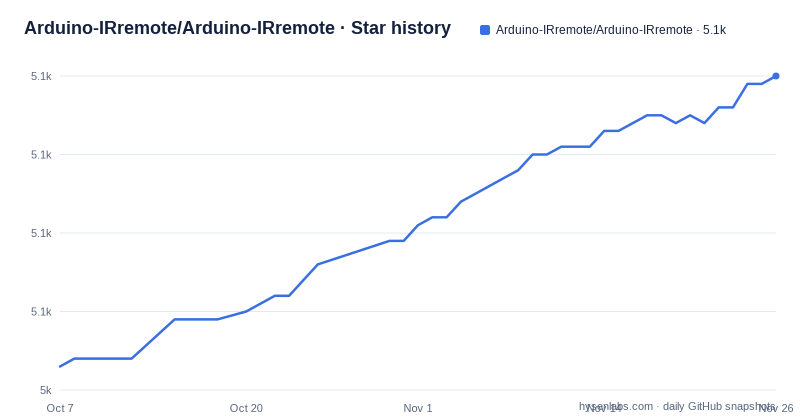
- Arduino-IRremote/Arduino-IRremote5,080 ★ · +37
| Repository | 2026-10-07 | 2026-11-26 |
|---|---|---|
| Arduino-IRremote/Arduino-IRremote | 5k | 5.1k |
37 Stars in the last 50 days, measured from the daily GitHub snapshot. Compare with other projects
Editorial analysis
Installing through the Arduino library manager rather than by cloning
IRremote is packaged as a standard Arduino library. The README states it is available as Arduino library IRremote, links the library listing on arduinolibraries.info, and carries an install badge pointing at ardu-badge.com/IRremote. So the install path is the Arduino IDE library manager or a `libraries/IRremote` directory in your sketchbook, not a compile-from-source step.
The repository tree confirms it is a proper Arduino library rather than a sketch collection. `library.properties` and `library.json` are the manifest files the IDE reads to show the library in the manager, and `keywords.txt` is the file that drives syntax highlighting in the editor. `src/` holds the sources, `examples/` holds the sketches, `pictures/` holds the images the README embeds, and `Doxyfile` at the top level is the Doxygen configuration.
That Doxyfile matters, because it is where the real manual is produced. The API badge in the README points at arduino-irremote.github.io/Arduino-IRremote/classIRrecv.html, which is generated Doxygen output for the `IRrecv` class. If you want the class members, the parameter lists or the inheritance diagram, that page has them, and the README is the signpost rather than the source.
One badge deserves attention if you are deciding whether to pin a version. Alongside the release badge and the MIT licence badge there is a badge counting commits since the latest release. It exists because master does not sit still between releases, so a sketch that behaves differently from the version you expected is often a master-versus-release difference rather than a bug in your wiring.
The README is a table of contents for a reference manual
Most of the README is navigation. It opens with a centred logo block, badges for licence, version, commits since release and the library build workflow, then a table of contents that runs to some forty entries.
What the table of contents does tell you is the shape of the library's problem space. Under receiving there are sections on IR receiver pinouts, the `decodedIRData` structure, callback functionality, ambiguous protocols, RAM usage of different protocols, and handling unknown protocols, with nested subsections for a disclaimer, other libraries which may cover those protocols, `Protocol=PULSE_DISTANCE`, `Protocol=UNKNOWN`, and how to deal with protocols IRremote does not support. Under sending there are sections on sending codes, sending the UNKNOWN protocol, sending from a description, sending IRDB codes, Flipper Zero codes, the send pin, the polarity of the send pin, simulating an IR receiver module for sending, increasing the strength of the sent output signal, and multiple IR sender instances.
The remaining entries are about scope control rather than protocol coverage: a tiny NEC receiver and sender, the FAST protocol, a feedback LED, and the `IRCommandDispatcher` class.
Two structural points sit alongside them. There is a section on migrating legacy projects to the latest version, with its own subsection for new features and changes in version 4.6, and a separate `Migrating.md` file in the tree. And there is a section on why the library uses `.hpp` instead of `.cpp` files, with a companion section on using the new `.hpp` files.
Three ways to name an IR code and what each one commits you to
The README has a section called 3 ways to specify an IR code, and the choice matters more than it sounds, because each way ties your code to a different level of detail about the signal.
The `examples/` tree shows related shapes, including `SendRawDemo`, `SendProntoDemo` and `SimpleReceiverForHashCodes`, and the table of contents has sections for `Protocol=PULSE_DISTANCE`, `Protocol=UNKNOWN`, sending the UNKNOWN protocol, sending protocol from description and Flipper Zero codes. The release history shows the library's protocol handling being corrected: v4.6.1 is titled as a fix for a bug in RC5/RC6 autorepeat bit handling.
Receiving: pinouts, the decoded data structure, and RAM per protocol
The receiving side is documented with the care you would want, because getting reception wrong is the most common way this library is blamed for not working. There is a dedicated IRReceiver pinouts section, and the tree includes `examples/ReceiverTimingAnalysis` for anyone who needs to measure rather than guess.
The core result type is documented as a `decodedIRData` structure, with its own section in the table of contents. The examples that touch it are numerous: `ReceiveDemo`, `ReceiveDump`, `SimpleReceiver`, `SendAndReceive`, `ReceiveAndSend`, and `ReceiveAndSendDistanceWidth`, which suggests the width of the received signal is treated as a first-class property rather than an implementation detail.
Two sections handle the hard cases honestly. Ambiguous protocols covers signals where more than one protocol fits, and RAM usage of different protocols covers what each protocol costs you in RAM to decode. On a microcontroller with a few kilobytes of free memory, that second section is the difference between a sketch that compiles and one that does not, and it is unusual to find that information stated plainly.
There is also a Multiple IR receivers section, and the tree has `examples/MultipleReceivers` and `examples/MultipleSendPins` beside it. Callback functionality has its own section and `examples/CallbackDemo` and `examples/IRDispatcherDemo` demonstrate two different ways of reacting to a decoded code, the latter pairing with the `IRCommandDispatcher` class entry in the README.
Sending: pin choice, polarity, and why a real remote aims better
The sending half has its own set of practical entries, and they cluster around one hardware problem: getting a strong enough signal from a pin to reach the target device.
A Send pin section and a Polarity of send pin section together mean the library treats output driving as configurable rather than fixed, which is what you need when your LED or transistor expects the opposite logic level. Increase strength of sent output signal is a separate entry, and so is Multiple IR sender instances.
There is also an entry called simulate an IR receiver module for sending.
The examples map the use cases. `SendDemo` is the baseline. `SendRawDemo` sends captured timings, `SendProntoDemo` sends Pronto strings, and `SendLGAirConditionerDemo` and `SendBoseWaveDemo` are device-specific cases. `ReceiveAndSend`, `SendAndReceive`, `ReceiveOneAndSendMultiple`, `ControlRelay` and `ReceiveAndSendHob2Hood` are the round-trip and device-control shapes, and `AllProtocolsOnLCD` and `MicroGirs` are the demonstration sketches.
Reading the list together with the protocol removals in the release notes is the useful exercise. v4.7.0 removed the LG2 protocol, which is a signal about how much of this library's value lives in per-device protocol work rather than in generic signal handling.
What the 4.6 and 4.7 releases say about maintenance and licensing
Three releases tell the story. v4.6.1, published on 2026-02-28, fixed a bug in RC5/RC6 autorepeat bit handling. v4.7.0 on 2026-04-02 removed the useless `LG2` protocol, along with bug fixes and improvements.
v4.7.1 followed on 2026-04-08 with a change whose name says all of it: Changed wrong `&Serial` to `aSerial` at 2 places. Two small fixes, named as two small fixes.
One of those entries is worth reading as a design signal rather than a bug report. The RC5 and RC6 autorepeat fix is about sustained presses: getting the toggle-bit convention right across repeated frames is exactly the kind of protocol bookkeeping that separates a library that works with one remote from one that works with a household.
There is a versioning pattern here too. The README links a migrating document, `Migrating.md`, and explains why the library uses `.hpp` instead of `.cpp` files.
On licensing, the README badge says MIT and there is a `LICENSE` file in the tree, while the repository's own license metadata reads NOASSERTION. The README also asks for a star if the program is useful, which is worth noting as a sign of where the project's attention goes. The last push to master was on 2026-10-10, six months after the v4.7.1 tag, so the commits-since-release badge is not decoration.
Editorial conclusion
IRremote is the library to reach for when you want an Arduino to read a remote control or impersonate one, and it earns that position by covering the awkward cases as first-class documentation rather than footnotes: unknown protocols, ambiguous protocols, RAM cost per protocol, IRDB codes and Flipper Zero codes each have their own section. The cost is that this repository is a library, not a tutorial, so almost every question is answered on the generated API pages or in `examples/` rather than in the README. If you are upgrading an old sketch, `Migrating.md` is the file to read first, since the library now uses `.hpp` files instead of `.cpp` files. The last push was on 2026-10-10 and the newest tag is v4.7.1 from 2026-04-08, so master carries fixes past the release badge. Start by flashing `examples/SimpleReceiver`, then move to `examples/ReceiveDump` to capture raw timings before you write any sending code.
Frequently asked questions
How to use irremote?
Install it as Arduino library IRremote through the library manager, then read `Migrating.md` before you start, because the library now uses `.hpp` files instead of `.cpp` files. For learning the shape of the API, open `examples/SimpleReceiver` first, then `examples/ReceiveDump` to see raw timings. The README itself is a table of contents pointing at the generated Doxygen pages for the `IRrecv` class.
How can I use an Arduino as an IR remote?
That is the sending half of the library, and it has dedicated documentation: a Send pin section, a Polarity of send pin section, a section on increasing the strength of the sent output signal, and one on simulating an IR receiver module for sending. `examples/SendDemo` is the baseline, with `SendRawDemo`, `SendProntoDemo` and `SendLGAirConditionerDemo` covering the device-specific cases.
How to test if an IR remote is working?
Use the receive side and read the output rather than guessing at the wiring. `examples/SimpleReceiver` is the minimum test, `examples/ReceiveDump` prints the decoded data for inspection, and `examples/ReceiverTimingAnalysis` exists to measure timing directly. The README also documents IR receiver pinouts in their own section, which is the first thing to check when nothing is decoded at all.
Does IR remote really work?
The library treats reception as a problem with documented causes rather than a yes-or-no question. Its table of contents carries sections on common issues, IR receiver pinouts, ambiguous protocols, RAM usage per protocol, and handling unknown protocols. Hardware compatibility is the part you verify yourself, against the documented receiver pinouts.
Official sources
Add this badge to your README
If you maintain this project, the badge below links readers to this analysis and shows its maintenance status from the daily GitHub snapshot. Paste the markdown into your README; add ?metric=license or ?metric=stars to the image URL for a different field.

[](https://hysenlabs.com/projects/arduino-irremote-arduino-irremote)Star history chart for your README
[](https://hysenlabs.com/projects/arduino-irremote-arduino-irremote)Was this useful?