bgfx: a graphics API agnostic rendering library for engines you already own
Cross-platform, graphics API agnostic, "Bring Your Own Engine/Framework" style rendering library.
At a glance
- What is it?
- bgfx is a C++ rendering library that targets Direct3D, Metal, Vulkan, OpenGL and WebGL behind one API. It suits teams that already have an engine and need portability, not a full engine.
- Who is it for?
- Adopt bgfx if you already have an engine or framework and want one rendering path across Windows, macOS, Linux, Android, iOS, consoles and Wasm. Do not adopt it if you need a scene graph, asset pipeline, editor or physics, because bgfx supplies none of those.
- Can I use it commercially?
- Yes. BSD-2-Clause is a permissive licence: you can use, modify and sell software built on it, as long as you keep its copyright and licence notices.
- Is it still maintained?
- Yes. The repository received new commits within the last day.
- What is it written in?
- Mainly C++, according to GitHub's language statistics.
Answers come from the project's GitHub data, last synced on November 14, 2026, and from our analysis. They are not legal advice.
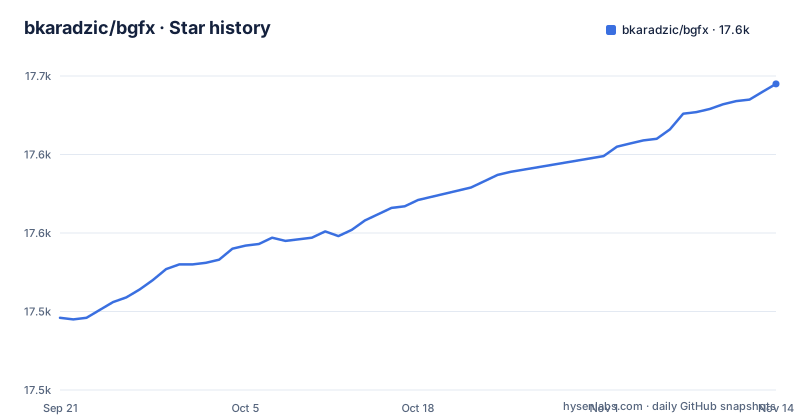
Star history
- bkaradzic/bgfx17,645 ★ · +149
| Repository | 2026-09-21 | 2026-11-14 |
|---|---|---|
| bkaradzic/bgfx | 17.5k | 17.6k |
149 Stars in the last 54 days, measured from the daily GitHub snapshot. Compare with other projects
Editorial analysis
The problem bgfx solves: one renderer, many graphics APIs
A game or tool that ships on Windows, macOS, Linux, Android, iOS and the browser faces a stack of graphics APIs: Direct3D 11 and 12, Metal, Vulkan, OpenGL, OpenGL ES and WebGL. Writing and maintaining a renderer for each is a large, permanent cost. bgfx's answer is a single C++ API that maps onto all of them. The README describes the project as a "Cross-platform, graphics API agnostic, 'Bring Your Own Engine/Framework' style rendering library." That last phrase is the important one. bgfx is not an engine. It draws things. It does not give you a scene graph, an asset pipeline, an editor or physics. It is aimed at developers who already have those, or who intend to build them, and who want the platform-specific rendering code to live in one place instead of six. The README lists bindings for Beef, C#, C3, Python, D, Go, Haskell, Java, Lua, Nim, Pascal, Rust, Swift, Zig and LWJGL 3 (some in the repository's bindings/ directory, others in separate projects), so the C++ core is not a hard requirement for every team.
How bgfx sits between your engine and the GPU
The architecture is a thin abstraction layer. Your code submits draw calls, buffers, textures and state through the bgfx API; the library translates those into the calls of whichever backend is active. The README lists the supported backends: Direct3D 11, Direct3D 12, GNM (for licensed PS4 developers, sourced through DevNet forums rather than the repository), Metal, OpenGL 4.3+, OpenGL ES 3.0+, Vulkan, WebGL 2.0 and WebGPU via Dawn Native. Platform support is broad: Android 4.0+ (API 14 or later), iOS/iPadOS/tvOS 16.0+, Linux, macOS 13.0+, PlayStation 4, RaspberryPi, UWP, Wasm/Emscripten and Windows 7+. Compilers are Clang 11+, GCC 11+, VS2022+ and Apple clang 12+. Two consequences follow from this design. First, the abstraction is deliberately not free: the library normalises state and resource handling across APIs, so you are working within its model rather than the native one. The repository layout reflects the split: include/ for headers, src/ for the implementation, examples/ for runnable samples, tools/ for the tools documented on the project's Tools page, and 3rdparty/ for dependencies.
Installing bgfx and running a first example
bgfx is built from source. The README links to a dedicated building page at bkaradzic.github.io/bgfx/build.html rather than listing steps inline, and the repository carries a top-level makefile plus scripts/ and 3rdparty/ directories. The practical entry point is the example suite, which is organised as numbered projects from examples/00-helloworld/ through examples/24-nbody/. Start by cloning the repository.
git clone https://github.com/bkaradzic/bgfx.git
cd bgfx
From there, build through the makefile, which is the build entry the repository exposes at the top level. The examples directory is the reference for how a bgfx application is wired up, from the minimal 00-helloworld sample upward. For exact build targets, follow the building page and the makefile. For a first real use, read examples/00-helloworld/ before writing anything: it is the first of the numbered samples.
Shaders and the tools directory: the part that catches people out
The repository carries a tools/ directory separate from src/, and the README links to a dedicated Tools page at bkaradzic.github.io/bgfx/tools.html. For how shaders are authored and built for each backend, read that Tools page and the examples under examples/ before planning your shader workflow.
Where bgfx is the wrong tool
The most common mismatch is treating bgfx as a game engine. It is not one, and the README is explicit that it is a rendering library in a "Bring Your Own Engine/Framework" style. If you need an editor, a scene graph, asset importing, animation, audio or physics, none of that is here, and you will be assembling it yourself or picking an engine that already contains it. Second, the abstraction itself is a cost: you are programming against bgfx's resource and state model, not against Vulkan or Direct3D 12 directly, so low-level control that a specific backend exposes may not be reachable through the common API. Finally, the repository has no published GitHub releases, so there is no documented path for moving a shipping title between bgfx versions. Verify that against the repository's own history before you plan an upgrade.
Alternatives: what changes if you pick something else
The README names no direct competitor, but the category is clear enough. If you want a rendering abstraction without an engine, bgfx is one option; the alternative approach is to write your own thin layer over the two or three backends you actually ship. That gives you direct access to backend-specific features and no shader compilation step, at the cost of maintaining the per-platform code yourself, which is precisely the cost bgfx exists to remove. If you want the engine rather than the layer, the projects listed under "Who is using it?" show the range: Crown describes itself as a complete cross-platform game engine, CETech as a data-driven engine and toolbox, and Torque6 as an MIT licensed 3D engine. Those are engines that happen to use bgfx, not substitutes for it. The honest distinction is scope. bgfx draws; an engine does everything else. Choosing between them is not a rendering-quality decision, it is a decision about how much of the surrounding stack you want to own.
Maintenance, licence and upgrade cost
The repository is not archived, and the last push was on 2026-11-01, so it is under current development rather than dormant. The repository has no published GitHub releases, which means there is no tagged version list to reason about; the practical upgrade unit is the commit you pin to. That makes pinning a specific revision the sensible default for a shipping title, and it means an upgrade is a deliberate act of moving that pin and rebuilding. The licence is BSD-2-Clause, a permissive licence that permits use in closed-source products and requires preserving the copyright notice and licence text. That is the general shape of BSD-2-Clause; read LICENSE in the repository for the exact terms, and treat anything beyond that as a question for your own legal counsel. One licence-adjacent detail worth noting: GNM support for PS4 is not in the repository and is obtained through DevNet forums by licensed developers, so console work has a separate access path from the open-source code.
Editorial conclusion
Adopt bgfx if you already have an engine or framework and want one rendering path across Windows, macOS, Linux, Android, iOS, consoles and Wasm. Do not adopt it if you need a scene graph, asset pipeline, editor or physics, because bgfx supplies none of those. Before committing, verify two things: that your target platforms appear in the supported list, and that your build integrates the makefile-based workflow rather than assuming a CMake package. The example that maps to your use case is the fastest way to confirm both.
Frequently asked questions
What is bgfx?
bgfx is a cross-platform, graphics API agnostic rendering library written in C++, described in its README as a "Bring Your Own Engine/Framework" style library. It abstracts over Direct3D 11 and 12, Metal, OpenGL, OpenGL ES, Vulkan, WebGL 2.0 and WebGPU, so one API covers many platforms.
What are some alternatives to bgfx?
The README does not name competitors, but the projects it lists as users show the adjacent options: Crown is a complete cross-platform game engine, CETech is a data-driven engine and toolbox, and Torque6 is an MIT licensed 3D engine. Those are engines that use bgfx, while the alternative approach is writing your own thin layer over the backends you ship.
Which platforms and compilers does bgfx support?
The README lists Android 4.0+ (API 14 or later), iOS/iPadOS/tvOS 16.0+, Linux, macOS 13.0+, PlayStation 4, RaspberryPi, UWP, Wasm/Emscripten and Windows 7+. Supported compilers are Clang 11 and above, GCC 11 and above, VS2022 and above, and Apple clang 12 and above.
Does bgfx include a game engine, editor or asset pipeline?
No. The README describes it as a rendering library in a "Bring Your Own Engine/Framework" style, so a scene graph, editor, asset pipeline, audio and physics are not part of it. You supply those yourself or use an engine such as Crown or CETech that builds on bgfx.
Official sources
Add this badge to your README
If you maintain this project, the badge below links readers to this analysis and shows its maintenance status from the daily GitHub snapshot. Paste the markdown into your README; add ?metric=license or ?metric=stars to the image URL for a different field.

[](https://hysenlabs.com/projects/bkaradzic-bgfx)Star history chart for your README
[](https://hysenlabs.com/projects/bkaradzic-bgfx)Was this useful?